purview
159 Topics
DLP Controls Not Enforced for Outlook Attachments Opened in Protected View
Good day, We are experiencing an inconsistency with Microsoft Purview Endpoint DLP enforcement and would appreciate guidance from the community. Environment Sensitivity labels: Confidential and Secret DLP policy configured to block copy and print activities Policy scope includes both Devices and Exchange Online Observed Behaviour When a labeled document is received via Outlook and opened directly from the email: The document initially opens in Protected View. If the user selects "Enable Editing" and/or "Enable Printing", the DLP controls are not enforced. The user is able to print or copy content despite the DLP policy being configured to block these actions. However, if the exact same document is first saved locally to the device and then opened from the local file system, the DLP policy is enforced correctly and the copy/print restrictions work as expected. Troubleshooting Performed As part of troubleshooting, we disabled the recommended Endpoint DLP file path exclusions for: %AppData% %LocalAppData% These locations are commonly used by Office Protected View and Outlook temporary files. Despite removing these exclusions, the behaviour remains unchanged. Question Has anyone encountered a similar issue where Endpoint DLP controls are not applied to Outlook attachments opened directly from Protected View but work correctly once the file is saved locally? Could this be related to: How Office Protected View handles temporary files? The file's classification state while opened from Outlook? Endpoint DLP monitoring limitations for transient Outlook/Office cache locations? Another known product limitation or configuration requirement? Any insights, known limitations, or recommended diagnostic steps would be greatly appreciated. Thank you.109Views0likes0Comments
Microsoft Purview | Share block at external users
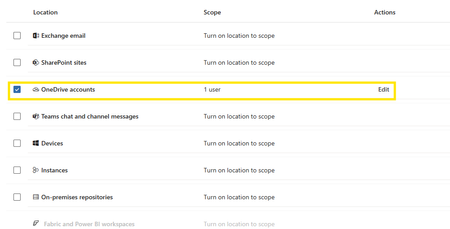
Hello community. I have an issue with Microsoft Purview DLP policies. I am trying to create a policy that prevents documents from being shared through OneDrive with external users, while allowing certain exceptions. However, when I select the option "Block Access to external domains and users" and assign a specific email address to be blocked, it does not work. The configured email address is not being blocked. I was reviewing this with Copilot, and it mentioned that if the external user you are sharing with already exists in Entra ID, the tenant may treat the user differently (not necessarily as an external user). My external user exists in Entra ID as a Guest account. The external user is registered as follows: Displayname: User Name Userprincipalname: user.name_external.domain#EXT#@company.onmicrosoft.com User Type: Guest Has anyone else experienced this issue? I am sharing evidence of the policy configuration.1KViews0likes7Comments
Purview SDK
I've been spending quite a bit of time working with Purview APIs, The APIs themselves are fine, but after a while I realized I was writing the same authentication, pagination and relationship handling code over and over again. So instead of construction the same code from project to project, I turned it into a python package, and now it's available on PyPI pip install purview-unified-sdk Right now, the SDK supports most of the common operations, such as creating, retrieving, updating and deleting business domains, data products, glossary terms, objectives, key results and etc., It also make it much easier to work with relationships, add group id as a owner, navigate resources and retrieve metadata across the unified catalog. https://niki9001.github.io/purview-unified-sdk/ https://github.com/purview-unified-sdk Feel free to fork the project, submit a pull request or open an issue if you have ideas or suggestions207Views0likes0Comments
Data Product Lineage not automatic
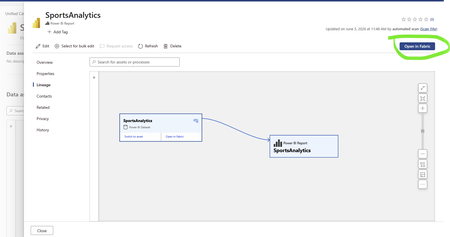
Hi all i am new in Purview and I am trying to create a lineage with a Report--> Dataset--> Tables in Data Products however after adding report only dataset is shown, how can I view all tables of this dataset. Only when I press open in fabric the Dataset the table list appears, how can I give permissions402Views0likes3Comments
Missing activity names from Audit Log documentation
We all know that the documentation team is A-tier and amazing at what they do and isn't just copy and pasting marketing materials. But I've noticed that some really obscure functionalities like 'user registered a device' or 'user joined a device' or about half the other things a user can do, are not documented on this list of activity names. The ironically named 'friendly' list doesn't work. So I actually can't audit the unfamiliar devices under our tenants? It appears that this KB is actually locked down, so more can't be added when they are discovered. How are we supposed to use the tool Microsoft has forced everyone towards, when the Documentation team is too bad to document anything, so they outsource it to the community (Microsoft victims), but then they lock down contributions (presumably, because they have some metric that keeps them from being useful - atleast based on my interactions with them). Documentation seems to be a massive fail on Microsoft's part. How did it get this way? Is there a reliable way of finding the activity name - one that ISN'T some preview Graph endpoint that I can't teach my techs to use, because I'm not teaching my techs to program?309Views1like1Comment
Struggling with running DQ Scans (Long queuing and Retry Count Error Issues)
Hi everyone, I have been exploring Microsoft Purview Data Quality quite extensively. At this point, I have configured more than 4,000 data quality rules across more than 10 Microsoft Fabric capacities, each with a minimum capacity of F16. Fabric is the source for all assets registered in Purview. I have identified several issues with the product, but the two that are currently impacting me the most are the following: DQ scans failing with a generic error“Max Retry Count Reached. Ending Workflow. Current Task HandleError”The challenge is that the error message does not identify which rule is causing the failure. As a result, I have to troubleshoot manually by disabling groups of rules, rerunning the scans, and repeating the process until I find the problematic rule. This trial-and-error approach is very time-consuming, especially at this scale. This seems to be caused by issues in some of the DQ rules, even though all rules are marked as “Good to go” in Purview. When running Data Quality scans, I often receive the following error: DQ scans remain queued for a long timeI am not sure why this happens or what resource, orchestration, or scheduling constraint is causing the delay. Whenever I run these DQ scans, they remain in a Queued state for at least 10 minutes, even when there is nothing running on the Fabric capacities. Has anyone experienced similar behavior with Purview Data Quality at this scale? Specifically, I would appreciate any guidance on: How to identify which DQ rule is causing a scan failure Why scans remain queued even when Fabric capacity appears to be idle Whether there are known limitations or best practices for running thousands of DQ rules in Purview Thank you.350Views0likes1Comment
Onboarding Devices to Purview
I am not clear on how can I onboard devices to MDE so that I can enforce EDLP policies. We have CrowdStrike as Primary AV and other policies. Devices are managed through Intune for Bitlocker encryption and all the other settings except they don't have Defender. These devices are not showing up in Purview nor under "Endpoint detection and response" location under Endpoint Security. If we create an EDR onboarding policy and deploy to devices, then it shows the devices and says that AMRUnningMode is Passive, but Antivirus is true. Which I feel like Defender is taking over CrowdStrike? or am I wrong. My goal is to make sure CrowdStrike still primary AV and devices should be onboarded to MDE and then to Purview so that we can scope EDLP policies properly. Can anyone help me to understand or provide right steps?520Views0likes1Comment
Confusion around Purview Definitions and Risk Scoring
In the early days of implementation and we've done our 'Quick setup' of Insider Risk Management which created our Adaptive Protection Policy for IRM, two IRM DLP policies (Endpoint & Teams/Exchange) and the Conditional Access policy. My question is around 'Triggering events', Indicators and Insider Risk Levels. To my understanding, a triggering event is the event that decides when the policy will start assigning risk scores to user activity which will then allow us to then give users risk levels. We have the option to either set this triggering event to either the DLP policies, or when a user performs an exfiltration activity/ sequence. The DLP policies only match activity when a user has a defined risk level and attempts to perform a specific activity i.e. sharing M365 with people outside the organisation. I'm not sure if I'm thinking about this backwards, but if I set my Adaptive protection policy to only start assigning risk scores to user activity when they match a DLP policy, how can they trigger a DLP policy if they wont be assigned a risk level until that scoring begins to happen? Should I be setting my triggering events to be "User performs an Exfiltration Activity" instead of "User Matches a DLP policy"?114Views0likes1CommentManaged VNET Integration Runtime failing with 502 error.
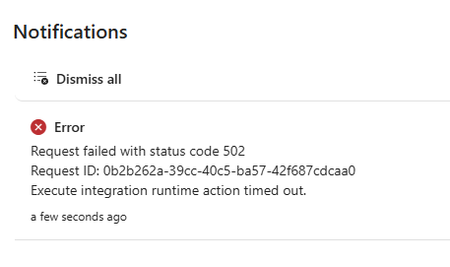
Good afternoon everyone. I'm a DevOps Engineer who is new to Purview. I used Terraform to deploy a Purview account for a POC for a client, however, I'm having a real issue creating a Managed VNET IR. The private endpoints are all visible and approved and if I check in the shell I can see the IR and the Managed VNET both exist (names sanitized). { "name": "SAMPLENAME", "properties": { "managedVirtualNetwork": { "referenceName": "ManagedVnet-name" }, "typeProperties": { "computeProperties": { "location": "WestEurope" } } } } But in the Purview portal the status shows as failed and if I try update it, I get a popup notification stating that the process timed out due to a 502 error. The URL in the error is " https://api.purview-service.microsoft.com/scan/integrationRuntimes/{NAME}?api-version=2022-02-01-preview" I thought this might be an issue with permissions or that I'm not in the admin role group in my client environment so I did the same process in my local purview account (where I'm global admin and in the Purview Administrators role group) and I'm having exactly the same problem. The managed vnet and IR exist when queried in the cloud shell but the state in the portal shows as failed. I am a "Data source Admin" in both purview accounts but I'm wondering if there's some other role assignment or role group assignment that I'm missing? Thanks in advance. Devon Britton.80Views0likes1Comment