purview
205 Topics
MS Purview DLP: Web search blocking also blocks Copilot response
Hello everyone, I am currently testing a Microsoft Purview DLP policy for Microsoft 365 Copilot that is intended to prevent personal or sensitive information contained in a Copilot prompt from being used for a web search. When a user enters a prompt containing specific Sensitive Information Types (SITs), only the web search should be blocked. Copilot should still process the prompt and, if possible, provide a response without using web search or sending the detected sensitive information to the web search service. Configuration In Microsoft Purview, I only have the following actions available: Processing of prompts → Block Performing web searches → Block I tested both options separately. Behavior with “Processing prompts → Block” This works as expected: As soon as a configured SIT is detected in the prompt, processing is blocked immediately and Copilot displays a corresponding policy notification. Behavior with “Performing web searches → Block” I observe the following behavior: I send a prompt to Copilot that contains a SIT covered by the DLP policy. Copilot initially generates a normal response. In this response, Copilot indicates that the personal information was not used for the web search. However, the actual question is still answered. This response remains visible for approximately 1–2 seconds. The entire Copilot response then disappears. Instead, the following message is displayed: “Due to your organization’s policies, none of the requested files or resources are available.” The previously generated response, which was briefly visible, can no longer be accessed afterwards. Expected behavior Since I would like to use “Performing web searches → Block” in the DLP policy, I would expect that: the web search is blocked, sensitive information is not used for the web search, Copilot can still process the prompt, and the response generated by Copilot remains visible. Question Is this behavior expected when using the DLP action “Performing web searches → Block”? In particular, I would like to understand why Copilot initially generates and displays a response without using the sensitive information for the web search, but then completely removes this response a few seconds later and replaces it with the policy notification. Is it possible to configure additional actions in the DLP policy, or to select an option other than “Block”? I only have the two actions mentioned above available. I have attached the relevant screenshots. Please note that the attached screenshots are in German. Thank you in advance!114Views1like4Comments
DLP Controls Not Enforced for Outlook Attachments Opened in Protected View
Good day, We are experiencing an inconsistency with Microsoft Purview Endpoint DLP enforcement and would appreciate guidance from the community. Environment Sensitivity labels: Confidential and Secret DLP policy configured to block copy and print activities Policy scope includes both Devices and Exchange Online Observed Behaviour When a labeled document is received via Outlook and opened directly from the email: The document initially opens in Protected View. If the user selects "Enable Editing" and/or "Enable Printing", the DLP controls are not enforced. The user is able to print or copy content despite the DLP policy being configured to block these actions. However, if the exact same document is first saved locally to the device and then opened from the local file system, the DLP policy is enforced correctly and the copy/print restrictions work as expected. Troubleshooting Performed As part of troubleshooting, we disabled the recommended Endpoint DLP file path exclusions for: %AppData% %LocalAppData% These locations are commonly used by Office Protected View and Outlook temporary files. Despite removing these exclusions, the behaviour remains unchanged. Question Has anyone encountered a similar issue where Endpoint DLP controls are not applied to Outlook attachments opened directly from Protected View but work correctly once the file is saved locally? Could this be related to: How Office Protected View handles temporary files? The file's classification state while opened from Outlook? Endpoint DLP monitoring limitations for transient Outlook/Office cache locations? Another known product limitation or configuration requirement? Any insights, known limitations, or recommended diagnostic steps would be greatly appreciated. Thank you.138Views0likes1CommentTroubleshooting playbook for Auto labelling in SharePoint and OneDrive
Auto-labeling policies are how most organizations label the backlog of files at rest, and with the tenant ceiling now up to 500,000 files a day, more teams run them at scale. When a policy doesn't label what you expect, the cause is almost always a missing prerequisite, simulation behavior or the label-precedence rules. I've put the field fixes in one place: run the checklist, find your symptoms, apply the fix. Scope: SharePoint and OneDrive, with Exchange differences called out. How service-side auto-labeling works Auto-labeling policies run in the service, not in Office apps. A policy (label + rules + scope) must complete at least one simulation; once it's on, SharePoint and OneDrive label matching files at rest, up to the tenant's daily maximum. Figure 1. Service-side auto-labeling lifecycle and where to look when it stalls Pre-flight checklist Missing any one of these typically makes a policy run without labeling anything, and without an error. E5/P2-tier license (Microsoft 365 E5, E5 Compliance, E5 Information Protection & Governance, or AIP P2) PDF support enabled if PDFs are in scope (EnableSensitivityLabelforPDF = True) Compliance Administrator or Information protection or Compliance Data Administrator role (Data Classification Content Viewer to preview matches) Label published to at least one user, scoped to “Files & other data assets”, and not a parent label Auto-labeling available in your region (the page is visible in the Microsoft Purview portal) Encrypting labels use “Assign permissions now” and never expire; no S/MIME Unified audit log turned on (required for simulation) When files are created or edited with SIT, they are classified immediately. However, corner cases to check include Custom SIT created or edited after the file’s last change, and New SIT requiring old files to be checked again; these require on-demand classification. Sensitivity labels enabled for SharePoint/OneDrive files (EnableAIPIntegration = True) OneDrive accounts associated with their users (detached accounts aren’t supported) Limits that matter (October 2026) Setting or limit October 2026 value Auto-labeled files per tenant per day 500,000, shared by all SharePoint/OneDrive policies (was 100,000; rolling out, MC1461154) Auto-labeling policies per tenant Up to 100 policies Explicitly selected locations per policy 1,000 SharePoint sites (was 100) SharePoint adaptive scope Up to 50,000 sites (configure with PowerShell) Simulation size and duration Up to 20,000,000 matched files (was 4M; MC1469958); ~12 h target New policy provisioning ~24 h before Turn on / Edit / Delete are available View coverage report 30 days after the latest simulation completes Library defaults → existing files 1 policy per tenant, up to 10 sites Also rolling out: editing an active policy without returning to simulation, Site Template filtering, detected-SIT summaries and a 30-day files-processed chart (MC1469958), the per-policy coverage report (MC1456609), and library default labels for existing files (MC1477181). If your tenant still shows the older values, the rollout hasn't reached it yet. Symptom-to-fix triage Symptom Likely cause Check → fix Group 1 Setup and access 1. Auto-labeling page missing, or a policy can't be created or saved No E5/P2-tier license; legacy portal instead of the Microsoft Purview portal; no Compliance Administrator or Compliance Data Administrator role; region not supported (backend Azure dependency). Fix the license or role; check region availability. Get-Command New-AutoSensitivityLabelPolicy confirms the cmdlet exists. “No matching database is available” on save is transient: retry; open a case only if it persists 24 h. Group 2 Simulation 2. Simulation stuck “In progress”, no results, or expired It runs as a backend search job and finishes within 24 hours. 12 hour was the old typical time with 4M limit, however after upgrading to 20M, it may now take upto 24 hours. Editing the policy mid-run can leave the status stuck; a restart from an older PowerShell session can fail before any job is created. Check TestModeStatus and LastSimulationCompletionDate; restart from a search-only session (Toolkit A), one policy at a time, no portal edits during the run. Results usually start within 24 h; open a case if matches haven't moved 48–72 h after restart. 3. Simulation finishes with zero matches and no error Missing pre-flight item; scope misses the content; rule too strict (confidence, instance count, AND/OR logic, unpublished classifier); files unchanged since the SIT was created or edited; “Document property is” needs exact managed-property values (no regex; values with “&” may not match). Walk the checklist; confirm the SIT exists in Content explorer; test with a new sample file in an in-scope site; run on-demand classification for older files, then rerun. 4. Simulation results incomplete or different after turn-on (also alert storms, duplicates stuck in simulation, Items to review not loading) Simulation is per policy and point-in-time. It considers the file's existing label but no other policies. Files edited after the run are missed, and Matched items is a sample estimate. Duplicates start in simulation, and Items to review shares DLP's test-mode surface. List all policies on the same locations or labels and rerun after editing. Above 20,000,000 matches, narrow the scope and rerun. Pause alert policies during simulation, set a duplicate's mode explicitly, and retry Items to review a few hours later. 5. Turn on, Edit or Delete greyed out; no content preview Still provisioning (~24 h after creation); turn-on needs Compliance Administrator or Compliance Data Administrator; more than 20M matches. Preview needs Data Classification Content Viewer, which Global Admins don't have by default. Wait 24 h and refresh; assign the role (for preview, e.g. the Information Protection Investigators role group); narrow the policy and restimulate. Group 3 Turn-on and labeling 6. Policy on, but nothing labeled and no failures Mode isn't Enable yet (still TestWithoutNotifications, or a scheduled turn-on hasn't happened; a displayed date isn't confirmation); distribution incomplete; label unpublished; files open or checked out; content out of scope. Run Get-AutoSensitivityLabelPolicy … | fl Mode,DistributionStatus and -IncludeProgressFeedback; check the Insights tab and Activity explorer. Allow 24 h; open a case at 48 h if every check passes. 7. Matched files not labeled after turn-on SharePoint/OneDrive couldn't apply the label, so the file keeps its old label or none or user might have labelled manually. Overview > Labeling failures card (top 3 reasons, 30 days) > Labeling failures tab > file > Details > Failure reason. Many files, same code? Check service health first, then check the failure-code table. Another way is checking history of the file through activity explorer. 8. PDFs not labeled PDF support is off, so matching PDFs aren't sent for labeling: skipped silently, with no failure and no error. Check: Get-SPOTenant | fl EnableSensitivityLabelforPDF. Enable via the “Protect PDFs with Auto-labeling” banner or Set-SPOTenant -EnableSensitivityLabelforPDF $true (per geo in multi-Geo). Signed PDFs unsupported. Still unlabeled when enabled? Open a case. 9. Encrypting label fails, or output looks different SharePoint/OneDrive policies need “Assign permissions now” with no expiry; S/MIME labels can't be auto applied. By design: no headers, footers or watermarks on documents; the RMS issuer/owner is the last modifier. Run Get-Label -Identity <label> -IncludeDetailedLabelActions | fl; switch to a compliant label. Also, by design: removing an encrypting label removes the encryption. Set expectations before rollout. Group 4 Label outcomes 10. Library default label vs. SIT-based auto-labeling — which label wins? Two mechanisms target the same file, and label priority decides. A library default overrides a lower-priority automatically applied label, but never a manually applied one. An auto-labeling policy replaces a default label only with a higher-priority label. Compare priorities (Get-Label | ft Name,Guid,Priority) and check how the file's label was applied (Activity explorer). Contact Support only if the higher-priority label doesn't win. 11. Existing label not replaced, or replaced unexpectedly Manual labels stay unless “Replace manually applied labels with lower priority” is on. Automatic or default labels are replaced only by a higher-priority label. Within one parent, the highest-order sublabel wins. Check how the label was applied (Activity explorer); compare priorities (Get-Label | ft Name,Guid,Priority); review overlapping policies. Only a remove-label policy leaves files unlabeled. 12. Relabel files from an old label to a new one The policy UI has no “current label” condition, so use one policy per mapping with the advanced rule “Document property is” InformationProtectionLabelId = <source label GUID>. The target must outrank the source; also turn on the manual override if the old label was applied manually. Simulate on a small scope first; don't remove the old label first. 13. Too many wrong labels (false positives) The rule is broader than the data: low confidence or instance count, loose AND/OR logic, or a classifier that doesn't fit. Pause expansion; sample matches with their detected SITs. Raise confidence and counts, AND multiple SITs, tune a custom SIT, add location or file-type conditions, or split policies; then restimulate. Group 5 Scale and scope 14. New limits or preview features not showing yet; planning against old limits Limits rose in Sept–Oct 2026 (500K files/day, 20M simulation, 1,000 sites) and are rolling out tenant by tenant. Editing an active policy without re-simulating is also rolling out. Previews and limit increases reach tenants in waves, so check the prerequisites and the Message center rollout dates. Track progress with View coverage, a link on the policy that opens a Sankey chart of labeled, pending, failed and not-processed files. It's available for 30 days after the latest simulation completes (LastSimulationCompletionDate) and greys out after that until you rerun simulation. 15. Fewer files labeled per day than expected 500,000/day is a tenant maximum shared by all active SharePoint/OneDrive policies: not per policy, not guaranteed, and 100,000 until the rollout reaches you. Failures cut throughput. Check the 30-day files-processed chart and -IncludeProgressFeedback; fix dominant failure codes first; collect several days of evidence before opening a case. 16. Site in the adaptive scope, but existing files not labeled Scope membership doesn't backfill files unchanged since the SIT was created or edited. Confirm membership and that the scope is attached to the policy. Test a new, a modified and an unchanged file: only unchanged missed → on-demand classification; new or modified missed → open a case. 17. Library default label missing on pre-existing files Library defaults apply only to new and edited files. Existing files need the auto-labeling option that applies library default labels to existing files (no content inspection). Confirm the library has a default label and the site is in scope. Limit: one such policy per tenant, up to 10 sites; work in batches. Open, checked-out, locked, unsupported or unsupported-encrypted files are skipped; open a case only if none apply. 18. Some files are never labeled At rest, only .docx, .pptx, .xlsx and PDF are supported. Open files, list-item attachments and 0-byte files can't be labeled. Exchange labels the email, not the attachments. By design, no workaround; submit format requests as product feedback. Reading Labeling Failure Codes Group Codes What to do Retried automatically FileLocked, FileCheckOut, GetTagsFailure, RmsUnavailable, Conflict, Transient, UnauthorizedAccessException, TransientErrorStorageConnection, GenericException, SqlThrottled, Unknown_SPException No action; monitor “Spikes of SqlThrottled, TransientErrorStorageConnection or Unknown_SPException” often match a service incident; contact Support if Unknown_SPException repeats for the same files. Needs your action EncryptedFileNotSupported (remove password or non-Microsoft encryption) · DisabledOrUnsupportedLabel (publish or activate the label) · InvalidFileName (rename or shorten) · CancelledByEventHandler (review custom SharePoint event receivers) · QuotaExceeded (free space or raise the quota, then rerun) · UnsupportedFileType (enable PDF labeling; with PDF support off, PDFs may not appear here at all) Fix is let the policy retry. Until then, the file keeps its previous label or stays unlabeled. By design CannotOverrideCurrentLabel (equal or higher-priority label already present) FileNotSupported / FileExtensionNotSupported · ZeroByteFile · DirectoryNotFound / FileNotFound (deleted or moved after classification) Nothing to fix. PowerShell toolkit A · Restart a stuck simulation (ExchangeOnlineManagement 3.9.0+) Update-Module ExchangeOnlineManagement Connect-IPPSSession -EnableSearchOnlySession Get-AutoSensitivityLabelPolicy -Identity "<policy>" -IncludeTestModeResults $true | Format-List Set-AutoSensitivityLabelPolicy -Identity "<policy>" -StartSimulation $true B · Distribution and progress Get-AutoSensitivityLabelPolicy -Identity "<policy>" -DistributionDetail | Format-List Mode,DistributionStatus,DistributionResults Set-AutoSensitivityLabelPolicy -Identity "<policy>" -RetryDistribution # only if distribution failed; one policy at a time Get-AutoSensitivityLabelPolicy -Identity "<policy>" -IncludeProgressFeedback # to label / labeled in last 7 days / total C · Labels and tenant settings Get-Label | Format-Table Name,Guid,Priority Get-Label -Identity "<label>" -IncludeDetailedLabelActions | Format-List Get-SPOTenant | Format-List EnableAIPIntegration,EnableSensitivityLabelforPDF # SharePoint Online Management Shell Get-AdminAuditLogConfig | Format-List UnifiedAuditLogIngestionEnabled # Exchange Online PowerShell Error “Failed to create job. Please close the current PowerShell session and open a new session using Connect-IPPSSession with the -EnableSearchOnlySession flag. This requires using ExchangeOnlineManagement v3.9.0 or higher.” (it may appear only after a timeout) means this case. Before you open a support case Open it promptly, because diagnostic data is retained only for a limited time. Include: Tenant ID Labeled, pending and failed counts for the same window Policy name and GUID (shown in the portal URL), mode, and the UTC time it was turned on or last edited Failure codes with 3–5 example file URLs Label GUID, priority and encryption settings Output of the toolkit cmdlets Rule logic (SITs/classifiers, confidence, counts) and scope (sites or adaptive scope) Service health check result Latest simulation match count and LastSimulationCompletionDate Expected vs. observed behavior and business impact Good to know - Auto-labeling doesn't change existing Modified, Modified By or date values, in simulation or when labels are applied. Learn more Automatically apply a sensitivity label to Microsoft 365 data — https://learn.microsoft.com/en-us/purview/apply-sensitivity-label-automatically Resolve auto-labeling failures in SharePoint and OneDrive files — https://learn.microsoft.com/en-us/troubleshoot/microsoft-365/purview/sensitivity-labels/auto-labeling-failures-sharepoint-onedrive Review simulation results for auto-labeling policies — https://learn.microsoft.com/en-us/purview/auto-label-simulation-results Use the Insights tab to analyze auto-labeling policies — https://learn.microsoft.com/en-us/purview/auto-label-insights-tab Enable sensitivity labels for files in SharePoint and OneDrive — https://learn.microsoft.com/en-us/purview/sensitivity-labels-sharepoint-onedrive-files Configure a default sensitivity label for a SharePoint document library — https://learn.microsoft.com/en-us/purview/sensitivity-labels-sharepoint-default-label Set-AutoSensitivityLabelPolicy — https://learn.microsoft.com/en-us/powershell/module/exchangepowershell/set-autosensitivitylabelpolicy262Views0likes0CommentsScaling classification and labeling: an interactive reference architecture update
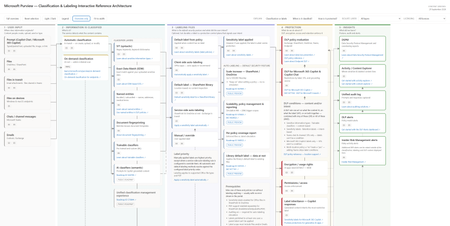
In April, I published a set of referential architecture diagrams for Microsoft Purview — Microsoft Purview Referential Architecture Diagrams. They have been useful in workshops and training sessions for a simple reason: one picture is worth a thousand words - attempting to explain the complex in a single image. Today I'm publishing an update focused on classification and labeling — and on the wave of public previews that make auto-labeling something you can scale across the entire estate with ease. ➡️ Download the interactive architecture on GitHub here. It's a self-contained HTML file - and it's a lot more than this picture! Why now: auto-labeling scales to the whole estate The most consequential change is surprisingly small. An auto-labeling policy can now be kept on while you edit it, without re-triggering simulation. Anyone who has run auto-labeling at scale knows why that matters. Until now, tuning a policy meant turning enforcement off, re-simulating, waiting, and turning it back on — delays every time you refined a rule. That friction made it challenging for organizations from broadening scope as fast as they wanted to. Removing it changes the operating model: you can simulate once with your conditions and expand scope (sites) when you're ready, without hitting the simulation limit. It arrives alongside a set of previews that lift every ceiling that used to cap the motion: Capacity is up 5x. Auto-labeling for SharePoint and OneDrive moves from 100,000 to up to 500,000 files per tenant per day (Roadmap ID 567890). Simulation goes from 4M to 20M items, so you can model against a real estate rather than a sample. Policy scope gets much bigger. Select up to 1,000 individual SharePoint sites per policy, adaptive scopes support up to 50,000 sites, and you can filter sites by the SiteTemplate property when configuring a policy (Roadmap ID 570445, MC1469958). Reporting finally tells you what happened. Audit and reporting now summarize the sensitive information types detected when labels are applied, and a new 30-day chart shows files processed per day so you can watch policy throughput. A per-policy coverage report correlates files processed during enforcement to the latest simulation run — including the files that enforcement processed but simulation never saw (Roadmap ID 568935). SharePoint library default labels now reach data at rest, applying the library's default label to existing files instead of only new or edited ones (Roadmap ID 559105, MC1477181). Read together, these are one story: classify and label the whole estate — unblocking your Microsoft 365 Copilot deployment by securing the data that matters to you most. The scalability improvements are on by default, and existing policies continue to function unmodified with no end-user impact. What the architecture shows The diagram follows content through five stages, each framed as the question it answers: User input — where information originates: files, email, Teams messages, files on devices, files in transit, and prompts. Information is classified — what is it? SITs, Exact Data Match, named entities, document fingerprinting, trainable classifiers, and AI classifiers, with automatic (in-transit) and on-demand (at-rest) classification as the two entry paths. Labeling files — what is the default security posture, and what did the user intend? Five labeling methods — default label from policy, client-side, library default, service-side auto-labeling, and manual — all converging on one node: the label is applied. Protection — what do we do about it? DLP (including DLP for Copilot), encryption and usage rights, permissions, label inheritance on Copilot responses, Adaptive Protection, and retention. Insights — what did we learn? DSPM, Activity and Content Explorer, the unified audit log, DLP alerts, and Insider Risk alerts. How to use it - it's interactive! It's a single self-contained HTML file — no dependencies or API call — it works offline. Click any node to light up its full upstream and downstream path; everything unrelated dims. The detail panel then shows what it feeds from, what it feeds into, what it sees, what it can do, and — the section I'd argue matters most — what it can't do. Explain runs three guided walkthroughs: Classification vs labels, When is it classified?, and How is it protected? These are my go-to openers for a workshop. Isolate layer cuts the diagram by control plane — sensitivity label, SITs, classifiers, DLP, encryption, permissions, retention, audit. Licensing lens filters to Included in E3, E5 only — the delta over E3, or Pay-as-you-go. Use it to answer entitlement questions honestly: where Microsoft publishes no SKU, the node says so instead of guessing. Always confirm entitlements on a quote, not from a diagram. Overview only strips to titles for a clean read; Fit to width scales the whole thing to the window; light/dark follows your OS or the toggle; it prints cleanly to PDF. Keyboard: Tab between nodes, Enter to select, Esc to reset. Auto-labeling at scale If you're standing up auto-labeling at scale, confirm the prerequisites node first — sensitivity labels enabled for Office files in SharePoint and OneDrive, PDF support enabled separately via EnableSensitivityLabelForPDF, auditing on (simulation requires it), labels published to at least one user, and label scope covering Files and/or Emails. Simulate on your priority sites, review, enforce, then expand scope to more sites or all sites and keep going. Combine that with capabilities already GA — labeling files contextually by site + file types, and overriding manually applied labels — and you can finally clear the backlog of unlabeled files. note: more to come soon for a full deployment guide. Feedback welcome — if a node is wrong, missing a limitation, or missing a link, tell me in the comments and I'll fix it in the next revision.2.3KViews8likes1CommentMeet the New Microsoft Purview Classifiers Experience: Your Admin Playbook for Public Preview
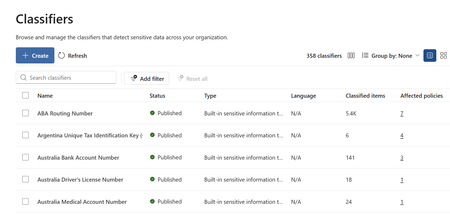
Microsoft Purview Unified Classification Management Experience Feature overview and administrator playbook Overview The new Classifiers experience brings supported Microsoft Purview classification types into one place where administrators can discover, create, inspect, and manage classifiers. It adds practical visibility into classified-item counts and policy dependencies so administrators can make more informed, lower-risk changes. Why this experience is important Classification underpins data protection, data loss prevention, and data security. As classifier inventories grow, administrators need a consistent way to understand what exists, where it is used, and what could be affected by a change. Centralized visibility Search and filter supported classifiers from a unified inventory instead of navigating separate management locations. Safer change decisions Review classified-item counts and affected policies before editing or deleting a classifier. Stronger governance Establish clear ownership, testing, approval, validation, and review expectations. Better coverage analysis Use matched-item information and Data Explorer to understand where classifications occur and where gaps may exist. What administrators can do Discover supported classifier types and understand what the organization already uses. Create classifiers from a single entry point with type-specific preparation guidance. Review classified-item counts and inspect policies that depend on a classifier. Validate matched items across supported data sources and investigate unexpected coverage. Access Classifiers through Information Protection, Data Loss Prevention, or Data Security Posture Management, depending on tenant availability. Supported classification capabilities include sensitive information types, named entities, Exact Data Match, trainable classifiers, credentials, document fingerprinting, optical character recognition, and on-demand classification. How the experience can help Reduce context switching: Use one inventory to find and inspect supported classifiers. Understand impact earlier: Identify policy dependencies before a change reaches enforcement. Improve accountability: Connect classifiers to business owners, policy owners, and reviewers. Standardize operations: Apply the same lifecycle to routine maintenance, quality improvements, and retirement decisions. How the admin playbook helps The companion playbook turns the preview into a practical operating guide. It is designed to be the first place an administrator goes to understand the value of the experience and apply it safely. Explains the administrator value of unified classifier management. Provides a continuous Inventory Offers a decision guide for selecting an appropriate classification method. Shows how to review policy impact and validate matched items. Includes customer scenarios and answers to common licensing, permissions, and coexistence questions. INVENTORY → ASSESS → TEST → APPROVE → CHANGE → VALIDATE → REVIEW Resources Public documentation Current availability, permissions, supported classification capabilities, and product guidance. Administrator playbook A self-contained, interactive guide with workflows, screenshots, scenarios, and FAQs.1.9KViews2likes0CommentsMicrosoft Purview Referential Architecture Diagrams
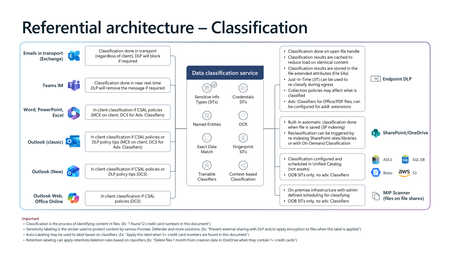
Microsoft Purview architecture diagrams provide a reference view of how classification, sensitivity labelling, Data Loss Prevention (DLP), Insider Risk Management, and Microsoft 365 Copilot protections work together across Microsoft 365 workloads. They illustrate how organisations can consistently identify, label, and protect sensitive data across endpoints, email, collaboration services, browsers, and AI‑assisted workflows—without prescribing a single deployment model. Classification generates sensitivity signals, labels express organizational protection intent, and DLP enforces that intent in real time across devices, apps, and services. Together, these patterns show how Copilot inherits existing security controls so AI‑generated content remains governed within the same compliance boundaries as organizational data.22KViews24likes9Comments
Anthropic Claude Purview Data Connector showing all users as Guests..
It appears this connector is not mapping fields properly causing internal users to be mapped as "guests", and since prompts/data isn't maintained for guest users the connector is effectively not gathering anything but noise. Unlike the other data connectors, one cannot create field mappings. Also the app being named using the guid of Microsoft's own "dataassessments" service principal I don't think is intended either. Has anybody else experienced this? See below for an example.911Views3likes8CommentsMicrosoft Purview | Share block at external users
Hello community. I have an issue with Microsoft Purview DLP policies. I am trying to create a policy that prevents documents from being shared through OneDrive with external users, while allowing certain exceptions. However, when I select the option "Block Access to external domains and users" and assign a specific email address to be blocked, it does not work. The configured email address is not being blocked. I was reviewing this with Copilot, and it mentioned that if the external user you are sharing with already exists in Entra ID, the tenant may treat the user differently (not necessarily as an external user). My external user exists in Entra ID as a Guest account. The external user is registered as follows: Displayname: User Name Userprincipalname: user.name_external.domain#EXT#@company.onmicrosoft.com User Type: Guest Has anyone else experienced this issue? I am sharing evidence of the policy configuration.1.1KViews0likes7CommentsClose the gaps: layered data protection with Microsoft Purview across endpoint, browser, and network
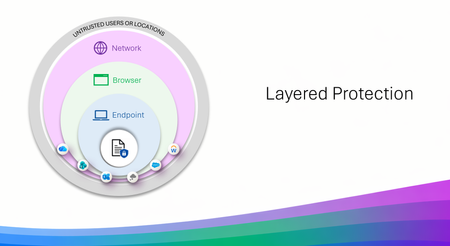
Three layers that work like a good team and slides to show it Data Loss Prevention (DLP) is not new, many use it daily without ever even knowing it, but with AI bringing faster results for productivity so does the risk of data leakage. That is where we take a layered approach, meeting the end user exactly where they are working, on a device, or in a browser, or through that cute cat Office add-in that had to be installed. But don't think of layered protection as three products but more as three specialists who are each excellent at their own job and have the good sense not to try doing everyone else's. Endpoint DLP lives on the device. USB and removable media, clipboard, print, restricted apps. It carries the deepest classification support, EDM, fingerprinting, OCR, and it works offline, which turns out to be more useful than it sounds at 30,000 feet. Browser Data Security lives in the session, inline in Edge for Business, checking content before an upload or a form submission. It is the most precise layer for AI prompts and for activity happening inside a managed web app, where nothing else is standing close enough to help. Network Data Security lives on the wire, via Entra Global Secure Access or a third-party SASE. It handles traffic that never touches a browser at all, desktop apps, Office add-ins quietly phoning a friend, and it is the layer that supports inbound classification of content coming back from cloud and AI apps. Each one has natural technical boundaries, and those are a design decision rather than an oversight. A network proxy is never going to have strong opinions about a USB stick. An endpoint agent is not positioned to unwrap an encrypted API call from a third-party add-in. Ask any one of them to cover all three domains and you would end up with something slower and less capable at each. Deployed together, though, the edges line up rather nicely. That is the entire premise of layered protection, and it is what I built this asset to show. What is actually in the slides A coverage view across all three layers. Common activities — removable media, RDP sessions, add-in API calls, in-session copy and paste, inbound AI content, classification depth, inline prompt inspection — matched to the layer best positioned for each. Six scenario walkthroughs. Realistic situations traced attempt by attempt, including one determined individual who tries three separate routes to get the same file to a consumer AI service. A departing employee and a USB drive. A contractor on a personal laptop. Files headed to personal cloud storage. Each shows which layer engages, and why. Deployment flows you can follow. Prerequisites, permissions, policy names, conditions, actions. Both browser patterns (managed device with unmanaged apps, unmanaged device with managed apps) and both network paths (Entra GSA, and third-party SASE including Netskope and iBoss). Four reference architectures. Traffic flow diagrams for each browser and network model — what gets evaluated, where the Purview verdict comes from, where enforcement lands. Collection policies explained thoroughly. The unsung plumbing underneath all of it. Anatomy, the full flow from event source to Activity Explorer, Insider Risk Management, eDiscovery, and Data Security Posture Management (DSPM), plus the operational details that are much nicer to learn about in a deck than in production. The parts people keep coming back to The coverage view is usually where planning conversations start. It gives everyone a shared picture of what is deployed today and what a sensible next step looks like; adding the browser layer to an existing Endpoint DLP footprint, say, or bringing in the network layer to extend coverage to add-ins and desktop apps. The scenario walkthroughs are where it tends to click for a wider audience. Following one situation through several routes and watching a different layer step in at each turn, does more for the story than any static diagram I have drawn. And the deployment flows are genuinely meant to be executed. Everyone is written to run against a pilot group first, with Conditional Access in report-only mode in production until you have confirmed the behavior. Please do that part. Your future self will appreciate it. Who it is for Architects scoping a deployment. Partners running workshops. Admins with Endpoint DLP already humming along who are working out what comes next. Anyone who would like a single starting point instead of a browser window that has stopped showing page titles. Take whatever is useful. Pull individual slides into your own narrative or run the whole thing end to end it was built to be borrowed. Things to keep in mind Several capabilities in here are in preview or Pay-As-You-Go backed, and network-layer coverage depends on supported SASE/SSE integrations and how traffic is routed. The deck flags this as it goes. Check current availability on Microsoft Learn, and with your SASE provider for the network layer. Now the fun The full slide set is at https://aka.ms/purviewlayeredprotection. It is a living reference, and it will keep evolving with the product. If it helps you plan something, or if there is a scenario you would like to see in the next version, I would love to hear about it.1.9KViews4likes0Comments