project desktop
161 Topics
Regarding the usage of PjAssignmentField in Microsoft Project
Hello, the following code is placed in the ThisAddIn class of a Project VSTO add-in. I want to execute other code when the field Text1 corresponding to the resource assigned under a task changes. The problem I am currently encountering is: When the Text1 corresponding to the resource assignment under a task changes, the message box "OK" does not pop up. However, in the "Resource Usage" view, when the Text1 of the task assignment under a resource changes, the message box "OK" does pop up. I hope experts can provide guidance. Private Sub ProjectBeforeAssignmentChange(asg As MSProject.Assignment, Field As MSProject.PjAssignmentField, NewVal As Object, ByRef Cancel As Boolean ) Handles Application.ProjectBeforeAssignmentChange If Field = MSProject.PjAssignmentField.pjAssignmentText1 Then MsgBox("OK", vbExclamation) End If End SubSolved271Views0likes2Comments
How to download MS Project Plans along custom fileds including data
I have Project plans in project online. I am opening the plan in ms project, custom fields data is getting loaded. But when i try to save the file in local desktop, schedule data is saving but custom fields data is not coming only column names are coming. How to save the file along with task level custom fields with data in local desktop261Views0likes0Comments
Generic Resources - Team Assignment Pool Yes or No?
Our On-Prem Project Server environment was set up with Generic Resources marked "No" for Team Assignment Pool. It seems we would want this to be a "Yes", so that tasks assigned to a Generic resource would be visible by Project Server users with the same role, and those users could then self-assign those tasks and provide updates. Our generic resources are meant to represent a "pool" of people in different labor categories, so that we can look at potential areas of under or over utilization. It seems that marking them as a Team Assignment Pool would reflect our intended use. For most of our generic resources, we don't plan to replace them with a specific person (such as production work). However, for some resources such as engineers, we would like them to be able to self-assign tasks and give updates in Project Server. Is there a particular reason to keep our Generic Resources marked "No" for Team Assignment Pool? Does changing to "Yes" affect their capacity, availability, or Work/Cost values?Solved603Views0likes3Comments
MS PROJECT 2019 UPDATE and Purchasing Options
HI We are currently using Microsoft Project Professional 2019 desktop version, but we are facing challenges with its reporting limitations. Specifically, the software can only display a maximum of 75 rows in its reports. As our weekly reports often exceed this limit, we find ourselves spending considerable time on manual entries. For our monthly reports, we can manage the filtering process to avoid this limitation, but the weekly reports require a hierarchical structure to display task statuses, and unfortunately, there is no workaround for this constraint. While researching this issue, I found discussions indicating that the 2025 version of Microsoft Project can display up to 150 rows, which would help us address our challenges. I have a couple of questions: 1. Does the new version of Microsoft Project 2025 indeed support the display of up to 150 rows? 2. What is the best approach for upgrading: subscription or standalone? 3. Could you provide pricing information and tell us where we can obtain it? Thank you! Best regards, Teshome HPU PMO Office493Views0likes1CommentIs there a way to graphically highlight all of the tasks under a summary?
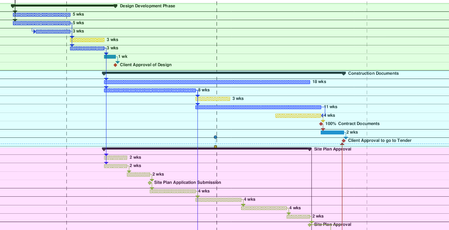
Looking to create what would essentially be a coloured background for all of the tasks in the gantt chart, under a summary. Been looking online and watching tutorials, but cant find what I am looking for. The image shows what I am trying to do (was done after the fact with a PDF reader, would prefer to do it straight in MS project).555Views0likes1CommentStart to Finish Relationship - earliest start when connecting to two predecessors
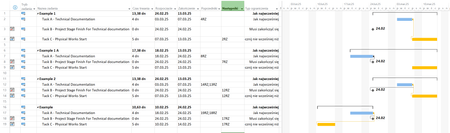
Hi I have a scenario. Three tasks Task A - Technical documentation (preparation of it) Taks B - Project Stage Finish For Technical documetation so A have to finish before B Task B have Constraint Type - Must Finish On Task B - can change its Start/Finish date Task C - Physical Works Start - Start of works for which Technical Doc. from task A is needed so A have to finish before C Task C - will move as in reality, it will also depend upon other "tings" in project which can and will change Task A is most "submissive" task It always have to be finished before Start of B and C (sorry to all Documentation designers out there) How to create proper connection between a/m taks that always will move finish of Task A before start of B and C independent of where B and C will be moved ? I've tried to use Start to Finish, but it works only if I connect one task Below a screen shoot form my MSP I'm sorry for Polish ... but can't switch it to English (entire Office suite will .. but not MSP.. ) RZ = SF Typ Ograniczenia -> Constraint Type Jak najwcześniej -> As Soon As Possible Musi zakończyć się -> Must Finish On Rozpocznij nie wcześniej niż -> Start No Earlier Than Rozpoczęcie -> START Zakończenie -> Finish Poprzedniki -> Predecessors Następniki -> Successors Example 1 and 1A - works.... but it A is connected to only one task (A or B) Example 2 - I've connected A to B and C, but A is moved beyond B Example - same problem as above but in this scenario I've moved C before B but A... stick itself for task furthrer in future I know that I can create connection like belowe Using "Standard" connection between A and B and in the moment when situation as above will happen (A will move past B), MPS will "Scream" at me with a message that he can't finish task A but that is not a solution for me.308Views0likes1Comment
Change Print Page Order
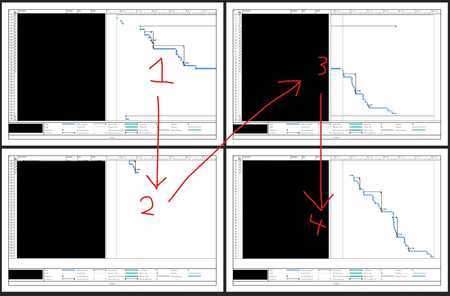
Hello, I'm looking to see if someone can help me find how to change the order that pages are printed in Project. Personally, I know this doesn't matter because you can just line them up as you like, but my job has me make PDFs of them as well and my boss would prefer the order to be different, so if possible I'd rather find a way to make it do it the way he'd like automatically than me re-arranging the PDF pages and editing the page numbers. Essentially, they want it to show the entire date line of the gantt chart first before showing the next set of rows. I've attached 2 screenshots of the print preview, one is the order it currently is (focusing on the rows first) and the 2nd is the order my boss would like (focusing on the gantt chart dates first). Is this possible and if so, how do I go about setting it up?504Views0likes3Comments
A colored column representing holidays
I am looking for ideas as to how to create a transparent, colored visual column within an MS gantt chart representing a date range that correlates with the Christmas holidays. Basically, just a vertical bar crossing all tasks that visually indicates the holiday date range (say 12/22/25- 01/02/26) so that as you scroll through all your tasks, that bar remains constant in the gantt chart. I can do a single date bar using Status Date, but have not found a way to perform a similar function for a date range. Any ideas or tricks?Solved395Views0likes1CommentTrack equipment capacity in MS Project
Hello, I have decent experience using MS Project desktop but currently struggling with how or if MS project is able to track equipment capacity in terms of quantity/units. Ideally, I would like project to alert/show capacity for an equipment based on task start/end date show capacity for future planning. For example, I have 70 samples to run on the equipment but capacity is 40 samples. I know that the 70 samples can't go through, but how can I set the equipment capacity in project to call this out? I have been tinkering with resource sheets, names, %, but don't understand how to manipulate it so that if I set an equipment capacity at 40 units (not %), it will show me capacity alerts. I also want to enter in tasks that are happening months out and would like capacity alerts to be called out in this situation too. This is how I'm tracking it in project. I don't want to put each sample as it's own line item as there are many projects with X samples so I keep it as a high level task with the project and associated sample count. Maybe it's how I am tracking that doesn't allow for tracking capacity in units? Any suggestions are appreciated. Thank you.429Views0likes1Comment
Project Professional 2024 and Project Server SE OIDC Authentication Issue
Hi all, I have setup a Project Server SE Environment (SharePoint and Project Server Subscription Edition) and configured Custom Open Id Connect Server as Trusted Identity Provider. Everything worked perfectly in the Project Server part from authenticating (redirecting the user to the Open Id connect server for authentication) to everything else except when I open the schedule in Microsoft Project Professional 2024 at first it opens the embedded web browser that it gives me that it can't load jQuery and Bootstrap JS files and CSS and after I enter my credentials it gives me SharePoint Error Page https://youtu.be/tgZ293boon8 unfortunately, I can't upload the logs here if anyone needs it let me know how to send it to him502Views0likes3Comments