outlook
21 Topics
**bleep**. Security Update (like KB5101650) breaking SmartCard Authentication for Office 2024 apps to O365
Looking for some support on this issue. I have Win11 clients that were upgraded from 24H2 to 25H2 last year. They were functioning well until earlier this year when the Cumulative Updates started breaking smartcard authentication on our clients (day after installing/rebooting/cache clearing). This seems to be a known issue but are there any real fixes? Symptom is that after the update is installed, next day (after a reboot or cache cleared) the user starts their Outlook or Teams application, when receiving the prompt that says "you will be prompted for your PIN" nothing follows, you will see the blue dots circling and after 5 or so minutes it times out. Clicking on the "..." shows an informational message error #50058, which says that not enough information was provided. The authentication process is failing... BTW - web authentication works just fine, it's just the local application (Teams, Outlook, etc.) that fail. I found that creating a new account on the system seems to work just fine, but for people that have established accounts and program environments that are setup for them to work, creating a new account is very unappealing to them. I'd like to be able to just get their current accounts working. Creating a new profile, wiping current profile info from registry doesn't seem to work thanks to automagic backups the OS is doing, but even that would still require setting up a new profile and copying over non AAPDAT file structure info... Does Microsoft not have a fix to this "known" issue? I spent a few weeks really digging into this and the best I can find as a work around is to disable the automatic backups of the NTUSER.DAT, blow away current profile info in registry, rename current profile structure, and then have the user login "anew". Again, this still requires a copy of the non-AAPDAT data back into the new structure (at least permissions won't be an issue) but that will not restore all application-based information for that user--that still will have to be re-created, which I think the users will not want to do because it means starting over from scratch.142Views0likes2Comments
Microsoft Teams and Authenticator lockdown
I’m having a very frustrating issue with Microsoft Teams. I am able to log in to teams using my normal personal email and account ONLY ON THE WEB BROWSER. From the web browser, I am not able to access the business channel that I am in. When attempting to log in on the downloaded mobile Teams App, I am sent directly to Microsoft Authenticator, which after waiting several hours, waiting even a full day, is still displaying a message about repeated verification attempt and to wait and try again later. I have accessed Microsoft support chat and they had no help for me. I need the authenticator lockdown to refresh and it will not.80Views0likes1Comment
mail@mydomain is causing a cert mismatch error in all browsers for Outlook.com
Hello, I have created a CNAME for our users in my domain so that they can access webmail. For example, it's called mail.mycustomdomain.com, and it is directed to Outlook.com But when I try to visit mail.mycustomdomain.com, it shows a security warning and recommends going back. I can understand because the SAN name in the certificate presented by Outlook doesn't include my CNAME. Is there anything I can do as a workaround so our users can enter the CNAME without encountering a Certificate Mismatch Error? It is causing repeated calls to the helpdesk, and we would like them to use something simple they can remember. Thanks134Views0likes3Comments
Hotmail to Outlook Migration Broke My Account
A year or two ago, I updated my Microsoft account to try and migrate from hotmail.com to @outlook.com. Since then, my Microsoft account is broken. I log in with my @outlook.com email, but account.microsoft.com displays my hotmail.com email everywhere. Mobile apps will not stay logged in properly and kick me out after a day. On my account info page my @outlook.com email isn't even listed and hotmail.com is listed as primary, but only logging in with @outlook works. I'm pretty sure when I originally tried to migrate my account some exception wasn't handled properly part way through the process and my account is in some sort of database limbo. Is there anyone at Microsoft here that can help with this? Also, sorry if this isn't the right place to post this, but a call with Microsoft support pointed me here and there doesn't seem to be a "Microsoft Account Support" hub or space on this platform. If anyone knows of a better location feel free to suggest that as well. Thanks!108Views0likes1Comment
Microsoft Authenticator issues
I’m simply locked out of my personal account because I lost access to my 2FA and the recovery form rejects due to active two-step verification. I’ve tried my verifying email and phone number but it rejects is due the active two step verification. I need manual identity verification or an escalation so my 2FA can be reset. Can you point me to the correct support channel for personal account recovery, because the link you sent is not working213Views0likes1CommentRequest for Manual 2FA Reset – Locked Out Despite Outlook App Access
I lost access to my Microsoft Authenticator because my old phone was factory-reset. Since then, I can’t sign in anywhere because I’m always asked for a 2FA code. Alternative verification methods (SMS/email) are also blocked due to too many attempts. The account recovery form is not available because 2FA was enabled, and the form gets automatically rejected. However, I am still signed in to the Outlook app on my old phone, but I cannot access any security settings or Microsoft account pages from within the app. This means I cannot change my 2FA options or disable two-step verification. I urgently need a manual reset of my 2FA or access to advanced identity verification, so I can prove ownership and regain access to my account.374Views0likes4CommentsNested App Authentication (NAA) token to protect middle-tier server
I'm working on an outlook addin and want to use the NAA accesstoken to validate the user on an api running on a php webserver. The addin runs as a taskepane (created with yo office) with the app only manifest. I have setup NAA to do Microsoft graph calls on behalf of the user. I have used this guid to setup NAA (copy/past) https://learn.microsoft.com/en-us/office/dev/add-ins/develop/enable-nested-app-authentication-in-your-add-in I have setup a php server (not in Microsoft infrastruktur) for a simple API, that handlers MySQL calls and app only calls to Microsoft graph. The php api authenticate itself with a client secret from the Azure app registration. Both are working as expected. Can i use the accesstoken from the NAA, to authenticate the user on the php server? If it can be done how do I validate the token?174Views0likes1CommentEvolution with business account (oauth2)
Recently domainFactory migrated mail to Microsoft 365 business accounts. I used to use the Evolution mail client (Fedora Linux, flatpak version) for mail. Unfortunately I am not able to login to my account with Evolution. You can find my discussion here: https://gitlab.gnome.org/GNOME/evolution-data-server/-/issues/515#note_2384010 I also noticed that the login is no problem with a personal account. Does anybody have experience with this?2.7KViews0likes5CommentsUser getting refresh token expired due to inactivity in Outlook desktop AADSTS70008
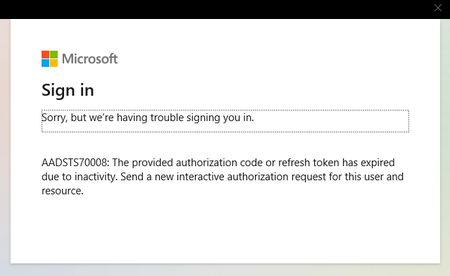
I have a user who continues to receive this AADSTS70008 error in Outlook Desktop. This computer has been in service for several years and Outlook desktop has been running fine. User can successfully authenticate in MS Teams and Outlook on the Web. MFA is enabled. I have attempted a restart but Outlook produces the same error. I have seen older posts suggesting that the registry key for the office activation be removed to fix this issue. Any thoughts on a more straightforward fix than registry hacks? DSTS70008Solved3.3KViews0likes2Comments
Problem z zalogowaniem się no nowym telefonie z maila firmowego
Dzień dobry , Mam problem , ponieważ wymieniłem swojego starego Iphona na nowszy model , i po przeniesieniu wszystkich danych na nowy telefon , ze starego Iphona usunąłem wszystkie dane i wyzerowałem go, jednak gdy chciałem zalogować się na nowym telefonie do aplikacji mailowej Outlook wyskoczyła mi informacja o zatwierdzeniu żądania logowania z numer "33". Nie mam możliwości potwierdzić tego numeru na starym telefonie ponieważ na starym telefonie już nic nie ma. Proszę o odpowiedź co w tej sytuacji mam zrobić ? P.S Próbowałem przez aplikacje Authenticator , logując się do aplikacji swoim prywatnym mailem i po zalogowaniu chciałem dodać konto służbowe jednak po raz kolejny wyskakuje informacja odnoście potwierdzenia logowania na urządeniu przenośnym ...281Views0likes0Comments