outlook
24 TopicsOutlook Not Syncing
Outlook is not syncing my emails properly. New emails are not coming, and sometimes sent emails stay in the outbox. I also get connection or server error messages. I have checked my internet connection and restarted Outlook, but the problem still continues. Please suggest how to fix this issue.12KViews4likes5Comments
How do I stop Copilot from adding to my Outlook?
I'm using Outlook Classic, and every day Copilot adds itself to my Outlook. I right-click and select uninstall, but the next day it comes right back. I do not want Copilot. How do I stop Copilot from adding to my Outlook. I've included screenshots to see what I'm talking about. Version: Microsoft® Outlook® for Microsoft 365 MSO (Version 2504 Build 16.0.18730.20122) 64-bit9KViews4likes18Comments
Office 2021 Classic not showing images in Signatures
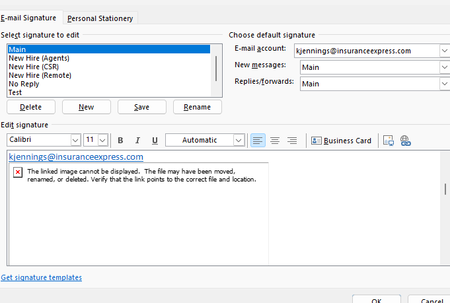
Hello I work in IT and trying to find a solution to this problem that our outlook are not showing the images in the signatures. Our Outlook 2021 Version is 2608, Build 16.0.20326.20072. This occurs even when creating a completely new signature and inserting a new local PNG/JPG using Insert Picture. The image initially appears correctly when inserted, but after saving/reopening the signature it becomes a red X with the message "The linked image cannot be displayed. The file may have been moved, renamed, or deleted." Existing signatures have the same problem. Recreating the signature does not resolve it. Here are some details we tried already. BlockHTTPimages is not configured in either the normal Office registry location or the Policies location. Uninstall Reinstalling Office didn't work We are under AD profiles, with new profiles and even rebuilding current profiles didn't solve it. Attempted a full reset of windows 10/11 didn't work. This appears to be an Outlook/Word signature-image regression rather than a corrupted signature or externally hosted image. Per Microsoft status that this should've been resolved back in June but the issue still persisted. https://support.microsoft.com/en-us/support/known-issues/images-are-not-displayed-in-emails-newsletters-or-signatures-in-classic-outlook?utm_source=chatgpt.com I did try using ChatGPT to help with the issue. I will share the thread link here if you wish to look into of all troubleshoots that was attempted. https://chatgpt.com/share/6aac0312-a08c-83ea-b1a8-2192b3677136 If anyone has any better knowledge of finding a solution as we have reported this issue to Microsoft via the help feature in outlook classic, but gotten no response since the last month since the issue started.331Views1like1Comment
"Scheduling Poll" unintentionally pitted against "Scheduling Assistant ... Why not both?
As a guest invited to a fellow outlook user's scheduling poll, it is unnecessarily difficult to propose additional times that make any sense. It's a strong start towards solving the scheduling problem it's intended to, but it doesn't usually hit the mark, and that's a missed opportunity. Several times, I received a scheduling poll, and each proposed time has already been rejected by one or more required attendees. This is where the "Propose another time" button at the bottom of the poll should help us, . . . Well it's not actually helpful, and will likely generate a lot of email traffic with low chances of helping. I'll explain. The first part of the problem is that there is just no information available about everyone else's schedule. So, how should we expect attendees to propose a reasonable suggestion, even if they are in the same organization and could have had that Free/busy information they need, elsewhere? Going across domains, it makes sense that the information isn't available. But 9 times out of 10, it actually is, because people are using this with people at their workplace. I just would have had to just start over from scratch, although that's bad form because the poll is already in play and this would nominally appear as a conflict. It's also pretty obvious duplicate effort. There just needs to be a better transition between meeting poll and a standard meeting invitation's scheduling assistant view. A person doing that would have to log in if they weren't already, but that seems perfectly fine. Perhaps more importantly, I've got to point out that this is a side-effect of the organizer-as-dictator problem that has been endemic to Outlook & exchange for decades. "FindTime"/"Scheduling Poll" has its place among cross-domain internet email users, but within a work or school environment, it's just good code thrown after bad. The fact that we sometimes need to do a poll before putting any info on the actual calendar is just silly. That's what the calendar is supposed to be for, but locking in the times and making yourself "organizer" just makes the work more awkward. And one last thing, I think it's a mistake that each "Propose another time" sends out another reply-all message. Considering how I described above that we're left just guessing what time could be any good, then sending two or three suggestions in as many separate email messages seems very wasteful. We should be able to set up a few times before saving them and having the poll email re-sent only one more time.1.2KViews1like1Comment