outlook on the web
531 Topics
my account has been hacked and the hacker activated 2FA so I can't reset my password
as said in the title. I downloaded a malicious file that took over my discord and outlook account linked to it. I tried to reset the password but the hacker both changed the account linked to it in case I needed to change the password and activated 2FA so even when I try to reset the password from my main account it says it was ignored. I want to either find a way to recover my stolen account or delete it so the hacker wont have access to my personal information92Views0likes2Comments
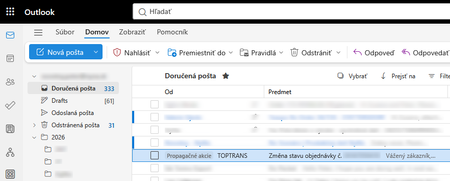
Outlook 365 "forced categories" in FROM field
Outlook 365 got new "feature" that marks random e-mail with "forced category" named "Promotion" (on screenshot "Propagacne akcie"). On attached screenshot you can see fairly important e-mail about delivery of big packet I'm waiting for. Definitely this is not related to any promotion or advertising. This new "forced categories" do not exists in normal categories. They can not be deleted, changed, or hidden from view. Please note that what you normally understand as category is displayed in SUBJECT ("Predmet" on screenshot) field, but these "forced categories" are displayed in the FROM ("Od" on screenshot) field. This feature was implemented cca 1 or 2 weeks ago. Has anyone experienced situation like this? How to get rid of these "forced categories"? What I tried: 1. Checked categories in settings - category like this does not exists 2. Checked categories in settings - suggested categories switch does not exists 3. Tried to create rule to remove the "forced category", but rules ignore these "forced categories", they work only with standard categories (in the subject field) 4. Searched view menu if it can be changed to not display "forced categories", but there is no single switch about it. 5. Tried all available conversation view options 6. Disabled copilot395Views0likes5Comments
Getting the error "Password sign-in isn't available. Try another method"
This is more of a complaint and a vent than a question. I constantly get that infuriating Outlook (web) "error" message when trying to log in: "You've tried to sign in too many times with an incorrect account or password" or "Password sign-in isn't available. Try another method," even though my password was correct. Microsoft, stop forcing us to enable cookies or avoid private browsing just because you are incompetent at securing and scaling your systems. I don't have this problem with Gmail, and I'm thinking about closing my Outlook account. Please fix this error! Who was the genius who had the brilliant idea (100% sarcasm) to force me to open a different email account, find a code, and paste it just to log in, instead of using a method that is MUCH faster, easier, and more convenient for me—like simply typing in my password? I should be the one to decide the "level of protection my account has"; it might be an account with nothing important in it, so I have NO interest in 2FA or using codes sent to alternate email addresses, etc. I think this error stems simply from my refusal to allow Outlook to allow tracking of cookies and history, combined with terrible design where they block access if a high volume of traffic is detected from a single IP address. Hello!!! Most ISPs use IP pools to route hundreds or thousands of users to the internet; there is no way for us users to control that. But I repeat, that I don't deal with this kind of nonsense with other email services. And in case anyone kindly wants to offer suggestions to "resolve this" (which aren't real solutions anyway, just workarounds): I do NOT use VPNs; I always log in from home, from the same computer (nothing changes). I do not use—and will not install—an authenticator app for an email account that holds nothing important; it is a hassle to have to open an app or check an alternate email just to log into my account on a PC. Microsoft, one never expects anything good from you, yet you still manage to disappoint us. PS: Every time I run into this error, I send a message via the "Give Feedback" option; I do this repeatedly, hoping to flood your inbox with this complaint.404Views0likes2Comments
Intermittent “We can’t retrieve the calendar events right now” error in Outlook team calendars
We are receiving an increasing number of reports from users who are unable to view colleagues’ calendars in Outlook. The following error is displayed: “We can’t retrieve the calendar events right now. Wait a few minutes and try again.” The issue appears to be intermittent and inconsistent across Outlook clients: Some calendars work in Outlook on the web but not in New Outlook or Classic Outlook. Other calendars fail in OWA as well. A calendar may work temporarily and then fail again after restarting Outlook or switching between New and Classic Outlook. Some users first experienced the issue yesterday, while others have experienced it for more than a week. One affected user is a manager with nine direct reports. Outlook automatically displays these users under “Team: [Manager name]”. However, the number of visible team members changes after restarting Outlook or switching clients. For example, the group may contain all nine members at one point and only three at another. The Manager attribute and reporting structure have been verified in Active Directory/Entra ID and are correct for all team members. Our Service Desk has already tested the following without resolving the issue: -Outlook on the web, New Outlook and Classic Outlook -Removing and adding the affected calendars again -Adding calendars manually using the users’ primary SMTP addresses -Resetting the Outlook navigation pane -Resetting Outlook views -Creating a new Outlook profile -Verifying the users’ Manager attributes and reporting structure Because the issue also occurs intermittently in OWA and the membership of the automatically generated Manager’s Team Calendar changes, this does not appear to be limited to the local Outlook profile. Has anyone else experienced this recently? Could this be a known Exchange Online issue involving the automatically generated Manager’s Team Calendar, shared-calendar synchronization or mailbox-side calendar navigation data? Are there any additional diagnostics or supported methods for rebuilding the Manager’s Team Calendar configuration in Exchange Online?1.1KViews4likes3Commentscan't verify my outlook account while logging in on IOS mail app
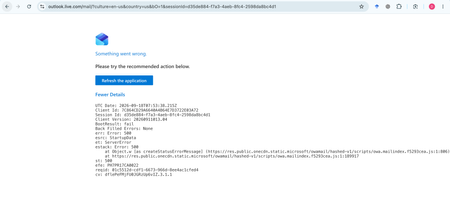
My Outlook.com mailbox cannot be opened on Outlook Web, macOS Mail, or iPhone Mail. Other accounts work normally. Outlook Web shows: HTTP 500, BootResult: fail, esrc: StartupData, et: ServerError. Please check the mailbox provisioning/backend status for my account.315Views0likes1CommentNew Outlook Comes With New Workflows: What Is Still Missing for You?
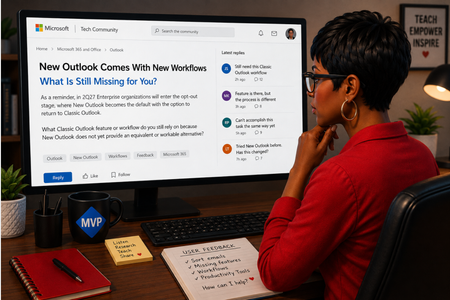
As a reminder, in March 2027, Enterprise organizations will enter the opt-out stage (Message ID 949965), where New Outlook becomes the default with the option to return to Classic Outlook. That is not too far away, especially if you need time to get your workflows and systems in place. That is why I keep coming back to this: New Outlook comes with new workflows. So I’m curious about where New Outlook workflows still fall short for you. A lot has changed. Users now have mail merge, Quick Parts, Unified Inbox, and partial PST support, with Advanced Mail Merge also on the way. New Outlook also has 30+ features and capabilities that are not available in Classic Outlook. What do you still do in Classic Outlook that you cannot accomplish, or cannot accomplish well, in New Outlook today? And if you tried New Outlook a year or two ago and went back to Classic Outlook, I’d be especially interested in what is still keeping you there now. I’m not looking for “I hate New Outlook.” I already know plenty of people do. I want to know the specific feature or workflow that still matters to you. PS: And be kind to me. I don’t work for Microsoft. I’m an MVP who teaches their products. 😉 traccreations4e-p26 8/26/2026587Views1like2CommentsOutlook Meeting Updated, But the Forwarded Attendee Never Received It
Accepted a forwarded Outlook meeting invitation but never received the meeting update when the organizer made changes? This behavior surprises many Outlook users and is often misunderstood. Learn why it happens and how organizers can prevent attendees from missing future updates. https://traccreations4e.com/forwarded-outlook-meetings-dont-receive-meeting-updates/ #traccreations4e 6/23/2026194Views0likes0Comments
Aptos preset font size in new installations
Hi, Can anyone confirm what the default Aptos font size in Outlook should be on first use, before any user changes are made to the settings? I’m seeing different default sizes depending on the application: 11 pt — Microsoft 365 Outlook for Windows (Classic) 12 pt — Microsoft 365 Outlook for Windows (New Outlook) 12 pt — Outlook for iOS 12 pt — Outlook for Android Based on the above, it appears that 12 pt may be the current standard default across most Outlook clients, with Classic Outlook for Windows being the exception. However, I haven’t been able to find any definitive Microsoft documentation confirming what the intended default Aptos font size should be. Can anyone confirm whether 12 pt is the official/default size?361Views0likes1CommentOWA Rich Link Preview: metadata returns HTTP 200 but preview card is never rendered
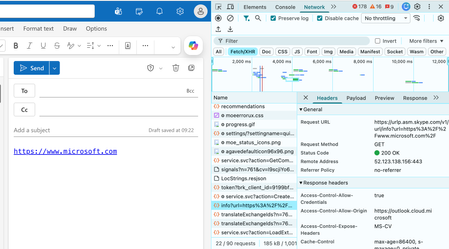
I am hoping someone from the Outlook team or anyone familiar with the Outlook on the web Link Preview pipeline can help with a reproducible issue that has already been investigated extensively through Microsoft Support. This is not a request for a new feature. It concerns the existing Rich Link Preview functionality that Microsoft currently documents and exposes through Outlook/Exchange configuration. The problem When a public URL is entered into a new Outlook on the web message, Outlook recognises the URL but displays only the normal blue hyperlink. No title, description, image or Rich Link Preview card is inserted. I have reproduced this using multiple unrelated public URLs, including: Microsoft.com Adobe(dot)com YouTube(dot)com The same behaviour occurs across multiple browsers and private/incognito sessions. Configuration already confirmed Both relevant Exchange settings are enabled: Mailbox LinkPreviewEnabled = True Organisation LinkPreviewEnabled = True The Outlook on the web Preview links in email option is also enabled and messages are composed in HTML. The important technical finding Chrome Developer Tools shows that Outlook correctly detects the URL and calls Microsoft’s own preview service: urlp.asm.skype.com/v1/url/info The request completes successfully with: HTTP 200 OK The service returns valid rich-preview metadata including: Title Description Favicon Thumbnail Large thumbnail For example, the YouTube test returned the correct YouTube title, description and valid thumbnail URLs. However, Outlook then does nothing with that successful response. The observable flow is: URL recognised → Microsoft preview service called → HTTP 200 → complete valid metadata returned → Outlook fails to insert/render the Rich Link Preview Further investigation shows: The returned title is never inserted into the compose DOM. Outlook never subsequently requests the thumbnail URL returned by the preview service. There is no LPNoLP suppression attribute on the hyperlink. The behaviour is reproducible across different URLs and browsers. This appears to place the failure after successful metadata retrieval, at the point where Outlook should instantiate or insert the preview component. Why I am raising this here An active Microsoft Support case already contains HAR traces, PowerShell outputs, screenshots, Developer Tools evidence and controlled reproductions. I have spent months troubleshooting this and have reached the point where there is very little more an end user can reasonably isolate. This also has genuine business impact. Professional email presentation matters when competing for customers. Businesses using other email platforms can present links professionally with rich previews while Outlook leaves us with plain blue hyperlinks despite the documented functionality being enabled. I would therefore really appreciate input from someone familiar with Outlook/OWA engineering: What condition or feature state could cause Outlook to successfully retrieve complete Link Preview metadata but then deliberately or incorrectly skip creation of the preview component? Could this involve an Outlook feature flag, mailbox/tenant state, rollout configuration or another client-side gate after the urlp response? I am specifically trying to get the existing documented functionality working correctly, rather than looking for a workaround. I have also submitted the issue through the official Outlook Feedback Portal: https://feedbackportal.microsoft.com/feedback/idea/dc18ed2e-119b-f111-9b47-7c1e52444ef6 If someone from Microsoft needs the existing support-case reference, I am happy to provide it privately.233Views0likes2Comments