outlook on the web
698 Topics
Oct 19 Update
The other day, when the new update was released, my Outlook would not stay open after I clicked it. I have an Outlook 365 account. I used it for my GoDaddy and .edu email, but it stopped working; it says these accounts can no longer be accessed with this Outlook account. When I checked my programs, I now see Microsoft with French and Spanish (extensions?), and I do not know what is happening. I tried uninstalling and reinstalling Microsoft, but it didn't work. HELP Please.36Views0likes1Comment
Outlook 365 "forced categories" in FROM field
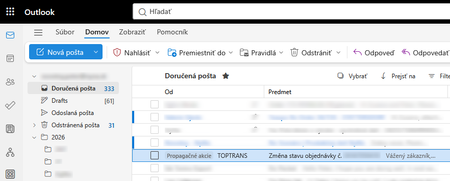
Outlook 365 got new "feature" that marks random e-mail with "forced category" named "Promotion" (on screenshot "Propagacne akcie"). On attached screenshot you can see fairly important e-mail about delivery of big packet I'm waiting for. Definitely this is not related to any promotion or advertising. This new "forced categories" do not exists in normal categories. They can not be deleted, changed, or hidden from view. Please note that what you normally understand as category is displayed in SUBJECT ("Predmet" on screenshot) field, but these "forced categories" are displayed in the FROM ("Od" on screenshot) field. This feature was implemented cca 1 or 2 weeks ago. Has anyone experienced situation like this? How to get rid of these "forced categories"? What I tried: 1. Checked categories in settings - category like this does not exists 2. Checked categories in settings - suggested categories switch does not exists 3. Tried to create rule to remove the "forced category", but rules ignore these "forced categories", they work only with standard categories (in the subject field) 4. Searched view menu if it can be changed to not display "forced categories", but there is no single switch about it. 5. Tried all available conversation view options 6. Disabled copilot622Views0likes7Comments
Microsoft Sign In Loop
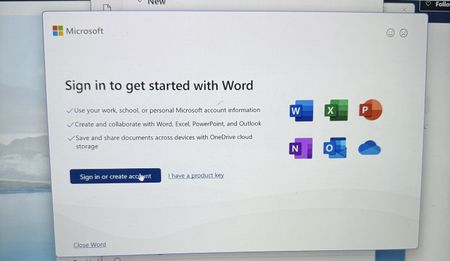
I am trying to sing into Microsoft 365, but every time I do, it takes me back to the login screen. I sing in with my outlook account, but I can't reach the applications. I can sign in on the browser, but not the applications on my computer. I have tried uninstalling and reinstalling M365, but the issue still persists151Views0likes1Comment
my account has been hacked and the hacker activated 2FA so I can't reset my password
as said in the title. I downloaded a malicious file that took over my discord and outlook account linked to it. I tried to reset the password but the hacker both changed the account linked to it in case I needed to change the password and activated 2FA so even when I try to reset the password from my main account it says it was ignored. I want to either find a way to recover my stolen account or delete it so the hacker wont have access to my personal information134Views0likes2Comments
How to Recover Data from a Damaged or Corrupted OST File When Outlook Cannot Open It
Hi everyone, I have seen several cases where users still have an old OST file but cannot access the mailbox data inside it. This usually happens after an Outlook profile is removed, a Microsoft 365 or Exchange account is changed, a mailbox is no longer available, or the OST file becomes damaged or corrupted. One common misunderstanding is that an OST file can be opened on another computer in the same way as a PST file. However, an OST file is linked to the Outlook profile and mailbox that created it. If that connection is no longer available, Outlook may not be able to open the file normally. Before trying to recover the OST data, it is worth checking a few things: Is the original Microsoft 365 or Exchange mailbox still available? Can the Outlook profile be recreated and synchronized again? Is the issue related to the OST file itself or only the Outlook profile? Do you need the complete mailbox data or only specific folders/items? If the mailbox is still available, rebuilding the Outlook profile and allowing Outlook to create a new OST may be the better approach. However, if the mailbox no longer exists, the Outlook profile has been deleted, or the OST file is damaged and contains the only available copy of the mailbox data, recovery becomes a different process. In these situations, it is important to first check what information is still readable from the OST file. Scanning and previewing the mailbox data before export can help identify available folders, emails, attachments, contacts, and calendar items before creating a new PST file. A practical OST recovery workflow usually involves: Keeping a copy of the original OST file before making any changes. Checking whether the original mailbox can still be synchronized. Scanning the OST file to identify available mailbox items. Reviewing important folders and messages. Exporting the required data to PST. Validating the resulting PST in Outlook. A detailed overview of the OST to PST conversion process, including scanning, previewing, selecting mailbox items, and exporting recoverable data, is available here: https://www.edbmails.com/pages/ost-to-pst-converter.html One important point to remember is that recovery results depend on the condition and readability of the OST file. A conversion tool can help extract available mailbox information, but it cannot recreate data that is no longer present or readable inside the source file.248Views0likes1Comment
Getting the error "Password sign-in isn't available. Try another method"
This is more of a complaint and a vent than a question. I constantly get that infuriating Outlook (web) "error" message when trying to log in: "You've tried to sign in too many times with an incorrect account or password" or "Password sign-in isn't available. Try another method," even though my password was correct. Microsoft, stop forcing us to enable cookies or avoid private browsing just because you are incompetent at securing and scaling your systems. I don't have this problem with Gmail, and I'm thinking about closing my Outlook account. Please fix this error! Who was the genius who had the brilliant idea (100% sarcasm) to force me to open a different email account, find a code, and paste it just to log in, instead of using a method that is MUCH faster, easier, and more convenient for me—like simply typing in my password? I should be the one to decide the "level of protection my account has"; it might be an account with nothing important in it, so I have NO interest in 2FA or using codes sent to alternate email addresses, etc. I think this error stems simply from my refusal to allow Outlook to allow tracking of cookies and history, combined with terrible design where they block access if a high volume of traffic is detected from a single IP address. Hello!!! Most ISPs use IP pools to route hundreds or thousands of users to the internet; there is no way for us users to control that. But I repeat, that I don't deal with this kind of nonsense with other email services. And in case anyone kindly wants to offer suggestions to "resolve this" (which aren't real solutions anyway, just workarounds): I do NOT use VPNs; I always log in from home, from the same computer (nothing changes). I do not use—and will not install—an authenticator app for an email account that holds nothing important; it is a hassle to have to open an app or check an alternate email just to log into my account on a PC. Microsoft, one never expects anything good from you, yet you still manage to disappoint us. PS: Every time I run into this error, I send a message via the "Give Feedback" option; I do this repeatedly, hoping to flood your inbox with this complaint.469Views0likes2Comments
Issues signing on to outlook.com
Hello, I'm having issues signing on to outlook.com. Either through the app or web, keep getting an error. On the Outlook Mobile app, I get "An error occured during authentication". On the web I get the error below. Any suggestions appreciated. UTC Date: 2026-05-12T19:49:17.826Z Client Id: Session Id: Client Version: 20260501001.13 BootResult: fail Back Filled Errors: Unhandled Rejection: SyntaxError: Failed to execute 'json' on 'Response': Unexpected end of JSON input:undefined|undefined:undefined|undefined:undefined|undefined:undefined|undefined:undefined|undefined:undefined|undefined:undefined|undefined:undefined|Unhandled Rejection: SyntaxError: Failed to execute 'json' on 'Response': Unexpected end of JSON input:undefined|undefined:undefined|undefined:undefined|undefined:undefined|undefined:undefined|undefined:undefined|undefined:undefined|undefined:undefined|undefined:undefined|undefined:undefined|undefined:undefined|undefined:undefined|undefined:undefined|undefined:undefined|undefined:undefined|undefined:undefined|undefined:undefined|undefined:undefined|undefined:undefined|undefined:undefined|undefined:undefined|undefined:undefined|undefined:undefined|undefined:undefined|undefined:undefined|undefined:undefined|undefined:undefined|undefined:undefined err: COMException esrc: StartupData et: ServerError estack: Error: 401 at Object.w [as createStatusErrorMessage] (https://res.public.onecdn.static.microsoft/owamail/hashed-v1/scripts/owa.mailindex.06641a1a.js:1:806) at https://res.public.onecdn.static.microsoft/owamail/hashed-v1/scripts/owa.mailindex.06641a1a.js:1:183650 st: 401 ehk: X-OWA-Error efe: MW4PR03CA0157 reqid: a64783dc-2fed-f293-3a10-efba70b9cc2e cv: BDANTiCGGDAkhZfLh5/96J.3.1909Views0likes3Comments
Can I automate performance review forms to be sent automatically through Outlook?
Doesn't even necessarily have to apply to just surveys to be honest. I'm trying to set up a system where our employees automatically receive forms like surveys, performance reviews, or feedback templates in their Outlook so I don't have to be the stereotypical HR lady who constantly chases and reminds them to complete them. Warning: Not a super techy person :)231Views0likes2CommentsIntermittent “We can’t retrieve the calendar events right now” error in Outlook team calendars
We are receiving an increasing number of reports from users who are unable to view colleagues’ calendars in Outlook. The following error is displayed: “We can’t retrieve the calendar events right now. Wait a few minutes and try again.” The issue appears to be intermittent and inconsistent across Outlook clients: Some calendars work in Outlook on the web but not in New Outlook or Classic Outlook. Other calendars fail in OWA as well. A calendar may work temporarily and then fail again after restarting Outlook or switching between New and Classic Outlook. Some users first experienced the issue yesterday, while others have experienced it for more than a week. One affected user is a manager with nine direct reports. Outlook automatically displays these users under “Team: [Manager name]”. However, the number of visible team members changes after restarting Outlook or switching clients. For example, the group may contain all nine members at one point and only three at another. The Manager attribute and reporting structure have been verified in Active Directory/Entra ID and are correct for all team members. Our Service Desk has already tested the following without resolving the issue: -Outlook on the web, New Outlook and Classic Outlook -Removing and adding the affected calendars again -Adding calendars manually using the users’ primary SMTP addresses -Resetting the Outlook navigation pane -Resetting Outlook views -Creating a new Outlook profile -Verifying the users’ Manager attributes and reporting structure Because the issue also occurs intermittently in OWA and the membership of the automatically generated Manager’s Team Calendar changes, this does not appear to be limited to the local Outlook profile. Has anyone else experienced this recently? Could this be a known Exchange Online issue involving the automatically generated Manager’s Team Calendar, shared-calendar synchronization or mailbox-side calendar navigation data? Are there any additional diagnostics or supported methods for rebuilding the Manager’s Team Calendar configuration in Exchange Online?1.1KViews4likes3Comments