outlook calendar
14 Topics
Issues with syncing calendar from outlook calendar in taskbar
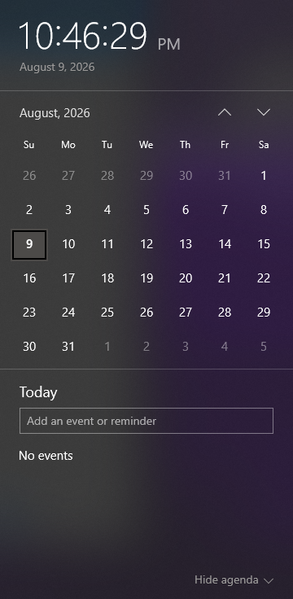
I am wondering how I can sync a specific calendar from outlook to be the one that the events get pulled from to appear in the taskbar calendar that is displayed when clicking the date/time tool. Currently the calendar that appears when I click the date and time section is blank, and trying to make a new event from that popup does not save anything. When go into the outlook calendar app, I can see the multiple email accounts and their respective calendar, but yet no events from these calendars show up when looking at the calendar popup from the taskbar. When trying to make an event in this calendar popup, it even gives me the option to save the event to one of my outlook accounts (the gmail account I have integrated), but does not successfully save any event anywhere. I am wondering what is required to be able to see the events from my outlook calendar in this popup, and to be able to quickly and conveniently make events from this taskbar popup and have them save to my actual outlook calendar. Including a screenshot of the calendar in taskbar that I am requesting help with incase of any confusion.386Views0likes3CommentsShared Calendars No Longer Visible
For years, I've shared Outlook calendars between my Outlook accounts and with my husband's, without any issues. However, since mid-June the shared calendars have disappeared for no apparent reason. The sharing permissions are still in place, but the calendars are no longer visible or available to add on Android, in the Outlook desktop app, or on Outlook on the web. I've spent hours Googling and tried all the usual troubleshooting steps, but nothing has worked! As a workaround, I now have to invite all @outlook.com accounts to calendar events just so everyone can see them and avoid double bookings. Has anyone come across this before and found a fix that isn't one of the standard "how-to" suggestions? Note: these are personal paid Microsoft accounts.1.9KViews0likes3Comments
Problems with Scheduled To Do Tasks and Outlook Calendar/My Day View using Mac/Apple
It is my understanding that tasks scheduled in To Do will appear in my Mac Outlook calendar and/or the "My Day" or as Mac users have "Day" tab next to your mail or calendar app. Every time I schedule a task, it does not show up in my calendar at all. I have tried everything I have read online and still not gotten anything to work - including syncing the apps. Can scheduled tasks be viewed on outlook calendar? Is this one of the many glitches in Microsoft's recent Mac updates? Please help.363Views0likes2Comments
Automatically accept an event when created in attendees' outlook calendar
Hi, I am currently using the API to create appointments on the internal technicians' calendars. The account used to create the event has permission to modify the technicians' calendars. I would like that when I create an event and invite Tech A, they do not have to accept or decline the event. This should work in the same way as if I were creating the appointment directly on their calendar, but in this case, I need to use a shared calendar that invites the technicians. The topics I found on this subject are a few months old or more, and they mentioned that it was impossible. Are there any updates on this? Thank you in advance. Best regards,298Views0likes0Comments
Using the web Outlook Calendar as a PWA
Can you please tell me how to install the web Outlook Calendar as a separate PWA (with its own app icon) on Microsoft Edge? Outlook Calendar (web) URL: https://t.co/fn5YBBLz1coutlook.office.com/calendar/view/workweek Right now Microsoft Edge allows me to install only one app for the web Outlook PWA. Outlook (web mail) URL: https://t.co/ftiZ3VDkksoutlook.office365.com/mail/5KViews0likes4Comments
SharePoint and Outlook Calendar Syncing Functionality
Hello all, New to the forum. Here is my situation and some background: Currently, I have a calendar created under my account that is shared with many individuals within my organization to add appointments to communicate who will be in-office. What I'd like to do is move this calendar over (or sync) to a new SharePoint modern communications site (intranet) since this calendar is already established and being used. We are still in the process of getting our site approval, but the process of doing this seems straight forward. In the event that I promote outside my current organization, what will happen to the synced calendar on SharePoint since it is shared from my account associated with my current org? Will there be issues since this is the origin of the calendar? If there are potential issues with this, any recommendations on how to more efficiently set this up? Will I have to start over with a calendar on SharePoint instead of how things are currently setup? I appreciate any advice/guidance 🙂1KViews0likes1CommentCreating Outlook Calendar appointments, other than your own e-mail via Access VBA
Hello peoples of this community, I am struggling with the following issue: In our organization, there is one email that manages the appointments of group events, and one email that manages the appointments of individual consultations. We have an Access template that fills the Outlook appointments, but that fills the appointment in the name of the email that is logged in. We have several employees that are all assigned to different individual consultations, but only one that plans al those appointments. Is there a way to assign the different individual appointments from one account to other accounts? Set objOutlook = CreateObject("Outlook.Application") Set objNameSpace = objOutlook.GetNamespace("MAPI") Set objFolder = objNameSpace.GetDefaultFolder(9) Here is the code that makes the appointment in Outlook, and fills the template out of an Access database. I hope I was able to clarify my problem with you, and if there is someone that can help me with this. Kind regards, JenniferDMS706Views0likes0CommentsSometimes Microsoft calendar event not generated in outlook calendar
We are using https://docs.microsoft.com/en-us/graph/api/calendar-post-events?view=graph-rest-1.0&tabs=http for creating events in the outlook calendar using Android. It works well but now sometimes it doesn't create events in Outlook Calendar and it also receives event invitations Mail in Junk Email. After updating that event now all events create properly. We encountered this problem two or three times but I couldn't figure out the problem.No errors were found on the front-end side as well as the backend side. Can anyone please suggest why this is happening?557Views0likes0Comments