online
291 Topics
How to download MS Project Plans along custom fileds including data
I have Project plans in project online. I am opening the plan in ms project, custom fields data is getting loaded. But when i try to save the file in local desktop, schedule data is saving but custom fields data is not coming only column names are coming. How to save the file along with task level custom fields with data in local desktop269Views0likes0Comments
People Picker in Project Detail Pages - Not Working for Already Created Projects
Hi, I have a non-mandatory field (say, "Expert") in PDP. When I create a new project, I can select the "Expert" using People Picker. When I try to open an existing project (to assign/reassign an "Expert") the People Picker feature does not work. Custom scripting is already activated. Any insight from users, as to what configuration changes should be made, would be much appreciated. Thanks437Views0likes5CommentsData access after Project Online (PWA) retirement
As the retirement of Project Online (PWA) approaches, some questions have come up regarding what will happen to the data and related content. I’d like to ask if anyone has information or guidance on the following points: What happens to the data currently stored in Project Online after the retirement date? Will this data still be available for viewing, export, or migration after that date? If so, for how long? Regarding the SharePoint sites linked to PWA, will they remain available? Will it still be possible to access or modify their content? Does Microsoft plan to publish official guidance on this transition? Any references or practical experiences on this topic would be greatly appreciated.4.5KViews1like16Comments
Project Server - All Project Deliverables in One View?
Using on-premises Project Server, there is a way to mark a task as a Deliverable in Project (thru Manage/Edit Deliverables button in Project Professional) and Project Server will display those deliverables on the PDP / Project Site page in Project Server. Is there a way to create a view or report which shows all deliverables for all projects that are currently in Project Server? This way, people do not have to go into each individual schedule or PDP to see all upcoming deliverables for the company.Solved227Views0likes1CommentCreating a Project through Graph API "msdyn_CreateProjectV1"
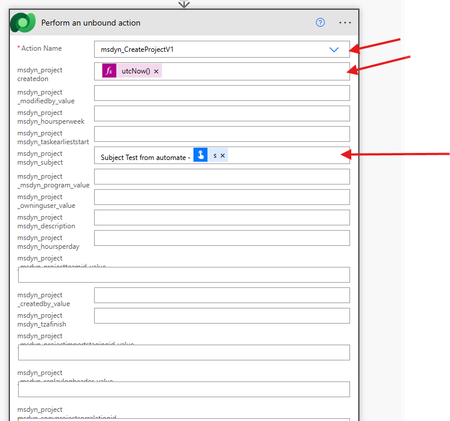
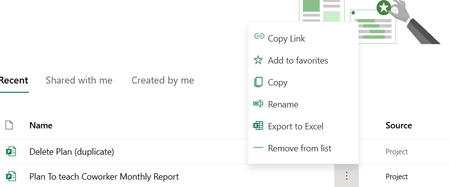
I want to create a new Project online plan using Microsoft Graph API, so i used this end point and action inside my flow:- now the action will run successfully, and it should have created a new Project with subject = "Subject Test from automate", as follow:- but i can not find the new project inside the UI:- any advice?255Views0likes1Comment
Integrating ESS Utumishi with Microsoft 365 and SharePoint: Best Practices and Insights
I’m working on a project to integrate ESS Utumishi, the Tanzanian government’s Employee Self-Service platform, with modern content management solutions like Microsoft 365 and SharePoint. My goal is to improve document management, automate HR workflows, and enhance overall employee engagement through a seamless digital experience. Has anyone worked on similar integrations or faced challenges in connecting government HR systems with Microsoft tools? I’d love to hear about any best practices, lessons learned, or success stories that could help guide this project, especially in terms of improving system efficiency and user adoption in the public sector.134Views0likes0Comments
Querying Custom Text Fields from MS Project Online
I am trying to call custom text fields (Text1, Text2, ...., Text30) from MS Project Online using OData feed i PowerBI. When I use {pwaUrl}/_api/ProjectData I am able to get the default fields on top of the custom enterprise fields but not the custom Text fields. Is there any way to query these custom text fields?221Views0likes1CommentHow do I manage my Microsoft Project? (notifications, deletion, and more)...
I finally got a license for Microsoft Project (instead of silly Planner which I cannot use for Agile Framework). However, I am still having some basic functionality issues with Microsoft Project Online. I am honestly trained on 2010 version of Microsoft Project, so a lot of these feature changes 1) How do I control notifications for Microsoft Project Online? First, I discovered there is these new notifications feature for Microsoft Project that sends out an email every time a even a sub-subtask (aka an action instance) is assigned. I do not want my coworker or the entire department to receive emails every time I edit a plan. (I mean 1 email is ok) but with how I work it can lead to like 60 emails.... So naturally I binged it which gave me this result.... https://answers.microsoft.com/en-us/msteams/forum/all/turn-off-sending-out-notification-to-all-members/84653dd8-187a-4178-9a94-96e96b86fca4 1. From the planning board, select the 3 dots (. . .) to the right of the plan's name. 2. Choose Plan Settings from the menu There are no settings under any of the 3 dots menu. So where are the notification settings for an entire project? 2) What is needed to access actual Microsoft Project Online? Normally I click on a project and simply edit it, but in the desperate search for the actual settings for a Microsoft Project.... I discovered today that I have a weird error. Something about permission to a SharePoint site. It did not give me this error before. I suspect that I might have to make my own PWA site. Can someone explain to me what this error is about and why the day before I could access Microsoft Project Online but now cannot? 3) How to delete a project? So, I was able to find a tutorial on this one, but I wanted to ask if there was a better way. https://answers.microsoft.com/en-us/msoffice/forum/all/deleting-a-project-from-project-for-the-web/a73789ef-b8be-4eb7-ba42-a9b2aaffe54b 4) How to control users that are part Microsoft Project Online? Because how many documents talk about need to be owner to control emails... I tried to make own group in hopes that will give me better control over notifications. But this led to a discovery that I am in like 15 different groups all with the exact same name as my section and members. So What settings in Groups are for a Microsoft Project Plan? Just an old fashion Project Plan user trying to understand how to use this confusing new Project version.387Views0likes1Comment
Project Online - Business Drivers matrix table in Power BI
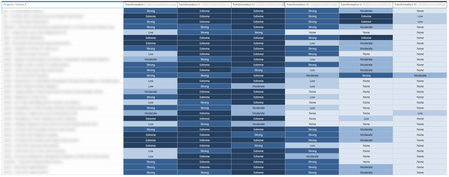
Hi! After classifying our ongoing projects we could get to this matrix table in Project Online: There are 6 Business Drivers where each project contributes on a rating scale (None, Low, Moderate, Strong, Extreme) I am stuck on Power BI to find the relation between each Project, the rating scale and each Business Driver to be able to build the same matrix table in Power BI: Any help would be much appreciated!821Views0likes6Comments
Pdp relative issues
Hi Community, I am configuring a new PWA and currently trying to add a new PDP, but I'm encountering a couple of issues that I've also noticed in other tenants. Under PWA Settings > PDPs & Workflows > PDP, when I click New, I only see three options: Link, Edit New Menu, and Add Template. I decided to edit one of the existing pages. However, even after adding a few custom fields to the page, once I click Apply and then Stop Editing, the page resets. Additionally, when I try to add a new web part, I don't find the Project web part category among the available options. Any suggestions?485Views1like3Comments