office 365
354 Topics
Text missing when printing in Office 2016, but appears fine in Print Preview
The Problem: When I send the document to print, certain parts of the text are missing on the printed page. However, everything looks completely normal in Print Preview. Consistency: This happens across multiple different printers, and the behavior is identical every time. Version Difference: The issue occurs on computers running Office 2016, whereas the exact same document prints perfectly fine on Office 365. What is even stranger is that the document prints correctly on some PCs with Office 2016, but fails on others. What could be causing this discrepancy, and how can it be resolved?67Views0likes2Comments
Word corruption
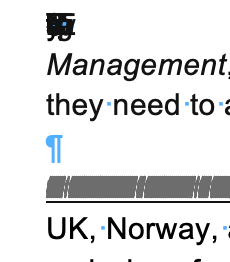
I am using Microsoft 365 on Mac running Tahoe 26.3.1. I downloaded a Google document from a client as a .docx Word document. This is something I do often. My client is also using a Mac. The Word document has corruptions in it, full lines of text are appearing as lines (like a barcode) and there seem to be letters and symbols stacked up on top of each other. Screenshots attached. I have tried saving as a .doc Word document but the corruptions are still there. If I select all of the text and change the font, the corruptions are still there. I copied the text into Text Edit and converted to plain text. The corruptions disappear in Text Edit but so does any text that was there, sentences are incomplete. If I copy and paste this plain text into a new Word document, the corruptions reappear. If I import the Plain Text into InDesign, the corruptions reappear. If I copy and paste the plain text into InDesign, the corruptions reappear. This strikes me as very odd because as far as I know Plain Text should remove any corruptions. My client says that they see no corruptions in the Word doc or in the Plain Text doc that they created. But when they send these docs in email, the corruptions are still there. I spent 4 hours with Microsoft Support yesterday trying to figure out the problem and when they couldn't figure it out, they just closed and left the chat.... I would love to let my client know what they can do to fix this on their end so that we can move forward with the project. Any suggestions are appreciated!220Views0likes4Comments
Word - Insert Key
Why doesn't the Insert key on the keyboard do anything? It's a key on the keyboard, make use of it! Most obviously, why doesn't pressing it make it change to overtype text. Why when in tables doesn't the insert key allow you to add rows to a table where you currently are? Today I found it very painful to add more than one row to a table. Even after an internet search I didn't find an easy way quickly. Surly making use of the insert key and pressing it once per new row would be the most easy? It works like this in MS Project.180Views0likes2Comments
Word friert ständig ein
Hallo, bei mir friert seit einer Woche immer wieder die Word App ein und ich weiß nicht, was ich tun soll. Ich habe alles geupdated, automatisches Speichern abgestellt, mein IPad neugestartet, das Internet immer wieder aus und angemacht und ich weiß einfach nicht weiter. Ich schreibe nicht mal einen ganzen Satz und schon friert alles ein und ich darf es schließen und erneut öffnen, nur damit dasselbe wieder geschieht. Ich brauche dringend Hilfe!128Views0likes0CommentsWord Copilot attachments fail with NoTokenObtained
Word Copilot cannot read local or cloud attachments with my Microsoft account. Cloud file attachment opens OneDrive Picker but fails with NoTokenObtained, timeout, or “Sorry, something went wrong.” Local files are accepted but reported as empty/corrupted. The same files work correctly in Microsoft 365 Copilot Chat with the same account. The issue reproduces on different computers, different networks, new Edge profile, new Windows user, and Word for the web without Office desktop installed. Word Copilot can read the active document, so only the attachment pipeline appears broken. Correlation IDs: 49a92ea2-7068-2001-bf16-3cf7d0c388fd and b39b30a2-b012-f000-cf51-72bd844c5dea. Please escalate to Word Copilot / OneDrive File Picker / Microsoft 365 Copilot engineering.428Views0likes1CommentPLEASE HELP ME. Can't Get Formulas In Word To Work?
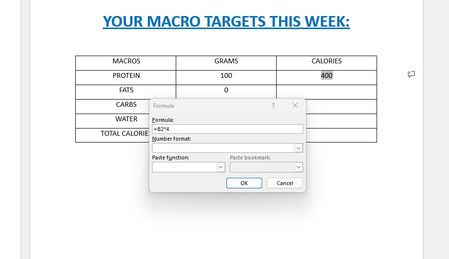
I know how to use formulas in EXCEL and I know WORD isn't EXCEL. But I'm trying to enter a very simple formula into a table in a WORD document to calculate simple macro-nutrients. The formula is very simple. Each gram of carbs is 4 calories. I'm just trying to enter a formula that automatically multiples the number of carbs by 4 so I don't have to manually do the math on my own every time. As you can see in my screenshot, I got it to work by entering (=B2*4). The problem is the formula doesn't stay there. It instantly vanishes once entered. So if I change the number of carbs from 100 which is 400 calories, to 200 which is 800 calories, the formula doesn't automatically update the total calories because the formula disappeared once entered. I just want to know if I can enter the formula in a way which causes it to permanently stay in the cell so it always updates the total calories whenever I change the number of carbs? Just like EXCEL always does? And how to do that? If it's not possible, that's okay. I will simply consider going back to EXCEL then.475Views0likes3CommentsCursor flickers excessively when STYLEREF field is used in header with multiple pages
[Performance & Graphic Issue] Word cursor flickers excessively when STYLEREF field is used in header with multiple pages Edit: This issue wont appear at the first time. You can try to edit for a bit time or just scroll a little bit and you will see flickers excessively in a unpleasant speed that ruins your whole writting experience... Description I have encountered a reproducible performance issue in Microsoft Word that causes the text cursor (insertion point) to flicker excessively and continuously when a STYLEREF field is present in the document header. Steps to Reproduce Open Microsoft Word and create a new blank document. Apply the "Heading 1" style to a few paragraphs in the body (e.g., "Chapter 1", "Chapter 2", ...). Double-click the header area to enter the header editing mode. Insert a STYLEREF field that references "Heading 1": Insert > Quick Parts > Field > StyleRef > Heading 1. Close the header and add enough content to the body so the document spans approximately 5–6 pages (e.g., by pressing Enter repeatedly or generating dummy text). Observe the text cursor behavior while typing or simply moving the cursor in the body. Actual Result The text cursor begins to flicker rapidly and continuously once the document reaches about 5–6 pages. The flickering stops immediately when the header/footer area is hidden. I Think the issue is directly correlated with the presence of the STYLEREF field in the header. Expected Result The cursor should remain stable and not flicker, regardless of the presence of the STYLEREF field or the document length. Environment Application: Microsoft Word for Microsoft 365 Version: 2607 (Current Channel) OS: Windows 10 22H2 (Build 19045) Additional Info: This issue occurs in a brand-new blank document with no third-party add-ins or custom templates. The problem is 100% reproducible. Severity This significantly impacts usability, especially when editing longer documents such as theses, reports, or books where chapter titles are commonly displayed in headers. The constant cursor flickering is visually distracting and causes eye strain during extended editing sessions. Note The above report was drafted and translated into English with the assistance of Deepseek, but all the information provided is based on my own manual testing and observations. The issue was discovered during my actual document editing workflow, and I have confirmed through repeated testing that it is directly related to the STYLEREF field.259Views0likes3CommentsNew Bug in Word Word (Version 2607 Build 16.0.20228.20124): QAT is not saved in template?
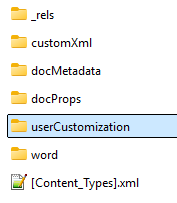
I often make template-specific customizations to the Quick Access Toolbar (QAT). As of today (August 04, 2026), these customizations are suddenly no longer being saved in a Word template. My tests revealed the following: For the customizations to be saved in a template, the UI-based process must create a “UserCustomization” subfolder in the template file (see the ZIP version of the file): The QAT customizations are saved in the “customUI.xml” file within this subfolder. In addition, the “.rels” file in the “_rels” subfolder receives a new entry: <Relationship Id="rId2" Type="http://schemas.microsoft.com/office/2006/relationships/ui/userCustomization" Target="userCustomization/customUI.xml"/> The UI-based process no longer creates the “User Customization” subfolder—an annoying bug! As a result, template-based QAT customizations are lost when a template is closed and reopened. Workaround: Make the described changes manually in the template file—this worked for me—but I hope Microsoft will fix this annoying bug! My Word Version: German UI, Version 2607 Build 16.0.20228.20124, 64 Bit. Can anyone confirm or disagree with this result? DieterG510Views1like8CommentsOffice.js: Is there any supported way to retrieve multiple non-contiguous text selections in Word?
Hi everyone, I'm developing a Word Office Add-in using Office.js. In Microsoft Word (Windows Desktop), users can select multiple non-contiguous text ranges by holding Ctrl while selecting text. However, when I use: context.document.getSelection() It only returns a single Word.Range, and I couldn't find any API to detect or retrieve all the selected ranges. I came across this related discussion: Microsoft Tech Community – Support for Retrieving Multiple Selected Ranges in Word via Office.js My questions are: 1. As of 2026, is there any supported Office.js API to retrieve multiple non-contiguous text selections? 2. Is there any workaround to detect that the user has selected multiple ranges? 3. Or is this still a platform limitation? Our use case is an AI-powered legal research add-in, where users may want to select multiple clauses from different parts of a document and send them together as context. Any guidance would be appreciated. Thanks!415Views0likes4Comments