office 365
736 Topics
Outlook Not Able to Open Files in Desktop App
Hello all, I work in an enterprise environment, and I have now seen two occurances of this issue. Essentially, when a user receives an email in New Outlook with a direct attach file (Word, Excel, PDF in Acrobat, etc.), and they try to open them in the desktop app, it simply never opens. No error codes or anything, essentially just "it did not work, restart Outlook" if anything at all. Opening in the web apps works fine, opening them from Outlook (Classic) in the desktop app works fine, and downloading them directly allows them to be opened as well. I did some searching for this, and found some issues from 2023 that seemed similar, but none of that troubleshooting got anywhere. From everything I can see, it seems like a bad update, but I cannot say for sure. Has anybody seen this, or any ideas on a way to fix this?336Views2likes1Comment
Outlook.com Spam Filtering Regression — Missing Rule Conditions Prevent Safe User‑Level Mitigation
I’m a program manager working with data engineers in a large corporation, and I’ve used Microsoft Exchange professionally for over 30 years. I’m posting because Outlook.com’s spam filtering pipeline appears to have regressed significantly, and the current rule system no longer provides the necessary conditions for users to mitigate the issue themselves. Summary of the Issue Over the past several months, Outlook.com has begun allowing large volumes of spam across multiple categories — explicit content, romance scams, foreign‑language marketing, calendar spam, health spam, lotto scams, and unsolicited newsletters. This is not typical spam leakage; it suggests a failure or degradation in one or more layers of the filtering pipeline (content classification, sender reputation scoring, behavioral heuristics, or transport‑level filtering). Technical Problem Outlook.com previously offered rule conditions that allowed users to safely filter spam based on message behavior and metadata. These included: Message type (new vs. reply) Does not include (critical for safe filtering) Header includes Unsubscribe detection Cold sender / no prior conversation These conditions are no longer available in the current Outlook.com rule interface. The remaining conditions — primarily “includes” filters on subject, sender, or body — are insufficient for safe spam mitigation. Any attempt to delete spam using the current rule set risks deleting legitimate mail, because: All legitimate transactional mail contains “http” All receipts, confirmations, and alerts contain structured HTML Many legitimate first‑contact messages contain links There is no longer a way to exclude legitimate patterns (unsubscribe, structured headers, known senders, etc.) Impact Users cannot safely create rules that distinguish spam from legitimate mail. This leaves them with only two options: Allow spam to reach the inbox Move all messages containing “http” to Junk, which also captures legitimate mail This is a regression in Outlook.com’s functionality and user safety. It also disproportionately affects users who rely on Outlook.com for critical communications. Escalation I have already escalated this issue directly to Microsoft leadership: Satya Nadella (CEO) Brad Smith (President) Rajesh Jha (EVP, Experiences & Devices) Steve Chew (Corporate VP, Outlook & Exchange) Chris Capossela (Chief Customer Officer) I’m posting here to ensure visibility within the Outlook engineering and product teams, and to request confirmation that: This regression is known and being investigated The missing rule conditions will be restored Outlook.com’s spam filtering pipeline is being reviewed for failures in classification or reputation scoring No part of this functionality will be moved behind a paid tier Why This Matters Outlook.com has historically been a reliable consumer‑grade and professional‑grade mail platform. Removing advanced rule conditions without providing alternative filtering controls leaves users unable to protect themselves from high‑volume spam. This is a user safety issue, not a feature request. I’m asking the Outlook team to prioritize this regression and restore the rule capabilities that previously allowed safe and effective spam management. Thank you for your attention.106Views0likes2CommentsOutlook Version 16.114.1 (26102031) not *sending* mail-BT is my mail service provider
Over the last few weeks I have had an intermittent problem whereby I cannot send emails from Outlook. BT is my email provider. I use the Legacy version of Outlook but occasionally switch to New Outlook to test whether I have the same issue and much of the time I do not, but this morning I do. Nobody on the Microsoft Support Team (as per "Help-Contact Support") has been able to advise or help. Having done my own AI/Google search, it seems that there is a conflict between BT and Outlook re-BT's servers? Does anyone know what is going on? I can send when I use BT's web based mail but I want to use Outlook, which I am paying for!96Views0likes2Comments
Outlook 365 "forced categories" in FROM field
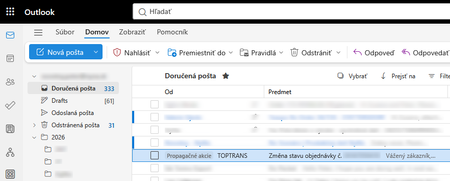
Outlook 365 got new "feature" that marks random e-mail with "forced category" named "Promotion" (on screenshot "Propagacne akcie"). On attached screenshot you can see fairly important e-mail about delivery of big packet I'm waiting for. Definitely this is not related to any promotion or advertising. This new "forced categories" do not exists in normal categories. They can not be deleted, changed, or hidden from view. Please note that what you normally understand as category is displayed in SUBJECT ("Predmet" on screenshot) field, but these "forced categories" are displayed in the FROM ("Od" on screenshot) field. This feature was implemented cca 1 or 2 weeks ago. Has anyone experienced situation like this? How to get rid of these "forced categories"? What I tried: 1. Checked categories in settings - category like this does not exists 2. Checked categories in settings - suggested categories switch does not exists 3. Tried to create rule to remove the "forced category", but rules ignore these "forced categories", they work only with standard categories (in the subject field) 4. Searched view menu if it can be changed to not display "forced categories", but there is no single switch about it. 5. Tried all available conversation view options 6. Disabled copilot860Views1like8Comments
MS Outlook 2024 LTSC automatically gets closed and later not getting open
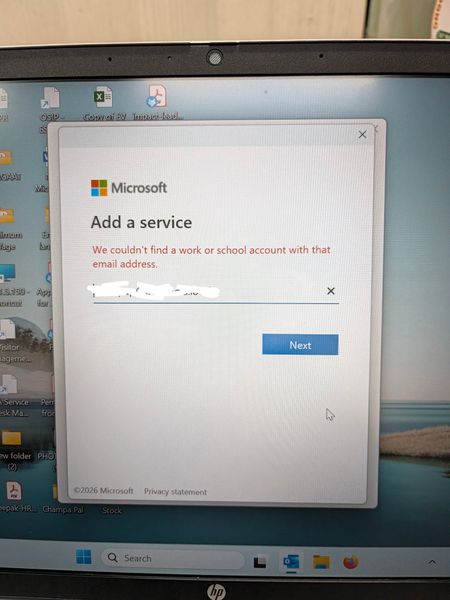
In Outlook 2024 LTSC, the application suddenly stops and closed automatically. Later troubleshooting, it is observed that it doesn't even open in safe mode. Tried to create a new profile where it is not able to search the user from exchange and automatically redirect to Microsoft 365 login page whereas our mail server works in exchange mode. Even after reinstalling the MS office 2024, it is not able to search the user and redirects to Microsoft 365 login page. What is the issue and resolution.422Views0likes2Comments
New Outlook - PST file cannot reopen and PST search not working
Hi, Issue 1 – One PST file cannot be reopened I have two PST files, PST A and PST B. PST A can currently be opened and browsed normally in New Outlook. PST B was previously opened in New Outlook and I was able to browse the folders and emails. However, after I closed/removed PST B from New Outlook, I am now unable to open/add the same PST file again. The PST file can still be opened using Classic Outlook. If the PST format is unsupported or too old for New Outlook, why was New Outlook able to open and browse it previously before I closed it? Could this be related to the PST format (ANSI vs Unicode), PST corruption, or a limitation/bug in New Outlook? Issue 2 – Unable to search emails stored in PST For PST A, I can open the PST and manually browse and read the emails in New Outlook. However, when I use Search, emails stored inside the PST do not appear in the search results. This is referring to searching for the email/message itself, not searching for attachments. The same PST can be searched using Classic Outlook. My understanding is that New Outlook now supports searching emails stored in PST files. Is PST search fully supported, or are there still limitations compared with Classic Outlook? I would appreciate any advice on how to troubleshoot both issues, especially whether there is a way to verify PST compatibility with New Outlook.310Views0likes2CommentsPST Export New Functionality in New Outlook For Windows
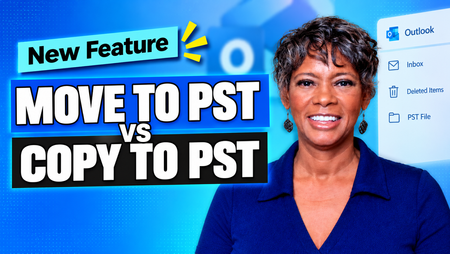
New Outlook for Windows PST Export has received a useful update. You can now choose between: Export Copy to PST (the standard method) Export Move to PST (new) Export Copy to PST is the method we already had. The exported items remain in the mailbox unless you delete them manually. Export Move to PST is different. It exports the items, then automatically moves the originals to the Deleted Items folder. The two options serve different purposes, especially when deciding whether you are creating a backup or archiving content you no longer want to keep in the mailbox. I created a short walkthrough showing the Export PST Move vs. Copy process, Deleted Items behavior, and when to use each option. 👉🏾Watch Video: New Outlook: Move to PST vs Copy to PST — What's New & When to Use It If you use PST files in New Outlook for Windows, I’d be interested in hearing which option you expect to use most: Export Move to PST or Export Copy to PST? For the full PST Export process, - Watch this video: New Outlook PST Export: What You Need to Know in 2026 - Read this blog: How to Export Mailbox to PST from New Outlook (Complete Guide) If this post was helpful, please like it to assist others. traccreations4e-p26 9/12/2026308Views1like0Comments
iCloud for Windows Contacts sync issue with Outlook Classic (Part of M365 package)
I have lost count the amount of times I see iCloud Sync issues cropping up with Outlook Classic (M365) but they never exactly describe the issue I am having. After uninstalling Outlook, iCloud for Windows, re-installing and enabled / disable the AddIn/ re-enable it for iCloud I've run into a brick wall I think So iCloud for Windows partly integrates with Outlook Classic - but I have an issue where the correct Sync'd contacts are appearing in the Contacts tab of Outlook and I enable that as an Address book by ticking the box in Properties. I give it a specific name Then open the main Home page of Outlook and start to create a test mail. If I open the Address Button on the main ribbon I can see the Contacts list name for iCloud and open it. Problem is it is not the correct list. It looks like a very old iCloud Contacts List - but where on earth is Outlook getting this old list from ?. The list is the same name as that one I just gave it under Outlook Contacts management page, but I can never get the correct sync'd iCloud contacts list to appear using the Address Button. Can anyone point me in the direction of where this old iCloud contact list is being stored within Outlook Classic ?. If I remove iCloud for Windows it is still there under the Address Ribbon button. Any help here welcomed !217Views0likes4CommentsNew Outlook Comes With New Workflows: What Is Still Missing for You?
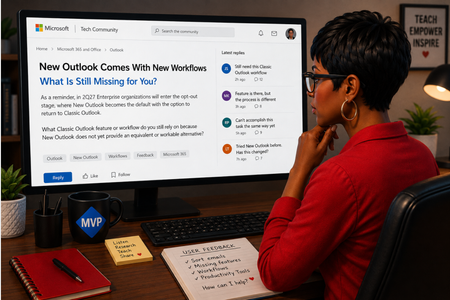
As a reminder, in March 2027, Enterprise organizations will enter the opt-out stage (Message ID 949965), where New Outlook becomes the default with the option to return to Classic Outlook. That is not too far away, especially if you need time to get your workflows and systems in place. That is why I keep coming back to this: New Outlook comes with new workflows. So I’m curious about where New Outlook workflows still fall short for you. A lot has changed. Users now have mail merge, Quick Parts, Unified Inbox, and partial PST support, with Advanced Mail Merge also on the way. New Outlook also has 30+ features and capabilities that are not available in Classic Outlook. What do you still do in Classic Outlook that you cannot accomplish, or cannot accomplish well, in New Outlook today? And if you tried New Outlook a year or two ago and went back to Classic Outlook, I’d be especially interested in what is still keeping you there now. I’m not looking for “I hate New Outlook.” I already know plenty of people do. I want to know the specific feature or workflow that still matters to you. PS: And be kind to me. I don’t work for Microsoft. I’m an MVP who teaches their products. 😉 traccreations4e-p26 8/26/2026639Views1like2Comments
Aptos preset font size in new installations
Hi, Can anyone confirm what the default Aptos font size in Outlook should be on first use, before any user changes are made to the settings? I’m seeing different default sizes depending on the application: 11 pt — Microsoft 365 Outlook for Windows (Classic) 12 pt — Microsoft 365 Outlook for Windows (New Outlook) 12 pt — Outlook for iOS 12 pt — Outlook for Android Based on the above, it appears that 12 pt may be the current standard default across most Outlook clients, with Classic Outlook for Windows being the exception. However, I haven’t been able to find any definitive Microsoft documentation confirming what the intended default Aptos font size should be. Can anyone confirm whether 12 pt is the official/default size?388Views0likes1Comment