notifications
51 Topics
Teams Notification Integration with Mac OS Notifications--is is missing?
Hello All, Teams banners are not showing up in Apple Notifications: On Catalina: 10:15:5, MS Teams (from MS Office 365), Version 1.3.00.18164 I am getting banners, for the requisite 5 seconds, but when I go to pull down the Mac OS Notifications list, it is not listed there. When I go to "System Preferences"-->"Notifications", I don't see "Teams" listed. Should I? I feel it should be integrated with the Mac notification so that the Teams' notifications can be viewed after the 5 second banner disappears, and also in the order received with other notifications. If I miss that 5 second display (maybe I had an alternate desktop obscuring the banner), it's essentially lost to me. Thanks for you time/help. MundeliSolved82KViews9likes60Comments
Notifications not working
No one in our office receives notifications for messages in our team channel even when mentioned. No banner, sound or anything. I've checked multiple times that all notifications are set properly I'm at a loss. The one thing that does happen is the task bar icon in the bottom right hand corner goes from green to red.37KViews4likes11Comments
Graph API: summary field ignored for Adaptive Card message notifications/preview
Hello, Problem Summary When sending Adaptive Cards via Microsoft Graph API to Teams chats, the `summary` field in the message payload is completely ignored. This results in unhelpful generic notifications like "Card" or "Sent an attachment" instead of meaningful preview text. Environment - **API**: Microsoft Graph API v1.0 - **Endpoint**: `POST /chats/{chat-id}/messages` - **Platform**: Microsoft Teams (Desktop, Web, Mobile) - **Adaptive Card Version**: 1.5 Expected Behavior According to the https://learn.microsoft.com/en-us/graph/api/resources/chatmessage?view=graph-rest-1.0, the `summary` property should be used for: > "Summary text of the message that could be used for push notifications and summary views or fall back views" When sending a message with `summary: "🚨 Big Alert: This is a real issue"`, I expect: - ✅ Teams notification toast displays: "🚨 Big Alert: This is a real issue" - ✅ Chat list preview shows: "🚨 Big Alert: This is a real issue" - ✅ Activity feed shows: "🚨 Big Alert: This is a real issue" Actual Behavior The `summary` field has **no effect** on notifications or previews: - ❌ Notification shows generic text: "Card" or "Sent an attachment" - ❌ Chat list preview shows generic text or first TextBlock from card - ❌ Activity feed shows generic text - ❌ The `summary` field appears to be completely ignored Minimal Reproduction Request Payload ```json POST https://graph.microsoft.com/v1.0/chats/{chat-id}/messages Content-Type: application/json Authorization: Bearer {token} { "body": { "contentType": "html", "content": "<attachment id=\"card001\"></attachment>" }, "attachments": [ { "id": "card001", "contentType": "application/vnd.microsoft.card.adaptive", "content": { "type": "AdaptiveCard", "$schema": "http://adaptivecards.io/schemas/adaptive-card.json", "version": "1.5", "body": [ { "type": "TextBlock", "text": "Critical Alert", "weight": "bolder", "size": "large", "color": "attention" }, { "type": "TextBlock", "text": "Database connection has failed. Please investigate immediately.", "wrap": true } ], "actions": [ { "type": "Action.OpenUrl", "title": "View Details", "url": "https://example.com/alerts/12345" } ] } } ], "summary": "🚨 Big Alert: This is a real issue" } ``` Steps to Reproduce Create a test chat in Microsoft Teams Obtain OAuth2 token with `Chat.ReadWrite` scope Send the above payload via Graph API Observe notification/preview in Teams client **Result**: The `summary` field is ignored, notification shows generic text. Business Impact This limitation severely impacts user experience for: - **Alert/incident notifications** - Users can't identify urgency without opening the chat - **High-volume scenarios** - Users can't triage messages efficiently - **Time-sensitive operations** - Critical alerts look identical to routine messages Our team manages 200+ incident notifications daily via Adaptive Cards. Without meaningful previews, users must open every notification to assess priority, defeating the purpose of notifications. Workarounds Attempted ❌ **Setting `summary` at message level** - Ignored when attachments present ❌ **Adding preview text in `body.content`** - Overwritten by attachment ❌ **Using different `contentType` values** - No improvement ❌ **Including fallback text in Adaptive Card** - Not displayed in preview ✅ **Only working solution**: Send plain text message first, then card separately (terrible UX) Questions **Is this a bug or by design?** If by design, why does the documentation describe `summary` as useful for notifications? **Is there an alternative mechanism** to control preview text for Adaptive Card messages? **Is this being tracked internally?** This seems like a fundamental limitation for bot developers. Full Reproduction Package I've created a complete reproduction package with test scripts and detailed documentation: - Test payload JSON - Bash/PowerShell test scripts - Step-by-step reproduction guide Can share via GitHub gist if helpful for the team to investigate. Request Please either: **Fix the implementation** to honor the `summary` field for Adaptive Card messages, OR **Provide an alternative mechanism** to control notification/preview text, OR **Update the documentation** to clarify that `summary` is not supported for Adaptive Cards This is blocking our production alert system deployment. Any guidance would be greatly appreciated! ---651Views4likes1CommentNew Teams macos notification sound is generic apple sound
Our users are trying New Teams on macOS and asking how to make the notification sound the teams sound instead of the generic Apple notification sound. As I understand it, this is not customizable by the device users and the app must implement the sound. Assuming this is the case, when will Microsoft add the Teams notification sound into new teams on macos?Solved6.2KViews4likes1Comment
The Chat Notification Badge That Won't Die
I know there's another thread on this, but literally none of those solutions worked, so I'm a starting a new thread. My chat notification won't go away. All of my chats are read. Here's everything I've done to fix this already (note- It's a corporate computer so I can't mess with the anti-virus): Signed out of the app every (desktop, web, phone) Restarted my computer Cleared the cache data from all 13 different locations Changed the setting to close the app when I shut down Closed it in the Task Manager Turned off all of my notifications Clicked on every chat I've received over the last week The only thing that seemed to maybe be the culprit was a very large company meeting and I was the last to leave. There was a lot of chat in that meeting, though I didn't participate in any of it. The reason I think this was when I went to log into to Teams from my browser, as I started to type "Microsoft Teams" I noticed in the suggested sites that there was a chat message from that meeting. So obviously I've left the meeting. I've deleted that chat. I've even left the teams channel that hosts those meetings. For what it's worth, I don't have any notifications on the phone app (android). It's just on the desktop and the web. Please, for the love of god, help. It's slowly driving me insane and I don't have the mental capacity to deal with anything else that makes me insane during quarantine. 🙂 *jk- I'm fine. It's a joke*160KViews4likes56CommentsApps notification settings missing in Teams settings
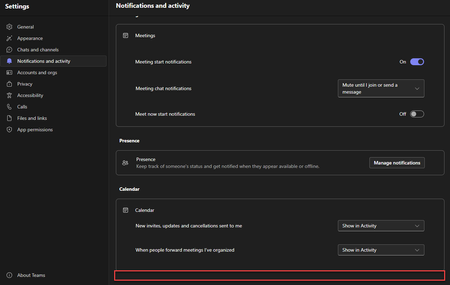
Hello Teams Community, I'm facing a strange issue with App notifications in Microsoft Teams. I've already researched this and found nothing. I've opened a Microsoft case and I'm waiting for an answer but it's taking longer than expected. So, I'm turning to you for expedited help! Scenario: You're an administrator in Teams. You've applied a setup policy for a pinned app like Viva Engage. After the policy is applied and the tool is launched, users complain that notifications are either too frequent or not frequent enough. You direct them to the Teams Notification and activity settings to control app notifications. The users go to Teams notification settings but report back to you that the App section of Teams settings doesn't exist. Problem Statement: Microsoft explicitly states in their documentation that in order for the App notifications section to appear, you must first add an app yourself within Teams and get at least one notification. But relying on users to add an app, somehow create a notification, and then remove it, just to access App notifications is impractical and would never work. Desired Outcome: I'm looking for a way to bypass this prerequisite and force the Apps section to appear in the Notifications and activity section without any user action whenever an app is pinned in the Teams admin center with a setup policy. I'm hoping this can work with any app, not just Viva Engage. Any help is appreciated. Thanks, Teams experts! -Rob3KViews3likes4Comments
Microsoft Forms daily alerts for old/expired survey
Hello, Our team uses Microsoft Forms within Teams to run quick surveys (ex: how many people will attend X so we can plan logistics). A survey was posted in a team chat on August 19th, and now we get an alert on this old survey every day. Any idea how to make this go away? I've played around with adding Forms to the team chat, where I'm able to see the results or collaborate, but I can't deactivate the form. Can you setup a form to only notify users once, and not every single day? Thank youSolved4.9KViews2likes4CommentsMultiple notifications for the same chat
Is there any way to reduce the number of notifications I get from a chat to just one? Right now, if someone sends me: "Hi" (return) "I have a quick question" (return) "it's about x" (return) "Can I do...." (return) I get 4 popups, all on top of each other, all displaying the message. This is intrusive, and due to the sensitive nature of some content, it can be really bad if I'm sharing my screen, or have someone looking over my shoulder. Skype, for comparison, will show the first message, and then just flash/make a noise for subsequent messages. This allows people to send "." and then any sensitive information in order to help protect the recipient. Is there any way to mimic this behavior on Teams?13KViews2likes7Comments
Teams Mobile Android Auto notifies old meetings
Recently, when I connect to my vehicle with Android Auto, Teams will notify me of meetings that already occurred, many times the day before. I don't want to turn off notifications for meetings, because I do want to be notified of a current or future meeting. It is useless for Teams to notify me of meetings from yesterday. Anyone know of a solution? Thanks, Eric707Views2likes2Comments