notes
149 TopicsAbility to take Personal Notes on Interactions in TEAMS
I have a lot of situations where I would like to take and keep personal notes associated to a specific TEAMS interactions. I don't want to have to keep my notes in a separate place like OneNote or Outlook. Requests Don't make the notes public for all of the participants (possibility to add a private tab to the interaction window in TEAMS Access the notes directly through the window in TEAMS for the Chat, phone call, or meeting23KViews14likes17Comments
Adding notes to a teams contact
Is there a way to add notes to a contact in Microsoft Teams (or an app or anything)? Example: we have multiple training managers that have continually rotating departmental responsibility and I'd like to keep a note as to what group each training manager is responsible for. (ex. Deb covers Global Support, Wendy covers Collections, Marcy covers Care, etc.)Solved9.9KViews7likes7Comments
Change the order of Teams video backgrounds
Hello, My company has a number of customized backgrounds that are available as background filters when enabling your camera. Currently they sit at the bottom of the list. I would like to know a way to re-arrange the background options so our custom backgrounds are at the top of the list for everyone in the organization. Thank you. Christopher.5.3KViews6likes3Comments🤝 How to use Microsoft Loop to supercharge your Teams meeting notes
NEW VIDEO N. 358 The new meeting notes will be shown on the right pane of the meeting window with the ability to open them in the browser for more room or on a second monitor. Participants can collaborate in real time, create an agenda, take notes, and add tasks. When participants are assigned a task in the meeting, they will also receive an email notification and it will be synchronized with the Planner and To Do apps. Meeting organizers will also see an ability to add Collaborative notes before meetings, to prepare by adding agendas or other materials in one place. After the meeting, Collaborative notes will remain accessible for all participants on the Teams calendar meeting details page. The experience is a Loop component, so they can be copied easily out of the meeting and into chats, group chats, emails, and other documents. #Loop #Teams #MicrosoftTeams #giulianodeluca #remotework #remotelearning #Microsoft #corporate #tutorial #officetips #Microsoft365 #Planner #ToDo64KViews3likes29Comments
notes attached to cells not visible, broken since last excel update (Office 365 on Mac)
I've got many notes (the yellow non-threaded formerly called comments) in my excel sheets. Since the latest software update I can not display/view my notes anymore. The cells containing note still show the red triangle-mark, but the note does not show up when I mouse over. By clicking "show all notes" in the ribbon menu, it will just only show the connection lines between cell and invisible note rectangle. But I can not access view or even edit the notes. Also right click on the cell -> edit note does not show anything. is there a fix or at least a workaround existing? regards dewege macos: high sierra, excel (office 365) version 16.21.1 (190123)99KViews3likes24Comments
New Page in Notes Missing
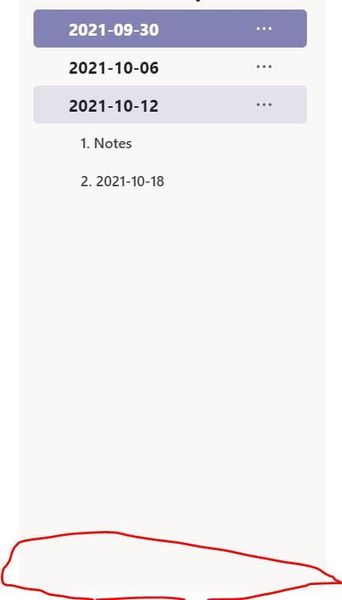
I'm missing the 'New Page' button at the bottom of notes. We have been using it to track weekly minutes for a number of committees. Is there any way to bring this back? I have quit teams and restarted. I have restarted computer. It seems to have disappeared in the last week. Circled in Red where it used to be. Get to this list by clicking on the hamburger when in meeting notes.3.6KViews3likes7CommentsMicrosoft Lists Release
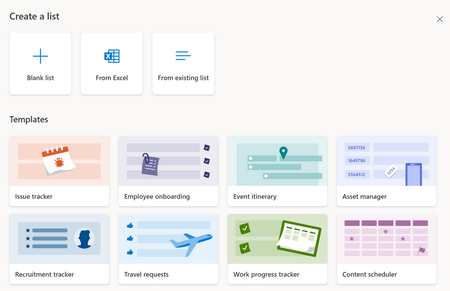
Availability update | July 28th, 2020 | Microsoft Lists began to roll out to Targeted Release (TR) customers in Microsoft 365, planned TR completion by end of August 2020 where will then begin broader production roll-out. More details at below links from the great experts. https://techcommunity.microsoft.com/t5/microsoft-365-blog/announcing-microsoft-lists-your-smart-information-tracking-app/ba-p/1372233 Here is a quick tip if you would like to use it right away if it has not been released to your tenant, Go to office.com > check all app you should see lists if not do the following Navigate to your OneDrive and replace onedrive.aspx on the url with lists.aspx . You will need to be in First Release mode for this to work however. For those who haven't seen what is Microsoft list; At Build 2020, introduced Microsoft Lists, a smart information tracking app in Microsoft 365.Solved8KViews3likes16CommentsHow are you running 1:1 meetings inside Teams without it turning into a mess?
Right now were using a shared OneNote for agendas and action items but honestly nobody updates it and half the time the meeting turns into a random chat with no structure. I tried using Planner tasks as a workaround but thats clunky because theres no real connection between the task and the meeting itself. Has anyone found a good way to keep 1:1 agendas, notes, and follow ups all in one place inside Teams? We have about 40 people so it needs to scale a bit.146Views2likes3Comments
Struggling to keep 1:1 meeting notes organized across weeks in Teams
I have 8 direct reports and we do weekly 1:1s. Right now I'm keeping notes in OneNote but theres no easy way to carry over action items from last week or see what we talked about 3 months ago without scrolling forever. Teams meeting notes are even worse because each meeting creates a separate note. Someone in my company suggested using a Loop page but that still doesnt solve the continuity problem. How are other managers keeping a running history of 1:1 conversations thats actually searchable and organized?152Views2likes1Comment