msteams
21 Topics
Pin a message in a channel in MS Teams using MS Graph API
I've created a MS Teams app and as part of it's functionality, it has to pin the message (in both one-on-one chat and in a channel) on behalf of the user I'm using below API to pin a message in a channel in MS Teams https://graph.microsoft.com/v1.0/chats/19:....@thread.tacv2/pinnedMessages Endpoint: - POST https://graph.microsoft.com/v1.0/chats/19:....@thread.tacv2/pinnedMessages Body: { "email address removed for privacy reasons": "https://graph.microsoft.com/v1.0/chats/https://graph.microsoft.com/v1.0/chats/19:....@thread.tacv2/pinnedMessages/messages/<message_id>" } Note: - https://graph.microsoft.com/v1.0/chats/19:....@thread.tacv2/pinnedMessages is the chatID of the channel And I get a successful response as below 201 Created { "@odata.context": "https://graph.microsoft.com/v1.0/$metadata#chats('19%3.......%40thread.tacv2')/pinnedMessages/$entity", "id": "<message_id>" } But when I go that particular channel, I don't see the message as the pinned message in the channel But when I try to get the list of pinned message in a channel using below API, it gives the response that the above message which I pinned. But I don't see it in the channel in MS Teams. And I'm facing this issue only while pinning the message in the channel using MS Graph API. I don't face the same issue with one-on-one chat with the bot I've created.212Views0likes1CommentMicrosoft Teams Preview - Windows 11
Good Morning, I have enabled the Teams Preview IAW setup document (https://learn.microsoft.com/en-us/microsoftteams/public-preview-doc-updates) . The policy updates and shows the "Try" slider in the upper left on all machines (Windows 10) except one which is a Windows 11 machine. I have completely uninstalled, cleared teams from user profile \appdata folder locations, reboot, and reinstall from teams.microsoft.com. The slider is still not showing. I have looked at the previous discussions, and the registry looks correct. Are there any issues / difference with the Windows 11 public preview? Thanks! 🙂 Vince
Apps in MS Teams
Hello Teams Gurus -We don't want unknowingly charged. We don't want to restricts users to use OOB Microsoft Apps or even free 3rd party apps. If we allow Apps to MS Team users, Is there any way to automatically Admin know that users are trying to add paid/subscription Apps?1.2KViews0likes1Comment
Preventing anonymous posts in Q&A
I have weekly contact sessions with university students, but have been experiencing problems with some making inappropriate comments (some which are of such a nature that we are in fact required to report them to our legal department). The individuals making the comments are however too cowardly/smart enough to post anonymously so nothing can be done to address the issue. They are also unfortunately quite incessant in their posts which actually disrupts the session as their inappropriate comments need to be dismissed first in order to get to the questions from students who actually have issues. Surely there is a way to ensure that no anonymous questions can be posted and culprits can be identified and removed?1.6KViews0likes2Comments
Direct Routing - Option to dial out with Auto Attendant Caller ID
Can you have to option to dial out from the auto attendant number when needed? Is there a way to delegate this number to users? I have numbers coming in to the auto attendant which allows me to play a greeting and use the out of hours options, then the call is passed to a queue (the queue uses a team rather than individual users). If I assign the number directly to the queue (and not use the auto attendant), I do have the option to dial from the queue number (using the dial pad within the Team). I am looking for similar when using the auto attendant so that the users can dial from their direct dial and auto attendant numbers when required.Solved4.3KViews0likes2Comments
Teams status has been stuck on "In a call"
My MS Teams status has been stuck on "In a call" since yesterday. The client was reinstalled and the cache cleared but to no avail. I also tried office repair. At this point, I had already signed out of my mobile device. The taskbar shows "Microsoft Teams - on the phone". After changing the status (Available) manually it stays for 15 minutes then automatically it changes to "In a call".9.9KViews1like8CommentsUpdate Theme in Ms Teams issue
I am trying to change Team's profile picture, but it just keep running with "Saving Change" message. I have to force quit the application. Any one can suggest solution? I tried both, the desktop app and web version Thanks Riy PS. This is now OK, case close!2KViews0likes3CommentsWays to ignore Chat and notification sound during Teams live event
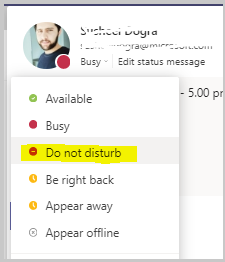
Hello Everyone, I know many of you are already hosting Teams live events but might have heard different types of notifications sounds during the live events. This can very be distracting, unprofessional or disturbing. Please find some important ways to ignore these dings and pings sound during the event: 1. Go to the settings of your Teams Client and choose your status to DND (Do not disturb), by doing that you will not hear any ping sound while receiving any message , though you will be receiving all the messages from others but silently. Checkout the below screenshot as a reference : 2. Second way , If you go the right bottom corner of your system's task bar and hit the notification center and click on the below icon shown in the screenshot and set it to PRIORITY only , you could actually avoid the unexpected sounds from your system during the event : 3. And the last way would be , go to the start menu of your windows and type FOCUS ASSIST , open the setting and choose PRIORITY ONLY I hope this will help you to produce the events more efficiently. Cheers !! #6.3KViews1like2CommentsStart an instant meeting in Teams From Outlook | Microsoft Teams New Update March 2021
How To Start a Teams Meeting Instantly From Outlook | Microsoft Teams New Update March 2021 DISCLAIMER: This is a community support forum meaning I'm just fellow regular MS forum users like you who are trying to help other MS forum users with their issues. I'm not a Microsoft staff. https://youtu.be/HL-6ibpH4Mk1.9KViews0likes1Comment