microsoft defender for office 365
74 Topics
Quarantine "finger print matching" false positive
Just done my regular quarantine check on our O365 tenant and was surprised to find a couple of legit messages from an external sender which were flagged as High Confidence Phish based on finger print matching, which I understand translates to a close match to a previously detected malicious message. I can see absolutely nothing wrong with the message and it was so very business specific in its content that I cannot see that it would closely match anything else that had ever gone before. The recipient tells me they regularly exchange business emails with the sender without any issue. When I run off a report and look at other recent messages caught by finger print matching on my tenant, they were the usual phishing emails that are probably doing the rounds globally and were correctly trapped. Questions are: 1. Anyone know why something so highly specific in its content would be trapped in this way? 2. I feel I can't trust O365 to correctly quarantine based on this example, but High Confidence Phish is currently set to have the AdminOnlyAccessPolicy applied on my tenant - and this doesn't notify. Is there any way for a sys admin (only) to be notified by email when something goes into quarantine? I can set up a custom policy to allow RECIPIENT notification but I don't really want to involve them when messages are being correctly quarantined almost all of the time. Ours is a non-profit tenant so I can't be sitting around watching it all day - I need it to tell me when something has happened! Thanks for any ideas!
URL Hyperlinking phishing training
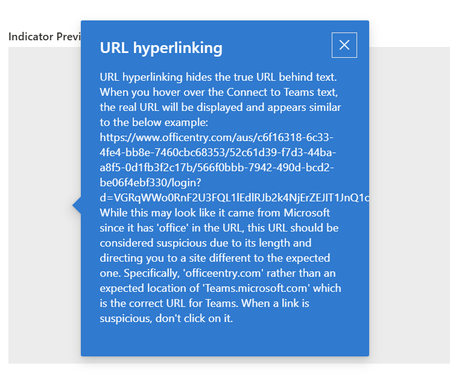
Mi using the Defender phishing simulations to perform testing. When creating a positive reinforcement email that goes to the person you have the option to use default text or put in your own text. When I put in my own text I have lines in the text, but when it renders the lines are not displayed so it looks like a bunch of text crammed together. Any idea how to get these lines to display?Solved249Views0likes3Comments
Add Privacy Scrub Service to Microsoft Defender?
Microsoft Defender protects accounts against phishing and malware, but attackers increasingly exploit nuisance data broker sites that publish personal information (names, emails, addresses). These sites are scraped to personalize phishing campaigns, making them harder to detect. I propose a premium Defender add‑on that automatically files opt‑out requests with major data brokers (similar to DeleteMe).
Extremely Slow Performance Since Defender Was Pushed on Us
Compliance, Security, Protection, and Defender are all extremely slow, with responses from screen to screen ranging from 30 seconds to multiple minutes between clicking items and waiting for Microsoft cloud to return results. I have a GB link and speed test well over 600 Mbps so it's not on my end. It appears the cutover in late January to this new "Defender" platform has been extremely detrimental to the Office portal response times in these portals. What is being done to resolve this?21KViews2likes12Comments
Website incorrectly flagged as security threat (Safe Links false-positive)
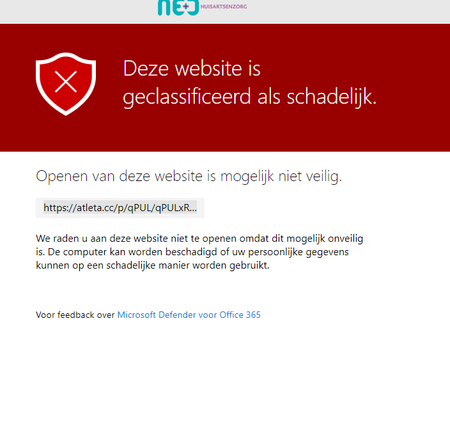
Hi, Our SaaS-website atleta.cc is currently incorrectly flagged as security threat by Microsoft Defender / Safe Links. This is causing trouble for clients and customers of clients in Outlook, Edge etc. Where can we report this false-positive, or request removal from the block list? Thank you! Greetings, Jarno Example:Outgoing mail is considered spam
Hi, I have a user in our tenant who sends emails to multiple people at one time. The maximum number is 200 recipients at a time per day. This concerns 1 email with, for example, 200 recipients. Now, after the email has been sent, this user is marked as Spam and the account is blocked. When I then look at the reason, it says Domain reputation. The user also remains within Microsoft's sent limits. How can I find out or where can I within O365 what the exact reason is why this user is blocked and the email is considered spam. There are several users who do this and do not receive any notifications. Can someone help me with this? Kind regards, JacobTracking a file using its Hash Value
Hi, I want to track files based on the SHA256 generated hash value. And while I am aware of the n number of tables in Log Analytics, it there any other way to accomplish this? For example if I want to track a file going out to an external email address, I want to be notified. I thought of transport rules but those don't seem to be useful for this use case. However I did find some records through Advanced Hunting, but it tracks only files identified as spam/phish/malware etc. Is there any way to track ALL files without Defender for Endpoint Solutions? Thanks in advance!Unable to Disable User Quarantine Mails after enabling security presets
Hi, We have recently enabled security preset policies with Standard protection in our tenant. Since then, our users are receiving quarantine mails from Microsoft. We use AdminOnlyAccessPolicy for quarantine in Anti-spam and Anti-phishing threat policies and in a couple of transport rules and yet users are receiving these quarantine mails. We did try creating a custom quarantine policy and assigning it to Anti-spam and Anti-phishing threat policies, hoping it would override the preset policies, but it didn't work. I know we can either turn off preset policies or block these using transport rules, but these are last resorts. Is there any way or policy to stop these mails keeping the security preset policies on? Thanks in Advance!!SolvedMicrosoft Defender XDR Unified RBAC | Tenant Allow/Block List, entry addition error
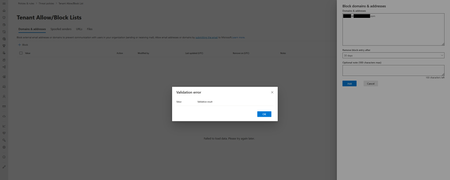
Hello community, I'm looking into an issue that has appeared using the new Unified RBAC permissions in Defender XDR portal. First of all, the user that is trying to perform the action is invited to a tenant as a guest user. The user is then assigned the Security Reader & Security Operator role. When accessing the Tenant Allow/Block List page in Defender XDR and trying to add a new entry, the user is met with the following error message: Unfortunately, the message is very generic. The new entry has been tested with both an email address, as well as a TLD. In both cases, the result was the same. The user has been assigned the following permissions, with Workloads enabled, on all Data Sources: While the Detection tuning (manage) permission, should be sufficient to complete this action, it appears that it's not. Should there be an additional permission assigned or would this indicate a different issue? Thank you for your time.