microsoft 365
88 Topics
Microsoft Entra and logging in
Hi there, I signed up for a free trial of M365 with my iCloud email. It showed me what my login would be, i.e. John@<companyname>.onmicrosoft.com I never received an email to my iCloud account with any type of confirmation that the trial was active or my login info. I did not screenshot the login as I thought I would get an email with it. How can I retrieve that information as I obviously cannot login with my iCloud account. Recently I have been getting emails like these to my iCloud. You have a new recommendation for Arlo inc Do not allow users to grant consent to unreliable applications See why this recommendation was generated for your tenant and how to remediate it in the https://entra.microsoft.com/#view/Microsoft_AAD_IAM/RecommendationDetails.ReactView/recommendationId/2bc392f3-b17c-44ce-bb25-b52a2b095d0b_integratedApps/source/email. https://go.microsoft.com/fwlink/?linkid=2260505. But again, I have no idea what my login is. Any help would be greatly appreciated. My trial has been active for a few days now and I am running out of tie with it. Sincerely, John30Views0likes1Comment
M365 Admin Center Global Administrator Lockout
Hello Microsoft Community, I am seeking urgent assistance and guidance regarding a critical Microsoft 365 tenant lockout that has been ongoing for several days without a resolution or proper communication from the support team. Our organization manages Microsoft 365 services for a business with more than 200 active users who depend on Microsoft 365 for their daily operations. Issue Description We have been locked out of our Microsoft 365 tenant's administrator account. This prevents us from properly managing our Microsoft 365 environment and restoring normal access to essential business services. Our business-critical data, including important documents and operational information, is stored in SharePoint. The inability to access and manage these services has significantly disrupted our business operations. Microsoft Support Ticket References We have raised multiple support tickets and followed up repeatedly, but the issue remains unresolved. Tracking ID: 2610050040001149 Tracking ID: 2610090010001066 Tracking ID: 2610050040001222 Despite these support cases and repeated follow-ups, we have not received a satisfactory resolution or a clear recovery timeline. Support Experience So Far Following a discussion with the support team, we were expecting a call to assist with unlocking the administrator account and providing a temporary password through the appropriate recovery process. However, we have not received the expected call or a meaningful update. Our main concerns are: Complete loss of access to the Microsoft 365 tenant administrator account. More than 200 users affected by the ongoing incident. Critical business data and documents stored in SharePoint. Multiple support tickets without a concrete resolution. Lack of clear communication regarding the root cause and recovery timeline. No clear escalation path or confirmation of the next recovery steps. Our Concerns We understand that technical issues can occur, but leaving a business-critical environment inaccessible for an extended period without meaningful updates is extremely concerning. We purchase Microsoft 365 licenses through a partner and expect appropriate technical support and escalation assistance when critical incidents occur. Our organization previously used Google Workspace and recommended migrating to Microsoft 365 because of its enterprise capabilities. This incident has seriously affected user confidence and business continuity. If access cannot be restored promptly, we may have to consider alternative email hosting arrangements to minimize further disruption. Request for Assistance I would appreciate guidance from Microsoft engineers, Microsoft 365 administrators, and community members who have experienced similar situations. What is the appropriate escalation process when all available tenant administrator accounts are inaccessible? How can we expedite tenant ownership verification and administrator account recovery? Is there a dedicated Microsoft team that handles critical tenant lockout incidents affecting business operations? What is the recommended recovery process when the administrator cannot access the Microsoft 365 Admin Center? How can we obtain urgent assistance when multiple support tickets and repeated follow-ups have not resulted in a clear resolution? Can the three referenced support tickets be escalated for urgent review by the appropriate Microsoft support team? We are not looking for workarounds that compromise tenant security. We need Microsoft's official recovery process to restore authorized administrative access safely. Microsoft Support Team: If any Microsoft support representatives are monitoring this community, we would appreciate your guidance on the appropriate escalation channel for this incident. We can provide additional information privately through the appropriate official channels. Thank you for your time and assistance. Any guidance that helps us restore our services and protect business continuity would be greatly appreciated. Best regards, Microsoft 365 Tenant Administrator57Views0likes0Comments
Changing Microsoft 365 billing frequency from monthly to yearly unexpectedly increased the price
Hello everyone, I would like to raise an issue with Microsoft 365 Business Standard that I find very difficult to understand and even harder to explain to my customer. I manage two Microsoft 365 Business Standard licenses for a customer. The pricing history was as follows: Until May 2026: €23.40/month total for 2 users From June 2026: €21.66/month total for 2 users This means the annual cost at the latest monthly rate was €259.92/year On September 28, 2026, I changed only the billing frequency from monthly to yearly. During this process, I was not shown any clear warning that the actual subscription price would increase. After the change, Microsoft created a new annual subscription with: €145.56 per user/year €291.12/year for 2 users So simply changing from monthly billing to yearly billing increased the annual subscription price from the equivalent of €259.92 to €291.12. This is particularly confusing because the Microsoft website normally presents annual billing as the cheaper option. I contacted Microsoft Support today. According to the support agent: this behavior is the same worldwide the billing change cannot be reverted the agent cannot revert it it cannot be escalated to a supervisor who could revert it there is apparently no email address or written complaint channel where I can formally dispute the change What concerns me most is not only the price increase itself, but the fact that I was apparently moved to a higher price simply by changing the billing frequency, without a clear indication during the process that the subscription price itself would change. I now also have to explain to my customer why their Microsoft 365 costs suddenly increased, even though no additional licenses or services were requested. From my perspective, changing how often a subscription is billed should not silently result in a different commercial price without a very clear confirmation beforehand. Has anyone else experienced this? I would especially like to know: Is this expected Microsoft behavior? Why does changing the billing frequency trigger a new, higher price? Is there any official escalation or written complaint process for Microsoft 365 billing issues? Is there really no way to revert such a billing-frequency change shortly after it was made? I would appreciate clarification from Microsoft, because at the moment this leaves both the reseller/admin and the customer in a very poor position. Regards127Views0likes0Comments
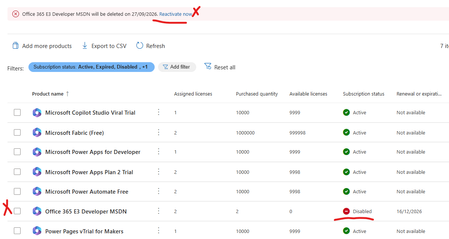
Error office 365 e3 developer license will be deleted on XXXXX. Currently disabled
My Office 365 E3 Developer has been marked for deletion and disabled today. No earlier comms from Micrsoft or any sort of messages.It just locked our my E3 Developer license has there a not supporting it any more. I wanted to try and backup/export my mail box and no luck - the option is greyed out. My SharePoint admin center has been blocked also can't backup any of my files. I'm just helpless.What a shame Microsoft What other plans can i move to and what should i do now since Teams and mail is not working. Can I at least get a a grace period. Any resources or advice would be appreciatedSolved1.3KViews1like17CommentsMicrosoft SSO SAML Assertion Claims
While getting the assertions back from SAML Assertion Claims, I have configured the user.country & assigned some value in the field. But while getting the claim we are reading the some different value like "IN" ? can I know does the user.country claim supports or not during the claim?398Views0likes4CommentsFile Sharing between licensed account holders
From a starting point of this year, we have been finding that any to most file shares that happened between licensed MS account users are being flagged and quarantined by the anti-malware policy. This should be, we are looking to resolve this issue. Has anyone else experienced this issue and what was your resolve. At the moment we have to monitor the quarantines and manually go in to release the share notifications.529Views0likes4Comments
Unable to access our Microsoft Entra admin center
We cannot create a support request from the admin center because we cannot sign in Dear Microsoft Support Team, We are unable to access our Microsoft Entra admin center because even our administrator account, email address removed for privacy reasons, is being prompted for MFA, and we do not currently have access to the Microsoft Authenticator method required to complete the sign-in. As a result, we cannot access Entra ID / Microsoft 365 admin settings to reset MFA methods, issue a Temporary Access Pass, or re-register authentication methods for the affected users. Tenant/domain: itieurope.com Affected admin account: email address removed for privacy reasons Issue: MFA is required to sign in, but the Authenticator method is unavailable Impact: We are locked out of the tenant administration portal and cannot manage users or authentication methods We request assistance with one of the following recovery actions: Reset MFA methods for the administrator account email address removed for privacy reasons; or Enable re-registration of MFA for this account; or Provide a Temporary Access Pass or another Microsoft-approved recovery method so that we can regain administrative access to the tenant. We had force majeure, the only authenticator was on the phone, which was destroyed due to an unforeseen situation. (crashed) We are ready to verify domain ownership, provide billing information, tenant details, proof of identity, or any other information required to confirm that we are the legitimate owners/administrators of this Microsoft 365 tenant. Please escalate this as an urgent tenant lockout / admin access recovery issue. Kind regards, itieurope.com email address removed for privacy reasons330Views0likes1CommentFraudThrottle Block SP/OD - 2+ Months Unresolved - Cases #2604230040009484, #2605260040000004
Summary: My organization's SharePoint and OneDrive access has been completely blocked for over 2 months due to a FraudThrottle flag. This is a production-blocking issue that standard SMB support has been unable to resolve despite two open support cases. Details: - SharePoint Online and OneDrive for Business are entirely inaccessible across the tenant - No downloads, uploads, or sync operations work - The block is caused by a FraudThrottle security flag triggered on our M365 E5 Developer trial subscription (purchased directly from Microsoft, not via CSP) - Support has confirmed the FraudThrottle block but has been unable to escalate or resolve it - The subscription status shows Active, but the FraudThrottle flag overrides access Cases: - Case #2604230040009484 (original) - Case #2605260040000004 (follow-up) What I Need: Escalation to the FraudThrottle/Identity protection engineering team to review and clear the false-positive block on our tenant. Standard support tiers have exhausted their ability to resolve this. Has anyone else experienced a similar FraudThrottle block on a dev/trial subscription? Any suggestions on how to expedite escalation to engineering? Thank you.Solved274Views0likes1Comment
Sole Admin Locked out of Microsoft tenant -- MFA Error 500121
Sole Admin Locked out of Microsoft 365 Tenant- MFA Error 500121 using OTPKEY Im the original administrator of a Microsoft 365 Business Basic tenant for the City of Briarcliff. Tenant: mailto:email address removed for privacy reasons Admin Account: mailto:admin@briarcliffar.onmicrosoft I can succesfully enter the correct password, nut MFA verification fails with error code 500121. I have original microsoft 365 setup email showing the admin account The microsoft purchase receipt and Order ID. Access to billing email account Control of the cityofbriarcliff.gov domain through Cloudflare. The tenant was never fully configured beyond the initial setup process. I was able to sign in originally and reached the Connect and Configure your domain page but did not complete deployment. I need assisstance with recovery of the sole administrator account and MFA reset for tenant. I can provide provide proof of purchase, original setup email, billing information, and proof of control of cityofbriarcliff.gov310Views1like1CommentMCA billing account stuck in "under review" status for 4+ days, no resolution
I'm the Global Admin for a Microsoft 365 tenant (domain: fortunamg.net) recently transitioned from a GoDaddy CSP reseller relationship to a direct Microsoft Customer Agreement (MCA) billing account. After setting up the MCA billing account and adding a payment method, I attempted to make an edit to my billing account address (updating to the new 9-digit zip code format). This triggered an "Account under review" status, which states the review usually takes up to 2 days. It has now been over 4 days with no update or email notification. This review is blocking me from purchasing a subscription, which I need to do to restore an active Microsoft 365 subscription on this tenant (currently showing as "Disabled" following the GoDaddy detach). Billing Account ID: 7793dd6e-68c9-5362-c5e2-3fe091b9854c Domain: fortunamg.net Could someone help check the status of this review or escalate to the appropriate team? Phone support has been unable to resolve this. Thank you.315Views0likes2Comments