microsoft 365
88 Topics
How to change user passwords in bulk - without force to change
Hello everyone, I'm in the process of updating the passwords for multiple users, and I'd like to set specific passwords of my choice. Additionally, I want to ensure that these accounts won't prompt users to change their passwords upon their first login. I'd greatly appreciate your assistance, as the scripts I previously used are no longer effective.Solved23KViews0likes3Comments
Hide Integrated Apps in Office 365 Portal / My Apps
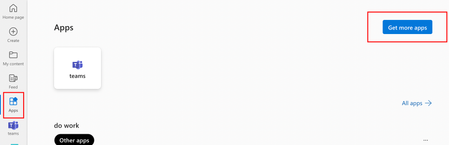
Hi, I've been trying to hide all integrated / available apps in the Office 365 portal for our users (https://www.microsoft365.com/m365apps/apps?auth=2) (Get more apps) I only found the option to require an admin to install those apps (so that users won't be able to use them if they are not assigned to them). (M365 Admin Center => Settings = Integrated Apps => Available Apps => Gearwheel Icon right => "Only Admins can install apps for users"). I've also disabled almost all apps (all third-party-apps, all user-created apps and almost all Microsoft apps) in the Teams Admin Center and disabled users from seeing those apps in teams (see https://www.loebmann.tech/disable-teams-app-user-requests/) However, the apps tile and the apps still show up in the Office 365 portal for all users. For most of the apps, when you click on them, it says that the app is not available. We still would like to hide those apps or the apps tile completely. Is there any way to hide those apps or even the Apps tile in the Office 365 portal? Best regards RobertSolved21KViews0likes4Comments
Alias from another domain with O365
Greetings, I will try to explain my question without any errors: The company that im working bought 2 O365 subscription ( we bought another company in the meantime). They used one O365 subscription for the main company and the other for the new company. This was the first mistake they made, since they could add the 2 domains under one tennant, if i´m not mistaken. Question1 We want that the users from the first company to have an alias from the second company. From what i have been digging, that isn´t possible, since these are two driferent tennants. The solutions i found imply create the domain from tennant b in the main tennant, so that the users can have that alias. This won´t work since the doamin is already in use in another O365.Am I wrong? Question 2: If i invite useres using the Microsoft Entra( Azure), they can acess all the apps? If i have a shared calendar in Tennnat A can the users i invited from tennant B work with it? I could do a migration, but i thnk i need to buy more licenses on tennant A to acomodate the users from Tennnat B ( and add the domain in tennant A) Once again I´m i Wrong?8.7KViews0likes9Comments
Restrict 365 to specific device or MAC address
Good afternoon We have different users in the field that need to access mailboxes and perhaps 365 apps, but they can't use MFA. We're looking into providing them with access to email (right now), but we'd like to limit it to a specific device or MAC address. Is this at all possible?6KViews0likes6CommentsUSB security key MFA prompt does not work on any app like Teams or Outlook, only via webbrowser
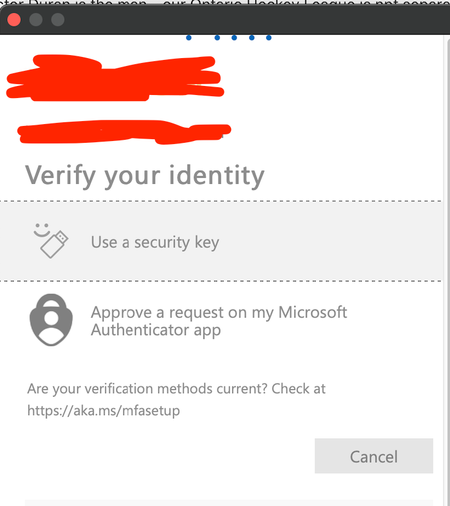
I have this issue on every computer or device I use. I use MFA and I'm a Global Admin. I ONLY have USB keys as my security method and have 3 added. If I'm using Chrome, Edge, any browser and get prompted for MFA, I simply insert the key, tap it, enter my pin, tap the key again and it works. However, for any desktop application, such as Teams, Outlook, etc, whenever it prompts me to log in, if I pick USB Security Key it just freezes and displays the loading progress bar at the top over and over. It does this on every computer I try, Mac, Windows, etc. The only option to ever authenticate is to go in, add the Microsoft Authenticator app as a MFA option, and then use that, then remove it as an option which is obviously not ideal. I have never been able to get USB security to work outside of a browser. If I access the same Teams, Outlook, etc from ANY web browser and get prompted, it works every single time. Please see screenshot above for what I'm referring to. The moment I click "Windows Hello or USB Security key" those blue dots just bounce across the top of the screen forever, it never proceeds past here. This is Teams when I'm trying to log in that's doing this. If I manually go to Teams on the web it will work fine. I can come back 4 hours from now and this screen will still be showing the same thing. As mentioned, ALL devices have this issue, it does not work on any computer, PC or Mac so it must be something with Microsoft 365. If it helps at all, I use Conditional Access and not security defaults.5.4KViews1like10CommentsUnable to access Office 365 admin account
Hi Team, I am the administrator of the domain of my organization xyz0.onmicrosoft.com. Unfortunately, I am currently unable to access it because I lost my phone, and I no longer have the Authenticator app. Additionally, I do not have a mobile number, or a recovery email associated with my account, making it challenging to regain access to my portal. On a positive note, I do have a personal account with the same email address, which I can access. I also remember the password for my business admin account. However, due to the loss of my mobile phone and the Authenticator app, I am unable to login as I don't have 2FA code. I urgently need your assistance because I need to migrate all my Rackspace emails to Microsoft. Please let me know what information or verification I require to confirm that I am the administrator of this account.. Thanks for your help.4.2KViews1like4CommentsAny Work arounds for not being able to share mailboxes across Multi-Tenant Organizations?
Hi, Multi-Tenant Organizations make a lot of things fairly seamless, but you can't have a shared mailbox that is shared to users in two tenants within the organization. Which is a bit of a problem because I have a situation where that would be the ideal solution. So does anybody have suggestions for the next best thing?3.1KViews0likes5CommentsWhere does Teams get its user list from? I can't make sense of which accounts I see vs which I can't
OK, so I have a currently rather unusual situation. I am looking at a 365 Tenant. A number of users have four accounts on the same tenant (let's not even get into why, cleaning things up is part of the reason I got called in). When you start typing their name into teams it comes up with three of them as a suggestion (I only want one) Account 1: has just been used for ActiveDirectory for permissions to the company's Distributed File System (stored in on on premises servers in various locations). This account has to the best of my knowledge never had a license or mailbox associated with it, and so has never been on the global address list, it's also never had the teams app enabled for it. I don't want this one to show, but it does Account 2: A now defunct account which used to have a Business Standard license assigned to it, but has now had the licensed removed. Before the license was removed this account was hidden from the GAL and its teams app disabled. I don't want this one to show, but it does Account 3: An now defunct account which still has a Business Standard license, but with Teams deselected in the Apps. I don't want this one to show... and it doesn't Account 4: An account shared via a multi tenant organization (the users in question have been migrated to a new tenant). So these are members (not guests) but external ones. I want this to show, and it does. Now, accounts 2 and 3 will be deleted soon, whether we can get rid of account 1 depends on whether the necessary access to the DFS can be done using account 4 (which I need to look into next). However for the time being they are all there so I was trying to hide accounts I don't want users trying to message on teams from teams, and I cannot make any sense of which I see which I don't. To sum up. Account that has never been on the Global Address List and never been activated for Teams - Shows Account that used to have a license and was on the GAL, and used in teams - Shows Account that still has a license, but has been removed from GAL and had teams app disabled - Doesn't show Account that has no license and is not on the GAL, but has teams on it's host tenant - Shows After a previous inquiry I set "Scope directory search using an Exchange address book policy" in the teams setup, but I have not set up any specific address book policy as yet. I have tried showing and hiding people from the global address list, and also the "ShowInAddressList" setting in Entra (which seems to only be available through graph?). Nothing seems to make a difference (it doesn't help that Teams takes forever to update its local cache for this stuff, so maybe a change DID make a difference at some point and I missed it). I cannot find any logic as to which of these accounts is showing in the auto suggests and which not, most notably that account 1 shows but account 3 doesn't. So, where is Teams getting its list of contacts from?3.1KViews0likes4CommentsMicrosoft Cloud Hits $111.6 Billion Annual Revenue
Microsoft’s FY23 Q4 results wrapped up another strong year for Microsoft Cloud revenues. The $111.6 billion (actual) and $121.2 billion (run rate) results continue a strong record of growth. In other numbers, Entra ID now supports over 610 million monthly active users and EMS has over 256 million. All in all, lots of use for the Microsoft Cloud. https://office365itpros.com/2023/07/27/microsoft-cloud-revenue-110b/3KViews0likes0CommentsI've set up a Multi Tenant Organization, but I'm not sure if the user contact information is correct
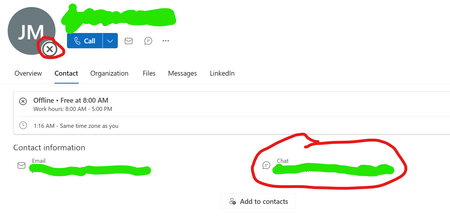
I have two 365 tenants (divisions of the same company) that want to be able to communicate as seamlessly as possible without merging the tenants. Now from what I could read and see on videos, a Multi Tenant Organization was the way to achieve this. I've found a number of YouTube videos explaining how to set one up (easy enough it seemed) but none that really showed the effects of this (I think they are pitched at people who probably have experience of B2B collaboration in 365) so I'm not sure exactly what I should expect. Anyway, I set up the MTO, shared a few users, and also found the "External Access With Trial Tenants" setting (one of the tenants is new, and so still in the trial period). I see the users show in the user lists, with the expected EXT address and a "No" for the "Guest" column, and they appear in each other's "Default Global Address List" in Outlook.. so far, so good I seem to be able to instigate chats within Teams, which is good. But if I look at their profiles in outlook or teams, then they always seem to show as offline unless I've got an active chat going on with one, and there is "chat" link for them. I don't know because so far I haven't found anything that shows, from the user perspective, the result of a correctly set up MTO. So should I expect the status of a synced user to show their actual connection status to their tenant"? So far they haven't unless I've instigated a chat, and in that case the recognition of the other party being connected only seem to go one way, so only one of the two parties in a cross tenant chat shows as connected in their respective tenants. And should there be a "Chat" link? (there isn't) Note: the above is the profile of a local user who was actually offline not one synchronized in from another tenant. I just used that as it could illustrate the two parts I have questions about.2.9KViews0likes3Comments