microsoft 365
46 Topics
Stuck in an authenticator loop
I have a 365 Business account. Haven't logged in for a while due to reasons, i was just starting up as a sole trader. Anyway decided now is the time to resurrect it and get up and running, except Authenticator doesn't work because I changed my phone, and my back up email is out of date, and no longer exists. I have tried the support web chat which wants to send a code to authenticator or my back up email. Just called the help line that referred me to the web chat which doesn't work, I couldn't get past the bot. So I am stuck. Any recovery options does not recognise my log in details, i think this is because its been a while since I logged in (I still pay but ....) but I can't resurrect it because I don't have a way of getting a code due to authenticator/back up email as cited above. I am really at a loss as to what to do. I don't want to abandon it and start again as there are documents in my one drive that I need. Can anyone help please. (I think all that needs to happen is an update to my back up email and then I can get going). I am the sole administrator on my business account.201Views1like3Comments
Can't Login to Authenticator App
I am unable to login to my Microsoft 365 Business account, because I'm unable to login to my Authenticator App. I am also the only administrator on my business account, so no one in my organization can help me. Microsoft online support and phone support just keep sending me in circles. The only way I see to create a support ticket is to login, but my issue is that I can't login. Help, please!243Views1like3CommentsOld Microsoft Office 2010 (Unknown version) license
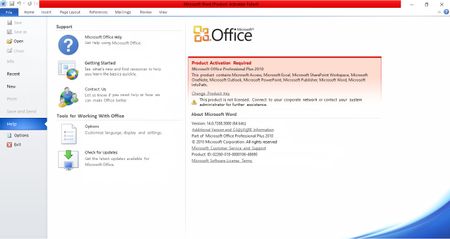
Hello everybody, I've been having an annoying activation problem with my old Microsoft Office 2010 license because of a number of reasons. In order to provide relevant details of my case, I've made a list of peculiar characteristics of this device and this Office 2010 license bought long ago and installed in a corporate CPU now under maintenance. Original Microsoft Office 2010 (Unknown version) license provided in a DVD case was bought in 2011 or 2012 for corporate purposes, purchase not performed by me. The software was originally installed in my corporate CPU, but the case with original intallation DVD was lost over the years after several administrative changes Serial product number was carefully kept by me in an anticipation of the possibility this DVD could be lost, which came true over the years. CPU is monitored in a corporate environment and has a specific Microsoft Windows 10 license unknown by me, which DOES NOT INCLUDE Microfost Office, though. This CPU is an Intel i3 with 16 Gb of RAM memory on a 64-based Windows 10 Home Single Language OS, version 22H2. Microsoft no longer provides support for Office versions older than 2013, therefore preventing me from finding a solution in Microsoft documentation and automated Microsoft Internet tutorials/assistants. I've risked downloading and installing a non-official Microsoft Office 2010 on this CPU from a third-party website with no relationship to Microsoft because of its absence from Microsoft official sources with good results. Activation fails continuously, though, even when I copy and paste the correct serial Microsoft Office 2010 serial number I have in my backups. I have a strong suspicion this has to do with the wrong software version (Home & Student X Pro), but I am not entirely sure of it. Product number error code is 0x8007232B My corporate environment does not provide Microsoft Office to all of its computers because of budgetary constraints and the availability of alternative freeware. Moreover, they are located in an institution completely separated from where I work, because the Windows 10 version I currently use is registered with the local regional Government under an institutional corporate e-mail completely apart from this centralized IT facility. This organization is called PRODESP (https://www.prodesp.sp.gov.br), which in turn is understaffed and deals with all kinds of issues, with a particular focus dedicated to financial issues, because of the countless employees the Government of Sao Paulo State (Brazil, South America) possesses accross the entire State. Recently I tried some alternative Office suites but neither option I tried had an advanced "Find and Replace" tool which only Microsoft Office has, which made me even more strongly attached to my user experience with Microsoft Office 2010 and this is why I would like to continue using it despite this license being now almost 15 years old, and its broad operational compatibility with the current Microsoft Office 365 version, particularly with regards to file formats, recorded MACROs and many other aspects not of interest and neither discussed here. An illustrative screenshot with my problem shown on it is provided below here too. Any help from whoever is able to help me solve this problem would be greatly appreciated, particularly if provided by a Microsoft representative. Thank you.553Views1like1Comment
Deactivating Option to change Profile Picture at myaccount.microsoft.com
As the title says. I would like to deactivate the option for users to change their profile picture at myaccount.microsoft.com. The profile picture at our company is synchronized to AD and via Entra Connect to Entra ID. Is there an option as an admin to deactivate that option without deactivating the entire portal? Kind Regards Christopher SiebertzSolved2.3KViews1like4CommentsHoldings and Subsidiaries - How to manage?
Hello and greetings from Portugal, I'm looking for some advice about how should I manage a client's request. They're changing they're structure in the following way. They're creating an holding and some subsidiaries. How should a manage this, in a way that, although they are different companies, they have a "top company" and they should be able to find themselves in Teams, for example. Thanks in advance! Best regards, Diogo Sousa1.3KViews1like5Comments
Inviting guest who already has a Microsoft account
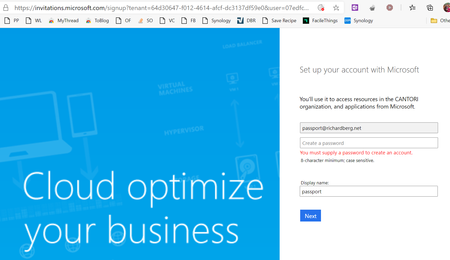
I am the global admin of an Office 365 domain for a small nonprofit. Of the people who need access to our Sharepoint and Teams channels, only a handful need a foo@mydomain.com identity; most will want "guest" access tied to their existing personal or work email instead. In cases where the guest email has no connection to Microsoft, this seems to work smoothly. However, when I try to add my personal MS Account as a guest, the invite link prompts me to create a new password. This seems wrong, as this email address has been an MS Account (formerly "https://en.wikipedia.org/wiki/Microsoft_account#History") since 1998, used daily for logging into my Windows 10 machines, licensing MS 365 Home, accessing OneDrive, etc. What am I missing? Many of my "guests" will have existing Microsoft accounts via their employer, their XBox, etc. I need to be certain we don't disrupt that access by creating duplicate accounts tied to the same email.11KViews1like4Comments