microsoft 365 admin center
1124 Topics
Add custom attributes to users (or devices) to map hardware peripherals
Hello everyone, I am seeking some help, guidance or suggestions with the following situation. We are looking for a solution that could map peripherals (such as monitors) to a user or a device. Once we have that info, we will utilize an additional tool to extend our visibility over the assets & assignments. I reviewed a few documentations and videos about potential solutions, and I just want to know if that's possible or I should not invest time on it any longer. The scope is the following: 1. We've collected information about connected monitors using Intune Script detection. That's perfect. It already maps devices with monitor's serial numbers and other details. 2. Export in CSV is fine (although, the data is not a 100% accurate, we have an internal data base that we can compare). 3. Now, how can we properly map that data to the cloud objects? What the best approach is? Logically, the monitors should be added to the devices, but Intune Custom Attributes are not easily populated/managed (?). On the other hand, Entra AD is capable of managing such expressions and overall has better capabilities (or am I wrong?) when it comes to operating with cloud objects. I am really looking for a human response; more of a knowledge share. I'd appreciate if someone shares their experience with similar scenarios. :) I apologise in advance if my question is not in the right section. Docs: https://learn.microsoft.com/en-us/graph/extensibility-overview?tabs=http https://www.reddit.com/r/AZURE/comments/1e5z3kv/add_customextension_attribute_in_entra_id/ https://www.reddit.com/r/AZURE/comments/1dz4cru/comment/lcdf2ev/?context=3&share_id=UqZR0m9s-9SWiHOiVwwAM&utm_content=1&utm_medium=ios_app&utm_name=ioscss&utm_source=share&utm_term=1 https://www.youtube.com/watch?v=kBm-fjqg0PU https://www.youtube.com/watch?v=LHXfFoygiOA Thanks :)
The support channels are failing miserably
I own a company and registered for a work account 2 years ago. We haven't purchased any Microsoft products yet, and I got logged out of authenticator. We're in a vicious cycle where logging in requires authenticator and authenticator requires authenticator. I called technical support Monday and was told to sign up for new account to log a ticket. Mid-way through the call the agent said his shift ended in 2 minutes and he would call me back Tuesday. He never called back. I followed up and waited on hold for the data and privacy department for 45 minutes 3 times, and each time the call dropped. I tried using the support agent and it won't help me, because it says I'm not the global admin on any of my accounts (this makes no sense). Are there any channels for escalating this? We would like to buy Microsoft 365 for our business, but now I am terrified of doing this, because it seems like there is no way to get technical support.7Views0likes0Comments
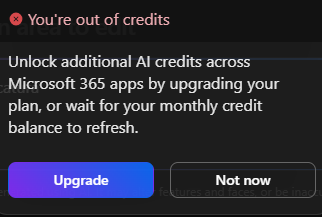
"Unlock additional AI credits across M365 apps by upgrading your plan..." It didn't happen
a { text-decoration: none; color: #464feb; } tr th, tr td { border: 1px solid #e6e6e6; } tr th { background-color: #f5f5f5; } I exhausted all my AI credits on Microsoft 365 Personal. I was then prompted to upgrade in order to get more AI credits. Based on that information, I upgraded to Microsoft 365 Family. However, after upgrading, I still have no AI credits available. 1. The prompt I received did not mention any specific plan needed to get more credits than I had. Simply stated that I needed to upgrade my account to get more credits (as shown here below). 2. I entered my Microsoft account and chose to upgrade. In any of the plans, the amount of AI credits included is shown. So I chose to upgrade to "365 family" 3. I did not get any credits for that as expected, and the prompt above kept showing the same. 4. The same day (Oct,10th) I contacted support to have this cleared out. They said it was a matter of account type migration for the upgrade to charge the AI credits, and I was told to wait for that to happen. If not, to come back for them to solve it. 5. I asked copilot about that, and I was told that "365 Personal" and "365 Family" have the same credits (????). So I did not get any additional credits unlocked for having done the upgrade as suggested by Microsoft. 6. Today I came back to support saying nothing happened, and I wanted to be compensated with the promised unlocked credits that I did not get, or to be refunded for the upgrade that did not produce the expected result. This might qualify the prompt as a misleading publicity teaser. 7. Support service unexpectedly told me they are not the ones to solve this complaint, and it was supposed to be solved by you here at the discussion forum. Which I found odd, but here I am asking you to solve my problem. Had I known that upgrading from Personal to Family would not provide additional AI credits I would not have upgraded. I believe the information presented to me was misleading, as I was not clearly informed that this specific upgrade would not serve the pourpose to unlock additional AI credits.74Views0likes1Comment
Microsoft Sign In Loop
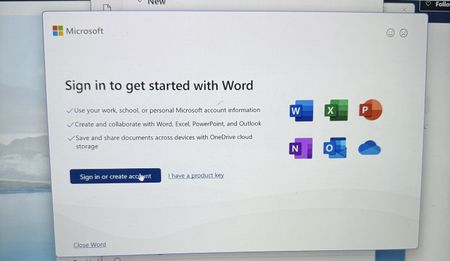
I am trying to sing into Microsoft 365, but every time I do, it takes me back to the login screen. I sing in with my outlook account, but I can't reach the applications. I can sign in on the browser, but not the applications on my computer. I have tried uninstalling and reinstalling M365, but the issue still persists238Views0likes1Comment
Changing Microsoft 365 billing frequency from monthly to yearly unexpectedly increased the price
Hello everyone, I would like to raise an issue with Microsoft 365 Business Standard that I find very difficult to understand and even harder to explain to my customer. I manage two Microsoft 365 Business Standard licenses for a customer. The pricing history was as follows: Until May 2026: €23.40/month total for 2 users From June 2026: €21.66/month total for 2 users This means the annual cost at the latest monthly rate was €259.92/year On September 28, 2026, I changed only the billing frequency from monthly to yearly. During this process, I was not shown any clear warning that the actual subscription price would increase. After the change, Microsoft created a new annual subscription with: €145.56 per user/year €291.12/year for 2 users So simply changing from monthly billing to yearly billing increased the annual subscription price from the equivalent of €259.92 to €291.12. This is particularly confusing because the Microsoft website normally presents annual billing as the cheaper option. I contacted Microsoft Support today. According to the support agent: this behavior is the same worldwide the billing change cannot be reverted the agent cannot revert it it cannot be escalated to a supervisor who could revert it there is apparently no email address or written complaint channel where I can formally dispute the change What concerns me most is not only the price increase itself, but the fact that I was apparently moved to a higher price simply by changing the billing frequency, without a clear indication during the process that the subscription price itself would change. I now also have to explain to my customer why their Microsoft 365 costs suddenly increased, even though no additional licenses or services were requested. From my perspective, changing how often a subscription is billed should not silently result in a different commercial price without a very clear confirmation beforehand. Has anyone else experienced this? I would especially like to know: Is this expected Microsoft behavior? Why does changing the billing frequency trigger a new, higher price? Is there any official escalation or written complaint process for Microsoft 365 billing issues? Is there really no way to revert such a billing-frequency change shortly after it was made? I would appreciate clarification from Microsoft, because at the moment this leaves both the reseller/admin and the customer in a very poor position. Regards154Views0likes0CommentsError office 365 e3 developer license will be deleted on XXXXX. Currently disabled
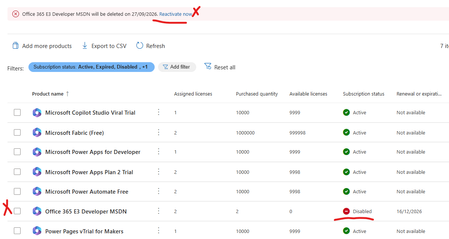
My Office 365 E3 Developer has been marked for deletion and disabled today. No earlier comms from Micrsoft or any sort of messages.It just locked our my E3 Developer license has there a not supporting it any more. I wanted to try and backup/export my mail box and no luck - the option is greyed out. My SharePoint admin center has been blocked also can't backup any of my files. I'm just helpless.What a shame Microsoft What other plans can i move to and what should i do now since Teams and mail is not working. Can I at least get a a grace period. Any resources or advice would be appreciatedSolved1.4KViews1like17Comments
DNS connections
In 2021, I bought a domain and connected it to a Microsoft 365 account at the time. Over the years, I did not renew the domain and the 365 membership. Luckily last month, the domain was still available so I bought it back. Now, I can’t connect it to my new 365 account because it is still connected with the old one. I don’t have the username so I’m stuck at the moment129Views0likes0CommentsM365 Business Standard renewal surprise: new subscription required!
Hi all, I wanted to share a recent experience in case it helps other Microsoft 365 admins. For many years, I have renewed several Microsoft 365 Business Standard subscriptions by purchasing annual product keys through the Microsoft eCompany Store and redeeming them in the Microsoft 365 Admin Center using the Extend end date workflow. This year, the renewal process suddenly stopped working. Symptoms When redeeming a newly purchased Microsoft 365 Business Standard key, the Admin Center displayed: "The product key you've entered can't be applied to this subscription. Instead, use this product key to add licenses to a new subscription." At first glance, this made no sense because: The existing subscription was Microsoft 365 Business Standard. The newly purchased product was also Microsoft 365 Business Standard. The purchase source was the same Microsoft eCompany Store that had been used previously. The renewal process had worked successfully for years. I initially suspected: Region mismatch Billing platform changes Subscription corruption Invalid product keys None of those turned out to be the cause. Investigation A few interesting findings: The subscription was still under MOSA (Microsoft Online Subscription Agreement). The keys were valid and recognized by Microsoft. The same behavior occurred with multiple Business Standard subscriptions. Redeeming from a US IP address vs. a non-US IP address made no difference. After multiple support escalations, Microsoft eventually confirmed that the behavior is by design. Root Cause (per Microsoft Support) Microsoft advised that although the product name is still Microsoft 365 Business Standard, the newly purchased keys belong to a different offer variant than the existing subscription. As a result: The keys are valid. The subscription is valid. However, the new keys cannot extend the existing subscription. The keys can only be used to create a new subscription. In other words, two products can both be called Microsoft 365 Business Standard while still being considered different offers internally. Workaround The Microsoft-recommended workaround was: Redeem the new product keys using Create Subscription. A new Microsoft 365 Business Standard subscription is created in the same tenant. Reassign users from the old subscription to the new one. Allow the old subscription to expire. The existing tenant, users, mailboxes, OneDrive, SharePoint, Teams, domains, etc. remain unchanged. Only the underlying subscription providing the licenses changes. Feedback The frustrating part was not the technical workaround. The issue was that there was no obvious indication prior to purchase that a Business Standard key purchased today would not be able to extend a Business Standard subscription that had historically been renewed using identical-looking keys from the same source. The eventual answer from Microsoft was reasonable, but it took over a week, multiple escalations, and considerable investigation to determine that the behavior was actually expected. Question for the community Has anyone else encountered this recently with: Microsoft 365 Business Standard eCompany Store purchases MOSA subscriptions Retail/prepaid product-key renewals I'm particularly interested in whether others have seen this offer-compatibility issue and whether future renewals of the newly created subscription behave normally. Thanks!411Views1like4Comments