mac client
16 Topics
OneDrive on MAC download all the one drive files
Hello everybody, I have some trouble with a MAC: I have two OneDrive acocunt on it, one is working perfectly but the second download in the local storage all the file existing on the OneDrive. - I've tried to stop syncing and relunch it - Log out and log in - re-install OneDrive and the account But nothing work, and it's litteraly fill up all the storage if anyone had the same problem please help me EDIT : I've tried to add the account on other computer and the problem is not present. I reset the one drive app by the script in the app package but now the two account have the same problem, i'm actually crying681Views0likes0Comments
Apple Silicon Rosetta 2 Performance issues
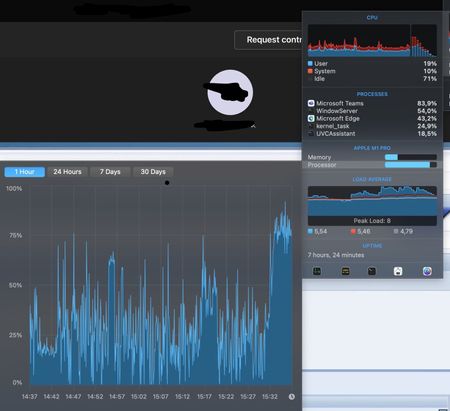
Dear Microsoft, Ever since the launch of the Apple Silicon machines, macOS users have been using the macOS native app of Teams via Rosetta 2. Due to that, the application is consuming a great amount of memory when compared to the Edge PWA of the Microsoft Teams web app. In my day-to-day I can notice that the Microsoft Teams app is in total consuming 2,10GB, however, if I hop into a call that number increases to 3,10GB.. If the video camera is turned on it goes beyond 3,30GB. Besides memory, there's also the battery life component where teams are my highest energy usage app on my Macbook Pro 14" with the M1 Pro chip. due to that my battery life only lasts up to 5-6 hours maximum. Additionally, I noticed during a video call my M1 Pro (GPU) is being used by around 80-90% when using the webcam. Logs below (inside a call and outside)4.6KViews0likes3Comments
Teams for Mac - Account selector to show more than two acccounts
A user i'm helping is employed by and needs to switch between 3 organizations in Microsoft Teams. She is using the Teams app for Mac. When signing out of Teams she can only pick between the first two accounts used. The third account (tenant) will not show up in the account selection list. You would expect to be able to manage this list, or that it would atleast show the most recently used accounts. As it is now she has to manually type in the third account email+password+MFA each time. Is there a way to reset this list or make it show more than 2 accounts?16KViews0likes2Comments
AUKEY-Webcam does not work in MS Teams on MacOS anymore
Hi all! Since today (without any changes to the system I know of) the webcam on my Mac does not work in Teams anymore. Teams can "see" the webcam (in settings -> devices) but it only shows a black screen in video calls. I use a M1 Mac Mini with the latest OS-softwareupdates. (checked today) I tried the following diagnostic steps: check if Teams is allowed to use the camera (in Systemsettings). It is. check with other devices and operating systems (Win10, Linux on my Laptop) if the webcam is broken. It works there flawlessly. uninstall and reinstall the Teams-App on the Mac. The problem persists. try out other apps on the Mac (Zoom, Facetime). The camera works there. try out the Teams Webclient in Safari. The camera works there. This leads me to the conclusion that the MS-Teams Mac-App somehow stopped liking my webcam over the weekend - and I don´t know how to fix it. Does anybody have a comparable problem or even a solution? Kind regards and thanks 🙂 HaukeSolved9.1KViews3likes12CommentsmacOS Remote Desktop client app - automatic logon (no credential prompt)
Sorry if this isn't a good place to post this question. But I'm trying to locate the right place for macOS RDClient feedback now that https://support.microsoft.com/en-us/topic/uservoice-pages-430e1a78-e016-472a-a10f-dc2a3df3450a. I am trying to automate the launch of RD Client without prompting for a credential. The macOS RD client (GUI) allows storing passwords securely in the macOS Keychain and will use them to automatically log on when double-clicked from the bookmarks. On Windows, I understand there is a way to use a little-known "password 51:b:<myEncryptedPassword>" attribute to pass an encrypted string as a password from the .RDP file. AFAICT there is no way to completely automate the RDP logon without password prompt on MacOS, for the following reasons: - No way to pass a password credential (encrypted or otherwise) via https://docs.microsoft.com/en-us/windows-server/remote/remote-desktop-services/clients/remote-desktop-uri - No way to control the RDClient app via AppleScript - Bookmarks within app support saving credentials in Keychain, but there's no way to initiate a connection to a 'bookmark' via the URL scheme (bookmarks are stored in a totally separate SQLite database, and password is not contained within) - https://github.com/PowerShell/PowerShell/pull/9199, so the hidden `password 51:b:myEncryptedPassword` attribute does not work. - No way to save an .RDP file or any shortcut/alias that includes the password (this would be bad for security even if it were possible!) Anyone got an ideas here?4.1KViews1like1Comment
Images used in Word template are not displayed in the email message (Mac OS, MS Word Mail Merge)
Hello, I'm struggling on this matter. Tried tons of things but nothing is helping to reveal the images within the email. Please find more details below. 1. First, I create the email message content (it consists of banner image + text) - please check attached screenshot I tried to insert image via Insert tab of Word, via dragging and putting it in the document, via copying and pasting and via all possible available options. 2. Set Mail merge settings (recipients, merge tags, etc.) 3. Send it as a HTML message. I receive the email properly. The only issue I have is that the inserted image is not being displayed. On outlook shows with a question mark and in Gmail it is not showing at all. It just shows as [cid:image001.png@01D7038D.E5D9B080] placeholder. The strange thing is that when sending this same template from Windows Word Mail Merge, it works perfectly, no issues with it. The issues start when I use Mac Word Mail Merge. Any ideas or help will be very very much appreciated. Many thanks2.9KViews0likes1CommentSkype for Business still in Location Services after uninstall
I had to use Skype for Business for a one-time conference call. After the call I uninstalled SfB application, but it still shows up in System Preferences --> Security & Privacy --> Privacy tab, the app still shows up in the Location Services section. How can I get that removed? I found the clean uninstall instructions at https://docs.microsoft.com/en-us/skypeforbusiness/troubleshoot/server-install-or-uninstall/clean-uninstallation, but that did not help. I have also rebooted several times and understand that having it unchecked should prevent any location activity, but it should not be there at all. Any idea how can I get SfB completely removed from my system preferences?741Views0likes0Comments
Mac screen recording problem: screen sharing not working while recording, works when not recording
EDIT: Might be powerpoint related issue and found a workaround! If I start the presentation before I share my screen, it works fine, but ifi I start screen sharing first and then start the presentation, it denies it. So basically, it's working, but in certain order. It's a bug. Everything is allowed in permissions and privacy, Hi, Using Teams Mac client and having odd issue. The screen sharing is enabled in privacy settings (also powerpoint etc.) and is working fine and sound BUT when the meeting is recorded, the screen sharing is denied due to security issues (gives out message indicating it's not safe). Mac book Air (Retina, 13-inch, 2019) MacOS Catalina ver. 10.15.6 Teams version: 1.3.00.18164. Updated 3.8.2020 Does this affect? https://support.apple.com/en-gb/HT2088628.8KViews0likes5Comments
Incoming video doesn't always show on Teams for Mac
I've got two mac users in my organization, my CEO, and myself (so i can support the CEO apparently), and occasionally we both have an issue where in a 1-1 video call, the incoming video doesn't always come up. This happens initiating or receiving a video call, but to my knowledge has not occurred for a 'scheduled meeting'. I have remoted into the other end and verified that their video is indeed turned on, and they can see themselves. i have heard reports that if the call goes on long enough, eventually the video will appear (haven't seen this one myself, only had reports from the CEO). I have had the far end disable video and reenable, i have tried disabling incoming video and reenabling on the near end but that hasn't brought video up. the only solution seems to be to hang up, and call again... then usually both sides can see eachother. The CEO has reported that other staff have had the issue on windows, but i have not heard from anyone else in the organization. There was one instance of a call between the CEO and I. She called me, could not see me, we hung up and i called her, i could not see her, hung up and she called again, then we could both see eachother. i've ruled out network, as it's happened both at home (on and off VPN), and in the office, and it happens with the CEO's personal mac as well as her work macbook. Anyone have any suggestions? I've got O365 support stumped6.7KViews0likes4Comments