licensing
393 Topics
Which license for private Windows 11 Pro VM running on KVM/QEMU on Homelab
Hello, I have a question about the license terms for Windows 11 Pro. I have an Ubuntu server at home that's always running. I’m setting up a Windows 11 Pro VM on it using KVM/QEMU to run Ableton Live. My laptop isn’t powerful enough for music production, so I’d like to use the server’s processing power and access the VM remotely from my own PC or laptop. Both devices already have a valid Windows 11 Pro license. The VM on the server would be an additional installation and would be used exclusively by me for personal purposes. My question is: Is an additional Windows 11 Pro retail license sufficient for this scenario, including use within the VM and remote access from my own devices? Or do I need a different license for this? I specifically want to clarify the licensing rights, not the technical activation process. I've already asked several Microsoft support bots about this, but haven't received a clear answer.18Views0likes0Comments
Windows 11 Enterprise Evaluation 26H2 — Is offline activation supported?
Hello, I'm seeking clarification from Microsoft regarding offline activation of Windows 11 Enterprise Evaluation 26H2. Environment: Windows 11 Enterprise Evaluation 26H2 Build: 26300.9457 Hyper-V virtual machine used for isolated software testing Licensing channel: Retail:TB:Eval Product: EnterpriseEval Current licensing status: Notification Notification reason: 0xC004F009 Grace period remaining: 0 The VM was installed offline and deliberately has no network adapters connected. An Installation ID is available through slmgr /dlv. No activation attempt, licence reset, rearm or product-key modification has been performed. My question: Microsoft documents an offline activation process using an Installation ID and Confirmation ID. Does this procedure support the specific Retail:TB:Eval licence used by Windows 11 Enterprise Evaluation 26H2? Can a Confirmation ID be obtained through Microsoft's Product Activation Portal using a separate Internet-connected device, allowing the VM to remain completely offline? If this evaluation edition does not support offline activation, is initial online activation mandatory? Is there official Microsoft documentation confirming the applicable activation requirements? I'm specifically asking about the 90-day Enterprise Evaluation, not a standard retail, volume or perpetual Windows licence. I'd appreciate confirmation from a Microsoft representative or a reference to authoritative evaluation-specific licensing documentation. Thank you.25Views0likes0Comments
Win11 Night light turns off automatically after waking from sleep
When the Night Light feature is enabled and the computer enters sleep mode, the Night Light feature will automatically turn off even after the system is woken up, although its scheduled tasks and manual on/off functions will remain enabled. The screen will revert to the default color temperature until the Night Light feature is turned off and then turned back on again.28Views0likes0Comments
Win 11 Pro - Unable to log in with MS 365 Business Basic account
Good day, I have a couple of new build Win11Pro 26H2 units that have been setup with a local admin account. When I go to SETTINGS, ACCOUNTS, OTHER USERS, ADD ACOUNT it comes up with a message stating "Looks like this isn't a Microsoft account." I know that this is a valid account as this is my MS365 Admin Center account. Is there something that I am missing on how to add an account? I had read that it had to be WinPro, so upgraded from Home to Pro. Thanks for any support that you can provide. Bill WilsonSolved100Views0likes2CommentsThe left-side taskbar in Windows 11 offers an excellent experience in a multi-monitor setup
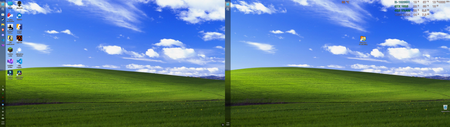
I’ve always been used to having the taskbar at the bottom, but recently I saw someone on Reddit using a left-side taskbar layout, so I gave it a try. It turned out to be surprisingly good on a dual-monitor setup—not only is it more efficient, but it also looks more balanced. Best of all, many apps look more natural with the taskbar on the left; for example, Discord’s left-side menu pairs very well with the taskbar. Configuration: Device: Dell G15 5510 laptop CPU: i5-10200H @ 2.4GHz GPU: GTX 1650 (laptop version) RAM: 16GB DDR4 Storage: 512GB NVMe SSD100Views0likes0CommentsThe installation of Windows 11 gets stuck and won't continue
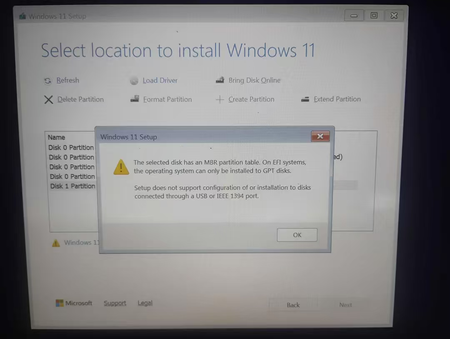
I've been trying to clean install Windows 11 on my Acer Aspire A515-43 (Ryzen 3 3200U, 4GB RAM, 119GB storage), but I always get stuck at the same screen and can't move forward. I'm using a 32GB SanDisk Ultra USB drive with only the Windows 11 installation media on it, and I have basically zero experience with this kind of thing. Is there a way to get past this screen? Do I need to convert the drive to GPT, and if so, how do I do that? Or is Windows 11 just not meant to run on this laptop? If anyone can explain it like I'm five, I'd really appreciate it.226Views0likes2Comments
Windows 11 won't activate following BIOS upgrade and reinstall (0xC004F213)
I upgraded my bios and did a full reinstall of Windows 11 on my PC. Everything went well, but I get the following error: 0xC004F213 When I follow the instruction to reactivate after a "hardware change", I just can't get my PC to be activated. In my Microsoft account, I do still see my PC which I can't activate anymore. Is there anything I could do to fix this or I need to call the Microsoft support directly?232Views0likes3CommentsWhy does the touch keyboard keep popping up on my non-touch laptop?
Why does the touch keyboard keep appearing at random times on my Windows 11 laptop, even though it doesn't have a touchscreen and I have no intention of using it? Why does it sometimes pop up when I click into a text field, and why does it refuse to stay closed even after I dismiss it? Could this be caused by a setting in the taskbar, a driver issue, or something in the accessibility options? And is there a way to disable it permanently without breaking other input features?75Views0likes0Comments
Windows 11 Activation after Drive changed
Hi all, I recently had a host of issues on my SSD and this lead to me having to install windows on a new SSD. I wasn't too worried since I had a digital license from when I upgraded to windows 11. After the setup though I am seeing that I am no longer activated. I have run the Troubleshooter (With the Hardware change option) and it just says: "We can’t find any devices linked to your Microsoft account that can be used to reactivate the device that you’re using at the moment. Make sure that you’re signed in with the same Microsoft account that you linked to the Windows 10 digital licence on this device, or try again later." I do see the new drive's PC name on the Microsoft Devices list I would prefer to contact someone at Microsoft who can look at my account directly but there is no way past the AI chatbots165Views0likes2Comments