ios
323 Topics
Natural Voices Not Available on Edge for iOS
I have noticed that when I use the Read Aloud feature, the Natural sounding voices are no longer available on iOS. I checked the MicrosoftEdge subreddit, and the recommended solution was to download an older version of Edge via Testflight to restore the natural voices. Is this an indication that Microsoft is no longer supporting these voice options on iOS? The other voices available sound very robotic so I hope that Microsoft has no plans to deprecate these voices. Thanks for your consideration.106Views0likes1CommentMicrosoft Intune and Apple OS 27: New settings, support, and platform changes
With Apple's release of OS 27, we’ve been working hard to ensure that Microsoft Intune provides support for Apple’s latest operating systems (OS) so that existing features work as expected, and adding support for new features that were introduced at WWDC. We’ll continue to upgrade our service and release new capabilities that integrate elements of the new OS versions. New DDM configurations and settings With continued investments in the Intune data-driven infrastructure that powers the settings catalog, we’re able to provide day zero support for new OS settings as they’re released by Apple. We’ve updated the settings catalog to support newly released iOS/iPadOS and macOS settings for both declarative device management (DDM) and mobile device management (MDM) to empower your IT teams to have devices ready for the latest OS release. Configurations that have been updated include: App settings (DDM) Control which apps can launch on supervised iPhone, iPad, Apple TV, and Apple Vision Pro devices and which binaries can run on supervised Macs using allow and deny rules. Define organization-suggested privacy permission defaults for apps - including camera, microphone, Bluetooth, location, local network, dictation, and accessibility - to present users with a single consolidated consent prompt. Intelligence settings (DDM) Control Apple Intelligence capabilities, including Visual Intelligence, Writing Tools, Genmoji, Image Playground, app-specific features in Mail, Notes, and Safari, and requirements for on-device dictation and translation. Accessibility settings (DDM) Configure organization-defined accessibility preferences - such as display, text, motion, audio, and interaction options - so supported settings can be applied consistently on managed devices. Safari settings (DDM) Manage Safari behavior and privacy, including cookies, fraud warnings, history clearing, JavaScript, pop-ups, private browsing, summaries, new-tab start pages, and website camera or microphone permission defaults. Siri settings (DDM) Control Siri availability and behavior, including Siri AI features, user-generated content, access while the device is locked, profanity filtering, and reduction of sensitive content. Content caching (DDM) Configure the macOS Content Caching service to store Apple-distributed software and iCloud content locally, define the clients and networks it serves, and optimize parent, peer, storage, and network behavior to reduce internet bandwidth use. DNS Proxy (DDM) Configure a DNS proxy network extension to handle device DNS traffic, including the provider app and its vendor-defined settings, so name-resolution requests can be routed through an organization-approved service. Web content filter (DDM) Configure a plug-in-based web content filter to inspect and control network traffic using an approved filtering app, with provider, authentication, and filtering settings appropriate to the organization. Login window (MDM) Customize the macOS login window and sign-in experience, including the information shown to users and the login options and controls available on managed Macs. Located under the Login Window category. More information on configuring these new settings using the settings catalog is available at create a policy using settings catalog in Microsoft Intune. New keys to skip Setup Assistant panes We recently added our new enrollment policies experience based on data-driven infrastructure that powers the settings catalog. This enables Intune to quickly and easily add new Skip Keys such as Liquid Glass and Accessibility Appearance. A list of Setup Assistant panes that can be managed is available in our Setup Assistant screen reference. Streamline AppleCare cases with enhanced logging support Microsoft Intune now supports Apple's Enhanced Logging device action on supported supervised devices running a compatible OS release. Administrators can start an AppleCare diagnostic-log collection session using an AppleCare-provided token and monitor device-reported status through DDM, reducing the need to coordinate manual log collection with the device user. More information is available in our device actions documentation for Enhanced logging. Support updates for legacy MDM workloads As more workloads are shifting to DDM, Apple is ending support for the following legacy MDM commands and payloads, which means they’ll no longer be updated or supported. You should instead manage these workloads using DDM through the settings catalog, which contains the latest settings. MDM payloads that are now deprecated with OS 27 include: Content caching service DNS settings DNS proxy Parental controls application restrictions Privacy preferences policy control Passcode Multiple settings have been deprecated in the MDM Restrictions payload, and we recommend using the equivalent DDM configuration to manage these features. The table below provides the new DDM location for these deprecated settings. DDM Configuration Deprecated MDM Settings App Settings Allow Listed App Bundle IDs Blocked App Bundle IDs External Intelligence Settings Allowed External Intelligence Workspace IDs Allow External Intelligence Integrations Allow External Intelligence Integrations Sign In Intelligence Settings Allow Apple Intelligence Report Allow Genmoji Allow Image Playground Allow Image Wand Allow Personalized Handwriting Results Allow Visual Intelligence Summary Allow Writing Tools Force On Device Only Dictation Force On Device Only Translation Allow Mail Smart Replies Allow Mail Summary Allow Notes Transcription Allow Notes Transcription Summary Allow Safari Summary Keyboard Settings Allow Auto Correction Allow Continuous Path Keyboard Allow Definition Lookup Allow Dictation Allow Keyboard Shortcuts Allow Predictive Keyboard Allow Spell Check Siri Settings Allow Assistant Allow Assistant User Generated Content Allow Assistant While Lock Force Assistant Profanity Filter Apple previously ended support for MDM device configuration templates, and software update commands and settings. These have been removed from OS 27, and you should use DDM for these instead. To align with this change, starting with the October (2610) release, Intune will remove the following legacy workloads from the Microsoft Intune admin center: iOS/iPadOS update policies macOS update policies macOS software updates report (per-device) iOS update installation failures macOS update installation failures More information on this change is available in the support tip: Move to declarative device management for Apple software updates. Support statement for “supported” versus “allowed” versions for user-less Apple devices As new operating system updates are released throughout the year by Apple, Intune plans to support critical functionality that comes with each new OS version. With the release of iOS/iPadOS and macOS 26, we’ll continue with our existing model for enrolling user-less devices for supported and allowed OS versions to keep enrolled devices secure and efficient. This includes devices enrolling without user affinity (user-less devices), such as shared iPads and devices enrolling through Automated Device Enrollment (ADE) without user affinity. We highly recommend updating your organization’s devices to the most recent Apple OS version publicly available to keep your devices secure and up to date. Supported OS versions means that user-less devices running the three most recent iOS/iPadOS versions are fully supported by Intune. Devices running iOS/iPadOS 26.x, 18.x, and 17.x can enroll and take advantage of all Intune MDM functionality that is applicable to user-less devices, and all new eligible features will work on these devices. Allowed OS versions let you enroll user-less devices running an unsupported iOS/iPadOS version within the three versions of the supported range. These devices can use eligible Intune features supported by the MDM protocol, but OS changes, bugs, or other issues might affect functionality. Devices enrolled with user affinity or apps that rely on user sign-in will continue to not be supported. User-less enrollment and feature support Capability Supported Allowed Applicable Versions Three most recent versions (N-2): iOS/iPadOS 18.x and later macOS 15.x and later Up to three versions below the supported version (N-5): iOS/iPadOS 16.x and later macOS 13.x and later Can Enroll Yes Yes User-less Eligible Intune MDM Features Yes Yes. May be impacted by breaking OS features, bugs, or issues. User Affinity Enrollment Yes No Apps That Require User Sign-In Yes No For more details, review our blog Support statement for supported versus allowed versions for user-less Apple devices to learn more. Intune MAM controls and updates As you plan for the new features and changes with the latest OS release, we wanted to highlight additions with the latest Intune App SDK. With Intune App SDK for iOS v21.8.0 or later, organizations can take advantage of the following Intune MAM updates. Apps must be integrated with SDK v21.8.0 or later to support the experiences described below. As always, we recommend keeping apps updated with the latest SDK. Refreshed app protection user experience We’ve modernized the Intune app protection experience on iOS to make policy interactions clearer and more intuitive. The refreshed experience includes updated prompts and full-screen messaging, clearer account context on conditional launch screens such as the MAM PIN screen, and a Remove Account option that lets users remove a blocked managed account and its organizational data from the app. This is a user experience update only, with no changes to app functionality or app protection policies. Control Siri onscreen awareness for organizational data The Screen capture app protection policy setting now controls whether Siri onscreen awareness can access work or school data. Set Screen capture to Block to prevent the Ask Siri option from appearing in the context menu for organizational data. If the setting remains Allow, which is the default value, users can share organizational data through Siri onscreen awareness. The updates require apps to use the Intune App SDK for iOS version 21.8.0 or later. Bookmark the Microsoft Intune Blog and follow us on LinkedIn or @MSIntune and @IntuneSuppTeam on X to continue the conversation. Stay tuned to What’s new in Intune for additional settings and capabilities that will soon be available.9.1KViews2likes3Comments
Debugging a .Net 11 Maui app for iPad
I am using Visual Studio 2026 to develop a .net 11 maui app for an iPad. The iPad is connected to my build map via USB. I understand debugging support on a physical device is not yet supported in .Net 11, but will be in the general release in Novenber. I've tried using the simulator on my windows machine but it is extreamly slow and freezes most of the time. How do I debug and continue development prior to the general release?267Views0likes1Comment
Problems identifying managed iOS devices when using APP
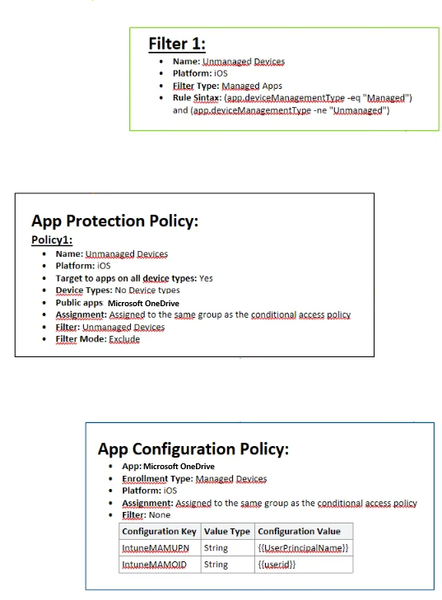
Hello, As the title says i am having a hard time getting this to work. We have been using APP for a long time, but it has not been necessary for us to have different policies for managed (we only use iOS) and unmanaged devices (all mobile device types). Now i want to remove APP from managed devices all together, and only enforce this on unmanaged devices (BYOD) Please see attached image of how it is configured today. I also have an CA policy which requires APP when using MS apps, where i have added and "Filter for devices" exclude with following syntax: device.enrollmentProfileName -contains "iOS standard profile" (which cover our enrollment profiles, both are fully managed) When enrolling a managed device, APP still is enforced. Does anyone have any tips? I wanted to try here before submitting a ticket to MS. As far as i have found out , the app.devicemanagmenttype is the only rule that can be used to filter managed devices when used with APP.653Views0likes1CommentWord for iPad cannot edit documents marked as “Recommended Reading” in Windows
I have a Word document created in Windows that was saved with the “Recommended Reading” option. When I open it in Word for iPad, the file is locked in reading mode and there is no option to switch to editing mode. Word Online can edit the document without any issues, so it seems that the limitation affects only the Word app for iPad. This appears to be a recent limitation, since the document could be edited without any issues a couple of months ago. Is this a known limitation in Word for iPad? Is there any way to remove this flag from the iPad or force editing mode without having to return to Windows? Thank you.248Views0likes4Commentsenrolling in Intune MacBook Pro with an M5 Pro
Hi everyone We have tested the Wi-Fi and ethernet profile without success with Apple businesses manager. The Wi-Fi and the ethernet connection itself works, but the enrollment process into Intune does not complete successfully. At this stage, we cannot sign in, and neither the Wi-Fi nor the Ethernet connection appears to be working. The device is a 14-inch MacBook Pro with an M5 Pro chip, running macOS 26.5.1 the device connects to the server, the settings begin to apply, but the process suddenly stops, and we are then unable to log in. These are steps followed : Synchronize the device from Apple Business Manager to Intune. Assign the enrollment profile to the device. Perform a device wipe/reset. Start Automated Device Enrollment (ADE). Complete the device setup and user sign-in. The device successfully enrolls into Intune. Intune begins deploying configuration profiles, compliance policies, security policies, and applications. During the policy application process, Wi-Fi connectivity stops responding. The device loses network connectivity and cannot continue synchronizing policies. We are unable to sign in because the enrolment process has not been finalized. As a result, we have to wipe the Mac and start the process again each time. We have disabled some policies, but we are still experiencing the same issue. Have anyone experienced any issues like that ? Regards,598Views1like3Comments