image
20 Topics
Foundry Agent deployed to Copilot/Teams Can't Display Images Generated via Code Interpreter
Hello everyone, I’ve been developing an agent in the new Microsoft Foundry and enabled the Code Interpreter tool for it. In Agent Playground, I can successfully start a new chat and have the agent generate a chart/image using Code Interpreter. This works as expected in both the old and new Foundry experiences. However, after publishing the agent to Copilot/Teams for my organization, the same prompt that works in Agent Playground does not function properly. The agent appears to execute the code, but the image is not accessible in Teams. When reviewing the agent traces (via the Traces tab in Foundry), I can see that the agent generates a link to the image in the Code Interpreter sandbox environment, for example: `[Download the bar chart](sandbox:/mnt/data/bar_chart.png)` This works correctly within Foundry, but the sandbox path is not accessible from Teams, so the link fails there. Is there an officially supported way to surface Code Interpreter–generated files/images when the agent is deployed to Copilot/Teams, or is the recommended approach perhaps to implement a custom tool that uploads generated files to an external storage location (e.g., SharePoint, Blob Storage, or another file hosting service) and returns a publicly accessible link instead? I've been having trouble finding anything about this online. Any guidance would be greatly appreciated. Thank you!
OneDrive Photos Restyle with AI-now rolling out on mobile and web
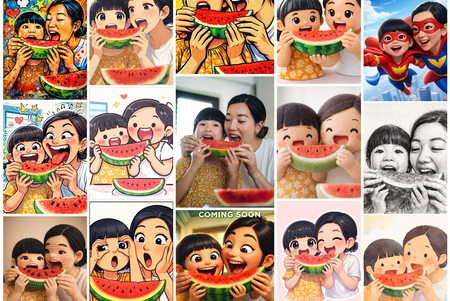
Photos capture real moments. With AI Restyle in OneDrive, you can reimagine them in fresh new styles-right where your photos already live. Meet AI Restyle Photos capture real moments. With AI Restyle in OneDrive, you can reimagine those moments in expressive new styles-right where your photos already live. With just a tap, transform everyday photos into cinematic posters, hand‑painted artwork, pencil sketches, anime‑inspired scenes, and more. Choose a style, watch a new version appear in seconds, and keep exploring until it feels just right. Through it all, the people, places, and memories you care about stay unmistakably yours-just seen in a fresh new light. Your photos stay private When you use AI Restyle in OneDrive, your photos remain under your control and are processed only to generate the style you choose. For more information on how AI Restyle works, its intended uses, and limitations, see Transparency note for AI Restyle in OneDrive - Microsoft Support. What you can do with AI Restyle Create something beautiful instantly. Choose from a rotating set of one‑tap styles designed to match the content of your photo-so it’s easy to get a great result right away. New styles are added regularly, giving you fresh ways to reimagine your photos. Add a personal touch when you want. Include an optional prompt to guide the look-no design skills required. Explore until it feels right. Try multiple restyles, undo or redo changes, and keep experimenting until you find the look you love. Share in just a few taps. Go from viewing to restyling to sharing with your favourite apps-without ever leaving OneDrive Photos. Availability AI Restyle is rolling out on OneDrive for iOS, Android, and web for customers with a Microsoft 365 Premium subscription. Availability may vary by region as rollout continues. What’s next We’re continuing to expand AI-powered photo experiences in OneDrive-bringing AI Restyle to additional platforms and investing in new editing capabilities that help you create with confidence while keeping your photos authentic. Try it today Open OneDrive on iOS, Android, or web, sign in with a Microsoft 365 Premium account, open a photo, and tap on ‘AI Restyle’ to start exploring new styles. Have fun creating something new today! Try it on the OneDrive mobile app. iOS: Download Microsoft OneDrive from the App Store Android: Download Microsoft OneDrive from Google Play We’d love your feedback-use 👍👎 to help us improve AI Restyle. #Microsoft #OneDrive #Photos #iOS #Android #Web #AI * This blog was updated on April 7, 2026 to inform how AI Restyle in OneDrive protects users’ privacy and ensures their photos remain secure and under their control.2.3KViews1like1Comment
Copilot Sign In On Edge Browser Not Working
The sign In button on the copilot toolbar on the edge browser does not work at all. I ask it to generate an image, or I try to upload multiple files, then it pops up the sign in, but clicking the sign in doesn't work. I've tried Microsoft support and they tried some things, but they ended up referring me to here.256Views0likes1Comment
Image Webpart that is not clickable. How to remove link?
Hello, I’d like to thank you in advanced for your assistance. I’d think something so basic would be easy to figure out, but I’ve been breaking my head with this all week and I’m now at a dead end. I have a normal page in a communication site and I would like to add an image without a link and which is not clickable. Just an image to be displayed. I’m currently using the image we parts but although I do not add a link, the user can still click on it, and the image enlarges. How do I disable this, Thank you so much, I really appreciate it.20KViews5likes15CommentsCannot group image and caption together
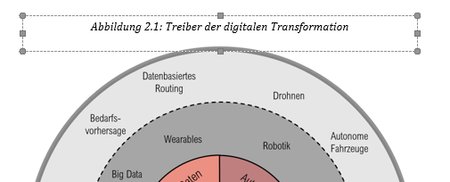
Hello, I am writing my masters thesis and experience the following issue: I have several images in my document (all with text wrapping, NOT in line) and want to add numbered captions for my automatically generated table of figures. The problem is, when right-clicking on an image and selecting "add caption", the text box of the caption is not groupable with the image. The text box has a different kind of border than one would expect, see image: For reference, I tried to recreate the issue in a new document, and there the caption has a "normal", groupable textbox, see: Does any one of you have an idea how to move forward and fix this issue? The upper version of the caption box isnt groupable and moveable, so it is very hard to work with and it messes up the document at serveral points. Thanks a lot and have a great day! Tobi18KViews2likes12Comments
Where are the Microsoft To Do theme backgrounds stored?
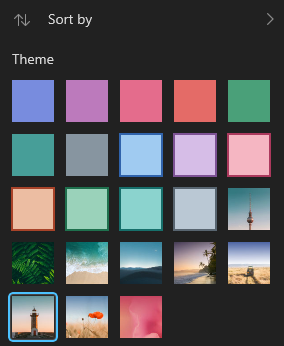
I was wondering where these backgrounds are stored, since a few of them are quite pretty and wanted to use them as my desktop wallpaper too. I was not able to stumble onto them through reverse image searches, thus I was wondering if anyone could help me out. See below for reference:Solved4.6KViews1like2Comments
Microsoft Teams Chat Pasted Screenshot Image Disappears
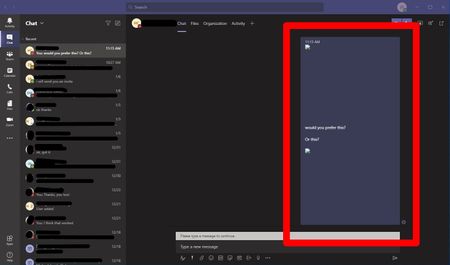
When pasting a copied screen shot from the Snipping Tool into the chat, sometimes my images appear like this (See below image). It will show the preview for a split second in the chat window and then turn to this thumbnail... Once you click on the small image icon the image shows full-size but the thumbnail preview in the chat is not visible. This only happens every so often and can be fixed sometimes by restarting Teams to get the preview to show in the chat window. Is there anything I can do to fix this besides restarting? Does the person on the receiving end see it correctly or with the small image icon? Not sure what the fix here could be or if I'm doing something wrong. Not a huge issue but frustrating nonetheless.29KViews0likes5CommentsMicrosoft Edge has got a new feature to magnify images on the web
This feature allows you to right-click on any image on the web and select an option to magnify it. The image will be opened in full size and its Alt text will be displayed under it. I personally like this feature because before this i would right-click on the image and open it in a new tab. To try out this new feature simply head to this release page in my GitHub repository, install Edge Canary channel and then follow the instructions in there: https://github.com/HotCakeX/MSEdgeFeatures/releases/tag/120.0.2198.0 Video demo: https://youtu.be/N3L6QwdIaPM3.2KViews1like2Comments