highlighted content
25 Topics
Shared channel site using Managed Properties
Does anyone know if I can use Managed Properties in a document library that is on a Shared Channel Site in Teams? My admin wants to change one of my communication sites to a Shared channel site but I am using the documents in the library in a number of Highlighted content webparts using managed properties and I am not sure they will work if they are moved. Has anyone done this?99Views1like0CommentsHighlighted Content: "Show title and commands" Toggle Switch Not Working
Hi, I've been building my second SharePoint, and have run into what I can only assume is a bug. I have liked using "Highlighted Content" as a way to limit the number of documents to 1, and switching off "Show title and commands" so it shows the user only the document they need, and doesn't allow them to explore all the other documents uploaded on the site, by clicking "See all". As mentioned I have already built a site before and so have never ran into this problem until now, as it historically has always worked, but the toggle switch to turn on or off "Show title and commands" is not working at all. In my case, I cannot switch it off, which of course is a bug of some kind, and is happening for members of my team too. So I know it's a bug for more than one admin using the site, I have tested this issue on another page, and another site entirely to which it failed to work. I also used another web part "News" to see whether it would present the same issue, as it also includes this toggle switch, which it didn't and the switch worked. Which means it could just be this web part. I really don't think there's answer for this, and this is more of a report the bug kind of deal, but any comments of support are welcome! Thanks for reading. ItsSamuelSolved1.6KViews1like6Comments
Highlighted Content with New Stream - Displaying Thumbnails
Hello Community! I am looking to create a video archive that is using the new 365 Stream experience. It was https://learn.microsoft.com/en-us/stream/streamnew/portals-guide-training-site#videos-grouped-by-categories to use the Highlighted Content web part to display the videos. But, I am struggling to get the thumbnails to properly display. I have https://support.microsoft.com/en-us/office/include-a-custom-thumbnail-for-your-video-or-audio-file-with-stream-on-sharepoint-b24f6c73-6496-44d4-bb31-bc0be3e61425 in the new Stream using the Video Settings but it does not reflect that in the Highlighted Content web part when I am in the Filmstrip, Grid or Compact views (which all display thumbnails). But, it works in the Carousel view - so I know that the thumbnail was properly added. What am I missing? I want the SharePoint site to look professional as they browse through multiple videos but I can't seem to get the thumbnails to display properly.895Views0likes0Comments
How to sort Highlighted Content by Date Created
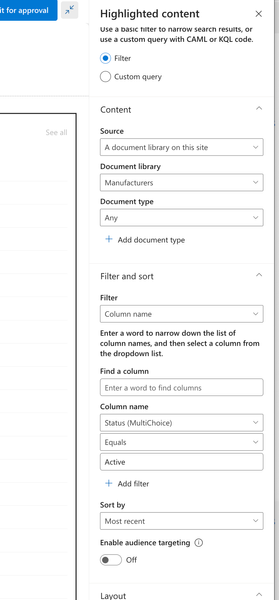
I'm using Highlighted Content to provide a list of documents in a directory using Filter to show items that have Active in the Status column. This way, regardless of the number of nested folders an item may be in, anything with Active in Status will appear in this Highlighted Content web part (a VERY useful feature!!). Currently, it's sorted by Most Recent but I want to sort by Date Created. As we acquire new documents, they should appear at the top of the list (provided Active is set in Status). The issue with sorting by Most Recent is that this is putting the most recent MODIFIED documents at the top of Highlighted Content. Is there a way to build a Custom Query to sort by Date Created?Solved8.2KViews0likes5Comments
Managed properties missing from web part "Highlighted Content"
I am trying to use the Highlighted Content web part to show a list of pages in the Page Library, filtered on a site column I created. But there is no option to select "Managed property" in the filter drop-down. Page property is there, but it only shows the Title property. Is this a bug or a feature?745Views0likes0CommentsCan you change Document thumbnails?
I have a library of PDF's that I want to display via Highlighted content Web part on Sharepoint Online. However the preview of the documents are just not the look and feel I am wanting in the webpart. Is there any way to change the thumbnails to actual images and not document preview thumbnails??6.6KViews0likes2CommentsHow to get the thumbnail in the highlighted content web part refreshed
Hi. Does anyone know how to get the thumbnails in the modern highlighted content web part refreshed after having updated the thumbnail for site pages? It seems to stick with the thumbnail that was grabbed at the creation of the individual pages (even if it is the standard thumbnail for no selected header). Is the only way to have all site pages re-created and add the images at creation? Thanks, Magnus1.6KViews1like1CommentContent Query functionality on modern SPO site
Hi all. I am wondering if there is a way to replicate the site selection functionality of the old Content Query web part, with the Highlighted content web part or something similar. With the old CQ part you could select the site you want to pull from and then filter from there. With Highlighted Content it doesn't give you the option to select another site to pull from, it's only within the current site. Is there anyway to pull in content from another site - and then filter it like you would with Highlighted Content? Thanks all. dB.1.5KViews0likes3Comments
Highlighted content web part item limit issue
Hi, I've come across an issue using the highlighted content web part. We currently have a single landing site for our customers with all the general standard links and images, we also have a single highlighted content web part to display the customer specific site. The idea being that they can only see their site on the carousel due to permissions and none of the other sites in the highlighted content webpart. This appears to be working as expected, however the issue that I've run into now is that once we exceed 17 selected sites I'm receiving "There are too many sites selected or too many filters added. Select fewer sites or remove some filters to continue." I thought the item limit for highlighted content was 200? Am I incorrect in thinking this? Does anyone know a workaround to list more selected sites in the carousel or an alternative way of display the link to a page dependent on group permissions? Any help would be greatly appreciated. Cheers, Lee2.7KViews0likes3CommentsPDF problem: highlight, bookmark, and read text
I had been using Edge Browser as my default PDF viewer for the past 3 years. After installing the new version of edge, I've got disappointed by it lacks many pdf features such as: Auto highlight option and color when blocking the text/phrases on pdf Ability to navigate through the bookmark And the ability to read pdf text using audio. The reason why I used Edge because it has higher stability than most of the other pdf readers. It scrolls smoothly and much simpler than most of the browsers. Now I'm using Foxit Reader which has a lot better features but lacks stability when scrolling through pages. I hope those missing features are coming to Edge as soon as possible because I'm tired of searching and using another pdf reader. Help me, developers, you're my only hope 😭7.2KViews4likes3Comments