hardware
12 Topics
0.011W Power Floor on i7-1255U: A Step Toward Microsoft’s Sustainability Vision
It is inspiring to see Microsoft leading the tech industry toward a greener future. Initiatives such as the Carbon Negative 2030 goal and the Energy Saver features in Windows 11 are important steps in environmental stewardship. These efforts show that software and hardware can work in harmony to preserve our planet. As a researcher, I have spent 18 months exploring how to further support this vision by identifying the absolute efficiency “floors” of the Intel Core i7-1255U (Alder Lake). My study focuses on a configuration that enhances Microsoft’s energy-saving protocols to achieve maximum hardware longevity. Key Technical Findings (18-Month Case Study): Dynamic Power Floors: Through precise optimization, I observed CPU power draw dropping to a floor of 0.011W at 1.8MHz during deep idle/sleep states, with the GPU reaching a 0W floor. Efficiency in Motion: During active productivity tasks, the system can reach 0.4W – 0.5W at a voltage range of 0.6V – 0.8V, demonstrating impressive scaling flexibility. Thermal Performance: The system consistently operates between 25°C – 35°C. In cooler ambient environments (15°C – 25°C), hardware can maintain 16°C – 20°C, virtually eliminating thermal stress. Battery Endurance: Using a standard 3-cell battery with 5% wear (originally marketed for 6 hours), these optimizations enabled up to 10 hours of continuous video playback. Uncompromised Stability: Over 18 months of daily usage, the system has encountered zero Blue Screen of Death (BSOD) events. This confirms that pushing efficiency boundaries can be done while maintaining the rock-solid reliability expected of the Windows platform. This study is a tribute to the versatility of Windows 11 and the engineering behind modern silicon. By maximizing the life of the devices we already own, we contribute directly to reducing global e-waste. Detailed technical logs (HWiNFO) and configuration data are available for verification here: 👉 [[Intel 12th] 0.011W Package Power Floor via Custom Optimization | Microsoft Community Hub] I look forward to discussing these efficiency milestones with the community and Microsoft engineers.202Views0likes0Comments
Problems Registering for the Hardware Program
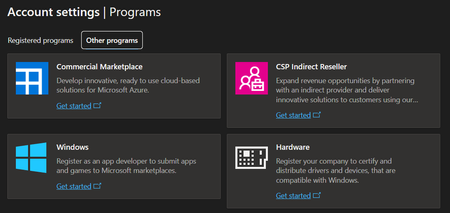
I recently (a couple weeks ago) created a Microsoft Partner Center account and that account was quickly verified. I now need to register for the Hardware program so that we can sign and release drivers for our hardware. If I try to register for the Hardware Program by clicking on "Get Started" on the hardware option in the "Programs" section of the Partner Center dashboard (shown below), I get an error saying that my account is not a Microsoft Account. Not only is my account a Microsoft Account, it is the primary account associated with our Partner Center and a Global Admin for our Entra ID Tenant. I have re-tried this many times over the past 2 weeks including trying in multiple different browsers, clearing cookies, trying in a Private window, and even on a different computer that I had never previously signed in on. I get the same error every time. I tried opening a support case but it was almost immediately closed saying that my problem had been solved. It had not been solved. I have also seen suggestions to register for the program using this link: https://partner.microsoft.com/en-us/dashboard/Registration/Tenant/Hardware?step=GetStarted?step=GetStarted# If I try that, I get a completely different error. In that case, it tells me that my organization already has an account and to contact my administrator. I am the administrator. It is possible that we have an account as I registered for something similar a couple years ago. But, if so, I cannot find any way or place to log into it. Finally, I have seen comments somewhere that the Hardware Dev. Center may be down and that is why this is failing? But, I can't find any verification of that from Microsoft. At this point, this issue is completely preventing us from signing and releasing new or updated drivers for our hardware which is preventing us from making product improvements or releasing new products. Can anyone help? Thanks!
Microsoft Audio Dock Mute Button Functionality in New Teams
Greetings, When I attempt to use the hardware mute button on the Microsoft audio dock in the new Teams client, only occasionally will it actually mute the Teams call. A more complete description of the issue may be found here: https://answers.microsoft.com/en-us/msteams/forum/all/microsoft-audio-dock-mute-button-does-not-always/36738417-165f-4557-8545-7108e9c234e5 I believe this issue is specific to the "New" version of Microsoft Teams; the hardware mute button works fine when used with Zoom, for instance. Any insight would be appreciated! Thank you808Views1like2Comments
HP ProLiant DL120 Gen9 - installation Windows Server 2022
Hello everyone! Im sure the answer is yes, but I want to be safe about the answer. We have a HP ProLiant DL120 Gen9 with a Intel Xeon CPU E5-2620 v4 and 32GB RAM. I'm 99,9% sure that I can install there without problems and use Windows Server 2022. I can't think of anything why server 2022 should not run on this machine, but as I said, I want to be 100% sure. Now - Can I install and use without doubts? 😄 Thank you for answers! Kind regards, Goodfred30KViews0likes6CommentsAccessing AVD Pools via Thin Client / Thin OS Options
Looking for some recommendations on hardware / Thin Client running a Thin OS to be used to access Azure Virtual Desktop Virtual Machine Pools from classrooms with multiple monitors I've looked at Chromebooks, but being a laptop design, wouldnt be the best fit to have to mount under desks and run wires to monitors / keyboard / etc. I also saw ChromeBoxes, but havent actually used / worked with one. Also looked at and have experience with Intel NUCs running Stratodesk Thin OS. Looking for any other recommendations... Appreciate any assistance.2.5KViews0likes1Comment
Where is a PNG file first created and how fast?
Dear all I want to find out, how fast my system is creating a PNG file. 1. In what part of the hardware, is the iDAT chunk first created, CPU, memory? 2. In what part of the hardware, is the WHOLE PNG file first created, CPU, memory? I have conducted a test, screenshot: https://imgbb.com/547f4XT At which of the points 1-8 on the screenshots is: 3. The iDAT chunk first created? 4. the WHOLE PNG file first created? Thank you for replying Best regards964Views0likes0CommentsSuggestion for MS Teams compatible hardware
Hey guys, I want to use a hardware with MS Teams and Camera but also the hardware for normal phone calls. Is there something which can both, and is user-friendly- I looked here: https://products.office.com/en-us/microsoft-teams/across-devices/devices but have no idea which could fit. Yeallink CP960 could be nice, which Camera (maybe with a NUC between). But would it work? and do i need MS Teams console? Best and cheers.3.4KViews0likes5Comments