getting started
375 TopicsHow to Use Microsoft 365 Copilot Cowork to Clean Up Your Inbox
If your inbox feels like a never-ending to-do list, you’re not alone. Between work updates, meeting invitations, newsletters, internal conversations, customer emails, and those messages that somehow require a five-paragraph reply, keeping your inbox organized can quickly become a full-time job. Link to the post12Views0likes0CommentsHow to Fix Copilot With Multiple Microsoft 365 Accounts
Using Microsoft 365 with more than one account can be incredibly convenient. Maybe you have a work account and a personal Microsoft account. Or perhaps you manage Microsoft 365 for multiple organizations and regularly switch between different tenants. link to the post142Views1like4CommentsHow to Fix Copilot When It Gives a Blank Screen
You open Copilot expecting a quick answer, but instead, you get a blank screen. No response, no error message, and sometimes not even a loading indicator. It can be frustrating, especially when you need Copilot for work, research, writing, coding, or simply getting something done faster. Link to the post33Views0likes0CommentsHow to Fix Copilot With Multiple Microsoft 365 Accounts
Microsoft Copilot can be a huge time-saver in Outlook. It can help summarize emails, find information, organize your inbox, draft replies, and make it easier to stay on top of a busy workday. So when Copilot is not working in Outlook, it can be surprisingly frustrating. link to the post19Views0likes0CommentsCopilot Chat vsus. Microsoft 365 Copilot What's the difference?
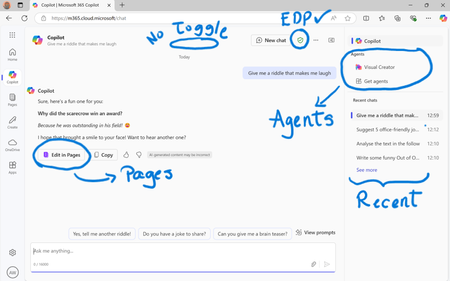
While their names sound similar at first glance - Microsoft 365 Copilot and Microsoft 365 Copilot Chat - they differ in several aspects. And more importantly, one can't be without another. What is Microsoft 365 Copilot Chat? First since first. Microsoft 365 Copilot Chat is also called Copilot Chat. Copilot Chat generates answers based on web content, while Microsoft 365 Copilot is also grounded on users' data, like emails, meetings, files, and more. Since January 15, Microsoft 365 Copilot Chat is available for everyone. Everyone in organizations. Also customers with a Microsoft 365 Business Basic subscriptions can enjoy using Copilot Chat securily. The screenshot below shows how Copilot Chat looks like and highlights its main capabilities. Note that EDP - Enterprise Data Protection is available. What is Microsoft 365 Copilot? Microsoft 365 Copilot is an add-on available for specific Microsoft 365 Subscriptions: Microsoft 365 E3, E5, A3, A5, and Business Standard & Premium. It includes Copilot Chat in addition to other Copilot features: Microsoft 365 Copilot also includes a chat grounded on users' meetings, emails, chats, and documents. It integrates into Microsoft 365 apps, like Outlook, Teams, Word, Excel, and more. It brings the capability to create agents and additional Copilot management features such as SharePoint Advanced Management and Copilot Dashboard. The screenshot below shows how the Copilot chat experience for those users who got the Microsoft 365 Copilot license. Note that EDP - Enterprise Data Protection is available here too. Copilot Chat can be pinned in MS Teams and MS Outlook as App. How can I access Microsoft 365 Copilot Chat? Copilot Chat is nowadays accessible via m365copilot.com using your Entra account. In contrast to Microsoft 365 Copilot licensed users, Microsoft 365 Copilot Chat users cannot see, by default, Copilot Chat pinned on the Microsoft 365 homepage. Microsoft 365 Copilot Administrators will have to pin the chat in the admin center so it is easy for Copilot Chat users to access it. What's the difference? There are some aspects, such as licensing requirements, subscription fees, data sources, or access to organization content, that determine the differences between Copilot Chat and Microsoft 365 Copilot. I have listed it in the screenshot below. 👇 Image showing a 3-column table: Aspect, Microsoft 365 Copilot Chat, and Microsoft 365 Copilot.Solved56KViews39likes44CommentsHow to Check if Your Microsoft 365 Copilot License Is Active
Microsoft 365 Copilot can be a powerful addition to your everyday workflow. It can help draft documents, summarize information, analyze content, create ideas, and make it easier to work across Microsoft 365 applications. But before you can use all the features available to you, there is one important thing to confirm: is your Microsoft 365 Copilot license actually active and assigned to your account?link to the post119Views0likes0CommentsWhat Do You Use Copilot Cowork For? Practical Ways to Get More Done
Artificial intelligence is quickly becoming part of everyday work. What once felt like futuristic technology is now helping people write emails, organize information, summarize content, brainstorm ideas, and complete tasks faster. One of the questions many professionals and teams are now asking is: What do you use Copilot Cowork for? Link to the post113Views0likes0Comments
I designed an OS-tan mascot for Microsoft PC Manager! (PC Manager-tan)
Hello! I’m a huge fan of Windows 11 and a daily user of Microsoft PC Manager. Since the app is so incredibly light and useful, I thought it would be fun to give it a face. So, I designed an "OS-tan" style mascot character for it: "PC Manager-tan"! I wanted to share my concept art and ideas with the community. Here are some of her design details: [Design Inspiration & Colors]--------------------------------------------------------------------------------------------------------------- Signature Colors: The green and blue color scheme is heavily inspired by the official Microsoft PC Manager logo. Hair Details: She has a blue 'ahoge' (cowlick) and a blue heart hairpin to represent the distinct dots in the app's logo. Outfit: A Full-Body Style energetic cleaning assistant wearing a cozy cable-knit sweater, a green plaid skirt, and round glasses. Slogan: "We'll clean up your PC for you" [Her Equipment & Skills]-------------------------------------------------------------------------------------------------------------------- Digital Broom (Boost): Her main tool. With one click, she aggressively sweeps away unnecessary RAM usage and temporary files. Sandbox Claw Glove (Security): A mechanical claw she uses to safely catch malware and inspect system health. AI Utility Bag: A handy bag filled with all the convenient AI tools she needs to assist the user. I had a lot of fun making this, and I hope you guys like her! What do you think? It would be amazing if the MS dev team actually saw this! 😂21Views0likes0Comments
Combining Project, Image, and Notebook Features for a Unified Experience
I'm currently using two different Copilot app experiences to manage my work, projects, and notebooks and each one excels in different areas while missing key capabilities found in the other. One app provides a much richer project management environment, with Tasks, true project folders, plugin connections, and the ability to embed instructions. The other offers a stronger, more fluid notebook experience, but lacks the depth and structure that the project-focused app provides. Switching back and forth between these environments creates friction, especially when I want my projects and notebooks to live together in one unified workspace. The separation makes the workflow feel fragmented. There are also inconsistencies across creative and experimental features. One Copilot app uses Create for image editing, while the other uses Imagen. One includes Team of Advisors, while the other doesn’t. Different experiments appear in different places, and the overall experience feels split rather than cohesive. I’d love to see these capabilities brought together into a single, integrated Copilot environment. I would love to have one place where projects, notebooks, agents, experiments, and creative tools coexist. Additionally, the video creation experience could benefit from deeper AI integration. Clipchamp is functional, but it doesn’t yet feel like an AI‑accelerated workflow. A more advanced, model video tool would dramatically improve speed and creativity for users who rely on Copilot for content production. Finally, many of us want broader access to Cowork and more agentic capabilities. The ability to design or customize our own agents would unlock huge value, especially for users who depend on Copilot for complex workflows. Right now, I often have to go elsewhere to build agentic tools because Copilot doesn’t allow enough personalization or agent creation within its own ecosystem. Bringing these experiences together ... unified projects, enhanced notebooks, consistent creative tools, richer video AI, and expanded Cowork access would create a far more powerful and seamless Copilot environment for everyone.29Views0likes0CommentsCopilot Chat vsus. Microsoft 365 Copilot. What's the difference?
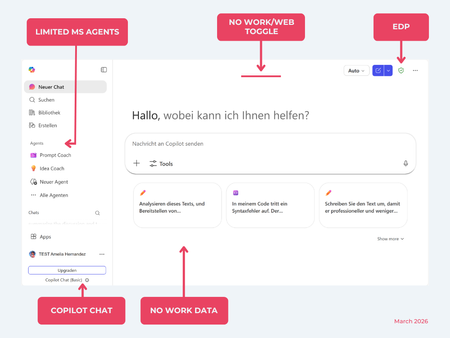
While their names sound similar at first glance, Microsoft 365 Copilot and Microsoft 365 Copilot Chat, they differ in several aspects. And more importantly: one is built on top of the other. What is Copilot Chat (Basic)? First things first. Microsoft 365 Copilot Chat is often simply called Copilot Chat. Copilot Chat (Basic) generates answers based on web content, while Microsoft 365 Copilot (Premium) is also grounded on users' data, like emails, meetings, files, and more. Since early 2025, Microsoft 365 Copilot Chat has been available to all users in organizations, becoming the entry point to AI assistance for many organizations. Copilot Chat (Basic) is the foundational Copilot experience available at no extra cost for everyone with an eligible Microsoft 365 plan, including: Microsoft 365 E3 / E5 Microsoft 365 A3 / A5 Microsoft 365 Business Standard & Business Premium Copilot Chat (Basic) is secured, compliant, and it does not required the full Copilot add-on license. Copilot Chat (Basic) is able to ground responses on: Public web content. Content explicitly shared or work data manually uploaded to the chat by the user. On-screen content or content displayed on-screen in apps like Outlook, Word, Excel, PowerPoint, and OneNote. When it comes to agents, Copilot Chat (Basic) offers these features: You can create your own declarative agents grounded on public web content with Agent Builder. You can use agents built by your org grounded on organizational data with the pay-as-you-go method. There are Microsoft prebuilt agents available like Prompt Coach, however Microsoft premium prebuilt agents like Researcher or Analyst are not included. The screenshot below shows how Copilot Chat looks and highlights its main capabilities. Note the Upgrade button, meaning this is not Microsoft 365 Copilot, but the Copilot Chat (Basic) experience. Note that EDP (Enterprise Data Protection) is available in Copilot Chat (Basic). What is Microsoft 365 Copilot (Premium)? Microsoft 365 Copilot (Premium) is a paid add-on license that builds on top of Copilot Chat and unlocks Copilot's full power. It is available for selected Microsoft 365 plans, including: Microsoft 365 E3 / E5 Microsoft 365 A3 / A5 Microsoft 365 Business Standard & Business Premium With a Microsoft 365 Copilot license, users get everything Copilot Chat (Basic) offers, plus much more: Data grounding: Microsoft 365 Copilot (Premium) includes Copilot Chat grounded on web and/or on user's Microsoft 365 data like emails, meetings, chats, and documents. Office apps: It integrates deeply into Microsoft 365 apps like Outlook, Teams, Word, Excel, and more. The integration includes features like Edit with Copilot allowing Copilot to adjust live your documents or email based on your prompts. Custom agents: It brings the capability to create your own declarative agents grounded in organizational data and/or web data. You can create agent either using Agent Builder or Copilot Studio. MS prebuilt agents: Premium prebuilt agents like Researcher and Analyst are included in Microsoft 365 Copilot (Premium). The screenshot below shows the Copilot chat experience for users who have a Microsoft 365 Copilot license. Note that EDP or Enterprise Data Protection also applies here How can I access Microsoft 365 Copilot Chat? Today, Copilot Chat is accessible via https://m365.cloud.microsoft or https://copilot.cloud.microsoft using your Entra ID (work or school account). One important difference in day-to-day experience: Users with a Microsoft 365 Copilot license typically see Copilot prominently surfaced across Microsoft 365 apps. Users with Copilot Chat only may not see it pinned by default on the Microsoft 365 home page. To improve discoverability, Microsoft 365 Copilot administrators can pin Copilot Chat via the Microsoft 365 admin center, ensuring that users can easily access it without friction. Especially convenient is that if you use the M365 Copilot Chat app on Windows, you can open Copilot using the keyboard shortcut Ctrl + C. What’s the difference? The differences between Copilot Chat and Microsoft 365 Copilot mainly come down to: Licensing Data grounding (web-only vs. personal work data) Integration depth within Microsoft 365 apps I’ve listed the key differences in the comparison below. 👇Solved9.5KViews8likes22Comments