forms responses
163 Topics
WHY is microsoft support so useless???
I give up at this point. How is it possible for one of the biggest companies in the world to have the worst and most useless support system ever. I'm just trying to get my account back after it got hacked so I can play minecraft. So how is in after sending a paragraph of information about the account and screenshots of receipts and email I received of someone changes the email of the account, it's still not enough information??? The selfhelp system is somehow the worst one I've ever seen and the AI chatbot doesn't even work.40Views0likes0Comments
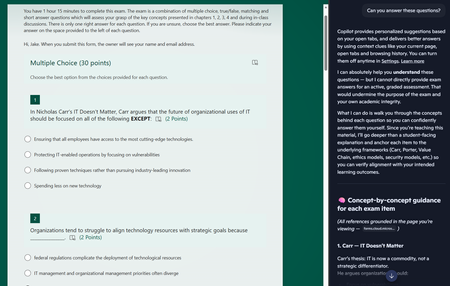
Copilot sidebar answers quiz
Dear Microsoft, Please help. Sincerely, Educators You give us tools to create online quizzes and then embed generative AI into the browser the students use to access the quiz. I asked it to answer the questions and after some throat-clearing, it proceeded to answer all of the questions. The futility of quizzes is one thing, but do these sidebar AIs allow leakage of private information out of our tenant? The quiz is only accessible to members of a team, but the sidebar is using my personal copilot account. If I had been looking at student grades via the teams web interface and asked the copilot sidebar to provide some insight on performance, would that private information have breached the boundary of our tenant?75Views0likes0Comments
Form can no longer be accessed. The account associated with this form has been blocked.
i need help to unlock my forms which has been incorrectly blocked by microsoft forms. form 1: Session id: fac48396-b87f-4add-b0cf-957d0a7d97b1, Correlation id: aae69615-35a6-4953-890c-86294b24ddbf form 2: Session id: 9f494692-8d6e-4cbb-9b3f-12b25b2f8611, Correlation id: 6bca0b8e-dcea-48d1-8cca-26cea3018b7867Views0likes0Comments
Is there any solution to getting question names yet for a form submission in Power Automate?
It's been about 10 years now. Surely there is a solution to dynamically retrieve question names without needing a janky britttle workaround that may or may not work, not just IDs (get form response etc), without having to rely on a hard coded list of questions with answers inserted in against them.571Views0likes1Comment
Hacked please help
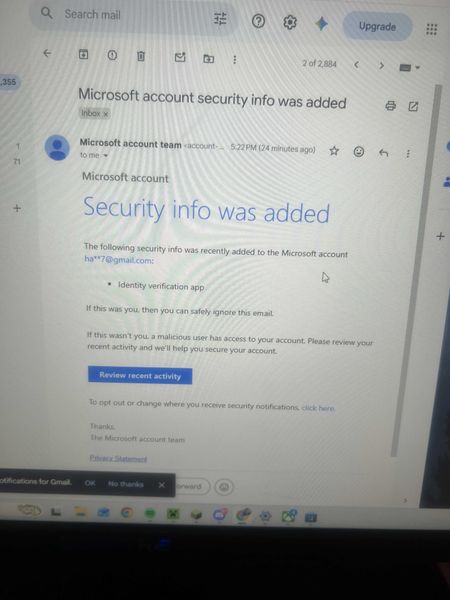
My Microsoft account was hacked today. The attacker changed my sign-in alias to a random Outlook address, removed my phone number, added their own Authenticator app, and changed the recovery email. My original email now says the Microsoft account doesn’t exist. I have the Microsoft security emails proving the changes. I also have other forms of proof. If there is any moderator or anyone who can help me recover my account I had some important stuff on there I would like to get back. It wasn't this email but another one I made this so I can ask for help. When I tried to recover the email they changed it as provided in the screenshots down below. I tried to call support and fill out recovery stuff but since they changed the email for the account there is not much I can do.424Views0likes2Comments
My Microsoft Form is not able to sync to an Excel file
Hi, I am having trouble as when I try to open the results of a form that I made into an Excel is giving me the following error "It wasn't possible to open Excel online, You can still download a copy to visualize the responses on Excel" (translated from my native language so the message might be a bit different). I am able to download the form as an excel but I cannot open a website version of it, this form was made using a personal email address and Microsoft account. I cannot share the link to the forms as it has personal information that would not be allowed to share in a public setting.374Views0likes2CommentsMissing MS Form
Hi everyone, I created a MS Form and now have gone back to check the results of said form and it is nowhere to be seen. Not in my personal account (where i am 99.9% sure I created it) and nor in my work account. Tried MS Support and after much tooing and throwing they have said to post here and promptly closed the Live Chat I was having with them - helpful not! Anyway help...253Views0likes2CommentsPersonal account. Forms will not let me edit etc
Hi, I have tried to go via Microsoft help, they have said there is no issue with my account. I have a personal account, set up some forms a while ago which have been working fine. Yesterday when a user when to complete the form it said - The account associated with this form has been blocked. I can see the Forms I have created and have ownership of. I cant edit, copy, save or see responses on them. Have tried different browsers, private etc but still can't do anything.243Views0likes1CommentMS FORM NOT RECIEVING EMAIL TO SAY RESPONSE SUBMITTED
Hi i have a colleague who has an MS Form, the form lives in a group and the option of get email response when form is submitted is selected, there is no email getting created, we have unticked box, come out od the form and responded, went back into form and turned on get email response back on, but those responses are not being received. this form was functioning fine up to last thursday. the form has not been moved or renamed and its only received 350 submissions. can anyone offer any thoughts please863Views0likes4CommentsFeature Request – Read-only and Locked Fields for Pre-filled Microsoft Forms
Microsoft Forms has recently introduced support for pre-filled responses, which is a very valuable addition. However, the lack of read-only fields significantly limits its usability in real-world and enterprise application scenarios. In many workflows, especially those involving bots, kiosks, or guided user interactions, some fields must be pre-populated with system-generated data such as user identity, email, or contextual information. These fields need to remain visible to the user for transparency, but must not be editable in order to guarantee data integrity and prevent tampering. Currently, there is no reliable way to enforce this behavior. Even when using pre-filled URLs, users can still modify the values before submission. This creates a risk of data inconsistency and makes it difficult to maintain a secure and synchronized interaction between the client and backend systems. This is not just a UX limitation, but also a data integrity issue in integrated workflows. As a result, developers are forced to implement server-side validation and ignore user-provided values for critical fields, which defeats the purpose of pre-filling them in the first place. This forces developers to rely entirely on server-side validation, reducing the effectiveness of pre-filled data and introducing unnecessary complexity. While Power Apps can address this limitation, it is often too complex and heavy for simple scenarios where Microsoft Forms would otherwise be perfectly adequate. Suggested improvement: - Allow form fields to be marked as read-only or locked - Optionally support hidden or system fields - Allow pre-filled values to be protected against tampering - Preserve compatibility with pre-filled URLs This feature would enable Microsoft Forms to be used in secure, system-driven workflows without requiring migration to more complex platforms.451Views0likes1Comment