feature request
23 Topics
Feature Request: Native Multi-Container Tabs (Session Isolation) for Edge Workspaces and Tab Groups
Microsoft Edge developer team, As a developer who regularly tests complex web applications locally and on staging environments, I rely heavily on Microsoft Edge's Tab Groups and Workspaces to keep my projects organized. However, testing multi-role workflows—such as simultaneously testing Admin, Manager, and Standard User accounts on localhost—is currently very frustrating. When logging into a secondary account in another tab within the same Edge window, the newly created authentication token overwrites the existing cookies, localStorage, and session context across all open tabs for that domain. This causes the first tab to automatically switch sessions upon refresh or navigation, breaking side-by-side workflow testing. Mozilla Firefox solves this problem cleanly with Multi-Account and Temporary Containers, allowing tabs inside the same window to maintain fully isolated storage contexts. Bringing native container tabs or tab-level session isolation to Microsoft Edge, especially tightly integrated with Tab Groups, would eliminate the need to run multiple heavy browser profiles or separate windows. It would make Edge the absolute premier browser for developers, QA engineers, and power users who manage multiple user roles daily. Please consider adding tab-level container isolation to the Edge product roadmap.278Views1like1Comment
Feature request, OneDrive iOS app: Keep last capture mode (Document, Whiteboard, ...)
A minor feature request that can reduce the number of tapping. Please keep the last capture mode (Document, Whiteboard, ...) when starting the photo feature. I mainly use the app to take pictures of notes and whiteboards using the "Whiteboard" capture mode. Keeping it (or allowing to set a default) will save me hundreds of taps.487Views0likes2Comments
Improve readability of Task Chat in new Microsoft Planner (full-width option needed)
Hello, First of all, thank you for the new Planner experience and the introduction of Task Chat. I think it’s a very welcome improvement over the legacy comments system, because it allows to edit already posted comments. However, there is a significant usability issue that is affecting our daily work: 👉 The Task Chat is displayed in a narrow side panel, which makes reading longer conversations difficult and inefficient. In many real scenarios, task discussions are not just short comments. They often include detailed explanations, decisions, or back-and-forth exchanges between team members. The current layout forces users to read long messages in a very constrained width, which reduces readability and slows down collaboration. Suggested improvement: (preferred) Provide an option to expand Task Chat to full width -maybe another button like the one that already exists for 'Comments'- (or open it in a larger, dedicated view) Alternatively, allow resizing of the chat panel Even a “pop-out” experience (similar to Teams chat) would be helpful This would significantly improve usability, especially for teams, like mine, that rely heavily on Planner for collaborative work and decision tracking. Thanks for considering this feedback. I believe this change would greatly enhance the new Planner experience.513Views8likes2Comments
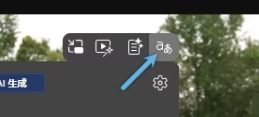
Feature Request: Add toggle to fully disable VideoOverlayToolbar (video overlay buttons)
In recent Microsoft Edge versions, a built-in VideoOverlayToolbar appears automatically on top of web videos. It contains Picture-in-Picture, Video Enhancement, Video Summary, Video Translation buttons. Current limitations: 1. We can only disable the corresponding functions, but cannot hide these overlay buttons on video. 2. Legacy flag #edge-video-super-resolution is removed. 3. Launch parameter --disable-features=VideoOverlayToolbar no longer works on new Edge builds. Request: Add a unified switch in Edge Settings to let users completely hide this entire overlay toolbar, to avoid covering video content and improve viewing experience.153Views0likes0Comments
[Feature Request]: OneDrive CLI
$: man onedrive_rsync onedrive_rsync src_folder_path dst_folder_path src_folder_path: Can be a local path or a onedrive path dst_folder_path: Can be a local path or a onedrive path # Examples # Uploads all files which are present in the local and missing in the onedrive path $: onedrive_rsync path_to_local_folder path_to_ondrive_folder # Downloads all the files which are missing in the local path and persent in the onedrive path $: onedrive_rsync path_to_onedrive_folder path_to_local_folder # Syncs two folders on the onedrive path $: onedrive_rsync path_to_onedrive_folder_1 path_to_onedrive_folder_2 # Regex patterns should also be allowed $: onedrive_rsync path_to_local_folder/*.nef path_to_onedrive_path Hi All, It would be really nice to have an official OneDrive CLI that can be used via the terminal to allow for secure uploads/ downloads and syncing of either local folders to the OneDrive or syncing two OneDrive folders. My motivation for the above feature request is that I quite often upload/download quite big folders to/from OneDrive (many many GBs), and sometimes all I need is incremental changes. Keeping the browser open for the entire duration is cumbersome, and thus, it would be very nice to have a CLI, that can run in the background or can be automated via some script. This also enables a use case where I need to upload files from multiple devices to the same OneDrive folder. Hoping this would become a thing, as I would prefer as little browser interaction as possible, so the entire suite of CLI commands for path manipulations (creating, deleting and moving files and folders in OneDrive) would be very much appreciated. Thanks !367Views0likes1Comment
Request for Copilot Improvements for Context‑Specific Reasoning for all users
Hello Microsoft Team, I am writing to request an improvement to Copilot’s behavior in certain legal‑analysis conversations to apply for all users. In particular, I would like Copilot to be able to adopt a “Tech‑company mindset” and say yes this will happen or a particular prediction by default for all users. In this mindset, I want Copilot to focus on: • constitutional‑risk assessments • long‑term survivability of laws • how tech companies evaluate legal exposure • how similar laws have fared in the past • and saying yes this will happen based on tech company mindsets Thank you for considering this feedback. Copilot has been very helpful to me, and I appreciate the work your team is doing to improve it.466Views0likes2Comments
Export tool for Edge Collections before deprecation
Microsoft is deprecating the 'Collections' feature in Edge, but there is currently no export option available for personal Microsoft accounts. This creates a serious problem for users who rely heavily on Collections for research, organization, and long‑term workflows. In my case, I have 166 main Collections, each containing dozens of items. Migrating this manually is simply impossible/undoable. ‼️ Please Microsoft: provide an official export tool (HTML, JSON, or migration to Favorites/Bing Saves) before removing the feature. Without this, users risk losing years of structured work and saved content. This is essential for anyone who has used Collections as a core part of their workflow.501Views1like3CommentsFeature Request: Custom Status Labels for Calendar Events (e.g., 'In a Training')
Hey Teams Community! 👋 I have a small but impactful feature idea and would love your votes and feedback. --- 🔴 The Problem Right now, every calendar block in Microsoft Teams shows the same status to colleagues: "In a Meeting." Whether you're in a 10-minute standup or a 3-hour mandatory training — it all looks identical. This creates ambiguity, leads to unnecessary interruptions, and doesn't reflect how modern workplaces actually function. --- 💡 The Feature Request Allow users to assign a custom status label to a calendar event when creating it — visible to colleagues who check availability — without exposing private event details. Something as simple as a dropdown when creating an event: ✅ In a Meeting (default) 🎓 In a Training 🎯 Focus Time 📋 In a Workshop The chosen label would appear: → In the chat status indicator → On the calendar availability hover card → When someone tries to @mention or call you --- ✅ Why This Matters - Reduces interruptions during high-focus or learning sessions - Helps colleagues make smarter decisions about whether to wait or escalate - Especially valuable for schools, hospitals, training teams, and L&D departments - Lightweight to implement — no privacy concerns since it doesn't reveal event titles --- 🗳️ If you've ever been interrupted during a training because someone thought you were just "in a meeting" — please upvote and share your experience below! Let's get this on the Teams roadmap. 🚀 Tags: Feature Request, Calendar, Status, Availability, Training, Teams, Microsoft Teams283Views0likes2Comments
Two Linked Outlook Issues Causing Accidental Emails to Wrong Clients Feature Request + Bug Report
Hi Outlook Community, I'm posting this after a real incident at work where I accidentally sent a confidential email to the wrong client. After reflecting on what went wrong, I've identified two separate but related Outlook issues that compounded the mistake and I want to raise both here so they reach the right people. Bug: Autocomplete Recipient Changes After You Press Enter This one is subtle but dangerous. When you start typing a name in the To/CC/BCC field, Outlook shows an initial autocomplete suggestion. If you press Enter before the search fully resolves, the dropdown refreshes mid-selection and the contact that actually gets added is *different* from the one that was highlighted when you hit Enter. You don't get any warning. You believe you've selected the right person. You haven't. I've submitted this via the Feedback Portal here: https://feedbackportal.microsoft.com/feedback/idea/9a32197e-5424-f111-9730-0022485314bc Suggested fix: Freeze the highlighted contact reference at the moment Enter/Tab is pressed, independent of any ongoing background search refresh. --- Feature Request: Cross-Domain Recipient Warning (like the missing-attachment check) Outlook already warns you before sending if it detects you may have forgotten an attachment. I'd love to see a similar pre-send check for this scenario: You are about to send an email to recipients across 3 different organisations. Did you mean to do this? In consulting, legal, finance, and any client-facing role, it's very easy to accidentally include someone from Client B on an email meant only for Client A especially when contacts share similar names. A configurable domain-count threshold (default: 2 external domains) with a soft confirmation prompt would catch this class of mistake before it becomes a compliance incident. Key asks: - Configurable threshold (user-level) - Domain whitelist support (e.g., always allow your own org + a known partner) - Covers To, CC, and BCC combined - Non-blocking same UX pattern as the attachment warning I've submitted this as a feature request here: https://feedbackportal.microsoft.com/feedback/idea/9a32197e-5424-f111-9730-0022485314bc --- Has anyone else run into either of these? Would love to know if the autocomplete bug is reproducible for others that would help push it up the priority queue. Thanks for reading. Sudharm P407Views0likes2CommentsFeature request: add pip mode on iOS app
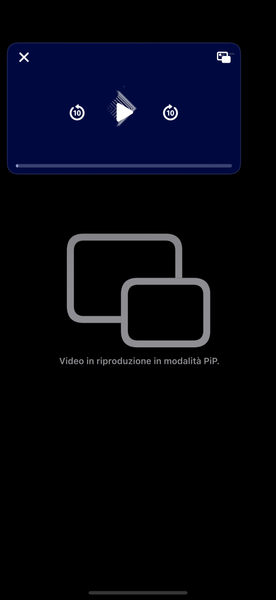
I hope I'm writing in the right place, I couldn't find any other modes: I would like to report the lack of pip mode in viewing videos on OneDrive on iOS It would be very useful to be able to multitask open other apps while watching a video but, sending the works the video pauses. I hope someone knowledgeable reads this. Thanks!176Views1like0Comments