csp
185 Topics
CSP Indirect Reseller enrollment deactivated + can't open a support ticket
Hello, My partner account (company LIS-INFO, France) has a legal verification status of Authorized as of today, on both the Partner and Reseller profiles. However, when I try to enroll in the Cloud Solution Provider – Indirect Reseller program (via aka.ms/accounts/varEnrollment or via "Other programs" in Account Settings), I consistently get the message: "This program registration has been deactivated for your account." I also notice that the "Customers" workspace shows "Access not granted" under Account Settings > My access, which is consistent with the CSP enrollment being deactivated. I believe this may be related to an earlier partnership application that failed before my current application was approved. I have been unable to submit a support ticket through the normal Partner Center channel — the "Contact support" flow gets stuck on an infinite loading spinner, across multiple attempts over several weeks (different browsers, different sessions). This is why I'm posting here instead. This is currently blocking me from establishing a distributor relationship with my indirect provider (ALSO), who has confirmed they cannot resolve this on their end since the block is on my Partner Center account, not on the distributor relationship itself. I'd be happy to share my Partner/MPN IDs privately with anyone from Microsoft who can help look into this. Thank you for your help.CSP August 2026 Monthly Partner Update
This month's updates covered important changes to agreements, security requirements, pricing capabilities, growth programs, and promotional offers that enable partners to increase customer adoption and make the most of upcoming CSP opportunities. Please use the survey link to share your feedback on these updates Survey Link. Visit the Launch Enablement Guide for additional readiness resources, guidance, and partner actions. This Month's Topic: Promotion Capabilities Consumption-based and per-user New Azure promotion capabilities will enable percentage-based discounts across eligible consumption scenarios, including pay-as-you-go, reserved instances, and pre-purchase plans, with discovery and redemption experiences available for sandbox testing. Upcoming per-user promotion enhancements will support more precise customer targeting by seat count and introduce greater flexibility for qualifying customers in new-to-offer scenarios. Watch the video for more details. If the player doesn’t load, open the video in a new window: Open video Important Links Visit the Azure promotions learn documentation Refer the https://aka.ms/Azure-Promos-FAQ Need More Information? Visit the Launch Enablement Guide for additional readiness resources, guidance, and partner actions.experiences with “MS incentives new experience”
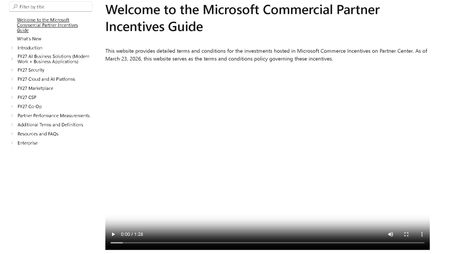
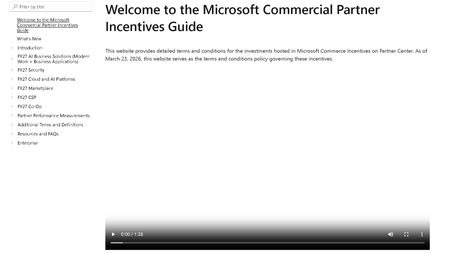
Dear Microsoft, dear fellow partners, Please find below first experiences with the new "incentives experience" where the annual incentives guide was replaced with a website. This fine product can be found at: https://incentiveguide.partner.microsoft.com/en-US/ Site only shows a video, no matter which link you click. We want text, not video. I want the CSP M365 incentives info, not that video overlay again. 2. Site refers to a ‘product addendum’ but no such is found in the guide itself (it is in the MCI collection on OpsReadiness luckily - https://assetsprod.microsoft.com/mpn/en-us/microsoft-commerce-incentive-product-addendum.xlsx ) 3. The MCI collection (https://partner.microsoft.com/en-US/asset/collection/microsoft-commerce-incentive-resources#/) links to various files/links. The link to the FY27 coop guide is broken ☹ (https://incentiveguide.partner.microsoft.com/en-US/fy27-co-op/how-to-use-the-co-op-guidebook) p- luckily the definitions of what cannot be found are present (at https://incentiveguide.partner.microsoft.com/en-US/additional-terms-and-definitions/glossary-cooperative-marketing-funds) 4. There are no rates mentioned in the website/download of the guide. For CSP you would need to view the MSFY27 documentation in collection mentioned earlier we eagerly await an updated & improved version of this site!experiences with “MS incentives new experience”
Dear Microsoft, dear fellow partners, Please find below first experiences with the new "incentives experience" where the annual incentives guide was replaced with a website. This fine product can be found at: https://incentiveguide.partner.microsoft.com/en-US/ Site only shows a video, no matter which link you click. We want text, not video. I want the CSP M365 incentives info, not that video overlay again. 2. Site refers to a ‘product addendum’ but no such is found in the guide itself (it is in the MCI collection on OpsReadiness luckily - https://assetsprod.microsoft.com/mpn/en-us/microsoft-commerce-incentive-product-addendum.xlsx ) 3. The MCI collection (https://partner.microsoft.com/en-US/asset/collection/microsoft-commerce-incentive-resources#/) links to various files/links. The link to the FY27 coop guide is broken ☹ (https://incentiveguide.partner.microsoft.com/en-US/fy27-co-op/how-to-use-the-co-op-guidebook) p- luckily the definitions of what cannot be found are present (at https://incentiveguide.partner.microsoft.com/en-US/additional-terms-and-definitions/glossary-cooperative-marketing-funds) 4. There are no rates mentioned in the website/download of the guide. For CSP you would need to view the MSFY27 documentation in collection mentioned earlier we eagerly await an updated & improved version of this site!CSP Transactional TTM Revenue Not Loading for Indirect Reseller - Anyone Else Seeing This?
Hello everyone, We are a Microsoft CSP Indirect Reseller and have been actively transacting through our distributor for more than two years. In the past, including during a Microsoft support review in December 2025, we regularly used the "Partner Global - CSP Transactional TTM Revenue" metric in Partner Center to monitor our CSP performance and eligibility requirements. At that time, the data loaded correctly and was fully visible to our Global Admin account. Recently, the report stopped loading completely. The widget appears, but the CSP Transactional TTM Revenue value never loads. The issue occurs across multiple browsers and devices, so it does not appear to be a local browser or cache problem. The affected report is: Insights > Cloud Product Performance > Subscriptions Reference documentation: https://learn.microsoft.com/en-us/partner-center/insights/analyze-subscriptions-licenses?utm_source=chatgpt.com I opened a support ticket and received a response stating that my account does not have the required permissions and that I should contact my distributor. However, this explanation does not seem consistent because: The same account previously had access to this metric. We can access all other Insights reports normally. Under Account Settings > My Access, access to the relevant workspaces is granted. We are an active CSP Indirect Reseller with paying customers and active subscriptions. My questions are: Has Microsoft changed the visibility or permission model for CSP Transactional TTM Revenue recently? Is this metric still available for CSP Indirect Resellers, or is it now restricted to certain partner types? Is anyone else experiencing the same issue where the widget appears but never loads the revenue data? Has anyone received official communication regarding changes to this report? Any feedback or confirmation from other CSP partners would be greatly appreciated. Thank you.SolvedPartner Collaboration – Copilot AI Readiness Sprint (MPN ID: 7110817)
Hello Microsoft Partner Community, We’re seeing increasing demand from clients exploring Microsoft 365 Copilot — and a consistent gap in readiness across licensing, data, governance, and security. ArcSecureAI (MPN ID: 7110817) is offering a virtual Copilot AI Readiness Sprint designed to support partners working with SMBs, nonprofits, and organizations preparing for adoption. What the sprint includes: • Readiness assessment (licensing, data, governance, workflows) • Security and Zero Trust alignment review • Identification of automation opportunities (Power Automate + Copilot Studio) • Scored readiness report (0–100) • Practical 30–60–90 day adoption roadmap Partner collaboration options: • White-label delivery • Co-delivery with CSPs and MSPs • Fast turnaround (typically 48–72 hours) • Microsoft-aligned approach Goal: Help partners start the Copilot conversation with structure, deliver immediate value, and position follow-on services. If you’re currently working with clients evaluating Copilot, I’d be open to connecting and exploring collaboration opportunities. – Sreita Wheeler ArcSecureAI LLC MPN ID: 7110817Tax ID Update -- no support
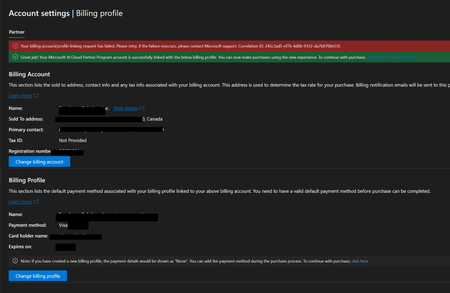
Hi there. I cannot add my TAX ID in the account settings workspace. Or any other place seemingly possible according to the Partner Center AI Assistant help feature, Google articles, and so on. I have followed various instructions for updating my TAX ID but none resemble precisely what I am seeing. I have been trying to resolve this myself for weeks now. I have two support tickets in with MS, have followed them each up in the tickets, all to no avail. I am part of the MAICPP, a CSP etc., and have been for a while. As you can see, my bill information is not linked which may be why I cannot edit/add the TAX ID according to the myriad instructions I've found. BOTTOM LINE: I do not know how to obtain support assistance from MS. Anyone have any suggestions? Thanks.Solved
CSP Account suspended without notification, no explanation given
Hello Microsoft Community, I'm hoping someone here has experienced something similar and can point me in the right direction. I have been a Microsoft Partner since 2019. This past January I renewed my Partner Success Core Benefits pack. A couple of weeks ago I noticed I had lost access to all my benefits. I opened a support case, and after going back and forth I still have no resolution. The only explanation I've received is a reference to section 4.b of the Microsoft AI Cloud Partner Program Agreement, which states that either party can terminate the relationship with 30 days' notice and without providing a reason. No notification was ever sent to me. No 30-day notice. I simply woke up one day with no access. At one point I was told I could re-enroll under a new tenant. I tried this, and it didn't work. When I followed up, the support team went back to citing section 4.b and closed the door again. I understand I'm a small partner in Microsoft's ecosystem, but I've invested years building my business around this partnership, renewed my benefits in good faith just a few months ago, and I would love to find a constructive way forward. My questions for the community: 1. **Is there a formal escalation path** beyond standard Partner Center support cases? 2. **Has anyone successfully re-enrolled** after a suspension of this kind, and what was the process? Any guidance, shared experience, or contacts would be enormously appreciated. I am not looking to complain, I just want to understand my options and get back to serving my customers. Thank you in advance.