copilot in excel
196 Topics
Excel “Trace Dependents” stops working in XLSX files generated by ChatGPT
Excel “Trace Dependents” stops working in XLSX files generated by ChatGPT – Cause and tested solution Problem When opening Microsoft Excel workbooks (.xlsx) generated by ChatGPT, the Trace Dependents feature may stop working, reporting that a cell has no dependents even when other cells explicitly reference it. The Trace Precedents feature may continue to function normally. In our testing, the problem was particularly difficult to diagnose because: It occurred repeatedly with Excel workbooks generated by ChatGPT. Opening an affected workbook caused Trace Dependents to stop working even in other workbooks that had previously worked correctly. The malfunction persisted after closing the affected workbook. Recalculating formulas, rebuilding the calculation chain and reconstructing the workbook did not consistently resolve the issue. Root cause identified The affected XLSX files generated by ChatGPT contained the following setting in xl/workbook.xml: forceFullCalc="1" This setting enables forced full calculation, bypassing Excel's normal dependency-based calculation mechanism. Tested solution Close Excel completely, including any remaining EXCEL.EXE processes. Open the affected XLSX file as a ZIP archive. Locate xl/workbook.xml. Find the <calcPr> element. Change forceFullCalc="1" to forceFullCalc="0", or remove the attribute. Save the corrected XLSX file. Restart Excel in a clean session. Open only the corrected workbook and test Formulas → Trace Dependents. Experimental confirmation We verified that: An original ChatGPT-generated workbook containing forceFullCalc="1" triggered the malfunction. The problem affected the entire Excel session and persisted after closing the original workbook. A corrected version containing forceFullCalc="0" worked when opened in a clean Excel session. The same issue was reproduced through multiple tests, including Excel Safe Mode. Recommendation for ChatGPT and XLSX-generation developers ChatGPT's spreadsheet-generation workflows should explicitly prevent the unnecessary activation of forceFullCalc=True. Before delivering generated XLSX files, the system should inspect xl/workbook.xml and ensure that persistent forced full calculation is disabled unless specifically required. This check is particularly important because the problem may affect not only the generated workbook but also other Excel workbooks opened in the same session. Scope and limitation This issue was repeatedly observed in workbooks generated through ChatGPT in our testing. The results do not establish that all ChatGPT-generated Excel files are affected, nor that this setting is responsible for every Trace Dependents malfunction. Nevertheless, the relationship between forceFullCalc="1" and the observed behavior was confirmed experimentally in the tested environment. Conclusion A ChatGPT-generated XLSX workbook with forceFullCalc="1" can trigger a persistent malfunction of Excel's Trace Dependents feature. Disabling this setting and restarting Excel restored the functionality in our tests.189Views0likes1Comment
Excel Copilot WebView2 crashes when rendering download links - Bug
Environment: Excel for Microsoft 365 (Desktop) Windows 10/11 - Enterprise account Issue: Excel Copilot's WebView2 panel goes completely black/blank when attempting to render download links for files generated in the Python sandbox. Steps to Reproduce: Open Excel with Copilot Ask Copilot to perform any task that generates a download link (e.g., "create a test file and give me a download link") WebView2 panel turns black immediately What I've Tried: Clearing WebView2 cache at: %LOCALAPPDATA%\Microsoft\Office\16.0\Wef\webview2\ Copilot works normally after cache clear UNTIL a download link is requested Issue is reproducible every time Workaround: Asking Copilot to write results directly to sheets instead of generating download files works fine. This started after an Excel crash during a Copilot session.80Views0likes2Comments
copilot app is unable to edit an excel file and save a new version
I asked copilot to review an excel file I created and add worksheets with dashboard etc; it does the analysis, suggests the solution but when I ask to save a new edited version comes up with all kinds of limitations.. example of message : I need access to the physical workbook file in the execution workspace, not just the extracted workbook content that I can read. What I currently have is access to the contents of "book2" , including all sheets and rows What I do not have is a file path that allows me to save a modified workbook and return a new Excel file. This is exactly the distinction you were asking about earlier: ✅ I can inspect and analyse "book2". ✅ I can design the full V2 architecture you specified. ❌ In this session I cannot yet create and return the modified .xlsx because the actual uploaded file is not available in the workbook-editing workspace. I save files on OneDrive and have MS365 Family subscription , similar limitations with all MS files is it a licence issue?66Views0likes0Comments
COPILOT DENIES ACCESS IN BETA VERSION
Hello, I am a Microsoft 365 Insider on the Beta Channel. I recently gained access to the multi-model preview features (Grok and Fable) in Word. While Word was open, my VPN accidentally connected to a restricted region (Russia). Shortly afterward, I was blocked from accessing Copilot and received the following error: "Copilot n’est pas disponible dans votre région." I have since permanently disabled the VPN and returned to my regular home network. However, whenever I rejoin the Beta Channel, the regional restriction immediately returns. I have already tried performing a clean installation of Office, verifying my Windows region settings, and resetting my privacy settings. Unfortunately, none of these steps has resolved the issue. Could this restriction be associated with an account-level setting or a server-side regional eligibility check? If so, is there an official troubleshooting procedure or a Microsoft support team that can review my account's eligibility and help restore access to the preview features? I would appreciate any guidance on how to resolve this issue. Thank you!ر111Views0likes1CommentLooking for advice on leveraging AI for Excel in a price-sensitive, third-world country
I work for a training company in a price-sensitive, third-world country and have been conducting training in MS Excel for close to 2 decades. My company has asked me to design Excel training that teaches how to use AI to improve productivity. Ethical considerations aside, it’s something I have been thinking about for a while. The main roadblock I see is the average purchasing power of participants in our market. Right now the cheapest Copilot plan is USD 99.99/yr for MS 365 Personal. The cheapest plan for Business or Enterprise is USD 18/user/month for MS 365 Copilot business (billed at USD 216/user/year). I’ve been casually speaking with the participants in training sessions and most are happy with the free chatbot versions of Copilot/ChatGPT/Gemini that almost no one would upgrade to a paid subscription to integrate AI with Excel - they describe their problem to the AI, send screenshots or upload files and then try and implement the solution that’s returned. It’s similar in the business/enterprise context. Larger organisations may have paid for AI subscriptions for their employees but those are few in number. Most businesses in this market are classified as Small-Medium-Enterprises (SMEs) and feedback from participants is that their management would not likely approve of the cost. It’s worth mentioning that my training company does not provide computers instead requiring participants to bring their own laptops with valid Excel licences though we standardize things as much as possible e.g. Windows only, no tablets etc… This means if we design a training that requires a paid Copilot subscription, then it is up to the participants to buy it for themselves which I don’t think many of them will. After speaking with management, they are open to designing a training that uses the free AI chatbots. I’m fine with that but don’t know how much value that would add to what people are already doing. I’m quite sure this strategy is management trying to revive Excel training which used to be top-sellers (demand fell off ever since COVID) and they see other Excel training incorporating AI so want to follow suit. So right now the most viable option is to create training that teaching using free AI chatbots. But I’d like to hear the opinions of others - what other options do you see for a price-sensitive, third-world market? And yes, I did ask AI how Excel users can leverage AI without paying for expensive subscriptions and it basically said “use the free chatbots”.139Views0likes1Comment
Please Remove Daily Cap Usage for Free Copilot Text Chat
Dear Microsoft Copilot Team, I am writing to express my disappointment with the new daily usage caps on Microsoft Copilot, particularly for ordinary text-based conversations. In the past, I could use Copilot freely for everyday questions, learning, research, brainstorming, and general conversations without constantly worrying about reaching a daily limit. The newer restrictions have made the experience significantly more frustrating and less useful. I understand that running AI services requires computing resources and that Microsoft must manage operating costs. However, I believe ordinary text chat should remain uncapped, especially when it was previously possible to use Copilot much more freely. Text conversations are a fundamental part of the service, and users should not have to stop in the middle of a useful discussion because they have exhausted a daily allowance. The move toward a unified Copilot experience should make the product simpler, more consistent, and more useful—not make existing users feel that they have lost access to a service they have come to rely on. I am therefore asking Microsoft to: Remove daily usage caps entirely for ordinary text-based Copilot conversations, including for free users. Keep basic text chat freely accessible without arbitrary daily cutoffs or lengthy waiting periods. If stricter limits are necessary for resource-intensive features such as image generation or advanced research, apply those limits separately rather than restricting ordinary text conversations. Clearly communicate any usage policies and reconsider changes that negatively affect the experience of long-time users. Unlimited text chat would help preserve user trust, encourage continued engagement, and distinguish Copilot as an accessible AI assistant for everyone. Restricting basic conversations risks pushing loyal users toward competing services that offer a more suitable experience. I hope Microsoft will take this feedback seriously and reconsider the current daily cap policy. Please restore uncapped text chat so users can rely on Copilot whenever they need assistance, without worrying about running out of messages. People on Reddit and online have been criticizing these changes ever since Copilot was unified under one product between enterprise and personal, If you guys dont do anything now it might reduce user trust and might be bad business decisions so please fix Copilot Thank you for your time and consideration. I look forward to seeing Microsoft make Copilot more accessible and user-friendly again.383Views4likes2CommentsHow to Create Your Own Copilot Skills in Excel and Work Smarter
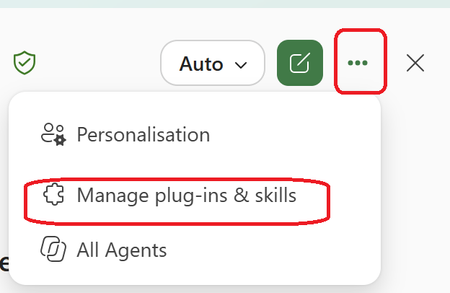
Many Excel users know how to work with formulas, pivot tables, and dashboards, but far fewer know that they can create Copilot Skills that help automate repetitive tasks and standardize business processes. Benefits of Copilot Skills in Excel ✅Save time on repetitive analysis ✅Standardize calculations and reporting ✅Reduce manual errors ✅Make advanced Excel capabilities accessible to everyone ✅Improve productivity across teams 💡 Best Use Cases ✅Sales performance analysis ✅Financial reporting ✅Data cleansing and transformation ✅Forecasting and trend analysis ✅Creating recurring management reports The real power comes from turning your organization's knowledge and best practices into reusable skills that anyone can use directly from Excel. 🎥 I recently created a video showing how to create and use Copilot Skills in Excel, with practical examples and step-by-step guidance. 👉 Watch the video and let me know what Excel task you would automate first! https://www.youtube.com/watch?v=uPfMQjlNhXY How do we create the skill? Within the Copilot Chat in Excel Go choose the 3 Dots Then Choose Manage Plugins & and Skills Choose the Custom Skills Here you will see the location that you can upload your skill that are stored in your OneDrive (Click on the Hyperlink "Skill OneDrive Folder") In my case this is the location in My OneDrive Now you need to Create a Folder with the name of the Skill and the Skill.MD file that includes the Name and description and instruction It will look like this A good approach is to use Copilot Chat to generate the entire skill package, including the required folder name and structure. Once Uploaded to OneDrive , Refresh the Custom skill Screen and you will see it and use it #Microsoft365 #Copilot #Excel #MicrosoftCopilot #Productivity #DataAnalysis #AI #ExcelTips #M365286Views0likes0Comments