community
775 Topics
Hindi Phonetic Keyboard Not Suggesting Full Words After July 2025 Windows 11 Update [FIXED NOW]
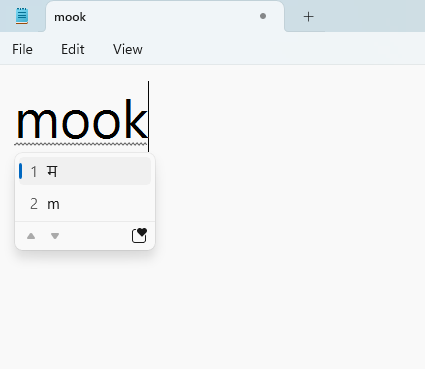
Hello Microsoft Team, After installing the July 2025 cumulative updates, the Hindi Phonetic keyboard in Windows 11 stopped providing full word suggestions. Earlier, when I typed Hindi words in Roman script, the keyboard gave complete suggestions in Devanagari. Example: Typing: mook Earlier suggestion: मूक, मूकता, etc. Now it only suggests म, or sometimes gives incorrect results. Recent Updates Installed (as shown in Windows Update) 2025-07 Cumulative Update for Windows 11 Version 24H2 for x64-based Systems (KB5062553) 2025-07 Cumulative Update for .NET Framework 3.5 and 4.8.1 for Windows 11, version 24H2 for x64 (KB5056579) Troubleshooting Steps I Have Tried Reinstalled the Hindi Phonetic keyboard from Language & Region settings. Verified that Basic Typing for Hindi is installed. Removed and re-added the Hindi language. Restarted the PC after all steps. Checked for additional Windows updates – no pending updates found. The problem still exists. Microsoft Chat Support Guidance I contacted Microsoft Support via chat, and they acknowledged that this is a known issue introduced in the July 2025 updates. They suggested I raise this issue here in the Tech Community so that the product team can track and prioritize a fix. They also mentioned that a fix might come in a future Patch Tuesday update, but no confirmed timeline is available yet. Screenshot of Windows Version and Build My System Info Windows Version: Windows 11 Version 24H2 (OS Build 26100.4652) Language: Hindi – Phonetic Keyboard Request Please confirm if this bug is being tracked and when we can expect a fix. This keyboard is essential for Hindi typing and this issue is causing daily inconvenience. [EDIT] In latest windows update, this issue has been fixed. Thanks Microsoft team.4.3KViews22likes26CommentsWindows 11 24H2/25H2 System Freeze After January 2026 Updates – Lenovo ThinkPad G2
Dear Microsoft Support Team, We would like to raise a high-priority technical support case regarding a stability issue observed after installing the January 2026 cumulative updates on our Windows 11 devices. Environment Details: Device Model: Lenovo ThinkPad G2 (multiple units) OS Versions: Windows 11 24H2 and 25H2 Update Installed: January 2026 Patch Tuesday cumulative update (KB number can be provided) Deployment Method: WSUS / Intune / Windows Update (specify accordingly) BIOS Version: (Installed Latest available from Lenovo) Issue Description: After installing the January 2026 cumulative updates, devices intermittently experience a complete system freeze. The system becomes fully unresponsive: Mouse and keyboard input stop responding No BSOD is displayed Task Manager cannot be opened System recovery is only possible via hard reboot (power button) Frequency: The issue occurs randomly, both during active use and idle state. Multiple users across our environment are impacted. Troubleshooting Performed: Reinstalled OEM-certified Lenovo display drivers Disabled Fast Startup Ran SFC and DISM health checks (no integrity violations) Updated BIOS to latest version Setting power idle mode, then work normally Request: - Please confirm whether this is a known global issue under investigation. - Advise if any hotfix, Known Issue Rollback (KIR), or registry-based mitigation is available. - Provide guidance on additional diagnostic logging required at kernel or driver level. - Confirm whether crash dump analysis is recommended for this scenario. We are prepared to provide additional diagnostic logs, memory dumps, or reproduction steps upon request. Kindly treat this as a priority case due to multi-user impact in a production environment. Thank you for your support. #Windows11, #Windows 11 24H2, Windows Update, Cumulative Update, System Freeze, Lenovo ThinkPad, Display Driver, Enterprise8.2KViews14likes32Comments
Why does Yahoo keep opening in Chrome Windows 11 computer?
Hi everyone, I'm experiencing a frustrating issue with my Windows 11 computer. For some reason, Yahoo keeps opening automatically in Google Chrome, even when I’m not trying to access it. This happens frequently and interrupts my workflow. I've checked my browser settings and extensions, but I can't find anything unusual. I’ve also cleared my browser cache and cookies, but the problem persists. Has anyone else faced a similar issue or knows how to stop this from happening? Thank you!30KViews11likes12Comments
I'm standing my ground, and sticking with Windows Mobile
Who else is with me? Till the bitter end we stick together, we will make it through, and we know good things come to those who wait. My 1520 finally crashed and screen shattered, I'm now looking for a 950XL as an upgrade or if I can find an HP x3 for cheap that'll be great too. I don't think WM is a burning and a sinking ship at all, I just think we're in a transitional phase, and there's absolutely no reason why MS isn't doing something secretly in their Research Lab. They're most likely preparing for the post-smartphone era that's about to unfold in the next couple of years or so. I'm very excited to finally see the "foldable phone" they've been working on for quite some time now, and I'm sure it'll be great. I would totally understand why you are leaving this platform, and it's absolutely within reason and totally justified, I won't miss you though because I know deep down inside, you've got a special place for WM and you'll eventually come back to us when a new spark has been ignited. But for us who are staying and sticking through this long haul, we're going to be all right. Everything is going to be all right. We shall make it through and reap the rewards when the time is right.74Views6likes1CommentDolby Vision has been removed from HDR options. Does anyone know which update removed it??
I'm posting this here as I tried posting in the official Windows 11 support forum, but my post has been pending approval for the last couple of days, so I figured I'd ask somewhere else. Question: What is going on with Dolby Vision (DV) on Windows 11!? DV was added to Windows 11, but there was a bug for months that forced it to be enabled every time HDR content was played, so you had to go into settings, then display, then HDR, and then disable DV. Microsoft patched it, and now, all of a sudden, Dolby Vision doesn't seem to exist in the settings. Can anyone tell me which update removed it, please? I want to remove the patch so I can use DV again.3.5KViews6likes3CommentsMicrosoft Print to PDF Missing
Hi, In the last couple of weeks the Microsoft Print to PDF has dropped off my laptop. I have tried everything suggested online already but I cannot get it to work. I have a Samsung Galaxy Book 4 Edge with Windows 11 ARM64 and Snapdragon which I have only had since the beginning of Jan. I am not very techie but I have tried the following based on other forums I have looked at: Checked it is turned on in windows features - it is Turned it off in windows features and restarted then turned it back on and restarted Tried to reinstall in via add device but when I go to the list of drivers it isn't there so I cannot select it Checked the print queue but it's not in there Various things on command prompt including: dism /Online /Disable-Feature /FeatureName:”Printing-PrintToPDFServices-Features” /NoRestart dism /Online /Enable-Feature /FeatureName:”Printing-PrintToPDFServices-Features” /NoRestart Updates to the powershell including: Disable-WindowsOptionalFeature -online -FeatureName Printing-PrintToPDFServices-Features Enable-WindowsOptionalFeature -online -FeatureName Printing-PrintToPDFServices-Features I just get an error code: 0x800f0922 I also did a full factory rest of my laptop and NOTHING!!!!!! I have just done a screen share with Microsoft and they reinstalled my office 365 but that did nothing and then I was told they couldn't help and to post here. PLEASE can someone help me fix this as it is driving me crazy? I need to create PDF's of my invoices to make sure I get paid each month.56KViews6likes31CommentsBluetooth driver disappears after every restart/sleep on Windows 11
Dear Support Team, I am writing this complaint out of sheer frustration after enduring a critical Bluetooth driver issue on my Windows 11 laptop for an unreasonably long time. Every single time I restart my system or wake it up from sleep, the Bluetooth driver completely disappears from the system. It is not just disabled — it is gone. Bluetooth vanishes from Device Manager, settings, and system controls as if the hardware itself never existed. The only way to restore Bluetooth functionality is to reinstall the driver manually every time. This issue occurs: After every restart After waking the system from sleep Randomly during normal usage The frequency is so high that I have been forced to keep a Bluetooth driver installer shortcut permanently on my desktop — something that feels absolutely absurd for a modern operating system in 2025. Let me be very clear: This is not a user error This is not a one-off bug This is not acceptable behaviour for a premium Windows device I have tried: Reinstalling drivers multiple times Using official OEM drivers Updating Windows fully Disabling power management options Troubleshooting through Device Manager Running system diagnostics None of these provides a permanent fix. The core issue is painfully obvious: Windows 11 (or its driver/power management stack) is failing to reliably retain or initialise the Bluetooth driver across restarts and sleep cycles. This is a basic OS-level responsibility. As a long-time Windows user, I find it shocking that in a system where I spent a considerable amount, I am dealing with an issue that feels more appropriate for an unstable experimental build, not a consumer-ready operating system. To be completely honest, this experience has pushed me to the point where I am seriously considering abandoning Windows altogether and switching to macOS, despite having used Windows on my personal machines for years. The idea of paying that amount again just to escape such basic reliability problems is becoming more appealing than continuing to fight my own laptop daily. This is not just a “bug report” — this is a usability failure that affects: Work productivity Meetings Audio devices Input devices Everyday usability I expect: A clear acknowledgement of the issue A concrete explanation of why this happens A permanent fix, not temporary workarounds Or an official statement admitting the limitation I am documenting this issue publicly and will be sharing it across relevant forums and feedback channels unless a meaningful resolution is provided. Windows users should not have to reinstall core drivers every day to use basic hardware features. I look forward to a serious response. Sincerely, A very frustrated but still hopeful Windows user2.8KViews5likes8Comments
Windows 11 23H2 → 25H2 in-place upgrade fails in SAFE_OS / MIGRATE_DATA
I'm trying to in-place upgrade a Windows 11 23H2 system to 25H2 and consistently get a rollback in the SAFE_OS / MIGRATE_DATA phase with 0x8007042B – 0x2000D. After a lot of analysis (Panther logs, SetupDiag, DISM, etc.), the failure always points to migration problems around Microsoft-Windows-TPM-Driver-WMI (CCSIAgent) and, secondarily, Microsoft-Windows-DirectoryServices-ADAM-Client (adammigrate.dll). I'd like to confirm whether this is a known 25H2 migration issue (especially on Education) and if there is any supported workaround short of a clean install. --- ENVIRONMENT - OS: Windows 11 Education 23H2, Build 22631.6276 - Edition: Education (confirmed via winver and Settings → System → About) - Target: Windows 11 25H2 (26200.6584, "2025 Update") - Upgrade method tried: - Windows Update feature enablement - Windows 11 Installation Assistant - Official 25H2 ISO (26200.6584.250915-1905.25h2_ge_release_svc_refresh_CLIENT_CONSUMER_x64FRE_en-us.iso) mounted locally → setup.exe - Hardware: - Motherboard: Gigabyte Z690 AORUS PRO (BIOS F31) - SSD: WD_BLACK SN770 NVMe (firmware 731130WD, WD Dashboard reports "Healthy", no errors) - TPM 2.0: Intel PTT (firmware TPM) enabled - Secure Boot: Enabled - BitLocker on C: OFF (fully decrypted) --- SYMPTOM Every full in-place upgrade attempt (23H2 → 25H2) behaves as follows: 1. Setup runs, copies files, reboots to SAFE_OS phase. 2. During MIGRATE_DATA, setup fails and rolls back to 23H2. 3. Message on screen: "0x8007042B – 0x2000D The installation failed in the SAFE_OS phase with an error during MIGRATE_DATA operation" In C:\$WINDOWS.~BT\Sources\Panther\setuperr.log / setupact.log, the failure is always in SAFE_OS / MIGRATE_DATA and includes: V2VArbitrate: Source migration unit <System>\Microsoft-Windows-TPM-Driver-WMI (CCSIAgent) is not supported on the destination machine and it will not be restored V2VArbitrate: Source migration unit is critical, arbitration will fail V2V Arbitration failed. Last error: 0x00000032 pSPExecuteApply: Apply operation failed. Error: 0x0000002C Apply (machine-independent apply, offline phase): Migration phase failed. Result: 44 ExecuteOperations: Failed execution phase Safe OS. Error: 0x8007042B On some runs, just before the TPM arbitration failure, there are also errors related to DirectoryServices-ADAM-Client: Failure while calling IPostApply->ApplySuccess for Plugin="Microsoft-Windows-DirectoryServices-ADAM-Client\adammigrate.dll"… Error: 0x80070002 Error READ, 0x00000002 while gathering/applying object: apply-success, Action,CMXEXmlPlugin, C:\$WINDOWS.~BT\Sources\ReplacementManifests, Microsoft-Windows-DirectoryServices-ADAM-Client\adammigrate.dll… However, the ADAM plugin errors are logged as "ignore" in some traces, while the actual rollback is always tied to the critical TPM-Driver-WMI migration unit. --- WHAT I HAVE ALREADY TRIED I've tried to rule out all the usual suspects and a bit more: 1. Health checks & storage - sfc /scannow → no integrity violations - DISM /Online /Cleanup-Image /ScanHealth / CheckHealth / RestoreHealth → clean - chkdsk C: /scan → no file system / bad sector issues - WD Dashboard extended test → drive healthy, no SMART warnings 2. Drivers, TPM, AV, services - TPM: - Device: "Trusted Platform Module 2.0" (ACPI\MSFT0101\1) - Driver provider: Microsoft (inbox TPM driver), no OEM TPM drivers - pnputil /enum-drivers | findstr /i tpm shows only Microsoft TPM entries; any OEM/TMP-related oem*.inf were removed. - Legacy / problematic drivers: - Removed old Intel CougarPoint USB driver (oem25.inf) via pnputil /delete-driver oem25.inf /uninstall /force. - Antivirus / security: - McAfee WebAdvisor fully uninstalled. - Kaspersky products uninstalled via standard uninstallers and then cleaned with Kaspersky's kavremover in Safe Mode. - No Kaspersky services, drivers, files, or uninstall entries remain. - Currently only Microsoft Defender is active. - Telemetry: - Connected User Experiences and Telemetry (DiagTrack) service set to Manual and Running to avoid telemetry-related cancellation (0x800704C7). 3. Upgrade artefacts / component cleanup - Deleted: - C:\$WINDOWS.~BT - C:\$GetCurrent - C:\$WINDOWS.~WS - C:\Windows\SoftwareDistribution\Download - Ran: - DISM /Online /Cleanup-Image /StartComponentCleanup /ResetBase - Then again DISM /Online /Cleanup-Image /RestoreHealth and sfc /scannow 4. ISO & media verification - 23H2 ISO: Win11_23H2_English_x64.iso (official multi-edition ISO, SHA-256 verified). - 25H2 ISO: 26200.6584.250915-1905.25h2_ge_release_svc_refresh_CLIENT_CONSUMER_x64FRE_en-us.iso (official 25H2 ISO, SHA-256 verified). - Both mounted locally; upgrade run via setup.exe from the ISO (no third-party media tools). - Tried with Dynamic Update enabled and disabled (/DynamicUpdate Disable). 5. Compatibility scan vs full upgrade behavior - Running from 25H2 ISO: setup.exe /Compat ScanOnly /DynamicUpdate Disable → completes WITHOUT logging the earlier TPM-Driver-WMI / MIGRATE_DATA critical failures. - However, when running a FULL in-place upgrade (same ISO, same environment, DynamicUpdate disabled, "Keep personal files and apps"), the upgrade still fails in SAFE_OS / MIGRATE_DATA with the same TPM-Driver-WMI critical arbitration error and rollback. So, compatibility scan looks clean, but the real SAFE_OS/MIGRATE_DATA phase still hits the TPM-Driver-WMI migration problem. 6. ADAM / DirectoryServices-ADAM-Client state - DISM shows DirectoryServices-ADAM-Client feature as Disabled. - The ADAM migration plugin (adammigrate.dll) logs 0x80070002 during IPostApply->ApplySuccess on some runs. - As suggested in other cases, I have tried: - dism /online /enable-feature /featurename:DirectoryServices-ADAM-Client /norestart → reboot - dism /online /disable-feature /featurename:DirectoryServices-ADAM-Client /norestart → reboot - The ADAM error sometimes disappears or is logged as "ignored", but the TPM-Driver-WMI critical arbitration error persists and still causes rollback. 7. Attempt to repair TPM-Driver-WMI as a package (failed) Following the idea that TPM-Driver-WMI might be a partially removed servicing package, I: - Ran: DISM /Online /Get-Packages | findstr /i "TPM-Driver-WMI" → NO ENTRIES. There is no Microsoft-Windows-TPM-Driver-WMI-Package~… installed as a standalone package. - Mounted Win11_23H2_English_x64.iso as G: and searched for *TPM-Driver-WMI*.cab: → No such cab found anywhere in the ISO. - Mounted install.wim (index 4, Education) read-only and inspected Windows\servicing\Packages, and ran offline DISM /Image:... /Get-Packages | findstr TPM: → No Microsoft-Windows-TPM-Driver-WMI package or mum/cab. Only the component payload exists in WinSxS (amd64_microsoft-windows-tpm-driver-wmi_31bf3856ad364e35_10.0.22621.1...), but there is no installable package to feed into DISM /Add-Package. So there is NO STANDALONE TPM-Driver-WMI package that I can re-add or repair via DISM; it appears baked into the base image. --- CURRENT SITUATION - TPM driver: Microsoft inbox, no OEM TPM drivers. - AV: only Defender. - Component store: DISM /RestoreHealth and sfc /scannow are clean. - Storage: healthy. - Telemetry service: running. - ADAM client: "enable → disable" cycle tried. - 25H2 compatibility scan: now passes without TPM migration errors. - Full upgrade: still fails in SAFE_OS / MIGRATE_DATA with: - Source migration unit <System>\Microsoft-Windows-TPM-Driver-WMI (CCSIAgent) is not supported on the destination machine and it will not be restored - Source migration unit is critical, arbitration will fail - V2V Arbitration failed. Last error: 0x00000032 - pSPExecuteApply: Apply operation failed. Error: 0x0000002C - ExecuteOperations: Failed execution phase Safe OS. Error: 0x8007042B At this point, the only remaining options I can see are: - In-place repair install of 23H2 using the 23H2 ISO (setup.exe → keep apps & data), to rebuild the whole servicing/migration stack, and then retry 25H2; - Or clean install 25H2 from scratch. Before I go down that path, I'd like to know: --- QUESTIONS 1. Is this a known migration issue in Windows 11 25H2 (especially for Education) involving Microsoft-Windows-TPM-Driver-WMI (CCSIAgent)? In other words, is the "not supported on the destination machine" for this migration unit an expected symptom of a current 25H2 bug or a misconfiguration on my side? 2. Is there any supported way to reset/repair/ignore the TPM-Driver-WMI migration unit on the source side, given that: - there is no standalone Microsoft-Windows-TPM-Driver-WMI-Package~*.cab in the 23H2 ISO, and - DISM /Get-Packages does not list such a package? 3. Is an in-place repair install of 23H2 the recommended next step in this scenario, or is the official guidance to perform a clean install of 25H2 when SAFE_OS / MIGRATE_DATA fails on a critical migration unit like this? 4. Is there any known difference between consumer vs Education/volume 25H2 media that could affect whether the TPM-Driver-WMI migration manifest is present on the target image? Any official guidance or confirmation (e.g., "this is a known issue; wait for an updated 25H2 image or cumulative update" vs "your 23H2 install is irreparably corrupted, clean install recommended") would be very helpful before I commit to a wipe-and-reinstall. Thank you in advance.10KViews5likes21Comments
Is this the Microsoft Windows Application Compatibility fix Database?
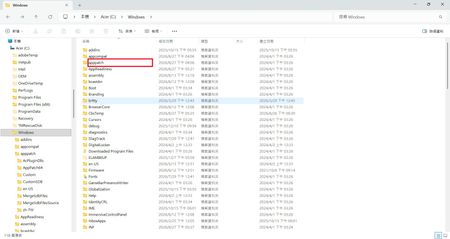
My Windows 11 25H2 laptop has an application called "Microsoft Windows Application Compatibility fix Database" that inexplicably appeared in "Settings" → "Applications". It was installed around 4 PM today; I didn't click on any applications, it just suddenly appeared. Does anyone know what this application is? Its location is C:\Windows\AppPatch, and the modification date has also changed.17KViews4likes10Comments