calendar
159 Topics
Microsoft Places individual desk booking is not working
Hi, Following the documentation, https://learn.microsoft.com/en-us/microsoft-365/places/configure-desk-booking, I successfully ran the shared command lines without any errors. However, on Microsoft Places, I am unable to see individual desks appear; only desk pools are visible. Has anyone managed to get this to work? Thanks,2.4KViews2likes20Comments
Prevent Microsoft 365 meeting invites from automatically appearing in users’ calendars
Hi All, We are trying to prevent Microsoft 365 meeting invites from automatically appearing in users’ calendars as Tentative until the user explicitly accepts the invite. Setting for Outlook Classic, New Outlook and Windows or Outlook Web. Need Microsoft recommendation on this one.977Views1like4Comments
Planning a Google Workspace to Microsoft 365 Migration? What Should You Consider?
Hi everyone, Has anyone recently migrated from Google Workspace to Microsoft 365? I’m interested in knowing what challenges you faced during the migration, especially around mailbox data, calendars, contacts, user mapping, or the final cutover process. For those planning the migration, what are the key things you recommend preparing before getting started? Would like to hear your experiences and suggestions.353Views0likes4CommentsHas anyone migrated from one Google Workspace to another after a company merger?
Hi all, Our company recently went through a merger and we now have two separate Google Workspace accounts that need to be consolidated into one. I need to move everything across, emails, contacts, calendars and tasks, for all users without anything getting lost in the process. Honestly not sure where to begin. Google's native tools seem limited for something like this and I don't want to start without a solid plan. Has anyone gone through a similar consolidation? How did you handle it and is there anything you wish you had known before starting?398Views0likes3Comments
synchronising outlook calendars between accounts
Hello together, I've got 2 different 365 accounts and have the Calendar in use on both. I'm searching for a possibility to sync between the two calendars so that if in one of the calendars an entry is entered, it gets synced to the calendar on the second account that gets synced as well. The other way around as well. Any ideas? br668Views0likes3CommentsNeed to Restore PST Files to Office 365 Mailboxes - What's the Best Approach
Hey everyone, I have a task coming up where I need to restore several PST files back into Office 365 mailboxes. Haven't done this before at this scale and honestly not sure where to begin. I've looked at Microsoft's native import service through Purview but I have a few concerns: Some of the PST files are quite large — not sure how well it handles that I need to restore only specific folders for some users, not the entire PST I'm worried about data consistency after the restore Would prefer something that doesn't require too many admin roles or complex setup For those who have done PST to Office 365 restores — what approach worked best for you? Any tools, tips, or things to watch out for that you wish you knew before starting?412Views0likes4CommentsHow to share calendar from Shared mailbox to mobile app
Hi, In our organization, we have the following requirement: to create three calendars within a shared mailbox and make them visible to members on both PC and the mobile app. On the PC, they are visible, but not on the Outlook app. On the app, we can only see the main shared mailbox calendar, not the three additional ones. The goal is to visually distinguish the three types of appointments on the app. We tried using categories (tags), but the colors have to be reset for each member. Any suggestions? Thanks166Views0likes2Comments
Multi-day all-day event in Bookings calendar does not block staff availability (single-day works)
I've found a reproducible issue with Microsoft Bookings staff availability blocking. Scenario: One of my staff members went on vacation. To block her availability without removing her hours, I created an all-day event directly in the Bookings calendar covering her entire vacation week. Problem: - When I create a single-day all-day event → her time slots are correctly removed from the booking page. - When I create a multi-day all-day event (covering the full week) → her time slots still appear as available on the booking page. Expected behavior: A multi-day all-day event should block availability the same way a single-day event does. Is this a known bug? Is there a fix or ETA?173Views0likes1Comment
Reserve Calendar Time for Bookings
How do you block space out on your personal calendar such that it's only available to Microsoft bookings, and shows busy to others in your organization? I've created a personal bookings page with custom timeslots--that's working just fine. The problem is that people in my org who can see my calendar are sending calendar invites for those same timeslots, making them no longer available to the bookings page. If I add my own events to my personal calendar to mark time as busy, those slots also disappear from the bookings page. How can I adjust things such as to reserve time exclusively for Microsoft bookings and no other users at my org?147Views0likes1Comment
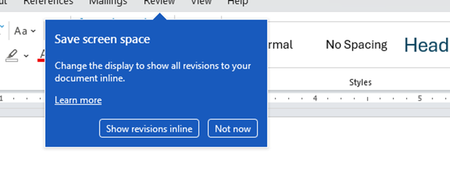
Disable incessant nagware popups
I don't know about everyone else, but I am sick and tired of the nagware pop ups in Word, Excel, PowerPoint, Outlook, etc. Every single product harasses me with pop ups trying to tell me "hey, did you know this feature was here?", "you can do this if you click that", "let me hold your hand through using products you've used for decades even though you don't want daddy Microslop to do that". This is a prime example. I keep getting the same ones again and again and again and everything I've read indicates they should only appear once. But they don't. They keep coming back like a psychotic stalker ex who wants alimony even though you were never married. How do I get this nagware to stop?!302Views1like1Comment