calendar
402 Topics
Microsoft Places individual desk booking is not working
Hi, Following the documentation, https://learn.microsoft.com/en-us/microsoft-365/places/configure-desk-booking, I successfully ran the shared command lines without any errors. However, on Microsoft Places, I am unable to see individual desks appear; only desk pools are visible. Has anyone managed to get this to work? Thanks,2.3KViews2likes20Comments
Prevent Microsoft 365 meeting invites from automatically appearing in users’ calendars
Hi All, We are trying to prevent Microsoft 365 meeting invites from automatically appearing in users’ calendars as Tentative until the user explicitly accepts the invite. Setting for Outlook Classic, New Outlook and Windows or Outlook Web. Need Microsoft recommendation on this one.808Views1like4Comments
Planning a Google Workspace to Microsoft 365 Migration? What Should You Consider?
Hi everyone, Has anyone recently migrated from Google Workspace to Microsoft 365? I’m interested in knowing what challenges you faced during the migration, especially around mailbox data, calendars, contacts, user mapping, or the final cutover process. For those planning the migration, what are the key things you recommend preparing before getting started? Would like to hear your experiences and suggestions.277Views0likes4CommentsHas anyone migrated from one Google Workspace to another after a company merger?
Hi all, Our company recently went through a merger and we now have two separate Google Workspace accounts that need to be consolidated into one. I need to move everything across, emails, contacts, calendars and tasks, for all users without anything getting lost in the process. Honestly not sure where to begin. Google's native tools seem limited for something like this and I don't want to start without a solid plan. Has anyone gone through a similar consolidation? How did you handle it and is there anything you wish you had known before starting?350Views0likes3Comments
synchronising outlook calendars between accounts
Hello together, I've got 2 different 365 accounts and have the Calendar in use on both. I'm searching for a possibility to sync between the two calendars so that if in one of the calendars an entry is entered, it gets synced to the calendar on the second account that gets synced as well. The other way around as well. Any ideas? br622Views0likes3Comments
Issues with syncing calendar from outlook calendar in taskbar
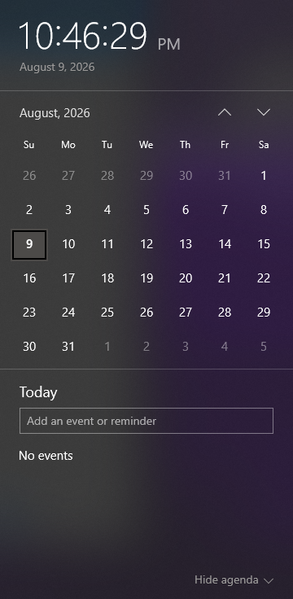
I am wondering how I can sync a specific calendar from outlook to be the one that the events get pulled from to appear in the taskbar calendar that is displayed when clicking the date/time tool. Currently the calendar that appears when I click the date and time section is blank, and trying to make a new event from that popup does not save anything. When go into the outlook calendar app, I can see the multiple email accounts and their respective calendar, but yet no events from these calendars show up when looking at the calendar popup from the taskbar. When trying to make an event in this calendar popup, it even gives me the option to save the event to one of my outlook accounts (the gmail account I have integrated), but does not successfully save any event anywhere. I am wondering what is required to be able to see the events from my outlook calendar in this popup, and to be able to quickly and conveniently make events from this taskbar popup and have them save to my actual outlook calendar. Including a screenshot of the calendar in taskbar that I am requesting help with incase of any confusion.205Views0likes3CommentsNeed to Restore PST Files to Office 365 Mailboxes - What's the Best Approach
Hey everyone, I have a task coming up where I need to restore several PST files back into Office 365 mailboxes. Haven't done this before at this scale and honestly not sure where to begin. I've looked at Microsoft's native import service through Purview but I have a few concerns: Some of the PST files are quite large — not sure how well it handles that I need to restore only specific folders for some users, not the entire PST I'm worried about data consistency after the restore Would prefer something that doesn't require too many admin roles or complex setup For those who have done PST to Office 365 restores — what approach worked best for you? Any tools, tips, or things to watch out for that you wish you knew before starting?350Views0likes4CommentsCreate event sometimes returns 201 but no Teams meeting link
Hello, I am creating calendar events through Microsoft Graph and setting them as Teams online meetings. Most of the time it works correctly, but very rarely the API returns 201 Created and the event is created without the Teams join link in the response. I have already checked the following: isOnlineMeeting is always set to true. The correct online meeting provider is being used. The issue is intermittent, not consistent. The same integration normally creates Teams meetings successfully. What I need to understand is: Why can Graph return 201 Created but still omit the Teams meeting link? Is this a known intermittent issue with event creation or Teams meeting provisioning? Is there anything I should check in the response, headers, permissions, or follow-up GET call to verify the meeting link was actually created160Views0likes1CommentHow to share calendar from Shared mailbox to mobile app
Hi, In our organization, we have the following requirement: to create three calendars within a shared mailbox and make them visible to members on both PC and the mobile app. On the PC, they are visible, but not on the Outlook app. On the app, we can only see the main shared mailbox calendar, not the three additional ones. The goal is to visually distinguish the three types of appointments on the app. We tried using categories (tags), but the colors have to be reset for each member. Any suggestions? Thanks141Views0likes2Comments
Feature request: meeting cancellation by organizer in M365 Copilot
During a recent usage of M365 Copilot, I identified a capability gap that significantly limits calendar-related automation. Current situation Copilot can: find meetings in my calendar, identify meetings where I am the organizer, interactively ask which meetings should be processed. However, Copilot is currently not able to cancel organizer-owned Outlook meetings and send cancellation notifications, although this is a natural next step in the workflow. Requested capability Cancel individual meetings organized by the user Cancel recurring meetings or selected instances Send a custom cancellation message to attendees Support bulk processing (e.g. vacation preparation) Example use case Before a planned absence, a user asks Copilot: Find all meetings during my vacation. Show only meetings where I am the organizer. Ask me for each meeting whether it should be cancelled. Cancel the selected meetings and send a predefined message such as: "Florian planned absent." This would be a valuable productivity enhancement for Outlook and Copilot users who manage large numbers of meetings. Could you please advise whether this capability is already planned, whether a feedback channel exists, or which product team would be the appropriate owner for this request?42Views0likes0Comments