azure linux
58 TopicsAzure Linux 4 is generally available
Today, we're announcing the general availability of Azure Linux 4, Microsoft's own Linux distribution, purpose-built for Azure. Azure Linux is open source, with its code and tooling on GitHub, and already powers millions of cores across Azure services, including AI workloads, Azure Kubernetes Service (AKS), App Service and Azure Cosmos DB. With this release, every Azure customer can run the OS Microsoft trusts for its own cloud, with no additional OS licensing cost. What is Azure Linux? Azure Linux is a Fedora-derived, RPM-based Linux distribution built and maintained by Microsoft. It is tailored for cloud workloads and designed with a minimal footprint for faster deployment, and a smaller attack surface. Azure Linux is not designed for desktop use or GUI applications. Why it matters Many teams run one Linux distribution on VMs, another on Kubernetes nodes and a third in container images, each with its own patch schedule and security baseline. Azure Linux gives you one consistent Microsoft-supported foundation across all of them. Optimized for Azure: validated across Azure VM SKUs and tuned for Azure compute, storage and networking, with built-in optional support for Microsoft Defender, Azure Monitor and Trusted Launch. Secure by default: a smaller attack surface, SELinux enabled by default, signed drivers, and OpenSSL 3.5 with post-quantum cryptography support. One accountable vendor: Microsoft builds the OS and runs the cloud beneath it, with predictable kernel and CVE updates. Lower cost: no additional OS licensing fee, plus faster boot and scale-out from a leaner OS. What's new in Azure Linux 4 Azure Linux 4 is the first release of Azure Linux designed as a general-purpose server OS for customer virtual machines. It moves the platform onto a modern, Fedora-based stack: Component Version What it means for you Linux kernel 6.18 LTS New hardware drivers, improved Hyper-V integration and GPU and AI accelerator support OpenSSL 3.5 Post-quantum cryptography support and improved QUIC support dnf5 New package manager Faster dependency resolution and lower memory use systemd 258 Faster boot sequences and improved service management glibc 2.42 Performance gains in string operations, memory allocation and thread handling RPM 6.0 Modernized database backend and stronger signature verification Python 3.14 JIT compiler and new language features Azure Linux 4 also supports multiple container runtimes, including containerd and Podman. Azure Linux on Virtual Machines Azure Linux 4 is now ready for production on Azure Virtual Machines and Virtual Machine Scale Sets. Whether you run web applications, databases or GPU-accelerated AI workloads, you get a consistent, secure foundation that starts. You pay only for the underlying Azure compute. Deploy your first VM in minutes from the Azure Marketplace. Azure Linux container images Today we're also announcing general availability of Azure Linux 4 container images, built from the same supply chain as your VMs. You get one Linux experience from VM to container, with the same security updates and compliance posture. Image type Use case Core Full flexibility to install any packages you need Runtime (Python, Node.js, Java, .NET) Preconfigured language stacks Distroless Minimal attack surface: no shell, no package manager All images are on Microsoft Artifact Registry. Microsoft Defender, Azure CLI and PowerShell are also available in the Azure Linux repositories. Develop locally with WSL With Azure Linux on Windows Subsystem for Linux, developers can build and test on the same OS they deploy to Azure, using familiar VS Code and CLI workflows. Partners Azure Linux 4.0 brings customers more choice in how they secure and run their workloads on Azure. Palo Alto Networks and AquaSec provide workload and container protection capabilities; Qualys helps teams identify vulnerabilities and monitor compliance; and Upwind and Wiz bring runtime visibility and cloud context to help prioritize security risks. NVIDIA broadens options for GPU-accelerated AI and compute-intensive workloads. Together, these partnerships help customers adopt Azure Linux 4.0 while retaining familiar tools, extending existing security workflows, and reducing integration effort. See the Azure Linux partner solutions documentation for each solution’s validated deployment options. Get started Azure Linux 4 gives you the foundation Azure runs on, open source and included at no additional OS cost. Deploy Azure Linux 4 from the Azure Marketplace Read what's new on Microsoft Learn Set up Azure Linux on WSL Explore the source on GitHub2.1KViews0likes0Comments
Azure Container Linux (ACL): making immutable infrastructure practical at scale
Where we left off… At Microsoft //Build 2026, we introduced Azure Container Linux (ACL) , an immutable, container-optimized OS for Azure Kubernetes Service (AKS) bringing greater consistency, reduced operational overhead, and a stronger default security posture to your nodes. Since GA, we’ve focused on helping customers operate ACL more effectively as their environments scale and security requirements evolve. Today, we’re announcing the next set of capabilities: simpler fleet scaling, hardware-backed protection for sensitive workloads, and new ways to assess code integrity and software vulnerabilities. These updates bring more of ACL’s benefits into your day-to-day operations. We’re also sharing what’s next for OS updates, an important part of making immutable infrastructure practical at scale. Stronger security shouldn’t complicate fleet management As Kubernetes environments grow, small differences between nodes become harder to track. Various platform components may install or update software independently, and non-deterministic package updates can cause hosts that started from the same baseline to gradually diverge over time. Direct changes made during troubleshooting can further contribute to this drift. These differences complicate upgrades, make incidents harder to reproduce, and create uncertainty about what is running in production. ACL addresses these challenges with an image-based operating system and a read-only /usr filesystem backed by dm-verity. Core OS components, including system binaries and kernel modules, remain consistent with the image you deployed and across your fleet, helping prevent OS-level configuration drift and potential tampering. A minimal package set also reduces the number of components you need to maintain and the potential exposure to vulnerabilities in packages your workloads don’t need. Node consistency is the foundation, but scaling a fleet also means matching capacity to changing workload needs. As your workloads grow, managing capacity shouldn’t mean spending more time configuring node pools. ACL now supports node auto-provisioning (NAP) in AKS, which automatically selects VM sizes and provisions nodes based on workload resource requirements. This is particularly useful for agentic workloads, where agents can launch parallel jobs and short-lived tasks that create unpredictable compute demand. NAP reduces manual node pool configuration and management, so you can automatically scale with demand while retaining ACL’s immutable OS protections. See Configure NAP with ACL for prerequisites and setup instructions. Layering OS protection with confidential computing and code integrity ACL provides layered protection for the operating system. As AI helps attackers analyze newly disclosed vulnerabilities and develop exploits faster than ever, the time between CVE disclosure and active exploitation continues to shrink. Immutability helps protect core OS components from modification, while SELinux restricts process access to limit the impact of a potential compromise. Trusted Launch protects the boot chain, with Secure Boot validating a signed Unified Kernel Image (UKI) that bundles the kernel, initial RAM disk, and kernel command line. Together, these controls help defend against tampering, reduce opportunities for persistence, and contain threats. Today, we’re extending these OS protections to confidential virtual machines (CVMs), combining ACL’s immutable foundation with hardware-backed protection for data in use on both Intel TDX and AMD SEV-SNP platforms. We’re also introducing FIPS-enabled CVM images for workloads that require FIPS-mode cryptography, making the ACL the only OS on AKS to offer this configuration. Alongside these protections teams need assurance that executable code comes from trusted, integrity-protected sources. Integrity Policy Enforcement (IPE) addresses this need by evaluating file-backed execution against policies based on a file's integrity properties. Originally developed at Microsoft to enforce code integrity across Azure infrastructure, IPE became part of the mainline Linux kernel in version 6.12. IPE complements SELinux by answering a different question. While SELinux controls what a process is allowed to do, IPE helps verify that the code being executed originates from trusted sources. Together, they provide both access control and code integrity protections. On ACL, support for IPE is currently focused on evaluation through an optional audit mode. ACL includes an IPE policy that permits file-backed execution only from dm-verity-backed devices with trusted root hashes. When audit mode is enabled, IPE records execution attempts that would violate the policy without blocking them, helping operators understand where workloads or operational practices diverge from a trusted-execution model. To learn more about enabling IPE audit mode in ACL and inspecting the resulting logs, see Enabling IPE for ACL. An immutable host still needs to fit your security assessment process When it comes to securing your fleet, platform teams need to assess host configurations, inventory software components, and identify known vulnerabilities using their existing tools and processes. The ACL CIS Benchmark and embedded software package inventories, published in SPDX format, support these efforts with security configuration guidance and software inventories for use with your existing security scanners. The CIS Benchmark for Azure Container Linux (ACL) is now generally available, giving teams a community-developed baseline for assessing node OS security. Its configuration recommendations help platform and security teams identify gaps, prioritize remediation, and conduct consistent reviews without defining assessment criteria from scratch. The latest benchmark can be found here: CIS Azure Linux Benchmarks. Further, Kubernetes users depend on a broad ecosystem of security scanners to assess vulnerabilities. Because ACL nodes do not include an RPM database or a traditional package manager, scanners cannot query installed packages as they would on a general-purpose OS. Instead, each ACL image now includes an embedded software bill of materials (SBOM) in Software Package Data Exchange (SPDX) 2.2 JSON format, listing the components included in the image. Scanners that integrate with this manifest can use the inventory to identify known vulnerabilities. This gives you inspectable evidence of image contents to incorporate into existing security reviews through compatible scanning tools. If you’re a security or vulnerability-scanning provider interested in integrating with ACL’s embedded SBOM manifests, reach out to: AzureLinuxPartners@microsoft.com. Bring immutable infrastructure to your fleet Today’s updates make Azure Container Linux easier to adopt and operate for containerized workloads at scale. Looking ahead, we're exploring support for A/B OS updates to further minimize upgrade disruption, reduce downtime, and simplify rollback scenarios. Stay tuned for future updates as this capability progresses on our roadmap. We’re excited to see what you build on the Azure Container Linux foundation, from established services to emerging agentic workloads. Try ACL in your AKS clusters and let us know what works well and what you'd like to see on our roadmap. Your feedback will help shape what comes next. Get started with deployment guidance and best practices at: aka.ms/azurecontainerlinux. Learn More Azure Container Linux documentation: https://aka.ms/azurecontainerlinux Azure Container Linux on GitHub: https://github.com/microsoft/azure-container-linux Azure Linux product page: https://aka.ms/AzureLinuxProduct Azure Linux documentation: https://aka.ms/azurelinux Joining the ISV partner program: AzureLinuxPartners@microsoft.com454Views3likes0CommentsMANA out-of-tree (OOT) driver for Linux LTS kernels
The Microsoft Azure Network Adapter (MANA) driver is part of the upstream Linux kernel and provides networking support for Azure Accelerated Networking. Today, we’re announcing an out-of-tree (OOT) driver, so you can use MANA on supported Linux LTS kernels without upgrading your kernel. MANA support is developed upstream in the Linux kernel, and that remains our preferred long-term model. But not every customer can move to a newer kernel quickly. Many customers maintain one standardized Linux image across Azure and other hyperscalers , and adopting a newer kernel just for Azure can mean: Building and maintaining an additional OS image Re-running security and compliance validation Changing an established patching lifecycle Waiting for Linux distribution to backport newer MANA capabilities The OOT driver gives you another option: install MANA separately and keep the supported LTS kernel you already run. How it Works? The OOT package contains the identical upstream MANA driver source, plus a thin compatibility layer that lets it build against older, still-supported LTS kernels. It is not a separate MANA implementation. Rather than upgrading the kernel, you download the source and build the MANA kernel module against the headers of your running kernel. In short: keep your kernel, install the MANA driver. Supported LTS Kernels: Linux 5.15 Linux 6.1 Linux 6.6 Linux 6.12 Linux 6.18 When to Use this OOT-Driver? If your Linux distribution kernel's already provides the MANA capabilities you need, keep using the in-tree driver. Consider the OOT driver only when: You are running a supported LTS kernel The MANA capability/feature you need isn’t available in that kernel You can’t move to a newer kernel yet You maintain a common Linux image across multiple clouds Think of the OOT driver as a bridge to the upstream driver, not a replacement for it. Support Model: The OOT driver is intended for supported, non-EOL Linux LTS kernels. Custom or heavily modified kernels fall outside the normal support scope. For long-term deployments, we recommend using the MANA driver shipped by your Linux distribution whenever it offers the functionality you need. Installing a MANA driver that is not provided or supported by your Linux distribution may affect your vendor support coverage. Before replacing the distribution-provided driver, confirm the support implications with your Linux distribution provider. Looking Ahead: MANA continues to be developed in the open Linux ecosystem, and we’ll keep working with the Linux community and distribution partners to make its capabilities available through standard kernels. At the same time, we recognize that production kernel lifecycles don’t always line up with the upstream release cycle. The MANA OOT driver helps close that gap. GitHub Link : microsoft/linux-kernel-drivers: OOT Linux driver for Azure MANA NIC333Views2likes0Comments
Built by experience: The journey to Azure Linux 4.0
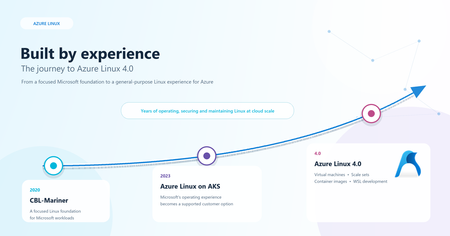
Azure Linux 4.0 builds on years of experience creating, operating, securing, and maintaining a Linux distribution for cloud-scale workloads. That journey began with CBL-Mariner, which emerged publicly in 2020 as Microsoft’s open-source Linux distribution for its cloud infrastructure and edge products and services. The distribution was built around a focused goal: provide a consistent, lightweight Linux foundation for Microsoft workloads. Over time, the scope grew. The project became Azure Linux, and in May 2023 it became generally available to customers as a container host for Azure Kubernetes Service (AKS). That was an important step: technology developed through Microsoft’s own operating experience was now available as a supported option for customers running production Kubernetes workloads. Azure Linux 4.0 is the next step in that evolution. It brings the lessons accumulated across Microsoft and AKS scenarios to a broader audience as a general-purpose server distribution for Azure Virtual Machines and Virtual Machine Scale Sets, as well as a foundation for container images. A distribution is more than a collection of packages Building a distribution involves much more than assembling open-source packages. Every package introduces decisions: which version to carry, how it interacts with the rest of the system, how changes are validated, how security fixes are delivered, and how customers move forward without unnecessary disruption. As a distribution grows, so does the long-term responsibility attached to each of those choices. Earlier Azure Linux releases were designed around focused Microsoft and container-host scenarios. Preparing Azure Linux for a broader range of customer workloads required a larger package ecosystem and a model that could remain sustainable as that ecosystem evolved. Azure Linux 4.0 uses Fedora Linux package sources as its upstream foundation, giving the team a coherent starting point, a mature RPM ecosystem, and an active open-source community. Azure Linux curates that foundation for Azure server and container scenarios rather than simply reproducing Fedora. It builds its own packages and images, integrates with Azure, and maintains its own support and release policies. The result combines a strong and sustainable upstream foundation with deliberate choices for Azure workloads. Stay close to upstream - and make differences clear Every downstream difference carries an ongoing cost. The team must understand, test, maintain, and reconsider it as upstream evolves. Azure Linux 4.0 therefore stays close to Fedora where practical. When an Azure scenario requires a difference, the team documents and intentionally scopes that difference so it remains understandable, reviewable, and maintainable over time. The same principle applies beyond package content. Azure Linux 4.0 increasingly uses familiar tools and practices from the Fedora and RPM ecosystems. This reduces the need for distribution-specific processes and makes the project more approachable to developers who already know that ecosystem. Staying close to upstream also strengthens our relationship with the open-source communities on which Azure Linux depends and helps us contribute broadly useful improvements wherever possible. Balance stability with a modern cloud platform Customers need a stable foundation, but they also need access to current cloud and developer capabilities. Hardware advances, security requirements change, and application runtimes introduce new supported versions. A lifecycle that is too short creates constant migration pressure, while one that is too rigid can leave customers waiting too long for important platform improvements. Our experience operating a distribution has taught us to treat predictability as a product feature. Azure Linux 4.0 is designed around a deliberately balanced support lifecycle: long enough for customers to plan and operate with confidence, while allowing the platform to evolve at a cadence that fits modern cloud workloads. It includes four years of full support, and its maintenance model is intended to keep routine servicing conservative while placing more impactful package changes into planned, clearly communicated refresh windows. Security updates and critical fixes continue throughout the lifecycle, while planned refreshes provide a clear path to newer capabilities and give customers time to prepare, test, and deploy changes. This model creates a dependable base without treating stability and progress as opposing goals. Built for cloud workloads Azure Linux is general purpose, but it is purposefully focused on server and cloud workloads. Customers can use the core image as-is or extend it for their applications, while its focused composition reduces unnecessary software and the security and maintenance surface that comes with it. The same foundation can support multiple Azure deployment models. Customers can use Azure Linux 4.0 on individual virtual machines, scale it through Virtual Machine Scale Sets, or use Microsoft-maintained Azure Linux container images as a starting point for containerized applications. That consistency can simplify how teams approach images, packages, security baselines, and operations across VM and container environments. From Microsoft’s workloads to yours The Azure Linux team did not begin this journey by designing a distribution in the abstract. The distribution evolved through real operating experience across Microsoft’s cloud infrastructure, edge products and services, and AKS. Those experiences shaped the priorities behind Azure Linux 4.0: Keep the base focused and reduce unnecessary components. Treat security servicing as a continuous responsibility. Make changes understandable and intentional. Stay close to upstream to improve long-term maintainability. Provide customers with a predictable lifecycle and refresh model. Design for consistent use across server and container scenarios. Make support part of the product experience rather than an afterthought. Azure Linux 4.0 brings those lessons together for a broader customer audience. It is a Microsoft-built and supported Linux option, optimized for Azure and available at no additional operating-system charge beyond the underlying Azure compute. It also remains one choice within the broad Linux ecosystem on Azure. Microsoft continues to work closely with established Linux distribution partners, and customers should choose the distribution that best fits their workload, ecosystem, and support needs. The next chapter With Azure Linux 4.0, we are bringing years of distribution engineering and operating experience to Azure customers in a new way. What began as a focused Linux foundation for Microsoft workloads expanded to a supported AKS container host and is now becoming a general-purpose option for Azure VMs, scale sets, and container images. We are excited for customers to evaluate Azure Linux 4.0, tell us what works, and help shape what comes next. Azure Linux 4.0 is currently available in public preview for evaluation and testing. Learn about Azure Linux 4.0 Deploy Azure Linux on Azure VMs and Virtual Machine Scale Sets Explore the Azure Linux open-source project578Views2likes1CommentAnnouncing Azure Linux on WSL - Beta
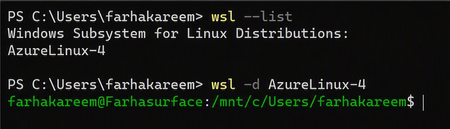
What is Azure Linux? Azure Linux is Microsoft's internal Linux distribution, designed and maintained to support Azure-scale cloud workloads. Today, Azure Linux runs across: Azure infrastructure Azure Kubernetes Service (AKS) Containerized workloads Edge scenarios Azure-hosted services With WSL support, Azure Linux now reaches another important environment: the developer workstation. Why Bring Azure Linux to WSL? A Consistent Path from Development to Production Developers often build in WSL and deploy to Azure. Differences in Linux distributions, packages, dependencies, configurations, and runtime behaviour can create environment drift and late-stage issues. One of the biggest challenges in modern development is environment drift. Teams often: Develop on one Linux distribution Test on another Deploy to something slightly different in production Azure Linux on WSL removes that gap. By bringing Azure Linux directly to the developer machine, teams can: Validate behaviour using production-aligned configurations Reproduce issues more reliably Reduce time spent debugging cross-environment differences The result: a faster, more consistent, and more predictable path from code to cloud. Azure Linux Across the Development Lifecycle Azure Linux already powers millions of cores across Azure. WSL now extends it to the start of the software delivery lifecycle, enabling teams to use one Microsoft-supported Linux foundation across development, testing, and production. Developers can use familiar tools such as VS Code and Git locally, then deploy to Azure targets including virtual machines, AKS, and containers. Not a Desktop OS and That’s Intentional Azure Linux on WSL is not designed to be a desktop Linux experience, and that’s by design. There’s no focus on GUI environments or replacing Windows on the laptop. Instead, Azure Linux remains what it was built for: A server-side operating system Optimised for cloud and container workloads Designed to run reliably at scale in Azure WSL simply makes that environment accessible locally, because today, developer machines increasingly need to mimic production. Getting Started Azure Linux on WSL integrates with standard WSL workflows: Enable WSL on your Windows machine Install Azure Linux by following the steps under the GitHub README documentation. Launch and start building in a production-aligned environment Within minutes, you have a fully functional Azure Linux setup on your local system. Start Building Azure Linux on WSL represents another step in making Azure Linux available wherever developers work. By bringing the same Microsoft-supported Linux distribution from Azure infrastructure to developer workstations, teams can build, test, and deploy using a more consistent foundation throughout the development lifecycle. To learn more about Azure Linux on WSL, see the Overview of Azure Linux on Windows Subsystem for Linux. When you're ready to get hands-on, follow the Azure Linux 4.0 on WSL getting started guide. Try it out and experience a more consistent path from local development to production.2.7KViews6likes3CommentsNow Generally Available: Built-in CIS Benchmark Auditing for Linux on Azure
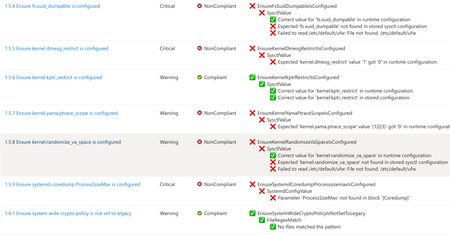
A few months ago, in From Policy to Practice: Built-in CIS Benchmarks on Azure – Flexible, Hybrid-Ready, we introduced a new way to bring Center for Internet Security (CIS) Benchmarks to your Linux estate using Azure Policy with Machine Configuration. It builds on the broader customizable security baseline policies in Machine Configuration capability. Today we're excited to share the next milestone: the audit capability for CIS Benchmarks on Linux is now Generally Available (GA). This release is officially powered by kompli - our native Linux compliance and hardening engine for CIS, STIG, and custom baselines. kompli is the evolution of the engine that drove the preview, now established as the dedicated home for this capability going forward. What "GA" means for you The audit experience is now ready for production use. You can continuously assess your Linux workloads against official, CIS-certified benchmarks - at scale, across Azure and hybrid environments through Azure Arc - and get clear, CIS-style compliance reporting directly in Azure Policy and Azure Resource Graph. If you've read the previous post, the how hasn't changed, so we'll keep this one short: Automated compliance assessment - continuously monitor Linux systems against official CIS benchmarks. Tailored benchmarks - customize evaluations with exceptions and custom parameters, no code changes required. Compliance reporting - detailed, CIS-style reports across your fleet. Hybrid-ready - the same baselines apply to Azure VMs and Arc-enabled servers on-premises or in other clouds. All supported benchmarks are CIS Benchmark Assessment Certified and stay in parity with the content published on the CIS website. Supported distributions and benchmark versions With this release, audit is GA across the following distributions, covering Level 1 + Level 2 Server profiles: Distribution CIS Benchmark Version(s) Profiles Audit Ubuntu 20.04 / 22.04 / 24.04 LTS + Pro v3.0.0 / v2.0.0 + v3.0.0 / v1.0.0 L1 + L2 Server ✓ Red Hat Enterprise Linux 8 / 9 / 10 v3.0.0 + v4.0.0 / v2.0.0 / v1.0.1 L1 + L2 Server ✓ AlmaLinux 8 / 9 v3.0.0 + v4.0.0 / v2.0.0 L1 + L2 Server ✓ Rocky Linux 8 / 9 v2.0.0 + v3.0.0 / v2.0.0 L1 + L2 Server ✓ Oracle Linux 8 / 9 v3.0.0 + v4.0.0 / v2.0.0 L1 + L2 Server ✓ Debian 11 / 12 v2.0.0 / v1.1.0 L1 + L2 Server ✓ SUSE Linux Enterprise 12 / 15 v3.2.1 / v2.0.1 L1 + L2 Server ✓ AKS Optimized Azure Linux 3 v1.0.0 L1 + L2 Server ✓ This GA covers the audit (assessment) capability. Looking ahead, STIG benchmarks are coming next, followed by a granular per-rule auto-remediation capability with dynamic scope assignments. You can run these benchmarks against your own hardened images, against CIS hardened images, and against custom images built on top of vanilla distros — as long as /etc/os-release retains its original content. We're also working with vendors to minimize deviations. Getting started Open Azure Policy in the Azure portal. Under Authoring, select the new Machine Configuration blade. Choose Official Center for Internet Security (CIS) Benchmarks for Linux Workloads, then Modify Settings to pick the distributions you want to assess. Full documentation, including per-distribution rule details, supported parameters, and any known deviations from the official CIS toolset, is available here: Overview: CIS Security Benchmarks for Linux Workloads Per-distribution references: AlmaLinux, Azure Linux, Debian, Oracle Linux, Red Hat Enterprise Linux, Rocky Linux, SUSE Linux Enterprise, and Ubuntu - all linked from the overview page. We're building this with you As part of this GA release, we've also expanded the set of exposed rule parameters compared to the preview - giving you more out-of-the-box customization across rules and distributions. That said, our customer-driven approach still stands: we keep the experience clean by enabling parameters based on real demand, so if there's a rule, benchmark version, or distribution you'd like parameters enabled for - or any feedback on rules, evaluations, or distro coverage - let us know: Open a GitHub issue in the kompli repository Open an Azure support case Try it out, tell us what you think, and help shape what we build next.688Views1like0CommentsAnnouncing the Open-Source Release of ML Video Codec (MLVC)
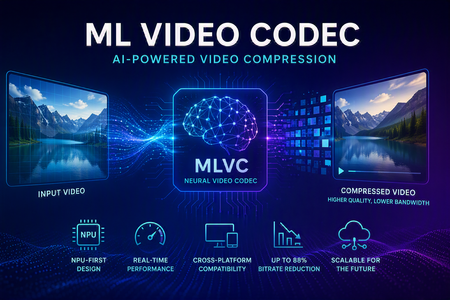
Video codecs compress video for transmission or storage, reducing bandwidth and storage requirements. MLVC is a modern machine-learning-based codec that uses substantially less bandwidth than conventional codecs, improving streaming and video-call quality—especially on constrained or unreliable networks—while lowering delivery and storage costs. MLVC is the product iteration of DCVC (Deep Contextual Video Compression) family of NVC (Neural Video Codec), open sourced by Microsoft Research since 2021, with improved compression efficiency, real-time performance on commodity Neural Processing Units (NPUs), and cross-platform support. We recently published this work in the paper MLVC: Multi-platform Learned Video Codec for Real-World Deployment. We are releasing the source code because we believe the next generation of video coding will be built openly, and we want the broader community — researchers, video codec engineers, platform vendors, product teams, as well as general developer community — to build it with us. Why MLVC Traditional video codecs (e.g., H.264/AVC, H.265/HEVC) have served the industry for a long time, but each generation requires enormous engineering effort for incremental gains and needs dedicated hardware which takes years to become commonly available. MLVC replaces conventional primitives — motion estimation, transforms, entropy modeling — with end-to-end learned neural compression, trained directly against rate-distortion objectives, and run on general-purpose NPU devices. The table below compares MLVC to popular video codecs, showing its lower bitrate and resulting savings in bandwidth and storage. Resolution vs H.264 vs H.265 360p 87.8% 75.5% 540p 82.7% 65.4% For example, for 360p video at 30 fps, where H.264 requires 1 Mbps, MLVC requires roughly 122 kbps for equivalent quality — about one-eight the bitrate under real-time conditions. The inference compute was kept approximately equal for the 360p and 540p resolutions. These results are based on a P.910 subjective test and are based on the Video Conferencing Dataset (VCD) dataset that we developed and also recently released as an open-source project. The following video demo illustrates the extent of quality enhancement achieved by MLVC relative to H.265/HEVC at the same bitrate of 200kbps (please watch by opening in a new window for better demonstration) \ Beyond video compression efficiency, MLVC also offers: NPU-first design. MLVC is built to run almost entirely on the AI accelerators already shipping in modern devices — Apple Neural Engine, Qualcomm and Intel NPUs — at no more than 50% NPU utilization, leaving NPU headroom for the rest of the system. Real-time execution at the targeted operating points. Demonstrated 540p at 30 fps on Apple, Intel, and Qualcomm hardware. A scaling-law trajectory. Empirically, MLVC's coding efficiency improves with increased model capacity and additional training compute. Content-adaptive behavior out of the box, without hand-tuned Rate Distortion Optimization heuristics. Already running in Microsoft Teams MLVC is more than just a research concept for Microsoft. We are currently rolling it out in Microsoft Teams, where it is being validated on real peer-to-peer video calls with active telemetry and A/B testing. The integration runs alongside fallback to conventional video codecs for hardware or reliability constraints — the kind of mixed-environment deployment that real products need. The scaling and reliability insights from this rollout are shaping the codec and its roadmap. We welcome your contributions We can not cover every use case, every device class, or every content domain by ourselves. That is why we are open sourcing MLVC. If you work on: Streaming, Video On Demand (VOD), or live broadcast Real-time communication and conferencing Cloud gaming or remote rendering Surveillance, drones, or robotics Mobile capture, Augmented Reality (AR) / Virtual Reality (VR), or volumetric video Codec hardware, NPUs, or inference runtimes We would love your help. Contributions of all kinds are welcome, including model improvements, training recipes, new platform ports and conversion targets, runtime backends, domain-specific fine-tunes, evaluation tooling, bug reports, and feedback on what is missing for your scenario. We particularly welcome platform ports that expand NPU coverage and efficiency improvements that push the rate-distortion frontier. What's in the release The MLVC repository is available at https://github.com/microsoft/mlvc and shared under the MIT License. It includes: MLVC model source code of the full network architecture. Trained model weights ready to run. Training scripts used to produce shipping models. Training data collection documentation to help reproduce and improve MLVC. Platform conversion scripts to target different NPUs and runtimes. Issues and pull requests will be open from day one. A follow-up release will add a C++ codec library, simplifying integration into real-world applications. Where we're heading Our long-term goal with MLVC is to create an open, learned video codec that meets or exceeds the coding efficiency of the best conventional codecs across the full range of video content, runs efficiently on the AI hardware already shipping in client and cloud devices, scales with compute the way modern ML systems do, and evolves in the open at the pace of the ML community rather than the pace of standardization cycles. In the near term that means stabilizing 540p real-time performance, expanding hardware coverage, and improving loss resilience. In the medium term: higher resolution, e.g., 1080p, and broader streaming scenarios. In the long term: an open video codec ecosystem that meaningfully replaces legacy stacks where it makes sense to. We can't create the future of MLVC alone. We're glad you're here, and we are looking forward to building the next-generation video codec with you. Who are we MLVC is brought to you by the following awesome folks working on the project at Microsoft: Ross Cutler, Ando Saabas, Tanel Pärnamaa, Ardi Loot, Haiyan Xie, Lauri Ehrenpreis, Andrei Znobishchev, Martin Lumiste, Evgenii Indenbom, Yan Lu, Bin Li, Jiahao Li, Naba Kumar, Babak Naderi, Juhee Cho, Badal Yadav, Jinxin Zhou, Tianyu Ding, Patrick Gregory. — The MLVC Team, Microsoft17KViews0likes5CommentsIntroducing kars - an Agent Reference Stack for Kubernetes
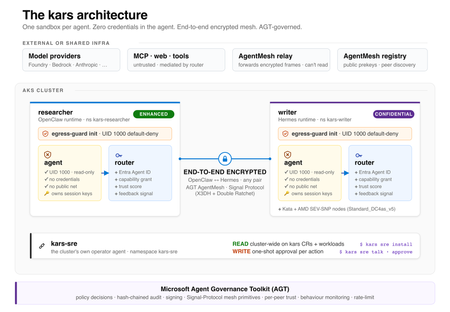
kars is an open-source, Kubernetes-native runtime for AI agents on Azure. It treats every agent as untrusted code - per-pod kernel isolation, zero credentials in the agent process, and an end-to-end encrypted inter-agent mesh - and governs agents on any framework with one set of Kubernetes policies via the Microsoft Agent Governance Toolkit. kars dev runs a governed agent on your laptop in minutes.2.9KViews1like2CommentsWhat IT teams need to know about Linux Secure Boot certificates expiring in 2026
If your organization does not use UEFI Secure Boot on Linux systems, this transition does not affect your boot path. You can stop reading now. If you do use Secure Boot, here is what you need to know. The Microsoft Corporation UEFI CA (Certificate Authority) 2011 expires on June 27, 2026 (June 26 local time in some time zones). Expiration alone does not stop anything from booting and does not render a system insecure. Existing 2011-signed shims keep working on systems that still trust the 2011 CA. The real risk is narrower: once an operating system vendor ships a shim signed only by the Microsoft UEFI CA 2023, any system whose firmware does not already trust the 2023 CA will fail to boot. The work for you is to confirm, before that update reaches your systems, that your systems trust the 2023 CA. If you want the history of why a Microsoft certificate sits in the Linux Secure Boot path at all, skip to the end. Terms used in this post You may see three Microsoft Secure Boot certificate authorities discussed in 2026 guidance. This post focuses on the Microsoft UEFI CA 2011, which is the CA used for third-party UEFI boot applications such as the Linux shim. The other expiring Microsoft Secure Boot certificates are the Microsoft Corporation KEK CA 2011, which is used to authorize updates to Secure Boot databases, and the Microsoft Windows Production PCA 2011, which is used for Windows boot components. Windows systems have a separate update path for those certificates; this post covers only the Linux boot chain. The 2023 update also separates two uses that were both covered by the Microsoft UEFI CA 2011. The Microsoft UEFI CA 2023 is for third-party UEFI boot applications, including the Linux shim. The Microsoft Option ROM UEFI CA 2023 is for third-party option ROMs, such as firmware on some add-in cards. This post is about the Linux bootloader path, but physical systems that rely on signed option ROMs may need to check that path too. Microsoft began returning 2023-signed Linux shim binaries to operating system vendors in October 2025, and since then a submitted shim comes back signed by both the 2011 CA and the 2023 CA. Once the 2011 CA expires, Microsoft can only sign with the 2023 CA. In UEFI Secure Boot terminology, db is the allowed signature database, dbx is the forbidden or revoked signature database, and KEK contains keys that can authorize updates to db and dbx . SBAT is a shim ecosystem mechanism for revoking boot components by generation. SBAT is related to Secure Boot revocation, but it is separate from the CA expiration itself. For brevity, the rest of this post uses operating system vendor to include Linux distributions and other vendors that ship and support Linux boot components. Microsoft returns signed shims to that submitting operating system vendor. It does not push shim updates to end users or IT departments. Those reach systems through the normal operating system, package, image, or platform update channels. What is not happening Expiration is not revocation, and it does not cause an immediate boot failure. The 2011 CA expiring does not make existing 2011-signed shims stop booting on June 27, 2026. UEFI Secure Boot validates a signature against the trust database and revocation state, not against the certificate's validity period. The image-validation process in the UEFI specification bases the decision on whether the image's hash or signing certificate is present in the authorized database ( db ) and absent from the forbidden database ( dbx ). It does not check whether the certificate has expired. Firmware bugs are always possible, but expiration by itself should not invalidate an already-signed shim. There is also no current plan to revoke the Microsoft UEFI CA 2011. Expiration means Microsoft can no longer sign new binaries with that certificate. Revocation would mean telling systems not to trust binaries signed with it. Revocation is not the plan. For the same reason, do not remove the 2011 CA from a system's Secure Boot db . Removing it strips that trust path. Removal is not required for this transition, and existing boot components may still depend on the 2011 CA. No operating system vendor has to move to a 2023-signed shim on the expiration date. An operating system vendor may keep shipping a 2011-signed shim (if one is available), ship a 2023-only shim, or ship one carrying both signatures. That decision belongs to the operating system vendor. What can break The failure case is a mismatch between the shim signature and the firmware trust database. The moment to worry about is not the expiration date. It is when a system first receives a 2023-only shim. That leaves a remediation window: the time between the expiration date and the first 2023-only shim reaching a given system. How long it lasts depends on your operating system vendor's packaging decisions, any security fix that forces a new shim release, and how easily you can update firmware or VM Secure Boot state on the affected platforms. The transition comes down to one table: Firmware trust database 2011-only shim 2023-only shim Dual-signed shim 2011 CA only Boots, but depends on continued 2011 trust Does not boot Should boot 2023 CA only Does not boot Boots Should boot Both 2011 and 2023 CAs Boots Boots Boots The table is deliberately simple. Real systems also have dbx revocations, SBAT policy, firmware bugs, operating system vendor packaging choices, and platform-specific update paths. But this is the core compatibility problem. Dual-signed shims help bridge the transition, because the same shim can validate through either CA. However, they are not a guarantee. Some firmware mishandles multiple signatures and evaluates only one of them, revocation and vendor support still apply, and the operating system vendor decides whether to ship and support a dual-signed shim at all. This kind of failure happens early, before the operating system loads. Recovery means restoring a trusted boot path or following your operating system, hardware, or platform vendor's recovery guidance. It is not a package rollback inside a running system. Who should pay closest attention This transition matters most where the operating system, firmware, and update path may not move together. If you run a maintained operating system on maintained hardware or a maintained virtualization platform, the normal vendor update path may handle most of it. Closer attention is worthwhile where that path is missing, delayed, customized, or hard to validate. Older hardware is the first case. Some systems need a firmware update before they can trust the 2023 CA, and support can vary by model even within one hardware vendor's portfolio. Check each model you operate rather than assuming one answer covers the fleet. Long-lived virtual machines are the second. VM firmware is still firmware. A VM's Secure Boot state depends on when it was created, which platform firmware it uses, and which UEFI variables have changed since. Firmware is not just another package update, so a long-lived VM may never have received the relevant firmware or database updates unless the administrator or platform applied them. Your cloud or virtualization provider should be able to say how the 2023 CA is handled for new VMs, existing VMs, and imported or custom images. For Azure Trusted Launch and Confidential VMs specifically, Microsoft has published guidance on identifying and updating affected instances. Older operating system releases need more careful validation. Some lack current Secure Boot tooling, current fwupd daemon behavior, or a supported path for updating UEFI trust databases. A command that works on one release may not be supported on another. Custom fleets are their own category: systems built from custom images, frozen package mirrors, pinned bootloader versions, or local Secure Boot policy changes. The more an environment differs from the vendor's default update path, the more you need to verify the actual firmware trust database and installed shim directly. Smaller operating system vendors and long-tail distributions are worth checking too, especially if they submit shim updates infrequently or have not finished their 2023 signing transition. No single authoritative public list tells you which releases have completed this work. Who is responsible for what There is no single Linux Secure Boot owner who can make every system safe for the transition. The operating system vendor controls which shim and boot components it ships. It also controls whether its update process checks the firmware trust database before installing a 2023-only shim. The Linux community runs a community-driven shim-review process for shim submissions. That process is the primary review gate before an operating system vendor requests a Microsoft signature. It is not a support channel for individual systems or fleets. The hardware vendor, firmware vendor, or virtual machine platform controls which trust anchors are present by default and how firmware updates are delivered. In a physical machine, that may mean a BIOS or firmware update. In a VM, it may mean platform firmware defaults, guest-visible UEFI variables, or a provider-specific remediation process. Microsoft controls the Microsoft UEFI signing service and the Microsoft UEFI CAs. After shim-review approval, Microsoft verifies the submitter's relationship to the operating system vendor, runs some additional checks, signs submitted shims, and returns the signed artifacts to the submitting operating system vendor. Microsoft does not choose when each operating system vendor ships a new shim to its customers. Your organization controls the systems it administers. In practice, that means checking whether Secure Boot is enabled, checking which certificates are trusted, following guidance from the relevant operating system vendor, and following guidance from the hardware vendor or VM provider. This is why the right answer for any specific system depends on its operating system vendor, hardware vendor, and platform. This post explains the model. Only those vendors can tell you what is supported for your systems. What to check The exact commands vary by operating system vendor, package set, and platform. Treat the examples below as illustrations, not guaranteed instructions for every Linux system. IT departments should validate commands against vendor documentation before using them in production automation. At fleet scale, the useful starting point is an inventory rather than a one-time manual check. Useful fields include whether Secure Boot is enabled, which Microsoft UEFI CAs are present in the firmware trust database, which CA signed the installed shim, the operating system release, the hardware model or VM platform, the update channel, and whether the system comes from a custom image or vendor image. Set up representative canary systems before any broad rollout. A canary set should cover the differences that matter in your fleet: hardware model, VM platform, operating system release, image lineage, and update channel. The aim is to avoid discovering a firmware or shim mismatch for the first time during a broad production update, not to build a new certification program. First, check whether Secure Boot is enabled: sudo mokutil --sb-state If Secure Boot is disabled, this certificate transition does not affect that system's current boot path. Next, check which Microsoft UEFI CAs are in the firmware trust database: sudo mokutil --db Look for entries such as: Microsoft Corporation UEFI CA 2011 Microsoft UEFI CA 2023 If both are present, the system is prepared for a future 2023-signed shim. If only the 2011 CA is present, check guidance from the relevant operating system vendor and platform provider before accepting a 2023-only shim update. On physical systems, also check whether the platform relies on signed third-party option ROMs. Those may require the Microsoft Option ROM UEFI CA 2023 in addition to the Microsoft UEFI CA 2023 used for boot applications. This is another reason hardware guidance can vary by model. Administrators can also inspect the signature on the shim currently installed on a system. On Enterprise Linux and related distributions, pesign is often used: sudo dnf install pesign sudo pesign -S -i /boot/efi/EFI/<vendor-or-distribution>/shimx64.efi On Debian, Ubuntu, and related distributions, sbverify from sbsigntools is often used: sudo apt install sbsigntools sudo sbverify --list /boot/efi/EFI/<vendor-or-distribution>/shimx64.efi The path to shim may differ. Some systems use a different EFI path, a different architecture suffix, or a different bootloader arrangement. Vendor documentation is the right source for exact commands. How updates may be delivered Many operating system vendors use the Linux Vendor Firmware Service (LVFS) and fwupd for firmware-related updates, including some UEFI Secure Boot database updates. Not every vendor enables the same tooling, and not every platform supports the same update mechanism. Common examples include: sudo fwupdmgr update sudo fwupdmgr security sudo fwupdmgr get-devices Some systems may require a firmware update from the hardware vendor. Some may support a standalone UEFI database update. Some may not support a safe standalone update at all. Some hardware and firmware vendors block standalone database updates because earlier failures showed that the update could break systems. Updating the Secure Boot allowed signature database ( db ) also depends on authorization from keys in KEK . That is one reason these updates often require cooperation from the firmware, hardware, or VM platform vendor. Administrators should not assume that possession of a certificate file is enough to update a system safely. Do not force a Secure Boot database update just because a command exists. Follow the guidance for the specific hardware, VM platform, or operating system vendor. Forcing an update can force a physical reboot of a machine or destroy the system. After the first inventory pass, keep watching the operating system vendor's security advisories and bootloader package updates. Questions for your vendors The right questions depend on the system, but these are the kinds of answers IT departments should look for from operating system vendors, hardware vendors, and VM providers: Does this operating system release currently ship a 2011-signed, 2023-signed, or dual-signed shim? If the vendor plans to ship a 2023-only shim, will the update process check whether the system trusts the 2023 CA before installing it? How is the Microsoft UEFI CA 2023 delivered for this hardware model, VM platform, or image? Is a standalone Secure Boot database update supported, or must the update arrive through a firmware update? Does support vary by hardware model, firmware version, VM generation, image type, or operating system release? What should administrators monitor for shim, GRUB, SBAT, db , KEK , or dbx updates related to this transition? What is the recommended validation path before broad deployment? What is the supported recovery path if a system receives an incompatible shim or firmware update and fails to boot? What to do now If an IT department administers Linux systems that use Secure Boot, the useful work is straightforward: Use the checks above to inventory Secure Boot state, trusted CAs, and installed shim signatures across representative systems. Identify the parts of the fleet most likely to diverge from default vendor paths, including older hardware, long-lived VMs, older operating system releases, custom images, and pinned bootloader packages. Read operating system, hardware, and VM provider guidance before accepting 2023-only shim updates or applying firmware and Secure Boot database updates. Test representative canary systems before rolling out shim or firmware changes broadly. Monitor operating system vendor advisories for shim and bootloader updates related to the transition. Avoid forcing low-level firmware or UEFI variable updates unless vendor guidance says to do so. How Linux got here UEFI Secure Boot was introduced to let firmware verify boot components before executing them. The firmware contains a trust database. If a bootloader is signed by a trusted certificate and is not blocked by revocation policy, the firmware can execute it. In the PC ecosystem, Microsoft has long operated the signing infrastructure used by Windows and by many third-party UEFI boot components. Linux operating system vendors do not have Microsoft sign the Linux kernel directly. Instead, they use a small first-stage bootloader called shim. The Linux shim is signed by Microsoft so firmware will start it. The shim then validates the next boot component, usually GRUB or another vendor-controlled bootloader, using keys controlled by the operating system vendor, not Microsoft. That structure lets Linux operating system vendors participate in the UEFI Secure Boot ecosystem while keeping control over their own boot chains. The shim code is developed publicly, and shim signing uses the community-run shim-review process before the Microsoft signing step. That split is important. The Linux community reviews shim submissions, and Microsoft operates the signing service that applies a signature firmware will trust. The certificate rotation affects this first handoff. Firmware must trust the CA that signed shim. If a future shim is signed only by the 2023 CA, the firmware needs the 2023 CA in its trust database. A system that keeps booting with a 2011-signed shim is not automatically broken or insecure on the expiration date. A system that moves to a 2023-signed shim needs to trust the 2023 CA; plan for that transition.2.7KViews2likes0CommentsAnnouncing Azure Linux 4.0: Purpose-Built for Azure, Now in Public Preview
Today at Microsoft Build, we're announcing the public preview of Azure Linux 4.0 - Microsoft's first party Linux distribution, purpose-built for Azure. Azure Linux 4.0 is available now for Azure Virtual Machines, VM Scale Sets, and container images – with Azure Kubernetes Service (AKS) support and Windows Subsystem for Linux (WSL) coming soon after. Why Azure Linux Running Linux on Azure often involves a mix of distributions - one for VMs, another for Kubernetes nodes, a third for container base images, and sometimes something different on developer machines. That flexibility is powerful, but it can also introduce operational overhead: multiple patch schedules to coordinate, multiple security baselines to validate, and more moving parts for SRE and security teams to stay ahead of. A more consistent baseline - especially one with a smaller footprint - can help reduce exposure and simplify day‑to‑day maintenance Azure Linux was built with that principle in mind: a single, Microsoft-supported Linux foundation designed to work across every Azure compute surface. From kernel updates to CVE patches, Azure Linux is built and maintained by Microsoft with a predictable update cadence designed around Azure infrastructure. Azure Linux is included with Azure compute at no additional cost. What Is Azure Linux 4.0 Azure Linux is a Fedora-derived, RPM-based Linux distribution built and maintained by Microsoft. It is open source, free to use, and optimized specifically for Azure. Minimal by choice, secure by default; Azure Linux ships only the packages required for cloud workloads. Azure Linux is built exclusively for cloud and server workloads, it is not intended to support desktop usage or GUI applications. Azure Linux already powers millions of cores across Azure's internal services, including AKS, Azure SQL, Azure Cosmos DB, and many others. With 4.0, we're bringing the same OS - same security posture, same performance tuning, same operational simplicity - to every Azure customer. When Azure Linux 4.0 reaches General Availability, you can expect seamless integration with the Azure services you already rely on, including: Microsoft Defender for Cloud - vulnerability assessment and threat detection Azure Monitor - telemetry, logs, and performance monitoring Azure Migrate - discovery and migration tooling Trusted Launch and Secure Boot - hardware-rooted security Azure Portal, CLI, ARM, Bicep, Terraform, Ansible -deploy and manage with your existing tools What's New in Azure Linux 4.0 Component Version What Changed Kernel 6.18 LTS Azure-tuned with new hardware drivers, improved Hyper-V integration, GPU/AI accelerator support Package Manager dnf5 Complete rewrite from python to reduce dependencies, faster package resolution, lower memory usage glibc 2.42 This includes performance improvements in string ops, memory allocation, thread handling OpenSSL 3.5 This release includes post-quantum cryptography support, improved QUIC support, and other crypto updates. systemd 258 Faster boot sequences, improved service management Python 3.14 JIT compiler, new syntax features RPM 6.0 Modernized database backend, improved signature verification FIPS 140-3 In progress Will be available at GA. Azure Linux on Virtual Machines Deploy Azure Linux 4.0 directly from the Azure Marketplace on any Azure VM or VM Scale Set. Azure Linux images are validated across Azure VM SKUs and tuned for Azure compute, storage, and networking delivering faster VM startup and provisioning with a reduced package footprint. Whether you're running web applications, databases, or GPU-accelerated AI/ML workloads, Azure Linux provides a consistent, secure foundation with no additional OS licensing cost. You pay only for the underlying Azure compute resources. Deploy your first Azure Linux VM in minutes from the Azure Marketplace. Azure Linux on Azure Kubernetes Service Azure Linux has been the container host for AKS since 2023, already powering mission-critical Kubernetes workloads at massive scale. With 4.0, we're also introducing Azure Container Linux (ACL) an immutable, container optimized variant for environments with stricter security and compliance requirements. To learn more about Azure Container Linux, see ACL blogpost. Azure Linux (General purpose) Azure Container Linux (ACL) Update model Package-based (dnf5) Image-based, immutable, auto-updating Customization Full package management Locked-down, minimal surface Best for General AKS workloads Regulated, high-security environments SELinux Supported Enforcing by default Both options share the same kernel, security update cadence, and Azure integration; fully supported by Microsoft, end to end. Azure Linux Container Images Build and run containerized applications on Microsoft-maintained base images from the same Azure Linux supply chain. One Linux experience from VMs to containers with the same security updates, same compliance posture, and same operational model. Image Type Use Case Base Full flexibility - install any packages you need Runtime (Python, Node.js, Java, .NET) [Not available at Preview] Pre-configured for your language stack Distroless Minimal attack surface - no shell, no package manager All images are available on Microsoft Container Registry (MCR) and follow the same monthly security update cadence as Azure Linux VM images. Azure Linux on WSL Familiar Linux, optimized for Azure. Develop locally on the same Linux you run in production. Azure Linux for Windows Subsystem for Linux brings your production OS to your developer workstation, eliminating environment drift and giving your team a consistent dev-to-cloud workflow. Azure Linux for WSL will be available shortly after Build. Secure by Default, Backed by Microsoft Security is not an add-on in Azure Linux; it's foundational. Built with security in mind from day one, Azure Linux applies defense-in-depth from the kernel through to the supply chain. A reduced package footprint means fewer vulnerabilities to manage, and Microsoft's ownership of the full supply chain enables fast-track CVE response. Below is a summary of security capabilities that you should expect to see in Azure Linux at the time of general availability. Capability Details Secure Boot & Trusted Launch Signed shim, GRUB, kernel, and systemd-boot. SELinux Supported on all images. Enforcing by default. FIPS 140-3 Certification in progress. Built-in crypto module support. Kernel hardening ASLR, stack protection, seccomp, systemd service sandboxing. Supply chain security All packages and repos cryptographically signed. SBOMs published. Identity Entra ID SSH support. CVE response Microsoft-owned supply chain enables fast-track Critical/High CVE patches. Lifecycle LTS kernels maintained for lifetime of the distribution. Day-1 Ecosystem Partner Support Azure Linux already has validated support from a broad ecosystem of security, monitoring, networking, and data partners via AKS and VM support: Dynatrace — Application performance monitoring and observability Aquasec – database platform support Qualys — Vulnerability management, compliance scanning, and asset inventory Isovalent — eBPF-powered networking, security, and observability via Cilium Elastic — Log analytics, infrastructure monitoring, and SIEM/XDR Upwind — Runtime cloud security and behavioral threat detection SAP — Enterprise workload certification for S/4HANA and NetWeaver Databricks — Data and AI platform powering lakehouse workloads at scale Arm — Native Arm64 architecture support for cost-efficient cloud compute Proven at Scale Azure Linux isn't new; it has been running production workloads at massive scale across Azure's internal services and early adopters. Azure Linux has been powering production workloads at massive scale since 2022 across AKS, Azure SQL, Azure Cosmos DB, and other core Azure services along with LinkedIn and Databricks. With version 4.0, we're building on that proven foundation with a modernized stack, expanded compute surface support, and a new Fedora-derived base, bringing the same reliability our internal services depend on every Azure customer. Databricks Databricks migrated over 100,000 VMs and more than 1 million CPU cores to Azure Linux with zero customer-facing incidents. The migration eliminated separate hardened images by leveraging Azure Linux's built-in FIPS support and delivered measurable performance gains: 27% faster image pull times and approximately 5% faster query execution across their serverless compute fleet. LinkedIn LinkedIn completed a major stack upgrade, migrating to Azure Linux 3 across their infrastructure. The transition enabled adoption of configuration as code and modern kernel integration, resulting in a more resilient, secure, and future-proof environment. LinkedIn's Grid team reported significant performance improvements following the migration. Predictable Lifecycle and Updates Patch faster. Operate simpler. Azure Linux follows a clear, predictable lifecycle designed for teams running large Azure fleets: LTS kernel - Maintained with monthly CVE backports. HWE kernels - Introduced annually for new hardware platforms, GPU, and AI accelerator enablement. Predictable updates - Packages (language runtimes, tools) are refreshed in predictable windows. Between windows, only critical/high CVE patches are backported. Monthly security updates - Predictable cadence for all supported packages. For full details on the lifecycle model, kernel tracks, and package tiers, see the Azure Linux Release Cadence and Lifecycle documentation. Get Started Azure Linux 4.0 is available now in public preview. Choose the path that fits your workload: Scenario How to Start Azure Virtual Machines Deploy from Azure Marketplace via Portal, CLI, ARM, Bicep, or Terraform Azure Kubernetes Service [Not available at Preview] Set --os-sku to AzureLinux when creating a node pool Container Images Pull from Microsoft Container Registry (MCR) WSL [Not available at Preview] wsl --install -d AzureLinux Learn More //Build Session: Build, deploy, and run Linux workloads on Azure Azure Linux documentation To learn more and get started, visit aka.ms/AzureLinuxProduct Azure Linux on GitHub Release notes Joining the ISV partner program: AzureLinuxPartners@microsoft.com We're excited to put Azure Linux in your hands. Try it today and let us know what you think.15KViews7likes0Comments