audio
47 Topics
Remote Desktop Web Audio Not Passing (Correctly)
Hello! I manage an RDS farm (WEB/GW, CB, DB, HST etc) at work, and it's been working great aside from Audio Passthrough. Clients will connect to the RD Website and then launch a remote app of their choosing. However, when the client is on the remote app PC and uses their audio (via an app or just using mmsys.cpl) the remote session will just freeze and be unusable. All RDS Infra is on at least Win. Server 2019+. All GPO Settings have been properly configured, as well as collection, CAP/RAP, and browser settings. I have confirmed launching RDP (mstsc.exe) session from my local laptop to the remote app PC (through the HST) does work without any issue, so I am led to believe there is something wrong with RD Web. RD Web Client Pkg is on the latest version. Any advice is greatly appreciated as I am banging my head against the wall trying to get it to work with RD Web. Cheers233Views0likes1CommentWhen the audio pipeline decides to act up 😂🤌
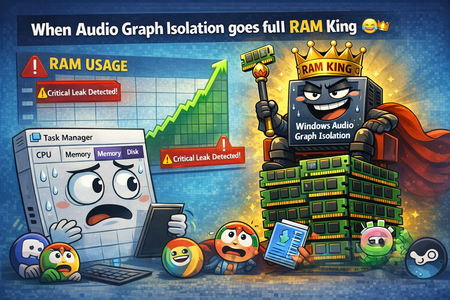
Ever since build 2820.x.x.x, I’ve been keeping an eye on one specific process — Audio Graph Isolation. And this little troublemaker 😂 sometimes decides it wants to “spice up your day.” Not by taking a few MB of RAM… Oh no, no — it goes straight for several gigabytes 😂 So you’re just sitting there, wondering why your system suddenly starts lagging, why the audio sounds like a corrupted Star Trek transmission after a virus attack 🙈😂 You open Task Manager, sort by RAM usage… And there it is, grinning at you, Audio Graph Isolation, quietly turning your system into its personal victim 🙈 How to deal with it until Microsoft finally fixes this regression? Honestly — the only thing that works is: 👉 force‑killing Audio Graph Isolation in Task Manager And boom, your system instantly gets its speed back. Unfortunately, because of this regression, you have to keep an eye on this process regularly, since the RAM leak can happen anytime during idle — whether you’re watching a movie, listening to music, or the system is just running with no user input.321Views0likes2Comments
Windows 10 LTSC 21H2 Audio Error
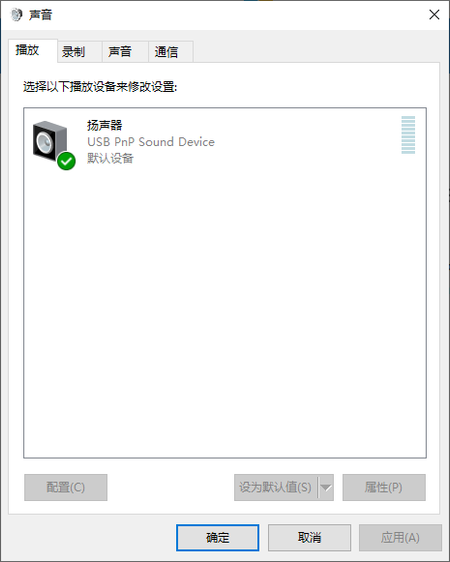
This night when I was listening to music, it suddenly didn't make any sound. I checked my Audio Settings(Right click the Speakers Icon). It didn't show my Realtek Sound Card Device, however, when I visit the DeviceManager, I could see the Realtek. How can I deal with it? I would appreciate it a lot if you could help me with the problem. Keenly anticipate your advices.715Views0likes2Comments
Audio quality when using Teams Townhall with rtmp-in.
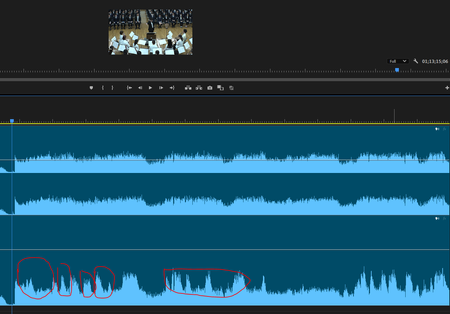
Hi everyone I have broadcast a live music (orchestra) concert using Teams Townhall with rtmp-in (using Blackmagic Design web presenter). When I checked the archive recorded on Teams, I realized that the volume of the music is being ducked automatically. All my audio sources are mixed down with a professional digital mixer before streaming to Teams so basically they have a good balanced. I have another back-up recorded data and it does not have the same problem, so i think it is caused by the algorithm of Teams, and even if I am using an external encoder?? Is there a method to fix this problem? I have compared the data recorded by the external device and teams. The ducking is quite obvious. Lower: Recorded on Teams Townhall Thank you Cheers Carson204Views1like0Comments
Blasts of white noise when using Jabra Evolve 75 SE headset.
When in a Teams call or Teams meeting after a couple of minutes I get a very loud blast of white noise in my headset. The blast is continuous and sometimes I can just about make out speech noises in it. Othertimes speech is audible but garbled like it's been scrambled somehow. If I leave and rejoin the meeting it is okay for maybe 30 seconds or so and then happens again. If I switch to another audio device (eg Laptop internal mic/speakers), even without leaving the meeting it all works fine through that device. Switch back to the Jabra and I get blasted eardrums within a minute or so. This only happens when using the Jabra, and it happens regardless of whether it is a USB, Bluetooth or JabraLink connection. The Jabra works fine with Zoom, and works fine as a bluetooth headset on my iPhone. No issues there. Only with MS Teams on Win11 System running Windows 11 Pro 10.0.22631 This headset is certified for MS Teams. Teams Software last updated 14th Oct 2024 Jabra headset with latest firmware.564Views1like0Comments
Some YouTube videos only play audio, no video, in Edge v116
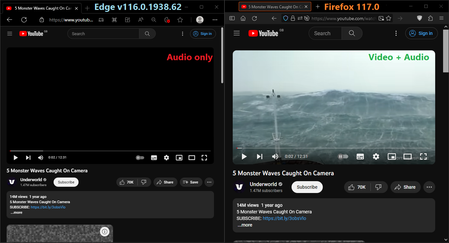
ISSUE There is an issue in the Edge 116 stable-release with some YouTube videos. Some videos that used to play without-issue in the 115 release no-longer work in the 116 release: the audio on such videos will play, but not the video. Even most adverts on YouTube are affected! Here is an example video: https://www.youtube.com/watch?v=nydwk87iEuM ("5 Monster Waves Caught On Camera" by "Underworld") Here you can see that video in the latest Edge and Firefox browsers: CODEC AND APP-VERSION INFO The "stats for nerds" YouTube feature reports the following codecs for that video: Edge: av01.0.04M.08 (397) / opus (251) Firefox: av01.0.01M.08 (396) / opus (251) And I am using the following software-versions: Edge: 116.0.1938.62 (Official build) (64-bit) Firefox: 117.0 (non-ESR) x64 Windows: 10 Home 22H2 x64 (Build 19045.3324) TROUBLESHOOTING I have already tried turning "Use hardware acceleration when available" off, and restarting Edge, but it made no-difference. I then turned it back on, but it made no-difference. In edge://flags I have tried turning "Hardware-accelerated video decode" to Disabled, but it made no-difference. Neither did changing "Choose ANGLE graphics backend" to "D3D9" (which I read on another site to try).6.5KViews2likes9CommentsHeadphone sound not working after 20230726 update
After applying these two updates, my headphone's audio stopped working. I highly suspect this is related to the recent update, since I was listening audio for the whole afternoon, and after applying the updates in the evening, it stopped working. Meanwhile, I did not install any other software. My headphone is functioning properly (tested on the phone), and the headphone's microphone is functioning on laptop (tested in a recording software, so the 3.5mm interface should not fail). The headphone's audio can be detected in the control panel, but testing it does not output any audio. I could provide more information if needed. Update: Tested on a Fedora 38 usb boot image, the audio works properly, thus the hardware part should have no issue.488Views0likes0Comments
Video error - I change the video description and it becomes audio only
Hi! I have uploaded a video to SharePoint for my colleagues, and if I don't change any information, such as the title, description, adding a thumbnail or subtitles, the video works perfectly. However, when I try to modify any of this information, Stream displays it as an audio track, with a still image (the thumbnail) on the video preview. To trick the issue i had to upload a blank empty png thumbnail that allows to shows the video behind. Im' not so happy about it. How can I solve this issue? Ironically, if I download the MP4 video from SharePoint, it opens as a video, as it should be. Thanks for the advices! Giovanni1.4KViews0likes1Comment
Audio issue with one particular user
Hello, I'm having a very odd issue with one of my coworkers. Any call my coworker is in with me, I have a tough time hearing him, his audio gets very muffled and cut off, but none of my other coworkers have this issue when they are in the same meeting. This happens when I'm in a one-to-one meeting with this coworker or a large group meeting with the coworker. It does not seem to happen when using my iPhone for the call, only when using one of my two laptops with my Bluetooth headset. Has anyone seen anything like this before? It's becoming very unproductive. I need to use live captioning anytime he's on a call to get an idea of what he is saying. My coworker has tried using his AirPods and his laptops mic/speaker and it doesn't seem to make a difference for me.1.2KViews0likes1Comment