ai agents
180 TopicsManaging apps built in Copilot Studio
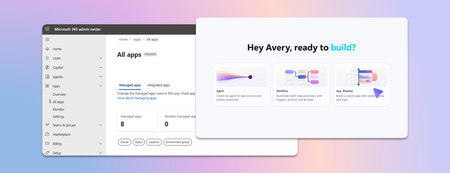
Last week we announced app building in Copilot Studio and Copilot Cowork. Makers can now describe business outcomes and produce full-stack apps with built-in source control, deployment stages, and version isolation—all on Microsoft-hosted infrastructure that requires no infrastructure provisioning, hosting configuration, or deployment pipeline. With those capabilities built in, your administrative scope is narrower and more familiar. Apps are created in the maker's personal developer environment following the environment routing policies you already have. That means things like connector permissions and data policies apply to an app both while it is being built and after it is published. Apps also access connected data on behalf of the signed-in user, which means publishing or sharing an app never grants anyone access to data they could not already reach. With these new capabilities, there are three things that every admin should be thinking about: Review your app estate Control cost with credit caps Choose where makers can build apps Review your app estate Published apps are inventoried in the Microsoft 365 admin center. Each app shows: Who built it Its lifecycle state Which data sources and connectors it uses Which policies apply to it Usage and operational metrics From the same experience, you can also block or disable a published app, remove a connector, bring an app back within policy, control whether it can be shared, and retire apps that are no longer used. Control cost with credit caps Building and running apps are both charged through Copilot Credits usage-based billing, and are metered as two separate services. This distinction lets you manage maker cost and app runtime cost independently. Build consumption varies with the language model used, the complexity of the app, and how much iteration is involved. Runtime consumption, on the other hand, varies with the volume and complexity of the tasks the app processes. At runtime, if the user holds a Power Apps Premium license, usage is included within existing request limits. Beyond those limits, or without a license, usage bills through Copilot Credits. You can learn more by reviewing the Copilot Credits licensing guide. As an admin, you can define credit cap policies to manage your costs. For both maker and runtime usage, caps are set per user, and the controls are managed through usage-based billing. For makers, think of a cap as a per-user budget: you can set the same budget for everyone, or different budgets for groups of users, such as departments that carry separate budgets of their own. Choose where makers can build apps By default, app creation is available to all users in both Copilot Studio and Copilot Cowork. However, you may want to limit where people can build apps. To do so: In the Microsoft 365 admin center, navigate to Apps, then Overview, and find ‘Choose where people can make apps’. Two paths appear: Copilot Studio, where makers build directly, which is on by default and recommended Copilot Cowork, where people create apps through chat, with availability managed by your organization's participation in the Frontier program Note that turning a path off prevents new apps being created that way. However, apps that are already published through that path will continue to run. Key takeaways for managing apps built in Copilot Studio The Microsoft 365 admin center is the one place to review the app estate, adjust app policies, and decide which creation paths stay open. Set credit caps as per-user budgets today, uniformly or by group, and plan for environment-level caps as project budgets when they arrive. Decide who is accountable for overseeing published apps before makers start publishing, as you would for any other application estate. Go to the Microsoft 365 admin center181Views0likes0CommentsChild agents and local agents in Copilot Studio
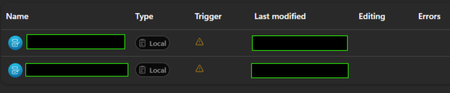
I'm AI administrator, and I have a colleague who've build an agent in Copilot Studio that uses to child agents. However on his screen they have the relationship "Local" and he can't access them or do anything. When I look at his agent, the sub agents have relationship "Child" and everything works fine. The image down below is what he sees - and the trigger also gets that orange triangle. Have anybody experienced the same? We tried to give another colleague editor permission to the agent, and that colleague experiences the same. They are both sitting at an office in another country than me.96Views0likes2CommentsIs "uncertainty" the feedback signal Copilot Studio agents are actually missing?
At today's M365 Platform Weekly session, we were asked for our input on what feedback we wish we could pull beyond thumbs up/down and verbatims. Is it trends over time, sentiment themes, the response-to-triage loop, etc. Here's an angle: What if the primitive itself is wrong? Thumbs up/down measures satisfaction after the fact. What if we measured confidence instead? How often an agent actually knows it's on shaky ground, and whether the user's reaction matches that? If an agent flags its own uncertainty at the point of response instead of a static thumbs up/down, a feedback prompt gets generated from whatever's trending in that uncertainty instead of the same generic question every time, and "trends over time" becomes "did this agent get more confident or less confident since the last update" rather than a flat satisfaction line. It might also solve the silence problem that most users rarely click anything. A reaction that's actually specific ("you caught something the agent flagged as shaky") seems easier to engage with than a binary good or bad. To be clear, confidence signals already exist in adjacent forms. Copilot Studio and most conversational AI platforms already use a confidence score internally to decide whether to answer directly, ask a clarifying question, or escalate to a human. GitHub Copilot has used a confidence score since its earliest versions too, ranking code suggestions and defaulting to the highest-scoring one. None of that is new. So rather than "add a percentage next to the answer", what if there is a specific flag pointing at the exact claim or step the agent is unsure about, feeding into the feedback loop? Curious if anyone else building in Copilot Studio has run into this: Do you ever wish your agent had hedged when it didn't? What would you actually do with an uncertainty score if you had one? And would just love others thoughts on this :)102Views0likes1Comment
Inside Orchestrated Media Intelligence: The Technology Behind Connected Media Workflows
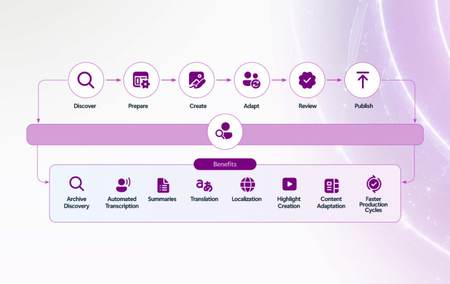
What orchestration changes Media workflows are already distributed across specialized creative, content, rights, archive, delivery, audience, and business systems. The technical challenge is not to replace those systems with one monolithic platform. It is to create an orchestration layer that can carry context, policy, and learning across them. In practice, orchestrated media intelligence connects four foundations: trusted data and metadata, specialized AI models and agents, scalable cloud infrastructure, and governance that follows every interaction. Agents can monitor state, retrieve context, recommend or initiate actions, and keep people informed. Human approval remains explicit for decisions involving creative intent, rights, brand, privacy, security, or material business impact. A reference pattern for connected media workflows Define the outcome and measurement model. Orchestration should begin with a specific business outcome, not a technology deployment. Teams should establish the workflow result they want to improve and the baseline against which progress will be measured. Telemetry should connect agent activity to outcomes such as time to market, localization cost, service reliability, incident response, inventory yield, engagement, and rights protection. The data, model, agent, and governance choices that follow are only valuable if they help achieve that result. Unify and enrich the data layer. Content assets, production metadata, rights information, operational telemetry, audience signals, and commercial data need consistent identity, access, lineage, and quality controls. Enrichment services can make archives searchable, connect live and historical context, and ground AI in enterprise knowledge. Coordinate models and agents. Different tasks require different capabilities, from language and vision models to media processing, speech, forecasting, optimization, and observability. An agent layer coordinates those capabilities, passes context between systems, and invokes workflows under defined permissions rather than treating each model as an isolated assistant. A practical example comes from Southworks, which developed an AI-powered quality control pipeline on Microsoft Azure. The solution combines deterministic media analysis with Azure AI Speech and Azure OpenAI so signal processing measures what happened, AI interprets whether a finding is meaningful, and an operator makes the final decision. This division of responsibility helps automate the first review while preserving human accountability. Embed security and governance. Identity, least-privilege access, rights enforcement, content provenance, privacy, policy, monitoring, and human review must be architectural components. Governance should travel with the data and action so an automated recommendation cannot bypass the controls that would apply to a person. How the pattern appears across the media lifecycle Creation and production: Galleri5’s AI Studio, powered by Microsoft Foundry, unifies multimodal capabilities across video generation, visual effects, 3D world building, storyboarding, asset generation, shot tracking, and post-production. Adobe extends this connected approach across creative and content supply chain workflows, while NVIDIA accelerated computing on Microsoft Azure provides the performance required for demanding generation, rendering, and visual-effects workloads. Together, these technologies connect creative tools with rights, approvals, brand controls, storage, and downstream production requirements. That connected workflow can also extend from production into rapid evaluation at scale. After rebuilding its LINK AI creative effectiveness platform on Azure, Kantar reduced ad-scoring time from as long as an hour to just a few minutes and enabled tens of thousands of ads to be evaluated within hours. Delivery and operations: Sanoma combined GPT-4o in Azure OpenAI, Finnish Meteorological Institute data, and Custom Neural Voice in Azure AI Speech to automate forecasts for 26 regions. Skyline Communications uses DataMiner and Microsoft Azure to provide a unified operational view across fragmented media systems, surface service insights, recommend actions, and optimize workflows in real time. NAGRAVISION adds an intelligence-led security layer: NAGRA Venturi turns multi-source piracy data into prioritized action so teams can focus on threats with the greatest business impact. Audience and content intelligence: The Premier League Companion demonstrates how Azure and Microsoft Foundry can connect archives, statistics, live match data, and audience context. Separately, MediaKind and Microsoft are connecting live production, delivery, and audience signals so personalized experiences remain responsive during live events. Protiviti’s Sport Performance Intelligent Platform uses Azure AI technologies to unify disparate sources and expose real-time insights through a conversational experience. Design principles for technical teams Start with a bounded, high-value workflow and a measurable business outcome. Design for composability, especially where high-value technology is evolving rapidly. Use published interfaces so components can be connected, adapted, or replaced as requirements change. Keep people in control of high-impact creative, rights, security, and commercial decisions. Make identity, policy, observability, and auditability consistent across agents and systems. Design context to move across lifecycle stages without exposing data beyond its permitted use. Test for reliability, quality, latency, cost, and safe failure, not only model performance. Moving from pilot to production A practical path begins by defining the outcome, establishing a baseline, and mapping the workflow, systems, decisions, data, and controls already in place. Teams can then identify one orchestration point where shared context removes a meaningful bottleneck and introduce agents behind explicit guardrails. As the workflow proves measurable value, the same trusted data, identity, governance, and observability foundation can support additional use cases. This is the technical promise of orchestrated media intelligence: not a single model or product, but a governed, composable system that helps specialized tools work together, allows people to retain accountability, and turns intelligence from isolated task assistance into a capability that improves across the media lifecycle. For the executive perspective and the three frontier use cases, read Silvia Candiani’s companion industry blog, Orchestrating Media Intelligence: Turning AI Potential into Business Value.Retention policy for only Microsoft Copilot Chat and Copilot Studio agent transcript?
Is it possible to create a retention policy for "Microsoft Copilot Experiences" location but targeting only Microsoft 365 Copilot and Copilot studio but not Security Copilot or Copilot in Fabric?Solved96Views0likes2Comments
how to create a globally Shared ServiceNow Connector Connection in Copilot Studio
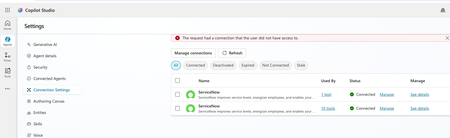
Hello, I have configured Microsoft entra ID oauth using certificate and shared this connection with everyone in my company since this is the only shared connection on the platform. https://learn.microsoft.com/en-us/connectors/service-now/#microsoft-entra-id-oauth-using-certificate. But, whey user's ( end users, agent maker, environment maker basically any user in copilot environment) are trying to use any servicenow tools ( e.g create record) which is using this shared connection in copilot studio/ teams, they are getting below error. https://learn.microsoft.com/en-us/connectors/service-now/ How to create a shared connection which can be shared across all enterprise users in my org for copilot AI agents which are using servicenow connector? Regards, Sachin37Views0likes0CommentsError Connecting Whatsapp Number (Copilot Studio to Azure ACS)
Please help. I created an AI Agent in Copilot Studio for connecting to WhatsApp. I created an Azure Communication Services (ACS) and connected my personal Facebook page to it. I created a WhatsApp Business number, I got the code, and it connected. However, when I return to Copilot studio to connect using my Azure Subscription and Resource, it says- Error connecting to WhatsApp phone number. Please try again. How do I resolve this?26Views0likes0CommentsChoosing a real-time voice architecture on Microsoft Foundry: three enterprise patterns
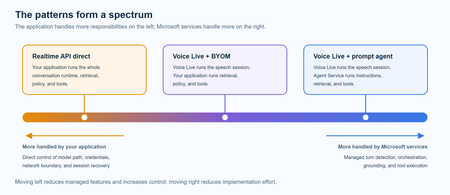
A practical comparison of three real-time voice architectures on Microsoft Foundry, including implementation tradeoffs and four enterprise release gates for residency, networking, retrieval authorization, and tool credentials.610Views0likes0Comments
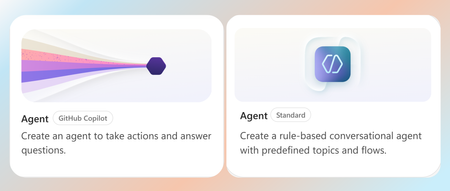
White paper: Choosing between the GitHub Copilot and Standard harnesses in Copilot Studio
The Standard harness and GitHub Copilot harness are two authoring and runtime options within Microsoft Copilot Studio. A harness is the operating layer between the model and the agent’s configuration. It determines how the model receives context, uses instructions and tools, interprets results, and moves through a task toward completion. Put simply, the model provides the reasoning capability, while the harness equips and directs it. Both harnesses are built for task-based, multi-step agents that create real business value, but they are suited to different scenarios. The Standard harness supports consistent, reliable execution of bounded business processes, while the GitHub Copilot harness extends these capabilities to longer-running, coordination-heavy, and reasoning-intensive work at a larger scale. This paper explains the key differences, tradeoffs, and scenarios to help you choose which harness is right for your business process. Read the full paper by clicking the PDF attachment below.4.4KViews0likes2Comments
How to Integrate Copilot Studio Agent with a Website Using API?
Hello Team, I have created a Copilot Agent using Copilot Studio and published it on our public website using an iframe. Currently, the agent does not have any authentication configured because we want it to be publicly accessible. However, our website development team has raised a security concern with this approach, as embedding the Copilot Agent directly using an iframe may not be the most secure or recommended approach. We are looking for an alternative integration approach. For example: Is it possible to expose the Copilot Studio Agent through an API or another secure endpoint? Can our website development team call the agent through an API, receive the response, and build their own custom UI instead of embedding the agent using an iframe? Is there any recommended architecture or Microsoft-supported approach for securely integrating a Copilot Studio Agent with a public-facing website? If anyone has implemented a similar solution or has any recommendations, I would appreciate your suggestions.154Views0likes1Comment