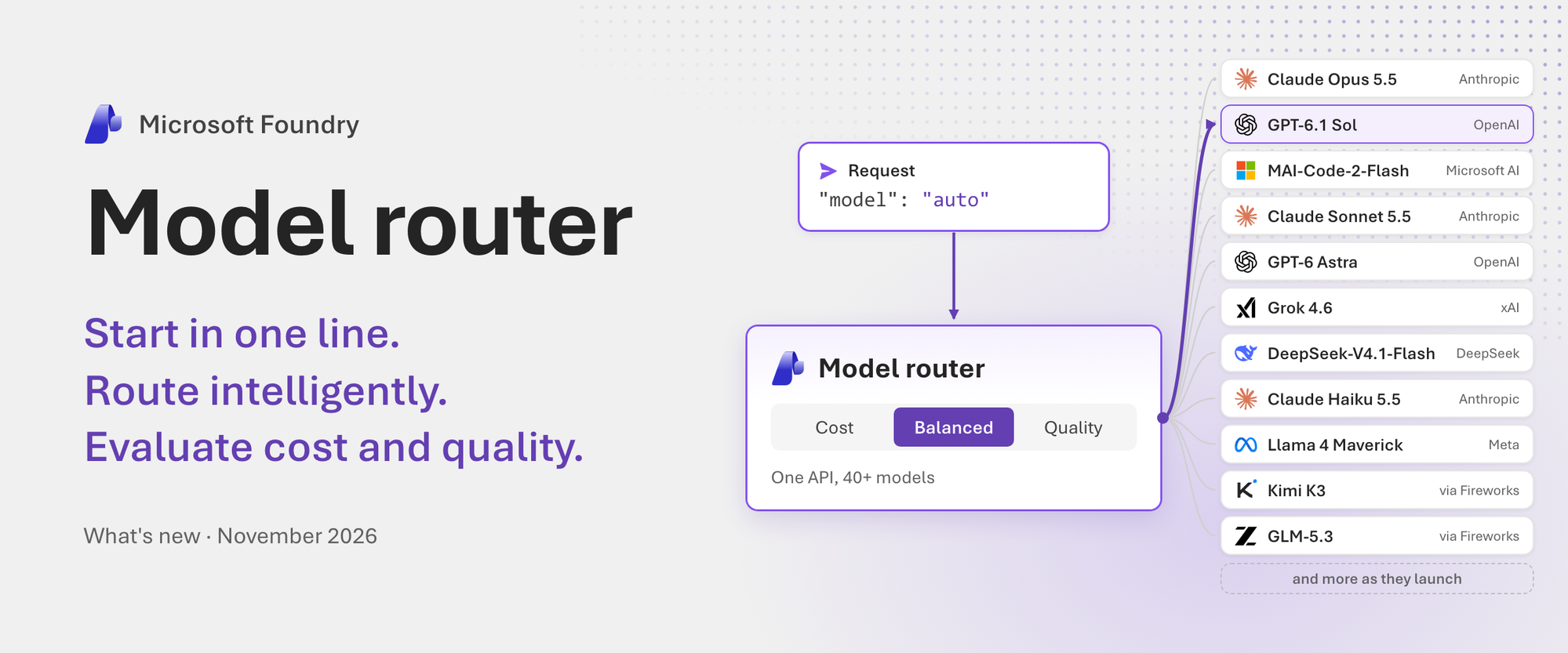
Build with model router from the agents you already use, steer requests when you need to, and evaluate cost and quality on your own workload. Here’s everything new since August.
Teams that build with AI now face a new model decision every few weeks. Each new frontier or open model brings its own price, speed, and strengths. Send every request to the most capable model, and you pay frontier prices for simple requests, which often make up much of your traffic. Default to a cheaper model, and quality can drop on the hard requests that matter most.
Agents multiply the problem. A single agent task can call a model dozens of times. Many of those calls are routine, like choosing the next tool or summarizing what it returned, and don’t need your strongest model.
Model router in Foundry Models makes that choice for you, one request at a time. Instead of choosing a model in your code, you send every request to model router, with the model set to "auto" or to your model router deployment name.
For each prompt, model router estimates how well each model would answer it. Then it picks one based on your routing mode, which sets what you optimize for: quality, cost, or a balance of the two. Simple requests can go to fast, low-cost models, and hard ones to more capable models. It weighs prompt caching too: with session affinity (preview), a conversation stays on its current model while that model’s cache is likely still warm and its quality holds up, which can lower cost and latency.
Since our August update, we’ve focused on making model router easier to adopt and easier to trust. You can start with one line of code. You can call model router from the API, agent framework, or coding tool you already use. You can route across a larger pool of models, steer a single request when you need to, and you can evaluate the results before you ship, then monitor them after.
Start in one line with Auto (preview)
Auto is model router without a deployment. Set model to "auto" in a request to your Foundry resource or project endpoint, and model router picks a model for each request. There’s nothing to deploy, and Auto works in all 32 model router regions. To run it, install the OpenAI SDK (pip install openai) and set FOUNDRY_RESOURCE_ENDPOINT and FOUNDRY_API_KEY to your resource’s endpoint and key. In production, it is recommended to use Microsoft Entra ID instead of keys.
import os from openai import OpenAI client = OpenAI( base_url=f"{os.environ['FOUNDRY_RESOURCE_ENDPOINT']}/openai/v1/", api_key=os.environ["FOUNDRY_API_KEY"], ) response = client.responses.create( model="auto", # ← That's it. Model router picks the model for each request. input="Explain retrieval-augmented generation in two sentences.", ) print(f"Model: {response.model}") # For example: Model: gpt-5.6-luna print(response.output_text)Each response identifies the model that answered. Auto is a quick way to start. When you need dedicated rate limits, your own routing mode or model subset, or Data Zone Standard processing, deploy model router and replace "auto" with your model router deployment name. The rest of your request code stays the same.
Get started: Send your first request with Auto
Use the API, agent framework, and coding tool you already have
Model router works with the APIs your code already uses: Responses (preview), Chat Completions, and Messages (preview) for the Claude models you deploy in your Foundry resource.
That makes it well suited for agents. An agent makes many model calls to finish one task, and each call needs something different. For every call, model router works in two steps:
- Filter. It checks what the request needs, such as its tools, its output format, image input, and, if you require it, every parameter you set. It keeps only the models that can serve the request.
- Rank. It reads the request, including the system message, the tool definitions, and the conversation so far. Then it ranks those models for the prompt and picks one based on your routing mode.
A greeting can go to a fast, low-cost model, and a planning step to a stronger reasoning model. With our new adaptive session affinity (preview), model router also calculates, at each step of a long agent loop, whether staying on the same model is worth it. When the previous model’s prompt cache is likely still warm and its estimated quality is comparable to other eligible models, model router may continue using that model to help improve cache hit rates. Each response identifies the model that answered, so you can trace each step of your agent.
You can bring model router to the frameworks you already build with. For example, it works with Foundry Agent Service, Microsoft Agent Framework, LangGraph, the OpenAI Agents SDK, Google ADK, CrewAI, and the Claude Agent SDK, among others. It also works in coding tools such as GitHub Copilot, Claude Code, Codex, and OpenCode. Each one needs a one-time setup that points it at your model router deployment: see how for GitHub Copilot, Claude Code, Codex, and OpenCode. After that, starting GitHub Copilot CLI on model router takes one line:
copilot --model foundry/model-routerHere's a real session, sped up. We sent the same two prompts, a one-line rename and then a multi-file refactor, to all four tools on one model router deployment. Watch the bar at the bottom of each terminal: it shows the model that model router picked for each request.
Learn more: Use the Responses, Chat Completions, and Messages APIs · Connect your agent framework or coding tool
More models, more providers: 45 and growing
Since our August update, 18 models have joined the routing pool, for 45 models from OpenAI, Anthropic, Microsoft AI, xAI, DeepSeek, Meta, and Fireworks as of November 17, 2026. The new models are:
- OpenAI: GPT-6 Astra, GPT-6 Sol, GPT-6 Luna, GPT-6.1 Sol, GPT-6.1 Terra, and GPT-5.1
- Anthropic: Claude Opus 5, Claude Sonnet 5, Claude Fable 5.1, Claude Opus 5.5, Claude Sonnet 5.5, and Claude Haiku 5.5
- Microsoft AI: MAI-Code-2-Flash
- xAI: Grok 4.6
- DeepSeek: DeepSeek-V4.1-Flash
- Fireworks: GLM-5.3 and GLM-5.3-Flash from Z.ai, and Kimi K3 from Moonshot AI
Production traffic is rarely uniform. The same app can field a short factual question, a long document, a code review, and a multistep agent task within the same hour. Matching each of those to the right model on your own means testing every new model on your workload, and it’s tempting to settle on one or two. Model router does that matching for you, request by request. Trained by Microsoft, it ranks the models that can serve each request, in order for each request to land on a model that fits it.
Deployments on the latest version (2025-11-18) that use the full pool get new models automatically (preview), with no code changes. You don’t deploy those models yourself, and you’re billed for the model selected for each request, plus any applicable model router fee. Claude and Fireworks models are the exceptions: to add Claude models to the routing pool, deploy them in your Foundry resource first, and to add Fireworks models, an admin first enables them on your subscription and accepts their terms.
Learn more: Supported models · What’s new in model router
Steer routing when you need to (preview)
Your deployment’s routing mode and model subset set the defaults for every request. Now you can also steer one request at a time. Send the Foundry-Features: ModelRouterControls=V1Preview header with a routing_config object to set the routing mode, narrow the models or pin one, or require that the selected model supports every parameter in the request.
completion = client.chat.completions.create( model="auto", messages=[{"role": "user", "content": "Review this contract clause for risks: ..."}], extra_headers={"Foundry-Features": "ModelRouterControls=V1Preview"}, extra_body={"routing_config": { "mode": "quality", "models": ["gpt-6.1-sol", "gpt-6-astra"], "require_parameters": True, }}, )Model router also does more for you across requests:
- Adaptive session affinity (preview). With the preview header, session affinity is on by default. It keeps a conversation on its previous model while that model’s prompt cache is likely still warm and its estimated quality stays close to the top-ranked model. That can lower cost and latency in long chats and agent loops, and it now works with the Responses API too.
- Your deployments serve first (preview). When model router selects a model that you’ve already deployed, with the same name and version, in the same Foundry resource, your deployment serves the request: your provisioned throughput (PTU) deployment first, for OpenAI models, and then your pay-as-you-go deployment. When your PTU deployment serves a request, it uses capacity you’ve already reserved, and the model router fee applies.
- Failover stays in your subset. When a retryable error occurs, model router first attempts to use available capacity for the same model before considering the next-ranked eligible model within your configured subset.
Learn more: Control routing per request · Keep a conversation on one model · Use your own deployments for routed requests
How model router weighs quality and cost
Lower cost only matters if the answers stay good, so quality is built into each routing decision. For each prompt, model router estimates how well each eligible model will answer it, compared with the top-ranked model. Your routing mode then sets how far from the top-ranked model it may go to save cost:
| Routing mode | What it optimizes for | How it picks* |
|---|---|---|
| Balanced (default) | Cost and quality together | The most cost-effective model within a small quality range of the top-ranked model for the prompt, for example 1–2% |
| Cost | Cost first | The most cost-effective model within a wider estimated quality range, for example 5–6% |
| Quality | Quality first | The model with the highest estimated quality for the prompt, regardless of cost |
Session affinity follows the same rule: a conversation stays on its current model while that model’s estimated quality stays close to the top-ranked model. And you can check each decision. Each response identifies the model that answered, and routing details (preview) also show the routing mode and each model that model router tried.
*Cost-effectiveness and quality are estimated based on a range of internal and external benchmarks. Benchmarks show how model router behaves across many tasks, but no benchmark knows your workload. The real test is your own prompts. Routing modes use estimated model quality to guide selection. These estimates do not guarantee the correctness of individual responses or application-level outcomes, and cost and quality results depend on your workload and configuration. We recommend that you evaluate both against your own workloads.
Learn more: How model router works
Evaluate before you ship, then monitor in production
Teams that adopt model router tend to ask three questions. Is it saving money without hurting quality? Is it healthy in production? What happened to a specific request? Foundry now helps you answer each one:
- Evaluate before you ship. Start with what success means for your workload, such as answer quality, code correctness, or task completion for agents, and choose evaluators that score it. Then, in the Foundry portal, run your model router deployment and a single-model baseline on the same dataset with those evaluators. Each run reports quality scores, P50 and P95 latency, and, for Global Standard deployments, estimated cost with a breakdown by the models that model router selected. To automate the comparison, use cloud evaluation in the Foundry SDK, or the open-source Model Router Auto Evaluation toolkit, which builds a one-file HTML report from a single command.
- Ship with Auto or your own deployment. Start with
"auto", or deploy model router with the routing mode and model subset that won your evaluation. Your code stays the same. - Watch it in production. The Monitor tab on your model router deployment, released November 5, 2026, shows requests by model, latency, cache hit rate, fallback rate, and estimated cost next to single-model baselines: what the same traffic would have cost on one model. Costs in evaluations and the Monitor tab are estimates based on list prices, so they can differ from your bill.
- Inspect any request (preview). With the preview header, responses include
model_selection_details: the routing mode that model router applied, the ordered model attempts that show any failover, and the session affinity decision.
Learn more: Evaluate model router for your workload · Monitor model router
Bring model router to AI Gateway
As AI use grows, platform teams want one place to control it: who can call which models, how much they can spend, and which capacity comes first. AI Gateway, Microsoft’s managed gateway for AI traffic, is that place: one governed entry point for their models, whichever provider serves them. Apps sign in with Microsoft Entra ID or a gateway key instead of holding provider credentials, and platform teams set token and cost limits and prefer capacity they already pay for, such as provisioned throughput.
Starting at Ignite, AI Gateway is generally available, and model router works inside it: you can turn on automatic model selection (preview) for a gateway model alias, and model router ranks the models behind that alias for each request, while the gateway applies your priorities, weights, and policies that customers define.
Your own backends serve the requests, wherever they run: Foundry or Azure OpenAI deployments, OpenAI and Anthropic, Amazon Bedrock, Google Vertex AI, or your own OpenAI-compatible endpoints for self-hosted open models, as long as each runs a model that model router supports. With Application Insights connected, gateway traces show the ranked models and the model that served each request.
Automatic model selection is in preview in AI Gateway. There’s no model router fee during the preview, and model router charges will apply at general availability. AI Gateway and backend charges still apply.
Learn more: Use model router with AI Gateway · What is AI Gateway?
We’re just getting started
Since August, model router has grown from a model you deploy into a routing layer you can reach in many ways: one line of code with Auto, the APIs and agent frameworks you already use, your coding tools, and your gateway. It chooses from more models and more providers, and you can evaluate what it does for you before you ship, and monitor it after. All of this stays within the controls your admins set. A model subset keeps routing inside the models they approve, Azure Policy checks those models whenever someone creates or updates a deployment, and admins can limit Auto to approved models, or turn it off, for each Foundry resource.
There’s more to come: new models will keep joining the pool, and we’ll keep sharing what we learn. Here’s where to begin:
| If you want to | Start here |
|---|---|
| Try model router | Quickstart |
| Pick an API, or connect your agent framework or coding tool | APIs · Agents and coding tools |
| Evaluate cost and quality on your own prompts | Evaluate model router · Auto Evaluation toolkit |
| Route through your gateway | Use model router with AI Gateway |
| See every change in detail | What’s new in model router |
| Build agents hands-on | Model router agents lab |
| Learn how model router decides | How model router works |
| See it live and ask questions | Ignite lab LAB663 · Model Mondays · Foundry Discord |
Are you already using model router? If your deployment runs the latest version with the full pool, new capabilities and models in your region join its routing automatically (preview). Deploy the new Claude models and enable Fireworks models to bring them in too, and open the Monitor tab to compare your estimated costs with a single model. Are you new to model router? Start with one line: set the model to "auto", run your own prompts, and see which models answer them. Either way, we’d love to hear what you find, at Ignite or in the Foundry Discord. Your feedback helps shape what we build next.
Features marked preview are subject to the Supplemental Terms of Use for Microsoft Azure Previews.

 Microsoft