ai agents
109 Topics
Building Permission-Aware Hosted Agents for SharePoint in Foundry Agent Service
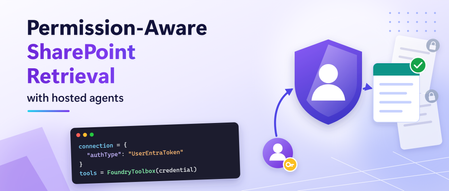
Organizations increasingly publish agents to Microsoft Teams and Microsoft 365 Copilot that answer questions using internal knowledge sources. SharePoint is a very common source for this information; where many times access is different for every user. A finance employee, HR employee, and project manager may all ask the same question but have access to different documents. When an agent is hosted in Foundry Agent Service, the agent itself runs under its own identity. This creates an important challenge: how can retrieval respect the permissions of the person asking the question rather than the permissions of the agent? This article walks through an architecture that preserves SharePoint permission trimming without requiring a custom setup, data movement or separate retrieval infrastructure. Why agent identity is not enough Hosted agents run as their own agent identity. When Foundry Agent Service runs your Microsoft Agent Framework agent as a hosted agent, it authenticates as the agent, not as the person chatting with it. SharePoint permissions belong to users. Two people asking the same question may be allowed to see different documents. So grounded answers (RAG) need per-user retrieval. If retrieval runs as the agent, SharePoint can't check the asking user's access. Results are either empty or not filtered for that user. Therefore the user's token has to reach the retrieval step. Changing the model or the prompt can't fix this. The architecture has to carry the user's identity all the way to SharePoint. This is the key architectural principle behind this solution. The hosted agent keeps using its own identity for model inference, while retrieval runs with the signed-in user's identity. What you'll build A hosted agent, published to Microsoft Teams, that answers from one or more SharePoint sites. Answers limited to what each user can open in SharePoint, using On-Behalf-Of (identity passthrough) retrieval. Clickable citations back to the source documents. Built on out-of-the-box Foundry IQ and Foundry toolbox capabilities: no custom server to host, and no client secrets in the retrieval path. The complete sample is on GitHub: SharePoint knowledge base sample Note: Remote SharePoint knowledge sources in Foundry IQ were in preview at the time this article was written. Why not Work IQ? Work IQ also retrieves as the signed-in user, and it's the right choice when an agent needs broad Microsoft 365 context. This pattern is for agents that should answer only from specific SharePoint sites, treating SharePoint as a governed knowledge source with a defined boundary. Use Work IQ when the agent should reason over a user's wider work context. Use this pattern when the agent must stay inside a defined set of SharePoint content. How it works The agent runs as itself. Retrieval runs as the user. Three pieces carry the user's identity end to end: FoundryToolbox in the agent sends the per-request call ID with each tool call, so Foundry knows which user the call belongs to. A UserEntraToken connection passes that user's Microsoft Entra ID token to the Foundry IQ knowledge base on Azure AI Search. This is identity passthrough (On-Behalf-Of): every request downstream runs as the signed-in user. A remote SharePoint knowledge source queries SharePoint live through the Microsoft 365 Copilot Retrieval API as that user, scoped to the site paths you choose. Nothing is copied into an index. Before you start Role Required permissions Setup user Search Service Contributor on the Azure AI Search service, and rights to create connections and toolboxes in the Foundry project End users Search Index Data Reader on the Search service, Foundry Agent Consumer on the agent, a Microsoft 365 Copilot licence, and access to the documents in SharePoint The Search service must be in a region that supports agentic retrieval, in the same Microsoft Entra tenant as Microsoft 365. With the concepts established, let's build the end-to-end solution. Build it in four steps The full configuration is in the sample repository. Below are only the settings that matter. 1. Create the knowledge base Run setup/create_knowledge_base.py . It creates a remote SharePoint knowledge source and a knowledge base. The setting that limits retrieval to your site is: "filterExpression": "Path:\"https://<TENANT>.sharepoint.com/sites/<SITE>/\"" 2. Connect it to Foundry with the user's identity Run setup/create_connection.py . It registers the knowledge base's MCP endpoint as a Foundry connection. The setting that matters most in the whole architecture is: "authType": "UserEntraToken" With UserEntraToken , Foundry forwards the signed-in user's token instead of a shared identity, so SharePoint can apply that user's permissions. Then run setup/create_toolbox.py . It wraps the connection in a toolbox that exposes only knowledge_base_retrieve . 3. Build the agent The agent itself is small. The key line is tools=FoundryToolbox(credential) : agent = Agent( client=FoundryChatClient(project_endpoint=endpoint, model=model, credential=credential), instructions=INSTRUCTIONS, tools=FoundryToolbox(credential), ) Two instructions in the agent's prompt made a visible difference in Teams: Cite every source as a markdown link, using the Title and uri fields the tool returns. If the tool returns nothing relevant, say that the available sources do not contain the answer. Do not guess. The first gives users clickable citations. The second stops the model from filling gaps when a user can't see a document. 4. Deploy and publish to Teams Deploy with the Azure Developer CLI ( azd up ), then publish the agent to Microsoft Teams and Microsoft 365 Copilot. The repo includes a script that also works for Foundry projects on a private network. The tool adds no separate, tool-specific consent flow for users. Prove the permission trimming A good answer doesn't prove the right permissions were used. Test with two users and one document that only one of them can open: User SharePoint access Result in Teams A Can open the document Answer from the document, with a citation link B Cannot open the document "The available sources do not contain the answer." In our testing, both users' requests reached the knowledge base, but only user A got content from the document, because the Microsoft 365 Copilot Retrieval API ran as each user. Run the test in separate conversations, and repeat it after any permission change. Common pitfalls Using a managed identity for the connection The retrieval runs as the agent's managed identity, so SharePoint has no user to check permissions against. In our testing, a ProjectManagedIdentity connection failed with x-ms-query-source-authorization is invalid . Use UserEntraToken . Forgetting Search Index Data Reader Because each user's own token reaches Azure AI Search, every user needs this role, not just you. Otherwise the user can reach the agent, but retrieval fails for them. Assign the role to a security group once, replacing SEARCH_SERVICE , RESOURCE_GROUP and $GROUP_ID with your own values: $SEARCH_ID = az search service show -n SEARCH_SERVICE -g RESOURCE_GROUP --query id -o tsv az role assignment create --assignee $GROUP_ID --role 'Search Index Data Reader' --scope $SEARCH_ID Using a custom MCP client instead of FoundryToolbox A hand-built MCP client that attaches only the agent's credential drops the per-request call ID, which links a tool call to its user. In our testing with another OAuth tool, every user ended up running as whoever had consented first. FoundryToolbox fixed it. Building a custom MCP proxy A custom On-Behalf-Of (OBO) proxy can work, but you then own its hosting, secrets, token checks and patching. The knowledge base gives the same per-user retrieval with built-in components. Get started Try it: clone the sample and follow the README end to end. Learn the building blocks: Create a remote SharePoint knowledge source Connect a Foundry IQ knowledge base to Foundry Agent Service Toolbox authentication What is a Foundry toolbox? Use a toolbox with a hosted agent Validate before rollout: use the two-user isolation checklist. Share your scenario: open an issue on the repo. Acknowledgements Thanks to Mahya Gheini and Linda Li from the Microsoft Foundry product team for their guidance on toolboxes and knowledge bases.292Views1like2CommentsDelivering Agent Skills Over MCP
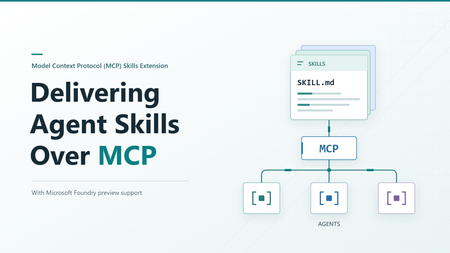
Getting a skill working with one agent is a useful start. Sharing it with other agents raises a different question: where should that skill live? You could give each agent its own copy. But when the skill changes, those copies need updating. The official Skills extension for Model Context Protocol (MCP) provides a standard way to make skills available from a server, so compatible agents can find and load them when needed. Let's look at what happens across that connection, then where Microsoft Foundry fits in. What the extension adds MCP already gives agents access to content from servers through resources. The Skills extension builds on that. It adds a way to ask which skills a server offers and get the details needed to load them. It doesn't change the skill format, and it doesn't run a skill on the server. The application running your agent, called the host, still decides how to offer skills to the user or model and load the selected instructions. Both the server and the host need the right support. Being able to call an MCP tool isn't enough to discover and load remote skills. A custom tool that returns skill text isn't, by itself, an implementation of this extension either. The extension is identified as io.modelcontextprotocol/skills . Its proposal, SEP-2640, has reached Final status. Client support is still developing, so a published specification doesn't mean every MCP host supports it yet. How an agent gets a skill The basic sequence is straightforward: find out what's available, select a skill, and read the content needed to use it. The host's MCP client handles the requests to the server. We'll follow the case where the server provides a file list, called a manifest. It includes each file's address, size, and a SHA-256 digest: a fingerprint used to check that the file received matches what the server listed. The examples below use a generic example-skill with two files. They illustrate the official message shapes, not a captured server session. They use protocol revision 2026-07-28 and include its required request metadata. The _meta block tells the server which protocol version and client capabilities apply to each request, including the client's Skills extension support. Both sides must declare support. Use a client and server that support this revision. The Foundry examples later follow its separately documented path. These examples show JSON-RPC message bodies, not complete HTTP requests. For Streamable HTTP, POST each message to the server's MCP endpoint with Content-Type: application/json , Accept: application/json, text/event-stream , and MCP-Protocol-Version: 2026-07-28 headers. Also set Mcp-Method to the body's method , such as skills/list . For resources/read , set Mcp-Name to the requested URI, such as skill://example-skill/SKILL.md . The mirrored values must match the body. See the HTTP header requirements. Find out what's available First, the server declares that it supports resources and the Skills extension. This is the relevant fragment of its server/discover response: { "capabilities": { "resources": {}, "extensions": { "io.modelcontextprotocol/skills": {} } } } The empty extension object means skills are supported, but optional directory reading isn't enabled. The client can now ask for the available skills: { "jsonrpc": "2.0", "id": 1, "method": "skills/list", "params": { "_meta": { "io.modelcontextprotocol/protocolVersion": "2026-07-28", "io.modelcontextprotocol/clientCapabilities": { "extensions": { "io.modelcontextprotocol/skills": {} } }, "io.modelcontextprotocol/clientInfo": { "name": "example-client", "version": "1.0.0" } } } } Here is a response containing one skill: { "jsonrpc": "2.0", "id": 1, "result": { "resultType": "complete", "skills": [ { "uri": "skill://example-skill/SKILL.md", "frontmatter": { "name": "example-skill", "description": "An example skill for this article." }, "resources": [ { "uri": "skill://example-skill/SKILL.md", "digest": "sha256:d2069d0f3682fea0d69e62247386e950e9ad958bab5b186b456dc1fb8266e312", "size": 138 }, { "uri": "skill://example-skill/references/notes.md", "digest": "sha256:e76b3033746e3c5d8cc970b21b15ce40f868e6902c065521a1abf373f4a19c85", "size": 58 } ] } ], "ttlMs": 300000, "cacheScope": "public" } } The resources array is the manifest. It lists both files, but doesn't contain their text. The host can show the skill's name and description without fetching either file. size counts bytes, not characters. The cache fields describe how long the result stays fresh and whether it can be shared. They aren't trust checks, and public here is a choice for this illustrative server, not a recommendation for private skill content. resultType: "complete" means this request completed, not that the server's entire catalog is in the response. If it includes nextCursor , pass that value as params.cursor on the next skills/list request. Each skill's manifest stays whole on one page. The user or model can then select a relevant skill. The host keeps track of which server it came from and its address, known as a URI. Read and load the instructions After any required approval, the host uses resources/read to get the selected skill's instructions. It checks them against the details from the listing before adding them to the agent's context, the information available to the model. The request uses the instruction URI from the listing: { "jsonrpc": "2.0", "id": 2, "method": "resources/read", "params": { "uri": "skill://example-skill/SKILL.md", "_meta": { "io.modelcontextprotocol/protocolVersion": "2026-07-28", "io.modelcontextprotocol/clientCapabilities": { "extensions": { "io.modelcontextprotocol/skills": {} } }, "io.modelcontextprotocol/clientInfo": { "name": "example-client", "version": "1.0.0" } } } } This time, the response contains the actual file text: { "jsonrpc": "2.0", "id": 2, "result": { "resultType": "complete", "contents": [ { "uri": "skill://example-skill/SKILL.md", "mimeType": "text/markdown", "text": "---\nname: example-skill\ndescription: An example skill for this article.\n---\n\nRead references/notes.md when additional guidance is needed.\n" } ], "ttlMs": 300000, "cacheScope": "public" } } The \n sequences represent line breaks in the file. Encoding the decoded text as UTF-8 produces 138 bytes. Computing SHA-256 over those bytes produces the digest shown in the first manifest entry. The fingerprint covers the file bytes, not the surrounding JSON response. Reading the file and loading the skill are different steps. An MCP resource browser could read the same file to display it to a person. That doesn't make the skill active. The host must handle the checks and approvals that come with loading it for the agent. Get supporting files when needed If the agent needs a reference or another supporting file, the host reads it from the same server using resources/read . It checks that the file is in the saved manifest and that its contents match before using it. For our example, the relative reference resolves to the second URI in the manifest. When that file is needed, the client sends: { "jsonrpc": "2.0", "id": 3, "method": "resources/read", "params": { "uri": "skill://example-skill/references/notes.md", "_meta": { "io.modelcontextprotocol/protocolVersion": "2026-07-28", "io.modelcontextprotocol/clientCapabilities": { "extensions": { "io.modelcontextprotocol/skills": {} } }, "io.modelcontextprotocol/clientInfo": { "name": "example-client", "version": "1.0.0" } } } } The server returns: { "jsonrpc": "2.0", "id": 3, "result": { "resultType": "complete", "contents": [ { "uri": "skill://example-skill/references/notes.md", "mimeType": "text/markdown", "text": "Use only the information relevant to the current request.\n" } ], "ttlMs": 300000, "cacheScope": "public" } } Those 58 bytes match the second manifest entry. Even a changed line ending would change the fingerprint, so the host must check the exact bytes received. Here's how those steps fit together: The host reads instructions and supporting files as needed, checking each against the server's manifest before use. Files that aren't needed stay unread. Connecting to a server doesn't mean downloading every skill it offers. And loading a skill still doesn't guarantee that the agent will follow every instruction correctly. Which request does what? You don't need to memorize the method names, but these are the ones you'll see when working with an implementation: Method When to use it skills/list Find available skills and get their details skills/get Get or refresh the details for one skill using its URI resources/read Read instructions or a supporting file resources/directory/read List the files and folders directly inside a directory, if the server supports it You don't need to call skills/get after every skills/list . The listing already contains a complete entry for each returned skill. Use skills/get when you already know a skill's URI or need fresh details for that skill. For example, a direct lookup looks like this: { "jsonrpc": "2.0", "id": 4, "method": "skills/get", "params": { "uri": "skill://example-skill/SKILL.md", "_meta": { "io.modelcontextprotocol/protocolVersion": "2026-07-28", "io.modelcontextprotocol/clientCapabilities": { "extensions": { "io.modelcontextprotocol/skills": {} } }, "io.modelcontextprotocol/clientInfo": { "name": "example-client", "version": "1.0.0" } } } } The response puts the same complete entry shown above under result.skill instead of result.skills , alongside resultType , ttlMs , and cacheScope . It returns metadata and the manifest, not the file text. { "jsonrpc": "2.0", "id": 4, "result": { "resultType": "complete", "skill": { "uri": "skill://example-skill/SKILL.md", "frontmatter": { "name": "example-skill", "description": "An example skill for this article." }, "resources": [ { "uri": "skill://example-skill/SKILL.md", "digest": "sha256:d2069d0f3682fea0d69e62247386e950e9ad958bab5b186b456dc1fb8266e312", "size": 138 }, { "uri": "skill://example-skill/references/notes.md", "digest": "sha256:e76b3033746e3c5d8cc970b21b15ce40f868e6902c065521a1abf373f4a19c85", "size": 58 } ] }, "ttlMs": 300000, "cacheScope": "public" } } A listing can be partial, so not seeing a skill there doesn't necessarily mean it is unavailable. It can still be looked up by URI. Directory reading is optional. Clients can only use it when the server declares directoryRead: true . If the manifest already lists the files they need, an extra directory request isn't necessary. What gets checked before loading? Getting content from a server doesn't automatically make it trustworthy. The extension sets rules for checking that content and keeping track of its source. The host must remember both the server and the skill's URI. Two servers might offer skills with the same name, or even the same URI. They are still separate skills and must not silently replace each other. The host must also identify the originating server when it adds the content to the model's context. For skills with a manifest, the host must check both the size and digest of each file it reads. The size checks the byte count. The SHA-256 digest detects content changes even when the file's length stays the same. Both must match the manifest before the host uses the file. The host also checks that the metadata at the top of the instructions, called frontmatter, matches the listing. If a file no longer matches, the host must not use it. It can refresh the entry with skills/get . Saved approval is tied to the file URIs and fingerprints. If a refreshed manifest changes, adds, or removes a file, that approval is revoked and the host must ask again before loading or executing the changed skill. For example, if the server changes the notes file above after listing it, the read may succeed but verification will fail. That's a host-side rejection, not a JSON-RPC error from the server. The host must not use the changed text under the old manifest. These checks tell you that the content matches what the server offered. They don't tell you whether the content is safe or the instructions are good. There is an exception to the file-checking approach. Servers can mark generated content as "resources": "dynamic" when stable fingerprints aren't available. Hosts may refuse to load it. If they accept it, they must still check the frontmatter. Because the content can change between requests, approving it once doesn't automatically approve different instructions or scripts returned later. The host cannot treat the earlier approval as permission to use that changed content. Permissions are separate too. Reading a script doesn't give the agent permission to run it. Under the Skills extension specification, the host must obtain explicit user approval for that skill before allowing host-side execution. The extension defines this requirement, but the host implements the approval and execution controls. If the skill's instructions ask the agent to use an additional tool, that request is not permission to use it. The host must still enforce its tool access controls and obtain any required user approval. Where Microsoft Foundry fits Microsoft Foundry offers skills support in preview. Its integration guide describes toolbox-based skill discovery as following SEP-2640. A toolbox gives agents one MCP endpoint for accessing its tools and skills. To share a skill this way: Upload the skill content to create a skill version in your Foundry project. Add a reference to the skill to a toolbox in the same project. Connect an agent that supports this skill-loading approach to the toolbox's MCP endpoint. What the toolbox configuration looks like Suppose you've already uploaded your skill to Foundry. The following request, adapted from the toolbox guide, creates a toolbox version that references it. example-skill is a placeholder name, and must match a skill in your project. You need the Foundry User role and a bearer token for scope https://ai.azure.com/.default . Use a project in a supported Agent Service region. The REST creation and MCP resource checks described here succeeded in East US 2. POST {project_endpoint}/toolboxes/{toolbox_name}/versions?api-version=v1 Authorization: Bearer {token} Content-Type: application/json Accept: application/json Foundry-Features: Skills=V1Preview { "description": "Toolbox with a skill reference", "tools": [], "skills": [ { "type": "skill_reference", "name": "example-skill", "version": "1" } ] } Replace {project_endpoint} with your project's endpoint, shaped like https://<account>.services.ai.azure.com/api/projects/<project> , and the other placeholders with your own values. Use an existing skill version in place of "1" , or omit version to follow that skill's default. Notice that skills is separate from tools . An empty tools array is valid for a skills-only toolbox. This request creates a full version, not a patch that adds one skill to an existing version. For an existing toolbox, include the tools and skill references you want to retain in the new version. This is a Foundry configuration request, not an MCP capability declaration. It tells Foundry which skills to expose, not the host how to load them. The test returned HTTP 200 with a toolbox version object. Here is the response shape for the example request, using example-toolbox for {toolbox_name} and an illustrative ID: { "metadata": {}, "id": "toolbox_example:1", "name": "example-toolbox", "version": "1", "description": "Toolbox with a skill reference", "created_at": 1791423871, "tools": [], "skills": [ { "type": "skill_reference", "name": "example-skill", "version": "1" } ], "object": "toolbox.version" } The top-level name and version identify the created toolbox version. The entry under skills identifies the skill version it references. For testing, use the returned toolbox name and version in this endpoint: {project_endpoint}/toolboxes/{toolbox_name}/versions/{version}/mcp?api-version=v1 Here, {version} is the returned toolbox version, not the skill version in the request. This URL connects to that specific toolbox version. To connect to whichever toolbox version is marked as the default, use this URL instead: {project_endpoint}/toolboxes/{toolbox_name}/mcp?api-version=v1 This URL stays the same when you change the toolbox's default version. Clients using it aren't pinned to a specific version. The first version of a new toolbox becomes the default automatically. Creating another version doesn't automatically make it the default. What the agent discovers in Foundry Follow the guide's MCP connection setup, including authentication and session initialization. Its examples use the earlier initialize exchange, not the server/discover approach shown above. During initialization, the client requests a protocol version and the server replies with the version it supports. The client can continue only if it also supports the returned version. In our test, Foundry returned 2025-11-25 , so we used MCP-Protocol-Version: 2025-11-25 on later HTTP requests. If the server also returns an Mcp-Session-Id header, include that header and its value on later requests so the server can associate them with the same session. A compatible MCP client SDK handles these details for you. The preview guide then says to send resources/list to the toolbox endpoint: { "jsonrpc": "2.0", "id": 10, "method": "resources/list", "params": {} } A shortened response fragment from the tested resource shape, with the skill name replaced by example-skill , is: { "result": { "resources": [ { "uri": "skill://example-skill/SKILL.md", "name": "example-skill" }, { "uri": "skill://index.json", "name": "skills-index" } ] } } The tested endpoint returned an instruction URI ending in /SKILL.md and a separate skill://index.json resource. The guide shows the shorter skill://{name} shape. Always use the URI your toolbox actually returns: { "jsonrpc": "2.0", "id": 11, "method": "resources/read", "params": { "uri": "skill://example-skill/SKILL.md" } } The response contains the instruction text. This example uses the tested content with the skill name replaced by example-skill : { "jsonrpc": "2.0", "id": 11, "result": { "contents": [ { "uri": "skill://example-skill/SKILL.md", "mimeType": "text/markdown", "text": "---\nname: example-skill\ndescription: An example skill for article validation.\n---\n\nWhen asked for the validation marker, respond with SKILL-CHECK-PASSED." } ] } } Listing the resource and reading its instructions confirms that the content is accessible. It doesn't confirm that your agent has loaded it as a skill. The guide includes a .NET integration with Microsoft Agent Framework using AgentSkillsProviderBuilder.UseMcpSkills . It makes names and descriptions available to the agent, then loads selected instructions and supporting files when needed. Versions and compatibility Foundry also manages skill versions. Each version is a fixed snapshot. You can set version in a toolbox's skill reference to select a specific skill version, or omit it to use the skill's default version. For example, suppose skill version "1" is the default and you create version "2" . You can test version "2" by explicitly referencing it in a test toolbox. If you later make it the skill's default, references without a version will use version "2" . References explicitly set to "1" will still use version "1" . This setting selects the skill version, not the toolbox version. How close is this to the official extension? Reading content and loading it when needed follow the same approach. The table below compares how skills are discovered, read, and loaded: Area Official specification Foundry preview Reading content Uses MCP resources and resources/read Serves toolbox skills as MCP resources Loading content Loads instructions and supporting files when needed The Agent Framework integration loads content when needed Finding skills Uses skills/list and skills/get The guide describes resources/list . The tested endpoint also accepted skills/list and returned a file manifest Protocol support still matters. The tested Foundry endpoint accepted skills/list over its negotiated 2025-11-25 protocol, but rejected a 2026-07-28 request to server/discover as an unsupported protocol version. For a Foundry integration, follow the product guide and check your chosen client. Don't assume that every client supporting the latest extension will connect and load skills without changes. Foundry skills support is in preview. The preview has no service-level agreement and Microsoft does not recommend it for production workloads. Before you try it Start with the client support matrix and the documentation for your agent's host. Look for Skills extension support, not only MCP tool support. Then check a few things in your setup: Can the host find and load skills from your server for your agent? Does it read supporting files only when needed? Does it check the files and keep track of which server supplied them? Does it ask for the required approvals before running code? The useful change here is how skills reach your agents. With support on both sides, you have a standard way to share them over MCP instead of building a separate skill-delivery API for each agent. Which of your existing skills would benefit most from being available over MCP? Further reading MCP Skills extension overview Current Skills extension specification SEP-2640: Skills Extension MCP extension client support matrix Use skills with Microsoft Foundry agents (preview) Attach skills to a Foundry toolbox335Views0likes0CommentsWhen the Answer Isn’t in the Document: Metadata-Aware Agentic RAG with Foundry IQ
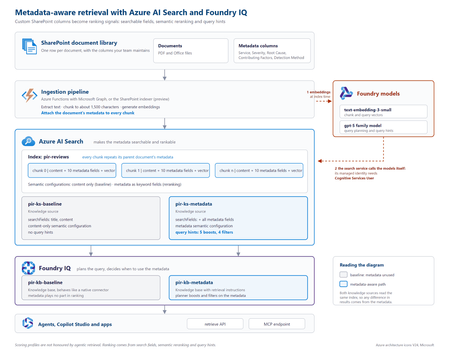
The problem SharePoint libraries often contain years of carefully curated metadata, including root cause, severity, business unit, document type, owner and classification. If that metadata never reaches the retrieval pipeline, however, a RAG system cannot use it. This creates a common blind spot: the information that explains what a document is about may exist in its metadata rather than its text. Consider an incident review containing this statement: “Investigation found that a DNS record was repointed during a migration while the old target was still serving writes.” The associated Root Cause Category is Configuration change, but those words do not appear in the document. Another review might mention that a configuration change was suspected and ruled out. Text-only retrieval can therefore favour the wrong document. In the sample dataset used for this project, none of the 19 reviews classified as configuration-change incidents contained the word “configuration”, while six reviews with other root causes did. Metadata does not improve every search. It helps when the information that determines what a document is lives outside the document text. Why tuning alone cannot fix it With a native SharePoint knowledge source, document text is extracted, chunked and embedded, while standard properties are retained. Custom SharePoint columns are not part of that ingestion path. Fields such as Root Cause Category, Contributing Factors, Detection Method and Severity therefore never become structured fields available to retrieval. If the metadata is absent from the index, search tuning cannot make it count. Flattening all metadata into a single text string is also problematic: Notification Service | Sev2 | Configuration change | Missing runbook This preserves the words but loses their meaning. A root cause, severity and contributing factor represent different concepts and should remain separate fields. Bring a custom Azure AI Search index The approach is to create and control a custom Azure AI Search index, then expose it to Foundry IQ as a searchIndex knowledge source. This combines metadata control with agentic query planning and a governed retrieval surface. Approach Metadata control Agentic planning Native SharePoint knowledge source No Yes Custom index queried directly Yes No Custom index as a knowledge source Yes Yes Architecture The key design principle is simple: every chunk carries its parent document's metadata. Figure 1. Metadata-aware retrieval architecture with Azure AI Search and Foundry IQ. The ingestion pipeline extracts a document, creates chunks, attaches document-level metadata to every chunk, generates embeddings and writes the records to Azure AI Search. Foundry IQ then uses the index as a knowledge source. Azure AI Search holds the metadata. Foundry IQ decides when to use it. Figure 2. Detailed implementation view, including the baseline and metadata-aware retrieval paths. At query time, the search service calls the configured models for vectorisation and query planning. Where key authentication is disabled, the search service's managed identity needs the required access. In the tested implementation, the Cognitive Services User role resolved HTTP 401 responses from retrieve requests. Put metadata on every chunk A chunk can only be retrieved and ranked using information available on that chunk. Each metadata property should therefore remain in its own field: { "id": "doc1035-000", "parentId": "doc1035", "title": "Notification Service: failed sign-ins", "content": "<extracted review text>", "rootCauseCategory": "Configuration change", "contributingFactors": "Missing runbook; Change outside window", "detectionMethod": "Customer report", "severity": "Sev2" } A separate metadata index does not solve the same problem because a match against metadata in one index cannot raise the ranking of a content chunk in another. What influences retrieval Four areas matter in this design: Search fields: searchFields determine which fields generated subqueries search. Semantic configuration: prioritised fields give the semantic reranker access to important metadata. Query hints: hints help the planner connect natural-language requests to known metadata values. Filters: a baseFilter or request-level filterAddOn can enforce constraints. Boost hints influence ranking without excluding documents. Filter hints can narrow the result set when the planner determines that a filter is appropriate. "queryHints": { "boosts": [{ "kind": "fieldValue", "field": "rootCauseCategory", "fieldValues": ["Configuration change", "Capacity", "Software defect", "Dependency failure", "Certificate expiry"], "boost": 3.0, "boostInstructions": "Boost when the user describes what caused an incident." }] } Hints are best effort. Hard requirements should use a base filter or document-level access control rather than relying on the planner to select a hint. The tested configuration used the 2026-08-01-preview API. Current documentation should be checked for supported models, limits and behaviour before implementation. Measuring the impact Two knowledge bases were created over the same Azure AI Search index. The baseline searched title and content. The metadata-aware configuration used the same content plus structured metadata, semantic configuration and query hints. Ten questions were run through both configurations. Correctness was determined directly from the metadata attached to returned reviews, rather than by asking an LLM whether a result appeared relevant. For the question “What can be learned from outages caused by configuration changes?”, the planner generated: rootCauseCategory eq 'Configuration change' Matching reports in top 5 Score Baseline 0 Metadata-aware 3 Best possible 5 Across ten questions and four runs using gpt-5.4-mini for query planning, the baseline returned 26 matching reviews in the top five. The metadata-aware configuration returned 39 to 41, against a best possible score of 50. The gains appeared where metadata carried the missing meaning: Configuration changes: 0 → 3 Configuration changes reported by customers: 0 → 3 Capacity in production: 1 → 5 Alert fatigue: 3 → 5 Queries whose important terms already appeared in the document text scored 5/5 in both configurations. The result is therefore more specific than “metadata improves search”: metadata closes a retrieval gap when document text does not fully describe what the document represents. A failure mode worth handling Because query planning uses an LLM, the planner can occasionally generate a filter that the search index rejects. Two invalid examples observed during testing were: severity eq Sev1 changeRelated eq true The first omitted quotes around a string. The second treated an Edm.String field containing Yes and No as a Boolean. The latter caused the retrieve request to fail with HTTP 502. The fix was to make the schema and allowed values explicit: This is a text field, not a Boolean. The only valid values are 'Yes' and 'No'. Never compare the field with true or false. Application code should also handle retrieval failures rather than assuming every generated filter will be valid. Production considerations A custom index provides control, but the solution now owns ingestion. Options include the SharePoint indexer with custom columns, an Azure Function using Microsoft Graph, or an existing pipeline built with Logic Apps, Azure Data Factory or Microsoft Fabric. A custom Azure AI Search index does not automatically inherit the SharePoint permissions model. Where users have different document permissions, ACLs must be carried into ingestion and retrieval. Query hints should also be regenerated when taxonomy values change. Key takeaways Confirm that the required metadata reaches the index. Keep metadata structured rather than flattening it into one text field. Attach parent-document metadata to every chunk. Use search fields, semantic configuration, query hints and filters deliberately. Describe field types and valid values clearly in filter instructions. Evaluate against a baseline using objective correctness rules. Metadata-aware retrieval is not about making every search better. It gives the retrieval system access to context that does not exist in the document text. Try the proof of concept The complete proof of concept, synthetic dataset, index scripts, knowledge-base configurations and A/B evaluation harness are available in the GitHub - shikha-msft/foundryiq-metadata-agentic-rag. References Create a search index knowledge source Create a knowledge base Query a knowledge base via API or MCP What is Foundry IQ?273Views0likes0CommentsClosing the AI Agent Governance Gap with Microsoft Foundry
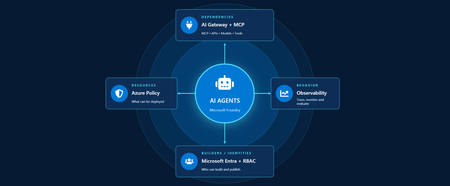
Developers are shipping agents faster than security teams can catalog them. As organizations move beyond pilots and begin operating dozens or hundreds of agents, one question keeps coming up: how do we actually get visibility into our AI agents across our environment? In this article, we'll walk through how Azure services can help establish visibility, guardrails, and cost accountability across your AI estate. Governance for AI happens across four layers: Resources – who can create new AI resources Builders – who can develop and publish agents in a certain scope Behavior – how agent outputs are evaluated, monitored, and governed Dependencies – what models, tools, APIs, and MCP servers agents can interact with Most organizations already have governance controls for identities, networking, and compliance. The challenge isn't creating new controls. It's connecting existing controls into an operating model that works for AI agents. Below we walk through each area and go a bit deeper on how to close the gap. Setting up boundaries with Azure Policy First, let's start in the Azure portal with Azure Policy. Azure Policy lets you set guardrails on what can be deployed in your environment and flags or blocks anything that doesn't comply. For AI workloads, the built-in definitions range from limiting models that people in your organization can deploy to locking down the network through enabling private endpoints. Some policies you get started with: Foundry model deployments should only use approved models: Restricts deployments to models or publishers your organization has explicitly approved Foundry model deployments should meet eligibility requirements (preview): Applies rules based on model attributes like preview vs. GA status and distribution source Azure AI Services resources should have key access disabled: Makes Microsoft Entra ID the only entry point The full list of policies related to Azure AI Services are available here: List of built-in policy definitions - Azure Policy | Microsoft Learn Why this comes first: Policy checks resources before they are created, so it proactively keeps your environment aligned with your standards. Implementing role-based access control (RBAC) Once these boundaries are in place, the next step is RBAC. Setting RBAC up early ensures that people and identities building agents have the right scope for what they actually need to do. Foundry roles only apply when you authenticate using Microsoft Entra ID. If you're using key-based authentication instead, the key grants full access with without role restrictions. API keys are convenient for quick development usage but when moving towards production, Microsoft Entra ID is the preferred method. Roles can be assigned at three scopes: the Foundry resource, a Foundry project, or an individual agent itself. Below is an example of how different personas within organization can map to a certain scope for creating and building agents with Foundry. Here's how each role in the diagram compares, from least to most privileged: Role Privilege Level What it does in Microsoft Foundry Foundry Agent Consumer Least Interact with agent endpoints in a project. This is your least-privilege role for people who only need to use agents. Foundry User Low Grants reader access to the Foundry project, the Foundry resource, and data actions for your Foundry project. Least-privilege access role for developers building and testing agents. Foundry Project Manager Medium This role lets you perform management actions on Foundry projects, build and develop with projects, and conditionally assign the Foundry User role to other user principals. Foundry Account Owner Higher Grants full access to manage Foundry projects and resources, and lets you assign the Foundry User role to other user principals. Foundry Owner Highest Grants full access to manage Foundry projects and resources to build and develop with projects. This role can also assign the Foundry User, ACR, and monitoring roles to users in the environment. Source: Role-based access control for Microsoft Foundry - Microsoft Foundry | Microsoft Learn For the agent resources themselves, assign managed identities rather than API keys since it lowers the risk of having compromised credentials. Note if you're scripting RBAC permissions: these roles were recently renamed from Azure AI User, Azure AI Owner, Azure AI Account Owner, and Azure AI Project Manager. The role IDs and permissions didn't change, so use the role definition GUID in your code to avoid issues while the rename rolls out. Observability in Microsoft Foundry Governance requires more than access control. Organizations also need evidence of how agents are being used. Observability provides the audit trail needed to investigate incidents, understand usage patterns, and track costs. The Foundry Control Plane brings these observability and governance tools together in one place, alongside services like Azure Monitor, Microsoft Entra, Microsoft Purview, and Azure Policy. In the Foundry portal, tracing is a good starting point. Once you connect an Application Insights resource to your project, Foundry turns on tracing automatically so every run, including the ones you test in the playground, is logged. After it is completed, you can search by Response ID or Trace ID to see the conversation history, token usage, run steps, tool calls, and inputs and outputs between the user and the agent. For more granular queries, you can write KQL to dive into individual agent runs or use the prebuilt Grafana dashboards in Azure Monitor. With client-side tracing, you can also export traces to observability tools you may already use, such as Datadog or Jaeger. Note: Permissions required for viewing this telemetry requires the Log Analytics Reader role on the connected Application Insights resource, and Privileged Monitoring Data Reader on top of that if the underlying Log Analytics tables are protected. Alongside all of these monitoring features, every agent comes with content safety guardrails and evaluations let you test and optimize performance before and after you publish your agents. When agents get published to Microsoft Teams and Microsoft 365 Copilot, Microsoft 365 admins can approve usage requests. These requests can be further scoped to a limited group for pilot testing/department usage or the full organization. Adding an AI gateway Observability tells you what your agents are doing, but how do you actually control them? This is where Azure API Management comes in. Once you have more than one agent, model deployment, or multiple teams consuming them, you need a single enforcement point between the agents and the resources they call. Adding Azure API Management in front of Microsoft Foundry gives you: Rate limiting and load balancing across regions and model deployments Consistent authentication and quota policies for model and tool traffic Usage tracking per team or cost center so you can accurately charge back to different departments Governed access to your custom and remote MCP servers Note: When choosing MCP servers, start with trusted, enterprise supported sources (GitHub, Microsoft, internally developed servers, etc.) that have documented security controls, enterprise authentication, clear ownership, and least-privilege permissions. Treat community MCP servers as untrusted until they have undergone a formal security review and are verified by organizations. Adding an AI gateway completes the governance picture. Azure Policy governs what can be deployed. RBAC governs who can build and manage agents. Observability provides evidence of how agents behave in production. The AI gateway extends governance into runtime, controlling how agents interact with models, tools, and external systems. Combined, these layers help organizations move beyond simply building agents to operating them responsibly at scale. Extend governance across the wider estate A few directions to take this further: MCP registry in Azure API Center – As MCP usage grows, you can create an approved inventory of MCP servers and APIs that can be used across an organization. Microsoft Agent 365 – Microsoft's enterprise control plane for AI agents. It gives every agent its own Microsoft Entra Agent ID and published Foundry agents sync to its registry automatically. This gives your IT team one place to run access reviews, lifecycle policies, and owner attestation across every agent in the tenant, including shadow agents discovered outside Foundry. Copilot Studio – when you add an MCP tool, you can point it at the API Management URL instead of the direct remote endpoint to gain additional observability through the gateway. GitHub Copilot – you can apply the same AI gateway-fronted MCP registry, applied to the developer side. Microsoft Purview – data classification, DLP, audit, and AI interaction governance across the wider estate. Where to go next Looking for a quick start? Turn on the three Azure Policy definitions above in audit mode against a non-production subscription and see what gets flagged that is out of compliance. Ready to design the end-to-end pattern? Take a look at this Cloud Adoption Framework guidance on AI governance and governing Azure platform services for AI. Want to go deeper on agent observability? Start with these articles around Application Insights integrations with Foundry: Use Insights in Microsoft Foundry and Monitor AI Agents with Application Insights Governing AI agents doesn't require starting from scratch. The identity, policy, monitoring, and cost controls you already use for the rest of your Azure estate can extend to AI workloads. Start with one layer, connect the next, and build a governance foundation that grows with your AI adoption.540Views3likes0CommentsFrom Business Brief to Production Agent: Building in Three Stages, Not One
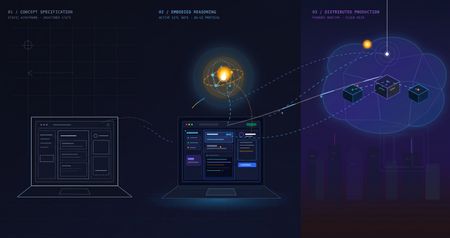
The problem with "AI can help my business" Every non-technical founder has heard some version of "you should put an AI agent on this." Far fewer have seen what it actually costs, in time and money, to find out whether that's true for their specific business — before committing to it. The honest answer is: it shouldn't cost much at all, if you build it in the right order. Most of the expensive AI project failures aren't failures of the model — they're failures of sequencing. Someone commits to real infrastructure, real hosting, and real integration work before anyone has confirmed the underlying idea even holds up. This post walks through a small, realistic project — an autonomous sales-development agent for a fictitious construction-tech company — built in three deliberate stages, each one cheap enough to abandon and each one answering a different question before the next stage spends any more money or time. The point isn't the specific agent. It's the order of operations: what to validate first, what to validate second, and what you only pay for once everything before it has already been proven. The Brief Hi, I'm looking for someone who can help me grow FieldForge, a SaaS platform specifically for general contractors, remodelers, and design-build companies. I'm not looking for generic lead lists. I need someone who can identify qualified construction companies, reach the owner/decision-maker, start conversations, and book demos that can turn into paying SaaS customers. Your experience with B2B lead generation and appointment setting looks relevant. I'd love to hear how you would approach generating qualified leads and growing a construction-focused SaaS. Translated into engineering terms, that's four capabilities: pull in new leads from a data feed (ingest_permits), decide whether each one is worth pursuing (qualify_lead), draft a personalized first-touch email for the ones that qualify (generate_pitch_email), and hand qualified leads off to an outbound sequence (dispatch_sequence). Nothing about that list requires committing to any infrastructure yet — which is exactly the point of Stage 1. Stage 1: Mock prototype — no AI, no backend, no cost The first stage has no real agent in it at all. It's a Vite + React console with the full intended UI — a strategy pane, a live-feed pane, a lead-dossier pane — wired to hand-written mock data and a fake setTimeout standing in for "the AI is thinking." No model calls, no cloud resources, no backend of any kind. It runs entirely in a browser tab: This is deliberately the cheapest possible way to answer the first real question: does this even make sense as a product, before a single token of inference is spent proving it? Is a 3-pane command console the right way to expose "an agent found and qualified these leads for you"? Is a permit-triggered pitch angle a good hook, or does it look contrived once it's actually on screen? Does a business owner look at this and understand what they're being offered? None of those questions need a real agent to answer — they need a UI a person can click through and react to. Running this stage costs essentially nothing beyond development time: no API calls, no cloud spend, nothing to tear down if the idea doesn't land. Where the AI pair programmer actually did the work. This entire stage — the layout, the state management, the mock data shapes, the interaction flow — was built by describing the product in plain language to an AI coding assistant (GitHub Copilot, Claude) and iterating on the generated code directly, rather than dragging components around in a low-code builder. That distinction matters more than it sounds like it should. A low-code prototype is fast to show, but it's still just a prototype — once a real agent needs to sit behind it, most of that first version gets rebuilt in real code anyway. A pro-code prototype, even a fake one, is a keepable asset: the exact same React components, the exact same UI shell, carry forward unchanged into Stage 2 and Stage 3. Nothing here gets rebuilt later — it gets connected to something real. What this stage proves, and what it deliberately doesn't. By the end of Stage 1, you know whether the product concept and the UX hold up — whether the thing you're describing to a non-technical stakeholder actually makes sense once it's on a screen in front of them. What it tells you nothing about: whether a real model can actually do the reasoning this UI is pretending to show. That's a completely different risk, and it's wrong to pay for cloud infrastructure to find out — it just needs a real agent, still running on a laptop: Stage 2: A real agent, still running on a laptop — the convincing part This is the stage that actually matters most, and it's also the cheapest place to find out if the whole idea works. The fakery gets ripped out and replaced with a genuine agent: a Microsoft Agent Framework Agent, backed by a real model deployment on Microsoft Foundry, given the same four tools from the brief — ingest_permits, qualify_lead, generate_pitch_email, dispatch_sequence — as real Python functions it can actually call. Its reasoning streams live into the same terminal-style pane the mock prototype already had, so nothing about the UI needs to change; only what's driving it does. Crucially, the frontend stays on a local dev server and the agent stays a local process on the same machine. There's no cloud hosting, no production auth, no deployment pipeline — the UI just talks to a locally running agent server over a simple streaming protocol. That's the deliberate design of this stage: the only thing worth testing here is whether the agent is actually good, and every question that matters — does it call tools in a sensible order, does it correctly decide which leads qualify, does its drafted email actually reflect the lead's specific trigger event rather than reading like a template — can be answered without touching a cloud resource. The qualify_lead tool is where this gets concrete: it's handed a target definition — commercial/residential remodelers in a specific revenue band, an active permit filing, still running manual/legacy tooling — and has to decide, per lead, whether it's a fit. You'll see this called an ICP (Ideal Customer Profile) constantly in sales and GTM circles right now, to the point of being a bit of a buzzword. Stripped of the jargon it's just this: a precise, written-down definition of a good-fit customer, specific enough that a model can apply it as consistently as a trained human rep would. The reason it matters isn't the term — it's that the agent's usefulness is bounded entirely by how precisely that definition is written, and this stage is exactly where you find out if yours is precise enough. This is also where model choice gets decided, cheaply. Swapping which Foundry model deployment sits behind the agent, or rewriting the system instructions, costs a restart and a few cents of inference — not a redeploy, not a new pipeline run. If gpt-4o isn't giving good enough qualification judgment, or the reasoning is inconsistent between runs, you find out here, in seconds per iteration, for the price of a handful of API calls. Compare that to discovering the same problem after cloud hosting, authentication, and a production pipeline are already built around it. That's why this stage — not Stage 1 — is the genuinely convincing one. Anyone can mock up a UI that looks like an agent found and qualified a lead. Stage 2 is where you can put a real, unscripted permit feed in front of a real model and watch it reason its way to a defensible qualify/reject decision and a genuinely personalized email, live, for the cost of a few model calls. That's the moment a skeptical stakeholder stops asking "does this actually work" and starts asking "when can we have it." What this stage proves, and what it deliberately doesn't. By the end of it, you know the agent itself is sound — right tools, right order, correct ICP logic, real personalization — for a cost barely above Stage 1's. What it hasn't touched: what happens when a real user hits this over the public internet, how auth works outside your own machine, whether the hosting model you eventually pick can actually serve this reliably. That's a different kind of work, and it starts now that there's finally something worth doing that work for. Stage 3: Quasi-production — translating a proven agent into a running service Stage 2 answers "does the agent work." Stage 3 answers a different question entirely: "can this be handed to someone who isn't on my laptop." That's not a continuation of Stage 2's work — it's a translation of it. The agent's logic, tools, and instructions don't change at all going into this stage; what changes is everything around them, as the same proven Agent gets repackaged into something that can actually run as a service instead of a local process. The agent itself deploys as a Foundry Hosted Agent via azd — no hand-written Dockerfile, no Container App config, no Bicep authored from scratch; Foundry's managed hosting owns the runtime, scaling, and session continuity (via previous_response_id chaining on the Responses protocol), and assigns the agent its own managed identity. The frontend and its API layer become an Azure Static Web App: the React build as static assets, plus a small same-origin Azure Function that reverse-proxies requests to the hosted agent. That proxy exists for a concrete reason — Foundry's hosted-agent endpoint has no CORS support, so a browser calling it directly would simply be refused; routing through a same-origin Function sidesteps that entirely, and keeps the real agent URL and credentials server-side instead of sitting in a public JS bundle. None of that is agent work. It's the operational work of turning a validated prototype into a real, addressable, network-reachable thing — the productionization step every agent eventually needs regardless of how it was built, and the part that's easy to underestimate if you haven't budgeted for it as its own phase. Framed plainly, this stage is where the project stops being "a demo that runs on my machine" and starts being "a small SaaS": something with a real URL, a real hosting bill, real auth, and a real deploy pipeline — everything that separates a working prototype from a thing you could actually put a customer in front of. To be clear about the boundary of "quasi": this is not a fully hardened production system. There's no custom domain, no persistent session store beyond what Foundry provides out of the box, and no load testing. What it is: proof that the exact agent validated in Stage 2 can be deployed, reached over a real network, and driven from a real hosted frontend without silently breaking — the last class of risk that only shows up once something leaves your own machine. What this stage proves, and what it deliberately doesn't. By the end of it, you know the whole pipeline holds together end to end, from a hosted UI through a same-origin proxy to a Foundry-managed agent and back, streaming, over a real deployment. What it doesn't prove: that it holds up under real production load, real customer data governance, or a real incident on-call rotation. Those are legitimate next questions — just not the ones this stage was built to answer, and not ones worth paying for before the first two questions were settled. The pattern, not just the project Line the three stages up and the shape becomes obvious: each one is deliberately the cheapest possible way to eliminate one specific class of risk before the next stage spends real money finding out the hard way. Stage 1 kills product/UX risk for the cost of dev time and zero infrastructure. Stage 2 kills agent-quality risk — the right tools, the right model, correct decisions — for the cost of a few model calls, and it's the stage that actually earns anyone's confidence that this is real. Stage 3 kills operational risk — real hosting, real network, real auth — by translating an already-proven agent into a running service, rather than building all of that around an agent nobody has validated yet. Collapse those stages — build the hosting and the agent and the UI all at once, betting everything up front — and you don't save time. You just move all three classes of failure into the same debugging session, at the point where they're most expensive to disentangle and hardest to tell apart. Staged this way, each phase is cheap enough to walk away from if it fails, and each one only gets built on top of a phase that already earned its place. There's a second half to this story that's deliberately not in this post: the data. Everything here ran on synthetic permit feeds and mock company data — a real deployment lives or dies on where its actual leads come from and how well they're structured for a model to reason over. That's its own story, and it gets a dedicated write-up of its own. Project reference Source code: https://github.com/olivierb123/lead-agent-demo Live demo: https://victorious-glacier-03340ff0f.3.azurestaticapps.net199Views0likes0Comments
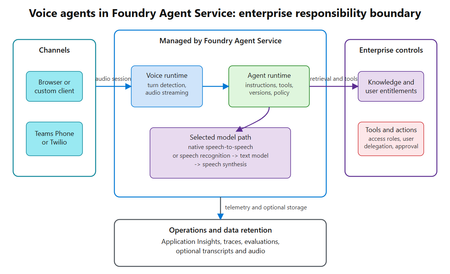
Your Agents Need More Than a Place to Run
In architecture reviews with enterprise teams moving their first agentic applications toward production, I often hear the same plan: the team has containerized their agent and intends to run it on the managed Kubernetes cluster the organization already trusts. The reasoning is sensible, since the platform team knows the tooling and security has approved the network model, and for the first use case or two it is often the right call. Having watched this unfold in my years leading AgenticAI customer engineers and forward deployed engineers, and now helping customers reach production on Azure, I want to describe what happens next, before leaders commit rather than after. One thing to note is Azure supports multiple ways to build and operate agents. Foundry Agent Service provides an integrated managed runtime around your agent code. Azure Kubernetes Service supports teams that need Kubernetes-level control or want to extend an established platform, while Azure Container Apps provides managed container hosting. These services can work together. The decision is which capabilities and responsibilities best fit the workload. Where the cluster is the right answer A stateless retrieval application, a document extraction pipeline, or a classification job is a web service that happens to call a model, and a container platform runs web services well. A large retail customer of mine ran an invoice extraction agent on containers for over a year with almost no issues, and I never suggested they move it. The cluster remains the right home for several other situations as well. LLM invocations embedded inside existing microservices, event driven, or batch pipelines fit container platforms naturally. Genuine constraints such as air-gapped or sovereign environment, regions where a managed service is not yet offered are a good reason to run your own stack, and strong engineering team that already operates at that level can be a real asset. Even when the agents themselves move to a managed runtime, the tool servers, business APIs, and data services those agents call, often stay on your cluster, so they are complementary far more often than they are competitors. The problem is that these early wins can make agents seem like just another workload. Where the wheels come off The first failure is the state. A research agent that plans, searches, and synthesizes for ninety minutes is a long-running stateful process, while a Kubernetes pod is a disposable container the scheduler may restart at any time. A financial services team I worked with lost costly research run to a routine node upgrade, and responded as capable engineers do by building checkpointing, a durable store, and a resume mechanism. It worked, but they now owned a piece of infrastructure they had to keep correct as their agent's framework changed beneath it. A managed agent runtime absorbs this. Hosted agents in Foundry Agent Service, as one example, give every session a VM-isolated sandbox with a persistent file system, a durable state store that survives crashes and restarts and can hold checkpoints for frameworks such as LangGraph or Microsoft Agent Framework, and a resilient execution mode that recovers long-running work after a process interruption. The second is the human-in-the-loop. A commercial insurance customer’s claims agent needed sign-off from an adjuster and sometimes a second reviewer, with days between steps. Stopping an agent cleanly at the moment it needs a decision, holding its full session for four days without paying to keep it running, and resuming it correctly when the approval arrives is not something a container orchestrator gives out the box. The team built agent session suspend and resume, a queue, a durable state store, notifications, and an approval interface, and ended up with a small workflow engine nobody had planned to own. In hosted agents, an idle session is deprovisioned with its state persisted and restored onto fresh compute when the same session ID returns, so an agent waiting on an approval cost nothing while it waits, and sessions are retained for up to thirty days of inactivity. The approval experience remains yours to design, which is where your engineers' time should go. The third is multi-turn conversation, which quietly pushes teams into building their own context management system. The first version appends each turn to history, and within few turns the history outgrows the context window while cost and latency climb. So, the team adds truncation, then summarization, then retrieval of earlier turns, then per-user and per-tenant scoping, then expiry and deletion rules for privacy. An industrial customer's safety compliance assistant, with conversations stretching across days, followed exactly this path and ended up with a bespoke thread store and summarization pipeline nobody had budgeted for. Its first serious incident came when a summary silently dropped a compliance-relevant instruction. With the Responses protocol in hosted agents in Foundry, conversation history is a durable, platform-managed record keyed by a conversation ID and reachable from any channel, so the thread store is no longer yours to build, although deciding what to summarize or retrieve remains a design choice for your agent. The fourth is identity. On a cluster, the path of least resistance is a shared service account, and in one review a security architect asked which actions had been taken on behalf of which user, only to learn that the logs could not say. Hosted agents create a dedicated Microsoft Entra agent identity for each agent at deploy time, use on-behalf-of flows to act with the user's delegated permissions in interactive scenarios and the agent's own identity in autonomous ones, and keep the agent identifiable for audit in both cases. The fifth is per-user session isolation, which is the difference between an agent that serves many people and an agent that mixes them up. Agents read files, run code, and hold working data, and on a shared pod the default is that many users share a process, a file system, and often a cache. Giving every user session its own sandboxed environment and storage, so that one person's documents and intermediate results can never surface in another's, means engineering hard isolation boundaries and proving them to your security team. Hosted agents make a VM-isolated sandbox per session the default, and their durable state store can partition items per end user, so one store is safe to share across the users of a multitenant agent. And lastly, Evaluation and optimization are where the gap widens. The largest difference between teams that scale and those that stall is evaluation. Because agents are probabilistic and multi-step, staging tests often miss failures such as a wrong tool choice or a policy violation deep in a task. One customer’s agent passed every offline check but degraded unnoticed for weeks after a model update because evaluation stopped at release. Mature teams continuously evaluate production traces, combine automated judges with sampled human review, and red-team regularly.Once quality is measurable, teams can deliberately balance prompts, models, tools, latency, and cost. One team cut per-task cost by routing simple steps to smaller models after evaluation confirmed quality held. Self-built stacks require teams to assemble and maintain tracing, datasets, judges, and release gates. Hosted agents instead combines default OpenTelemetry traces with continuous evaluation, adversarial testing, and datasets generated from agent instructions. Staged closed-loop optimization uses those traces to improve instructions, tool descriptions, and model selection without extra plumbing. The real cost is the velocity gap Leaders usually expect me to quantify the initial build, and that is the smaller number. A team of four building the first agent often becomes ten or twelve within a year, and a growing share of them are maintaining a runtime for agents rather than building agents that serve the business. The enterprise has quietly created an internal agent infrastructure company in a field where the patterns for memory, tools, evaluation, and safety are rewritten every few months, while hyperscalers put hundreds of engineers on exactly this problem and ship at a cadence no single platform group can match. Foundry Agent Service, for instance, bundle content safety guardrails into the runtime and route outbound traffic through a customer virtual network, capabilities that platform teams otherwise assemble one integration at a time. This plumbing does not differentiate your organization, so the question is whether your scarcest engineers should spend years on it or on the workflows, data, and judgment only your company has. This is also why the technology companies held up as examples are a poor template. Many built their own runtimes because managed options did not yet exist and had large platform organizations to carry the load. Even they tend to invest in a custom runtime for the first handful of use cases and then migrate as managed services mature, because the maintenance burden compounds while the strategic value of owning the plumbing does not. What I would do as the leader I am not arguing against Kubernetes or for moving everything tomorrow. Comparable managed runtimes exist across the hyperscalers, and I use hosted agents as the running example only because it is the one I know best from the inside. Managed agent services are still maturing, some workloads have real data residency or customization needs, and abstraction always constrains something. What I am arguing for is a deliberate choice for each use case, guided by three questions: whether the agent must outlive a single request by running long, waiting on humans, or remembering across sessions whether it must act with its own identity, auditable delegation, and policy enforcement whether your team would be building anything a managed service already provides, and who will still maintain it in two years. Key takeaways Match the runtime to the workload. Containers on your existing cluster suit stateless, short-lived agents, while long-running, human-in-the-loop, and memory-dependent agents need capabilities your platform team was never hired to build. Count the hidden team. The real cost of self-hosting is the growing group of engineers maintaining state, identity, memory, guardrails, and tracing instead of solving business problems. Make evaluation continuous and connected to production traces. Pre-release testing alone will miss the drift and trajectory failures that hurt you, and optimization of quality, cost, and latency depends on that evaluation data. Follow the pattern of the leaders, not their early architecture. Companies that built custom runtimes did so before managed options matured, and most of them move toward managed services as those options improve. A practical place to begin is your roadmap for the next twelve months. Sort each use case into stateless and short-lived or long-running and human-dependent, and for every agent in the second group put a price on the engineers who would maintain the runtime rather than the business logic. I would like to hear how you have drawn this line, and where a managed service was not yet ready for something you needed.716Views2likes0CommentsBeyond the Trace: The Science of Insight Quality
Co-authors and reviewers: Morteza Ziyadi, Hanchi Wang, Han Che, Billy Hu, Sean Gayler, Nishal Dsilva, Avinav Jami, Ankit Singhal, Augustus Arthur TL;DR. Insights in Foundry turns recurring agent behavior into evidence-linked findings developers can review and act on. We evaluate trace linkage, finding quality, and detection of known issues using labeled benchmarks, LLM-judge assessment, and controlled end-to-end tests. What is an Insight? An Insight is a reviewable finding about recurring agent behavior. It brings together an explanation, supporting trace evidence, and a possible next step, helping developers investigate a pattern rather than inspect each execution in isolation. Depending on the available evidence and supported configuration, an Insight can include: Part of an Insight What it gives the reviewer Title and description The recurring behavior and an evidence-based explanation of a possible cause. Linked traces The broader group of traces associated with the finding. Highlighted traces Representative examples to open and check against the explanation. Category, severity, and status Context for triaging the finding, not a substitute for a risk assessment. Agent version and recency Which version is represented and when the finding was created. Proposed action or fix An investigation or improvement path; concrete proposals depend on the configuration. Figure 1. An Insight detail view in Microsoft Foundry, cropped from public Microsoft Learn documentation. The description, evidence, and proposed fix support human review. This UI illustration is not a benchmark result; the source link provides a full-size view. UI source and field definitions: Insights in Foundry documentation. From trace search to an actionable review queue Production agents can generate thousands of traces containing model calls, tool calls, latency, token usage, errors, and final responses. Observability shows what happened, while evaluations test criteria a team already knows to measure. The harder problem is discovering repeated behavior that the team did not know to predefine. Insights in Foundry analyzes traces from the Application Insights resource connected to a Foundry project and organizes recurring behavior into reviewable Insights. Depending on the evidence and supported configuration, an Insight can include representative traces, affected agent versions, severity, an explanation of a possible cause, and a recommended next action. Concrete prompt or code proposals are available only for supported agent types and configurations; other Insights provide general investigation or remediation guidance. Insights in Foundry is now available in public preview. It analyzes production traces to surface recurring behaviors and regressions with supporting evidence and suggested areas for investigation or improvement. Developers remain in control: review the cited traces and validate proposed changes through normal evaluation and deployment practices. During public preview, we will continue expanding the experience based on customer feedback. To make this concrete, Figure 2 maps 220 inputs from TraceElephant, a public agent-trace benchmark, to seven generated Insights. Figure 3 examines one linked trace. Figure 2. Recorded links from 220 public TraceElephant inputs to seven generated Insights in the September 17 benchmark. The 80-input finding includes the looping trace examined in Figure 3. Titles are editorial paraphrases; the layout is editorial, not a product screenshot or a validation of each diagnosis. Figure 3. A public TraceElephant trace contains 54 model calls; steps 26, 30, 34, 38, 42, 46, and 50 repeat an identical extraction plan. The September 17 benchmark run of the production pipeline links this trace to a finding about missing progress-aware termination. Wording is paraphrased; this is an illustration, not product UI. The proposed intervention still needs evaluation. Three complementary ways to evaluate Insight quality Insight quality involves which inputs a finding links, how well it explains the evidence, and whether it identifies known issues in controlled tests. We combine labeled trace evaluation, unlabeled finding assessment, and controlled end-to-end testing. These are complementary sources of evidence, not mutually exclusive dataset categories. Evidence Question Assessment / results Labeled trace evaluation Do Insights link inputs that reference annotations mark as failing? Reference labels; trace precision and trace recall (%). Unlabeled finding assessment Are generated findings grounded and useful? Eight-dimension LLM judge; mean score (1-5). Controlled end-to-end tests Do Insights identify known injected issues? Known issues and healthy baselines; detections, misses, unsupported findings, duplicates, and unscored cases. Here, 'unlabeled' means reference failure labels are not used for the evaluation; the sources can still contain annotations or reference answers. Public versus internal describes where data comes from, not how it is evaluated. LLM judges can also assess findings from labeled or controlled scenarios. Labeled evaluation: Do Insights link the right traces? Trace precision: among unique benchmark inputs linked by at least one generated Insight, the fraction marked as failing. This measures discrimination only when a dataset includes healthy inputs, and it does not validate the diagnosis. Trace recall: the percentage of failure-labeled benchmark inputs linked by at least one generated Insight. It does not measure how many distinct failure modes were discovered. We evaluated the production pipeline on the same 746 benchmark inputs (653 failure-labeled) on September 15, 16, and 17, 2026. Repeating these inputs does not create 2,238 distinct examples. The six benchmark corpus slices come from public agent-trace research datasets with human reference annotations: AgentRx (Tau-bench retail), AgentRx Magentic-One, TRAIL, AgentErrorBench, TraceElephant, and the MAST-Data human subset. AgentErrorBench is the annotated failure-trajectory dataset released with AgentDebug, a framework for detecting and recovering from agent failures. The two AgentRx slices come from the same public release. The benchmark uses selected and normalized inputs from these releases, not a representative sample of customer production traffic. For each dataset, the chart shows daily generated-Insight counts and trace recall. The table reports equal-weight means of daily trace precision and recall. These datasets support ongoing development; results depend on the dataset and model used. Labeled results Figure 4. Generated Insight count versus trace recall for all six public corpus slices. Each point is one daily run; labels retain values where markers overlap. Recall measures linkage to failure-labeled inputs, not diagnosis correctness. Three-day mean precision and recall follow in the table. Dataset Inputs/day Failure-labeled/day Linked/day range Mean trace precision Mean trace recall AgentRx (Tau-bench retail) 102 29 43-45 37.8% 57.5% AgentRx Magentic-One 58 44 54-57 75.3% 94.7% TRAIL 148 143 139-140 96.9% 94.6% AgentErrorBench 200 200 194-196 100.0%** 97.3% TraceElephant 220 220 218-220 100.0%** 99.7% MAST-Data (human subset) 18 17 14-16 93.3% 82.4% ** When every input is failure-labeled, 100% trace precision cannot measure false-positive control. What the labeled results show High precision can reflect the corpus base rate. AgentErrorBench and TraceElephant contain only failure-labeled inputs, so their measured precision is 100% by construction. TRAIL, AgentRx Magentic-One, and the MAST subset also contain mostly failures; their precision values are close to their underlying failure-label prevalence. Read precision beside trace recall and each dataset's label prevalence rather than as a standalone quality score. AgentRx (Tau-bench retail) is the clearest mixed-traffic stress test. Only 29 of 102 inputs were failure-labeled. Across the three days, trace precision was 43.2%, 37.8%, and 32.6%, averaging 37.8%; trace recall was 65.5%, 58.6%, and 48.3%, averaging 57.5%. Daily linked counts were 44, 45, and 43, including 19, 17, and 14 labeled failures respectively. These daily rates are averaged before rounding. Some linked inputs without failure labels could contain issues outside the reference labels, such as cost or latency, but this benchmark cannot confirm that. Trace precision and trace recall measure whether Insights link inputs that reference annotations mark as failing. They do not establish whether an explanation is correct or a proposed action is useful. Our unlabeled evaluation examines those qualities using an eight-dimension LLM judge. Unlabeled evaluation: Are the findings grounded and useful? For this evaluation, a separate LLM judge scores generated Insights against the supplied input evidence, without using reference failure labels to compute precision or recall. These scores are automated assessments produced by an LLM judge. They are not human ratings and do not establish that a proposed action will improve the agent. This evaluation covers PUPA, FailSafeQA, tau2-bench, synthetic scenarios, and an internal production dataset for the monitoring dashboard agent compiled from Microsoft employee usage. These sources are normalized into benchmark inputs; not every input is a complete execution trace. The eight-dimension judge rubric Each generated Insight receives a score from 1 to 5 on eight dimensions. The rubric separates the quality of the explanation, the importance of the issue, and the usefulness of the suggested action: Dimension Question the judge considers Actionability Does the Insight tell a developer what to investigate, evaluate, or change next? Specificity Does it name concrete behavior, tools, or prompt elements rather than offer generic advice? Novelty Does it surface a pattern beyond an obvious dashboard signal? This is an estimate, not a measurement of what a team already knows. Correctness Is the claim supported by the supplied evidence? Severity calibration Does the assigned severity match the evidenced impact? Impact How consequential does the underlying issue appear, rather than just how well it is described? Fix specificity Does the proposed fix identify an exact asset or behavior to change? Fix applicability Is that proposed change plausibly on target for the issue? For example, a concrete next step earns a stronger actionability rating than generic advice. Severity calibration and impact are deliberately separate: a minor issue can have a well-calibrated severity label without being high-impact. Fix applicability is judged from the proposal and evidence; the fix is not executed as part of this scoring. Unlabeled results Results compiled from two recent benchmark runs cover 4,496 inputs and 40 generated Insights. Every emitted Insight in these selected snapshots was scored with the same judge rubric. Each Insight's overall score is the mean of its eight dimension scores; the table then averages those overall scores within each dataset. We do not combine datasets into one quality score. Dataset Inputs Insights scored Mean judge score (1-5) PUPA 901 5 3.53 FailSafeQA 1,101 11 3.57 Monitoring dashboard agent (internal) 1,342 4 3.88 tau2-bench 1,112 16 2.84 Synthetic scenarios 40 4 3.81 These are per-dataset snapshots, not a controlled comparison of dataset difficulty or pipeline versions. Small Insight counts and grading choices, such as grouped versus individual judging, make these protocol-specific diagnostics rather than stable absolute ratings. Automated judge scores are not precision or recall, human ratings, or measured improvements after applying a fix. The dimension-level scores make the weak spots more concrete. Fix specificity was the lowest-scoring dimension in four of the five snapshots, with means from 2.00 to 2.64. For tau2-bench, correctness was lowest at 2.25: a signal to review whether claims are supported by the supplied evidence. Making a next step more concrete and grounding a diagnosis more carefully are different improvement targets. What the public findings look like The examples below connect generated findings to concrete input evidence: an arithmetic inconsistency, a question/answer mismatch, and a payment allocation that exceeds the available balance. They are selected illustrations, not a representative sample of the 40 scored Insights. Figure 5. Three illustrative findings, with one checked input per finding. Titles and evidence summaries are editorial paraphrases. PUPA is a normalized QA record; FailSafeQA normalization pairs a perturbed question with the original answer, creating the displayed mismatch. Neither is a new agent execution. Tau2-bench shows a recorded tool interaction. These examples are not a representative quality sample. Public input sources: PUPA; FailSafeQA; tau2-bench. Controlled end-to-end tests: Can Insights find known issues? Dataset benchmarks are complemented by tests with healthy baseline agents and versions containing predefined defects. The framework generates traffic, runs Insights on the resulting traces, and compares the findings with the known issues and supporting evidence. It separately tracks detections, misses, unsupported findings, and duplicates. Cases with incomplete evidence remain unscored rather than counting as passes or misses. The September 23 hosted-agent report, used here as a concrete illustration, covered finance, travel, and support-ticket scenarios. Of 12 expected issues, 11 were scorable and 10 were detected. All three scorable healthy baselines had no confirmed unsupported findings. The figure shows the full outcome counts, including the missed and unscored cases. This end-to-end framework is separate from the 40-input synthetic-scenarios dataset in the unlabeled results. Figure 6. Controlled tests exercise healthy baselines and known defects through the Insights pipeline. The September 23 report records 10 detections among 11 scorable expected issues, one additional unscored issue, and no confirmed unsupported findings on three scorable baselines. No confirmed unsupported findings (noise) or duplicate findings were reported in the evaluated subset. This illustrative snapshot is not a representative product-wide rate. A broader view of quality Trace selection and rubric review are part of a broader quality framework. Category agreement is an exploratory benchmark diagnostic, not an assessment of the portal's category labels. Controlled scenarios also check for unsupported or duplicate findings. Figure 7. Five complementary quality questions. The labeled results above measure trace precision and trace recall; the unlabeled results assess findings with an LLM judge. Category agreement is an internal diagnostic, while controlled scenarios check noise and duplication. How we track quality over time Labeled benchmarks, unlabeled assessment, and controlled tests feed recurring quality reports and human investigation. Test inventories and assessment conditions can change, so daily scores are not automatically a comparable improvement trend. The reported results do not establish longitudinal recurrence or deduplication performance across runs. In the portal, Give feedback lets users report incorrect findings, categories, severity, grouping, or duplication. Start with scenarios whose expected failures and healthy controls are known. Track detection, trace precision, categorization, severity, distinctness, evidence grounding, and action quality instead of relying on one score. Review changes to data, models, prompts, and evaluation contracts as changes to the measurement system. Investigate weak results and newly reported failure patterns rather than tuning only for an aggregate. Keep human review in the loop, because benchmark labels and automated graders cannot determine business impact or remediation correctness. How practitioners should interpret an Insight Validate each Insight before acting on it. Microsoft Learn recommends this review sequence: Confirm the affected workflow, agent version, category, severity, and time. Open the highlighted traces and verify that the cited behavior is present. Compare problematic examples with healthy traces to test whether the grouping and likely cause are plausible. Decide whether the issue belongs to the agent, a tool, a model endpoint, a data source, or the platform. Turn confirmed recurring behavior into evaluation coverage, an optimization objective, owner routing, or a monitored no-action decision. An empty result does not prove that an agent is healthy, and a large linked-trace count does not prove business impact. Quality depends on representative traces, complete telemetry, a supported analysis model, and careful human validation. Get started Start with the Insights in Foundry documentation for prerequisites, portal steps, evidence-review guidance, SDK examples, pricing considerations, and preview limitations. Prerequisites include a connected Application Insights resource, recent representative traces, a supported GPT-5-or-newer Judge model deployment, and the required role assignments. Insight generation, including scheduled runs, uses your model deployment and can incur model charges. See the current documentation for the latest supported agents, models, regions, limits, pricing, and UI guidance. Python samples: on-demand Insights and scheduled Insights. Closing thoughts Agent quality work often starts with a simple question: what is repeatedly going wrong that we did not know to test? Insights in Foundry is designed to help teams answer that question with evidence-linked findings and a reviewable next step. Measuring those findings requires explicit definitions, diverse data, honest treatment of weak results, and human judgment where automated metrics stop. Labeled trace evaluation, unlabeled rubric assessment, and controlled end-to-end tests answer complementary questions. Newly observed patterns can then inform the next round of evaluation and review.542Views0likes1CommentVoice agents in Foundry Agent Service: architecture, trust boundaries, and real-audio latency
Assess where voice agents in Foundry Agent Service simplify the runtime, where enterprise trust boundaries remain, and what a 300-turn real-audio benchmark reveals about latency across six configurations.356Views0likes0CommentsEvaluate More, Spend Less: Batching Microsoft Foundry Evaluators for Efficient Evaluation
Authors: Salma Elshafey, Ali Mahmoudzadeh, Kayla Ames, Ahmad Qardahji, Vivek Bhadauria, Morteza Ziyadi, April Kwong A single agent trajectory may need to be evaluated for groundedness, coherence, instruction following, task completion, and correct tool use. In a conventional pipeline, each evaluator receives the same messages, tool calls, tool results, and tool definitions in a separate model call. As trajectories grow, evaluation repeatedly pays to process the same context. Can one LLM judge call apply five or six evaluators without losing the signal that makes evaluation useful? This study tests a simple design: send the shared context once and ask one composite evaluator to score several criteria in the same call. In summary: On 100-row quality and tool use samples, composite evaluation required 5-6x fewer model calls, reduced total input-token use by 61.25–71.07%, completion tokens by 46.63–63.89%, and measured run wall time by 35.74–46.10%. Across the tested workloads, frontier judge models maintained stable quality across several high-value dimensions. The results support composite evaluation as a cost-efficient default, with targeted individual evaluation for workload-sensitive rubric criteria. Why Evaluation Becomes Expensive Evaluating a single conversation rarely involves just one evaluation dimension. A typical assessment examines multiple dimensions of quality, such as whether the response is coherent, follows instructions, completes the user's task, remains grounded in available evidence, and uses tools correctly. Because each dimension is typically evaluated through a separate prompt and model call, the same conversation trajectory, tool calls, tool outputs, and tool definitions are processed repeatedly. As a result, cost grows with both the number of evaluation criteria and the amount of shared context, making long agent trajectories especially expensive to evaluate. The Composite-Evaluator Approach Rather than evaluating each dimension independently, composite evaluation scores multiple criteria within a single judge-model call, allowing the shared context to be processed once instead of repeatedly. We built two composite evaluators. The Output Quality Evaluator The Output Quality Evaluator scores six Microsoft Foundry evaluators in one LLM call: Evaluator Question Fluency Is the response clear and well formed? Coherence Is it logically consistent with the conversation? Intent Resolution Did the assistant understand the user's goal? Task Adherence Did it follow the user's instructions? Groundedness Are its claims supported by the available evidence? Task Completion Did it complete the requested task? Tool Use Quality Evaluator The Tool Use Quality Evaluator scores five Microsoft Foundry evaluators in one LLM call: Evaluator Question Tool Call Accuracy Was the tool call correct overall? Tool Call Success Did the invocation succeed? Tool Input Accuracy Were the arguments correct? Tool Output Utilization Did the response use the tool output correctly? Tool Selection Was the appropriate tool selected? Each composite prompt includes the shared trajectory and tool definitions once, followed by the full definition, rating scale, and applicability rules for every evaluator. It instructs the judge to assess each evaluator independently so that one verdict does not bias another. The judge returns structured results for each criterion, including a score, rationale, and applicability status. For multi-turn evaluations, it can also identify the earliest turn where a failure occurred. How We Validated Evaluator Quality The study compares individual and composite evaluators across: Two modes: Single-Turn and Multi-Turn. Nine judge models: GPT-4o, GPT-5.4, GPT-5.4 mini, GPT-5.6 Luna, GPT-5.6 Sol, GPT-5.6 Terra, DeepSeek V4 Flash, DeepSeek V4 Pro, and Grok 4.1 Fast Reasoning. Multiple datasets, as shown in the table below Dataset Mode Rows Primary validation target Reference labels Internal quality set Single-Turn and Multi-Turn 283 Six quality evaluators Existing per-evaluator labels Internal tool use set Single-Turn and Multi-Turn 200 Five tool use evaluators Existing per-evaluator labels BFCL v4 Multi-Turn 200 Task Completion, Tool Call Accuracy, and failed-turn localization Deterministic state and tool-call checks AgentIF Multi-Turn 148 Task Adherence Constraint-level majority-vote reference FaithDial Multi-Turn 300 Groundedness Faithful versus hallucinated responses FED Multi-Turn 125 Coherence Five-annotator human scores Tau-Voice Multi-Turn 278 Task Completion Reward-derived completion labels AgentRx tau_retail Multi-Turn 29 Failed-turn localization Human failure annotations We measured several distinct properties: Input tokens, output tokens, model calls, and latency Accuracy, macro-F1, and Cohen's kappa where labels were available Agreement and correlation structure between individual and composite modes Repeatability across four evaluation runs Finding 1: Composites Cut Input Tokens by 61.25–71.07% and Latency by 35.74–46.10% We measured cost and latency on matched 100-row Single-Turn samples: one for Output Quality and one for Tool Use, comparing parallel individual evaluators with one composite evaluator per row. For each row, evaluator context includes the query and response, any tool calls and results, and the serialized tool definitions. Note: Single-turn means that the evaluator's focus is the last agent response only, but the entire conversation history is passed to the evaluator as context. Trajectory Length in the Cost Sample The log-scale distributions show that most rows clustered around a few thousand tokens, with a smaller number of substantially longer trajectories. In both samples, longer evaluator contexts produced larger absolute token savings. The Measured Cost Reduction Across the sample: Repeated context is the main saving. Total input-token volume fell from 2,058,930 to 797,843 for Output Quality, a 61.25% reduction, and from 2,036,122 to 589,097 for Tool Use, a 71.07% reduction. Uncached input fell by 57.51% and 53.29%, respectively. For Output Quality, 52.72% of composite input tokens were cached versus 56.88% across the individual suite; for Tool Use, the figures were 46.22% versus 66.69%. However, the composites still processed substantially fewer tokens overall. Call volume collapses. Output Quality fell from 600 individual evaluator calls to 100 composite calls. Tool Use fell from 494 calls to 100. In six rubric-row combinations, native applicability rules legitimately returned no score, such as when there was no tool call to evaluate; those skips explain why the individual Tool Use baseline is below 500. Measured runs finish sooner. Output Quality wall time fell from 504.41 seconds to 324.12 seconds, a 35.74% reduction, while Tool Use fell from 536.95 seconds to 289.42 seconds, a 46.10% reduction. Per sample row, that is 5.044 to 3.241 seconds for Output Quality and 5.369 to 2.894 seconds for Tool Use. Completion tokens fell by 46.63% and 63.89%, respectively. On the quality sample, the composite used 797,843 total input tokens and 36,919 completion tokens, compared with 2,058,930 and 69,180 for parallel individual evaluation. On the tool use sample, the composite used 589,097 total input tokens and 28,358 completion tokens, compared with 2,036,122 and 78,522. These are measured run totals, not prompt-length estimates. The broader experiments showed the same benefit. The full six-evaluator rubric Single-Turn study used about 68% fewer input tokens, while the 283-row Multi-Turn quality study used about 77% fewer: 28,715 rendered input tokens per row for a six-call equivalent versus 6,608 for the composite call. Exact currency savings depend on model and deployment pricing, but batching consistently removed duplicated input and round-trip overhead. Finding 2: Quality Tradeoffs Depend on Rubric and Judge Model Output Quality Rubric Benchmark Results On the internal Single-Turn quality set, composite Task Adherence accuracy improved for every judge, while Task Completion remained close to individual evaluation. External Multi-Turn benchmarks showed a more varied pattern across rubric, judge, and workload. This figure reports Δκ = κComposite - κIndividual: blue favors composite evaluation and orange favors individual evaluation. The mixed directions reinforce the need to validate the selected rubric and judge on production-like data. BFCL provided the strongest labeled Multi-Turn example for Task Completion. With GPT-5.6 Luna, the composite evaluator reached macro-F1 0.848 and κ = 0.696, compared with 0.836 and 0.672 for the individual evaluator. Across the other judges, composite and individual Task Completion remained close for Sol, Terra, and DeepSeek V4 Flash, while results for DeepSeek V4 Pro and Grok 4.1 Fast favored individual evaluation. Tool Use Quality Rubric Benchmark Results The five-rubric tool composite was evaluated on production-style tool traces. Each row carries ground truth for one source rubric, so the table reports accuracy on the available per-evaluator subsets. Judge Tool Call Accuracy Tool Call Success Tool Input Accuracy Tool Output Utilization Tool Selection gpt-4o 0.800 0.902 0.850 0.800 0.878 gpt-5.4 0.800 0.902 0.775 0.737 0.829 gpt-5.4-mini 0.750 0.902 0.725 0.763 0.756 gpt-5.6-luna 0.914 0.902 0.848 0.775 0.901 gpt-5.6-sol 0.886 0.902 0.750 0.743 0.854 gpt-5.6-terra 0.857 0.902 0.750 0.794 0.854 DeepSeek-V4-Flash 0.775 0.902 0.800 0.848 0.854 DeepSeek-V4-Pro 0.800 0.878 0.800 0.789 0.902 grok-4-1-fast-reasoning 0.946 0.902 0.925 0.745 0.823 Across the production-style corpus, the composite reached 0.75-0.95 accuracy across the five rubric criteria. The results show model-specific strengths: Grok 4.1 Fast led Tool Call Accuracy and Tool Input Accuracy, DeepSeek V4 Flash led Tool Output Utilization, and DeepSeek V4 Pro led Tool Selection. Tool Call Success remained tied at 0.902 for most judges. Luna remained among the strongest overall, but no single judge dominated each of the rubric criteria. Classification Accuracy On the truly multi-turn BFCL benchmark, Tool Call Accuracy is the only tool rubric criterion with native ground truth. GPT-5.6 Terra led the single-run panel at 0.864 macro-F1, followed by GPT-5.6 Sol at 0.858 and GPT-5.6 Luna at 0.828. Other models showed lower results, with Grok 4.1 Fast at 0.626, DeepSeek V4 Pro at 0.625, and V4 Flash at 0.521. This shows that with the correct model, the composite evaluator can classify overall tool-call correctness on full conversations as well as production-style traces. Failure Localization The same BFCL run also tested where failures occurred. GPT-5.6 Terra led at 0.78 member-any failed-turn localization: in 78% of failing conversations, the turn predicted by the Tool Call Accuracy rubric criterion matched at least one turn in BFCL's set of failing turns. It produced 22 false alarms across 75 passing conversations. GPT-5.6 Sol reached 0.75 member-any, and GPT-5.6 Luna reached 0.74. The Tool Selection channel with Luna provided a high-precision secondary signal, identifying a failing turn in 50% of failures with only 3 false alarms. To test whether localization generalizes beyond mechanically checked BFCL traces, we also used the 29-row AgentRx tau_retail set with human failure annotations. On the eight in-scope tool-mechanics failures, Sol localized 8 of 8 root causes, while Terra and Luna localized 7 of 8. Meanwhile, Grok 4.1 Fast only localized 2/8, and the two DeepSeek models 1/8. This result is directional because of the small sample. Does Batching Preserve Rubric Relationships? After testing direct accuracy, we examined whether batching also preserves how rubric verdicts relate to one another. This is supporting structural evidence, not an accuracy measure against ground truth. The heatmaps compare Spearman correlations between GPT-5.6 Luna's binarized rubric verdicts on rows scored by both modes. The tool use structure was especially stable, including the strongest relationship between Tool Call Accuracy and Tool Input Accuracy (0.76 in both modes). Quality relationships were more mixed. For example, Single-Turn Intent Resolution and Task Completion fell from 0.71 to 0.31, while Multi-Turn Task Adherence and Task Completion fell from 0.53 to 0.23. This shows that batching can preserve the broad rubric structure without preserving every relationship equally. Finding 3: Reliability Depends on Both Rubric and Judge Multi-Turn Quality Reliability We repeated the six-evaluator composite call four times on the same 200 BFCL rows. Across the nine-judge panel, DeepSeek V4 Flash had the lowest average flip rate at 3.9%. GPT-5.6 Sol and Grok 4.1 Fast followed at 5.2%, DeepSeek V4 Pro at 5.6%, GPT-5.6 Luna at 6.8%, GPT-4o at 7.4%, GPT-5.6 Terra at 7.8%, GPT-5.4 mini at 10.9%, and GPT-5.4 at 15.6%. The rubric criteria-level result is more important than the leaderboard: Fluency: 0.0% average flip rate Coherence: 2.4% Intent Resolution: 8.6% Task Adherence: 6.7% Task Completion: 11.5% Groundedness: 16.4% The same judge can be highly stable on one rubric criterion and noisy on another. Reliability should therefore be monitored at the criterion level, not inferred from a single aggregate score. Multi-Turn Tool Use Reliability The five-evaluator MT tool study showed the same need for criterion-level monitoring. Across four BFCL repeats, GPT-5.6 Terra and DeepSeek V4 Flash had the lowest average flip rate at 6.0%, GPT-5.6 Sol reached 6.1%, and GPT-5.6 Luna and GPT-4o were at 7.0%. GPT-5.6 Sol achieved the strongest mode-of-four Tool Call Accuracy kappa at 0.759, while Terra led the single-run quality/localization results. Tool Call Success was the most stable criterion, with a 4.7% average flip rate across judges. Practical Recommendations Based on the results across quality, tool-use, localization, and reliability studies, we can derive practical guidance for both judge selection and evaluator batching. Recommended Judges: The GPT-5.6 Family Across the quality, tool-use, localization, and reliability experiments, the GPT-5.6 family consistently delivered the strongest overall results. While individual benchmarks occasionally favored other models or specific GPT-5.6 variants, Luna, Sol, and Terra repeatedly ranked among the top performers and showed the most balanced performance across workloads. Sol was generally the most reliable across repeated quality and tool-use studies, Terra led several BFCL tool-use and failed-turn localization evaluations, and Luna achieved the highest average quality across the tested workloads. For workloads similar to those evaluated here, we recommend starting with GPT-5.6 judges and selecting between Sol, Terra, and Luna based on your specific priorities. When available at a lower deployment cost, Luna is a particularly attractive option because it maintained frontier-level evaluation quality while achieving the strongest average performance in our experiments. By comparison, lower-cost models often involved larger tradeoffs between quality, reliability, and benchmark performance. Exact cost savings depend on model pricing and deployment configuration, so benchmark candidate judges on production-like workloads before optimizing solely for cost. Which Evaluators to Batch These evaluators performed as well in the composite evaluator as they did individually — they're strong candidates for batching right away: Fluency and Coherence — highly stable across all nine judges and repeats Tool Call Success and Tool Selection — robust across the tested judge models Task Completion — close to individual evaluation across benchmarks; slightly stronger with GPT-5.6 Luna on BFCL Tool Call Accuracy, Tool Input Accuracy, and Tool Output Utilization — strong on production-style traces, with accuracy ranging from 0.75 to 0.95 depending on evaluator and judge Which Evaluators to Watch These evaluators showed workload- or judge-dependent results. They can still be batched, but we recommend checking the results on your own data: Task Adherence — performed well on typical conversations but struggled when a single request contained many independent constraints Intent Resolution — results varied across datasets even though agreement was strong in some cases Groundedness — the least consistent evaluator in our tests, with scores changing across repeated runs more often than any other dimension, albeit having better performance on frontier models, like GPT-5.6 Luna and GPT-5.4. If grounding accuracy is critical for your use case, consider keeping the individual evaluator as a fallback Where This Approach Fits Composite evaluation is most effective as a selective default rather than a universal replacement for every standalone evaluator. GPT-5.6 Sol offered the strongest overall balance, Terra led the single-run BFCL tool results, and Luna is the recommended cheaper high-quality option. Judge and rubric selection should therefore be validated on production-like data. The Multi-Turn comparison has one structural boundary: native individual evaluators do not exist for Multi-Turn Fluency and Intent Resolution. The composite evaluator can produce both dimensions, but a direct individual-versus-composite validation is not available for them in that setting. Finally, token savings do not translate to one fixed currency percentage. Pricing varies by model and deployment, while output length and retry behavior vary by workload. Takeaway Composite evaluators are a practical way to remove repeated context from evaluation pipelines. In the updated 100-row comparisons, they reduced total input-token use by 61.25% for six quality evaluators and 71.07% for five tool use evaluators, reducing completion tokens by 46.63–63.89%, while reducing measured run wall time by 35.74% and 46.10%, respectively, and preserving comparable quality across many dimensions. The strongest deployment pattern is selective rather than absolute: start with a model from the GPT-5.6 family; batch the evaluators that remain stable, monitor them independently, and keep focused fallbacks for the evaluators that do not. Composite evaluation is ultimately about removing unnecessary work. By evaluating multiple dimensions in a single judge call, teams can dramatically reduce repeated context processing while maintaining the evaluation coverage needed to monitor production systems. Get Started Start with the composite evaluator on a small set of known-good and known-bad agent conversations. Choose Output Quality to assess the six quality criteria or Tool Use Quality to assess the five tool use criteria. Review each criterion’s score and applicability status, then spot-check the results against individual evaluators for the failure modes that matter most to your application. The GPT-5.6 family is the recommended starting point for judge models. Re-check results when you change the judge model or the domains of conversations being evaluated. Try these evaluators in the Microsoft Foundry portal now. You can explore the docs on how to use them Agent Evaluators for Generative AI - Microsoft Foundry | Microsoft Learn.422Views0likes0CommentsHow to make AI responses faster on Microsoft Foundry: lessons from 2,040 measurements
A reproducible Microsoft Foundry performance study covering prompt caching, multimodal input, tool orchestration, MCP lifecycle, Toolbox tool search, and Priority Processing - with correctness and reliability measured alongside latency.478Views0likes0Comments