ai agents
179 TopicsCopilot Studio agent suddenly stopped working in Teams
Hello, I've run into a strange issue with a Copilot Studio agent and I'm trying to understand where to investigate next. The agent is published to the "Teams and Microsoft 365 Copilot" channel and was working normally in Microsoft Teams until recently. The agent still works correctly in Copilot Studio. The agent still works correctly in Microsoft 365 Copilot / Copilot Chat. The issue only occurs in Microsoft Teams. What happens in Teams: Messages can be sent to the agent. No error message is displayed. No response is returned. Most importantly, no session is created in Copilot Studio (Analytics / Observability). Because no session is created, it looks like the message never reaches the agent runtime. What I've already checked: Republished the agent. Reinstalled the Teams app. Verified the Teams and Microsoft 365 Copilot channel configuration. Checked permissions and sharing settings. Checked Teams Admin Center configuration. Tested in both Teams Desktop and Teams Web. Reviewed Microsoft 365 service health. This same tenant has another Copilot Studio agent that works normally in Teams. The affected agent previously worked in Teams for several weeks before the issue appeared. The agent architecture is very simple (single MCP server, no custom connectors, no Power Automate involved in this scenario). At this point, I'm mainly trying to understand why Teams no longer seems to create a conversation/session for this specific agent while the same agent continues to work in Copilot Studio and Microsoft 365 Copilot. Has anyone seen similar behavior or found a way to diagnose why Teams is no longer forwarding requests to a specific agent ? Thank you for help378Views2likes2CommentsIntermittent Post-Deployment Issues with Copilot Agent Using SharePoint Knowledge Sources
Summary We are testing a Copilot Studio agent following admin approval and installation for a set of users before we launch it to everyone in the organization - the objective being to test out the end user experience and check that everything is working fine. We have encountered several inconsistent behaviours using the agent across both the Copilot app and Microsoft Teams. The issues seem to be resolved after signing out, restarting the application, or signing in again. 📍Looks like a lot of instabilities and poor end user experience with this method & this is blocking us from launching the agent to the organization. Agent Setup Agent built in Copilot Studio & deployed via pipeline (Development > QA > Production) Knowledge source 1: SharePoint connection using Dataverse indexing/synchronisation Knowledge source 2: Live SharePoint connection Tested in the following apps after admin approval/publishing/pinning: Microsoft Copilot app Microsoft Teams Issues observed Agent not visible in Copilot app After agent is approved, installed, shared and pinned (to specific users) from Admin side, the agent is not visible in Copilot app. We gave it over 8 hours after the admin process. Agent appeared after signing out of Copilot app and signing back in again. SharePoint connection consent prompt not displayed Users are expected to receive a prompt with consent to connect to SharePoint (with "Allow" button). What appears is only a message but no card with the "Allow" button. This started working after signing out of Copilot app and signing back in again - so the sign out + sign in had to be done twice Responses not retrieved from Knowledge source 1 In spite of proceeding with the "Allow" prompts, for some users, the responses are coming only from Knowledge source 2 (live connection) & not Knowledge source 1 (connection with dataverse indexing). This is seen both when interacting with the agent in Copilot app and Teams. For some users, this was fixed after signing out and back into the apps Questions Has anyone experienced such instabilities with admin deployment/publishing of agents? If yes, what have you done to sort them out and have you been able to successfully launch agents organization wide with this approach? Does anyone know about known issues/glitches with admin deployment/publishing of agents? We did not see these issues when sharing the agent using Copilot Studio.306Views1like4CommentsIs "uncertainty" the feedback signal Copilot Studio agents are actually missing?
At today's M365 Platform Weekly session, we were asked for our input on what feedback we wish we could pull beyond thumbs up/down and verbatims. Is it trends over time, sentiment themes, the response-to-triage loop, etc. Here's an angle: What if the primitive itself is wrong? Thumbs up/down measures satisfaction after the fact. What if we measured confidence instead? How often an agent actually knows it's on shaky ground, and whether the user's reaction matches that? If an agent flags its own uncertainty at the point of response instead of a static thumbs up/down, a feedback prompt gets generated from whatever's trending in that uncertainty instead of the same generic question every time, and "trends over time" becomes "did this agent get more confident or less confident since the last update" rather than a flat satisfaction line. It might also solve the silence problem that most users rarely click anything. A reaction that's actually specific ("you caught something the agent flagged as shaky") seems easier to engage with than a binary good or bad. To be clear, confidence signals already exist in adjacent forms. Copilot Studio and most conversational AI platforms already use a confidence score internally to decide whether to answer directly, ask a clarifying question, or escalate to a human. GitHub Copilot has used a confidence score since its earliest versions too, ranking code suggestions and defaulting to the highest-scoring one. None of that is new. So rather than "add a percentage next to the answer", what if there is a specific flag pointing at the exact claim or step the agent is unsure about, feeding into the feedback loop? Curious if anyone else building in Copilot Studio has run into this: Do you ever wish your agent had hedged when it didn't? What would you actually do with an uncertainty score if you had one? And would just love others thoughts on this :)148Views0likes2Comments
The bottleneck isn't AI. It's transformation capacity.
AI everywhere, except at scale Ask almost any operator where they are with AI and the answer sounds impressive. Hundreds of potential use cases. Dozens of pilots in play. Multiple foundation models, thousands of agents, several data platforms, and a meaningful share of infrastructure already running in the cloud. Then ask how many of those use cases are in production at scale, with a measurable business result attached, and the room goes quiet. The usual explanations arrive quickly. The models aren't ready. The data is a mess. We can't hire the talent. Microsoft's view is that it is none of those things. As Kevin Shatzkamer, the Corporate Vice President leading the Telco and Media Engineering Studio at Microsoft Frontier Company, put it on a recent episode the Telco in 20 Podcast, the bottleneck is no longer the AI model. It isn't cloud, it isn't data, and at this point it probably isn't even engineering capacity. The bottleneck is transformation capacity: how fast an organization can move from idea to production to measurable outcome to scaled capability. “The distance between what AI can do and what enterprise can actually operationalize has just become too large.” Kevin Shatzkamer, Corporate Vice President, Microsoft Frontier Company AI doesn't break in the demo. It breaks at the seams. There is no shortage of good telco AI demos, and that is precisely the problem. AI rarely breaks down in the demo. It breaks down at the seams of the operational environment, where a model that performs beautifully in isolation meets business context it doesn't have, permissions it wasn't granted, observability nobody built, and an escalation path that was never designed to carry it. Telcos carry a particular version of this problem. They have extraordinary technical depth. They also have fragmented data, decades of accumulated systems, regulatory obligation, and workflows that run cross-domain across network, care, field service, security, and commercial operations. An agent that automates one step of that chain still has to earn the trust of the five organizations that own the rest of it. What has changed is how operators describe the problem to themselves. For the first time, they are looking at this and saying it is structural capability they need to build, not a set of tools to procure. The industry is converging on an AI-native operating model thesis, and Kevin is openly optimistic that telecoms capture this one. This is the single biggest transformation the industry will ever go through. Three phases, and why the third one is hard Kevin frames the industry's arc in three phases. The encouraging part of his read is that a lot of the foundational capability for the third phase already exists. The hard part is what the second phase quietly left behind. Phase What it connected What it produced One People and things The network as the product Two Businesses, experiences, and ecosystems A digitized business built on edge computing, digital identity, cybersecurity, and IoT Three Intelligence itself: infrastructure that senses, decides, acts, and continuously optimizes The AI-native telco, and the phase operators are entering now Phase two consumed the last decade. Operators digitized the business because they recognized it as an imperative, and they built a genuine platform in the process. What it did not do was simplify the telco operating model. What it produced instead was a digital services conglomerate running on top of the network. Every new capability arrived as another platform, another vendor, another API, another integration point, another data silo, another product, another lifecycle journey for the customer. The cumulative result is technical debt at industry scale. Operators need to do two hard things simultaneously: burn down that technical debt while capturing the AI-native opportunity. Kevin's shorthand for it is the tightest summary of the decade ahead I have heard. “What we used to think about in the cloud world as migrate and modernize has become migrate, modernize, agentify.” Kevin Shatzkamer, Corporate Vice President, Microsoft Frontier Company In practice, phase three looks like the network becoming intelligent, customer service becoming intelligent, and products becoming intelligent. Instead of bundles of services, products become software plus AI plus connectivity plus data, sold with outcomes attached. It also looks like the employee becoming augmented, which is not a matter of handing everyone a copilot. It is redesigning work itself around human and agent teams. The proof points are already growing across business functions, from AI customer care and AI coding to autonomous procurement and zero-touch network operations. What embedded engineers actually do Microsoft Frontier Company is not a product. It is engineers embedded directly inside customer environments, building and running AI alongside the people who own the work. The operating thesis is that forward deployed engineering is largely the right model, and that the real value sits in co-design, co-deployment, and continuous improvement of AI systems at scale. Every system is outcome-driven by design, because at this point a system that cannot deliver a measurable business result is not worth deploying. Kevin describes what he asks of his own team in a single line. “Fall in love with our customer's problems and not our products.” Kevin Shatzkamer, Corporate Vice President, Microsoft Frontier Company In practice, the engagement runs in four beats. Start with an outcome, not a model. What business or operational result do you actually want to change? What is the baseline? Who owns it? Which constraints are non-negotiable? Those questions sound simple and are not, and most organizations discover they cannot yet answer them. Observe the work as it actually runs, not as it is documented. Where are people compensating for missing context? Where do approvals stall? Where do exceptions accumulate? Where does risk enter the system? Identify the smallest production workflow that proves the new operating model, then run it for real. A prototype is very good at telling you where something can work. It does not tell you where it fails, and it does not tell you whether an organization can trust it. Close the learning loops, for quality, exceptions, adoption, business outcomes, and human-in-the-loop. The objective was never a clever agent. It is a repeatable agentic harness that lets the customer build, govern, observe, and improve many agents over time. The part most likely to feel foreign inside a telco is the cadence. Transformation in this industry has meant heavyweight programs that last years and are tracked by milestone. The discipline Frontier is trying to instill is capability-driven rather than milestone-driven, and it snaps to what engineering cadence actually looks like today: two-week sprints. That forces capability transfer and change management to become continuous as well, rather than a training event bolted on at the end. Fewer meetings about AI, and more AI in production. A partnership with a deliberate boundary The obvious question follows quickly. Do Microsoft's engineers train telco teams to eventually take over the work, or does Microsoft simply become the operator's AI department? Kevin calls that a false choice, and he answers both halves of it. If Microsoft becomes a customer's permanent AI department, we have not built a durable operating model for the industry, and industry-level transformation is the actual goal. At the same time, pretending that every enterprise should independently recreate a hyperscaler, or stumble through problems that already have solutions, is not productive either. This is explicitly not about taking over telco operations. The industry ran that experiment, and most operators have since re-insourced. The model is build-with from the beginning: shared architecture, shared decisions, shared governance, and deliberate transfer of knowledge. Teams embed for a period of time, and when they leave, they leave a structural capability behind. The interlock between the two sides is unusually clean. Microsoft brings The telco contributes what we can't manufacture Platform depth Network context Engineering patterns Customer context Product knowledge Regulatory judgment Shared learnings across other operating environments Operational excellence and accountability for the business outcome “My team is not successful when we've delivered. We're successful when the outcome that we intended to create for the telco is realized.” Kevin Shatzkamer, Corporate Vice President, Microsoft Frontier Company The question to ask your team this week The operators who capture this cycle will not be the ones with the most pilots or the biggest AI budget. They will be the ones that rewire how change gets done: sprints measured in days rather than two-year programs, shipping in weeks rather than quarters. So, there is one diagnostic worth running. Ask your team what your cycle time is from idea to production. If the answer comes back in months or quarters, the constraint is not the model, the cloud, or the data. It is transformation capacity, and unlike the other three, it is entirely within your control to change. Kevin closed the conversation with the advice he is giving his own kids as they head into an AI-shaped workforce, and it holds up just as well against operating models as it does against careers. Do not try to predict which jobs AI will replace, because the work inside just about every job is going to change. Build judgment instead. Learn how to frame a problem, ask a better question, think about system dynamics, test an answer, and take accountability for outcomes. Before the internet there was value in holding and retaining knowledge. In this next world it is not just knowledge but task execution that sits at your fingertips, and the advantage belongs less to the person who has every answer than to the person who can frame the right problem. That is as good a description of transformation capacity as any.Managing apps built in Copilot Studio
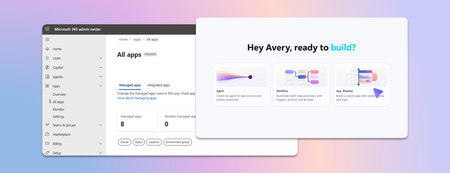
Last week we announced app building in Copilot Studio and Copilot Cowork. Makers can now describe business outcomes and produce full-stack apps with built-in source control, deployment stages, and version isolation—all on Microsoft-hosted infrastructure that requires no infrastructure provisioning, hosting configuration, or deployment pipeline. With those capabilities built in, your administrative scope is narrower and more familiar. Apps are created in the maker's personal developer environment following the environment routing policies you already have. That means things like connector permissions and data policies apply to an app both while it is being built and after it is published. Apps also access connected data on behalf of the signed-in user, which means publishing or sharing an app never grants anyone access to data they could not already reach. With these new capabilities, there are three things that every admin should be thinking about: Review your app estate Control cost with credit caps Choose where makers can build apps Review your app estate Published apps are inventoried in the Microsoft 365 admin center. Each app shows: Who built it Its lifecycle state Which data sources and connectors it uses Which policies apply to it Usage and operational metrics From the same experience, you can also block or disable a published app, remove a connector, bring an app back within policy, control whether it can be shared, and retire apps that are no longer used. Control cost with credit caps Building and running apps are both charged through Copilot Credits usage-based billing, and are metered as two separate services. This distinction lets you manage maker cost and app runtime cost independently. Build consumption varies with the language model used, the complexity of the app, and how much iteration is involved. Runtime consumption, on the other hand, varies with the volume and complexity of the tasks the app processes. At runtime, if the user holds a Power Apps Premium license, usage is included within existing request limits. Beyond those limits, or without a license, usage bills through Copilot Credits. You can learn more by reviewing the Copilot Credits licensing guide. As an admin, you can define credit cap policies to manage your costs. For both maker and runtime usage, caps are set per user, and the controls are managed through usage-based billing. For makers, think of a cap as a per-user budget: you can set the same budget for everyone, or different budgets for groups of users, such as departments that carry separate budgets of their own. Choose where makers can build apps By default, app creation is available to all users in both Copilot Studio and Copilot Cowork. However, you may want to limit where people can build apps. To do so: In the Microsoft 365 admin center, navigate to Apps, then Overview, and find ‘Choose where people can make apps’. Two paths appear: Copilot Studio, where makers build directly, which is on by default and recommended Copilot Cowork, where people create apps through chat, with availability managed by your organization's participation in the Frontier program Note that turning a path off prevents new apps being created that way. However, apps that are already published through that path will continue to run. Key takeaways for managing apps built in Copilot Studio The Microsoft 365 admin center is the one place to review the app estate, adjust app policies, and decide which creation paths stay open. Set credit caps as per-user budgets today, uniformly or by group, and plan for environment-level caps as project budgets when they arrive. Decide who is accountable for overseeing published apps before makers start publishing, as you would for any other application estate. Go to the Microsoft 365 admin center708Views0likes0CommentsChild agents and local agents in Copilot Studio
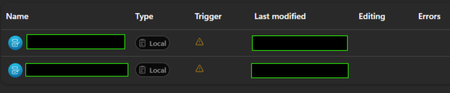
I'm AI administrator, and I have a colleague who've build an agent in Copilot Studio that uses to child agents. However on his screen they have the relationship "Local" and he can't access them or do anything. When I look at his agent, the sub agents have relationship "Child" and everything works fine. The image down below is what he sees - and the trigger also gets that orange triangle. Have anybody experienced the same? We tried to give another colleague editor permission to the agent, and that colleague experiences the same. They are both sitting at an office in another country than me.187Views0likes2Comments
White paper: Choosing between the GitHub Copilot and Standard harnesses in Copilot Studio
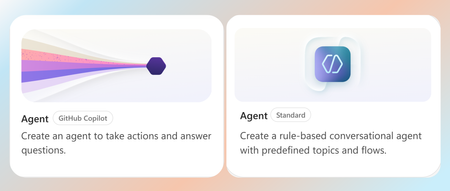
The Standard harness and GitHub Copilot harness are two authoring and runtime options within Microsoft Copilot Studio. A harness is the operating layer between the model and the agent’s configuration. It determines how the model receives context, uses instructions and tools, interprets results, and moves through a task toward completion. Put simply, the model provides the reasoning capability, while the harness equips and directs it. Both harnesses are built for task-based, multi-step agents that create real business value, but they are suited to different scenarios. The Standard harness supports consistent, reliable execution of bounded business processes, while the GitHub Copilot harness extends these capabilities to longer-running, coordination-heavy, and reasoning-intensive work at a larger scale. This paper explains the key differences, tradeoffs, and scenarios to help you choose which harness is right for your business process. Read the full paper by clicking the PDF attachment below.4.8KViews0likes2CommentsRetention policy for only Microsoft Copilot Chat and Copilot Studio agent transcript?
Is it possible to create a retention policy for "Microsoft Copilot Experiences" location but targeting only Microsoft 365 Copilot and Copilot studio but not Security Copilot or Copilot in Fabric?Solved140Views0likes2CommentsChoosing a real-time voice architecture on Microsoft Foundry: three enterprise patterns
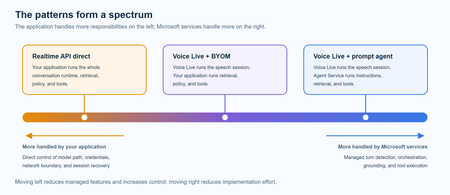
A practical comparison of three real-time voice architectures on Microsoft Foundry, including implementation tradeoffs and four enterprise release gates for residency, networking, retrieval authorization, and tool credentials.654Views1like0Comments
Inside Orchestrated Media Intelligence: The Technology Behind Connected Media Workflows
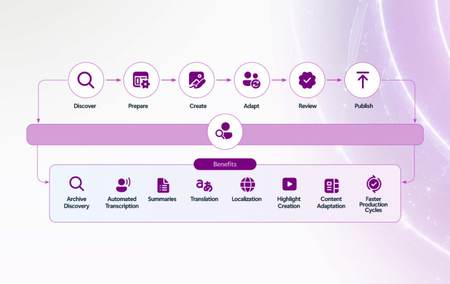
What orchestration changes Media workflows are already distributed across specialized creative, content, rights, archive, delivery, audience, and business systems. The technical challenge is not to replace those systems with one monolithic platform. It is to create an orchestration layer that can carry context, policy, and learning across them. In practice, orchestrated media intelligence connects four foundations: trusted data and metadata, specialized AI models and agents, scalable cloud infrastructure, and governance that follows every interaction. Agents can monitor state, retrieve context, recommend or initiate actions, and keep people informed. Human approval remains explicit for decisions involving creative intent, rights, brand, privacy, security, or material business impact. A reference pattern for connected media workflows Define the outcome and measurement model. Orchestration should begin with a specific business outcome, not a technology deployment. Teams should establish the workflow result they want to improve and the baseline against which progress will be measured. Telemetry should connect agent activity to outcomes such as time to market, localization cost, service reliability, incident response, inventory yield, engagement, and rights protection. The data, model, agent, and governance choices that follow are only valuable if they help achieve that result. Unify and enrich the data layer. Content assets, production metadata, rights information, operational telemetry, audience signals, and commercial data need consistent identity, access, lineage, and quality controls. Enrichment services can make archives searchable, connect live and historical context, and ground AI in enterprise knowledge. Coordinate models and agents. Different tasks require different capabilities, from language and vision models to media processing, speech, forecasting, optimization, and observability. An agent layer coordinates those capabilities, passes context between systems, and invokes workflows under defined permissions rather than treating each model as an isolated assistant. A practical example comes from Southworks, which developed an AI-powered quality control pipeline on Microsoft Azure. The solution combines deterministic media analysis with Azure AI Speech and Azure OpenAI so signal processing measures what happened, AI interprets whether a finding is meaningful, and an operator makes the final decision. This division of responsibility helps automate the first review while preserving human accountability. Embed security and governance. Identity, least-privilege access, rights enforcement, content provenance, privacy, policy, monitoring, and human review must be architectural components. Governance should travel with the data and action so an automated recommendation cannot bypass the controls that would apply to a person. How the pattern appears across the media lifecycle Creation and production: Galleri5’s AI Studio, powered by Microsoft Foundry, unifies multimodal capabilities across video generation, visual effects, 3D world building, storyboarding, asset generation, shot tracking, and post-production. Adobe extends this connected approach across creative and content supply chain workflows, while NVIDIA accelerated computing on Microsoft Azure provides the performance required for demanding generation, rendering, and visual-effects workloads. Together, these technologies connect creative tools with rights, approvals, brand controls, storage, and downstream production requirements. That connected workflow can also extend from production into rapid evaluation at scale. After rebuilding its LINK AI creative effectiveness platform on Azure, Kantar reduced ad-scoring time from as long as an hour to just a few minutes and enabled tens of thousands of ads to be evaluated within hours. Delivery and operations: Sanoma combined GPT-4o in Azure OpenAI, Finnish Meteorological Institute data, and Custom Neural Voice in Azure AI Speech to automate forecasts for 26 regions. Skyline Communications uses DataMiner and Microsoft Azure to provide a unified operational view across fragmented media systems, surface service insights, recommend actions, and optimize workflows in real time. NAGRAVISION adds an intelligence-led security layer: NAGRA Venturi turns multi-source piracy data into prioritized action so teams can focus on threats with the greatest business impact. Audience and content intelligence: The Premier League Companion demonstrates how Azure and Microsoft Foundry can connect archives, statistics, live match data, and audience context. Separately, MediaKind and Microsoft are connecting live production, delivery, and audience signals so personalized experiences remain responsive during live events. Protiviti’s Sport Performance Intelligent Platform uses Azure AI technologies to unify disparate sources and expose real-time insights through a conversational experience. Design principles for technical teams Start with a bounded, high-value workflow and a measurable business outcome. Design for composability, especially where high-value technology is evolving rapidly. Use published interfaces so components can be connected, adapted, or replaced as requirements change. Keep people in control of high-impact creative, rights, security, and commercial decisions. Make identity, policy, observability, and auditability consistent across agents and systems. Design context to move across lifecycle stages without exposing data beyond its permitted use. Test for reliability, quality, latency, cost, and safe failure, not only model performance. Moving from pilot to production A practical path begins by defining the outcome, establishing a baseline, and mapping the workflow, systems, decisions, data, and controls already in place. Teams can then identify one orchestration point where shared context removes a meaningful bottleneck and introduce agents behind explicit guardrails. As the workflow proves measurable value, the same trusted data, identity, governance, and observability foundation can support additional use cases. This is the technical promise of orchestrated media intelligence: not a single model or product, but a governed, composable system that helps specialized tools work together, allows people to retain accountability, and turns intelligence from isolated task assistance into a capability that improves across the media lifecycle. For the executive perspective and the three frontier use cases, read Silvia Candiani’s companion industry blog, Orchestrating Media Intelligence: Turning AI Potential into Business Value.