administrator
2920 Topics
Teams Retains Stale App Metadata After Removing and Re-uploading a Sideloaded App
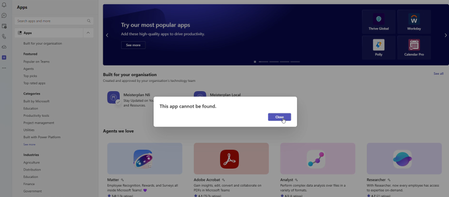
After the app is removed and subsequently re-uploaded, Microsoft Teams appears to retain stale application metadata or session information from the previous installation. This may include the previous app identity, bot or static tab references, and WebView session state. As a result, Teams may display errors such as "This app can't be found" or prevent navigation to the Messages/Chat section, even though the application configuration and React routing are functioning correctly. The issue appears to occur particularly when the application is re-uploaded using the same manifest version. Completely quitting and restarting Teams may temporarily resolve the problem. Expected Behavior After removing a sideloaded app and uploading it again, Teams should load the latest application configuration and should not retain stale metadata or session state from the previous installation. Actual Behavior Teams may continue using stale app metadata or session state after the app has been removed and re-uploaded, resulting in navigation failures or "This app can't be found" errors.10Views0likes0CommentsStatic Tab and Chat Tab Order Is Not Persisting in Microsoft Teams
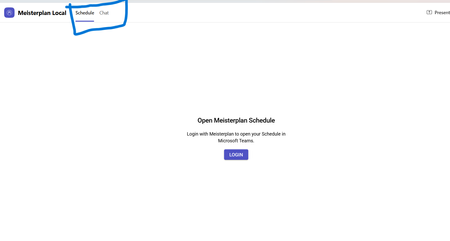
manifest file: "staticTabs": [ { "entityId": "schedule", "name": "Schedule", "contentUrl": "...", "websiteUrl": "...", "scopes": ["personal"] }, { "entityId": "conversations", "scopes": ["personal"] } ] the Schedule tab is intentionally place before conversations: it initially appears correctly, but after navigating away from the app and returning, Teams places Chat/Conversations before Shcedule. I'm using schema version 1.12. The tabs are configured in the specified order in the manifest file, and the expected tab order is displayed correctly when the app is initially opened. However, when I navigate to the Chat section, the tab order changes and does not persist as defined in the manifest file.10Views0likes0Comments
Security loophole in Private Channels?
We came across an interesting use case in our organization today. We have a Team and a private channel within that Teams team. Within the private channel a subsite was created. I am not an owner or member of the Team nor am I a member or owner of the private channel. However during creation of the subsite I was able to be invited with unique permissions to the subsite and I was successfully able to access it. After the initial creation of the subsite, our admin was not able to add or remove or effect any additional permissions on that subsite. Is this a loophole? I expected that without being a member of the private channel I would have absolutely zero access to any items associated with the private channel and site. Which has remained true (when I go to the private channel URL I get denied access) except that I do have access to this specific subsite. My instinct is that the reason permissions cannot be changed after the fact is that this is a genuine loophole and permissions weren't intended by Microsoft to be able to be granted at all on the subsite. This is due to the fact it is under the private channel and permissions should only be able to be changed via the admin UI or from the Teams application. Has anyone come across this in their work? Any guesses or explanations for why the subsite access would be initially available? Is this just genuinely a loophole in the permissions architecture?106Views0likes1CommentIs Teams especially the class notebook being very slow?
Has anyone else noticed Teams being slower this last two weeks? What about class notebooks? Ours are taking more than an hour to distribute a simple page. Is that just us, or is anyone else experiencing that? What can you suggest to make it faster, how it was previously? Thank you.50Views0likes0Comments
Cannot deploy Custom backgrounds for Teams in VDI environment
We have detected (or so we think) a malfunction in Teams on VDI when attempting to deploy Teams backgrounds that should be available to users for their video calls. The only article that documents how to do this is the following: https://learn.microsoft.com/en-us/microsoftteams/custom-meeting-backgrounds It clearly states that the path where custom Teams backgrounds are stored is in the user profile, specifically in the folder: %LOCALAPPDATA%\Packages\MSTeams_8wekyb3d8bbwe\LocalCache\Microsoft\MSTeams\Backgrounds\Uploads Expected Process The process is not direct, but it is straightforward. Using a script, a UUID is generated, which is used to create two image files (JPG, BMP, or PNG format, depending on the original image). For example, if the original is a JPG: UUID.JPG UUID_thumb.JPG These two files are copied to the path above, and on the next Teams session startup they should be available to the user. ✅ This works correctly in physical (non-VDI) environments. Tested many times without issues. What We Have Observed in VDI Even when the file pair is copied to the correct path within the user's FSLogix profile, the image does not become available in the Teams client — even after restarting Teams multiple times or even the VDI session itself. After each restart, the files are confirmed to be persistent and located at the correct profile path.[ %LOCALAPPDATA%\Packages\MSTeams_8wekyb3d8bbwe\LocalCache\Microsoft\MSTeams\Backgrounds\Uploads folder contents] When a background image is added manually through the Teams UI, a folder is created in OneDrive called "Microsoft Teams User Custom Video Backgrounds". If additional images are manually added to that OneDrive folder, they do not appear as available in Teams. This leads us to believe that the upload process performs additional operations in the registry or other configuration locations beyond simply copying the file. A ProcMon capture was performed, but after an initial superficial inspection, it was not possible to determine exactly what is happening under the hood.216Views0likes2Comments
Teams calls reporting as potentially scams incorrectly
Hey Teams Community, In the past 5 days I am seeing callers from external tenants that are trusted and in mto showing as suspected scam callers when they call me. They see.me as a suspected scam also when I call. These tenants are all trusted and most of them are.members of the same MTO. This only started happening in the last 7 days. What is causing this? Does anybody else see this happening recently with a similar setup?375Views0likes2CommentsTeams Events App / Plug-in, targeting events vs registration
Hi all, We would like to leverage Teams Events app in our organization, but find it is less than ideal due to a key function in choosing whether to use a registration form with an event. There is an audience targeting function, which we would like to leverage, that is disabled once a registration form is configured. In turn, that opens the event for people who may not find it relevant in the Events view (i.e. wrong language, wrong timezone). On the other hand, if no form is configured, we can elect to turn off notifications and not add an event automatically to a calendar. That's great, but then there is no option at all to add an event from the Events view. Is there a way to subdivide the teams Events app into organizations behind the scenes, without subdividing the entire M365 tenant? Is there a chance that further development on this resource will allow for audience targeting AND registration?285Views0likes1CommentFeature Title: Ability to Transfer Ownership of a Recurring Meeting Series
Problem/Use Case: When a meeting organizer creates a recurring meeting series and later moves to a different team, role, or leaves the organization, there is currently no way to transfer ownership of that meeting series to another person. This creates several issues: The meeting series may need to be cancelled and recreated from scratch, causing stakeholders to lose the original meeting history, chat thread, shared files, and notes tied to that series. All previously invited stakeholders and the meeting's context/topic history become fragmented or lost. The new owner has to manually recreate invites, re-add all attendees, and re-link any associated channels or files. Requested Feature: Allow the original organizer (or an admin) to reassign/transfer ownership of an existing recurring meeting series to another user, while preserving: The full list of existing stakeholders/attendees The meeting's chat history, shared files, and notes The recurrence pattern, time slot, and associated channel (if applicable) Any linked agenda items or topics tied to past occurrences Suggested Implementation: Add a "Transfer Ownership" option within the meeting series settings (similar to file/document ownership transfer in SharePoint/OneDrive) Notify the new owner and all attendees when ownership changes, so context isn't lost Ensure calendar entries update automatically for all invitees without requiring them to accept a new invite Business Impact: This would reduce disruption during team transitions, org changes, or role handovers, and ensure continuity of important recurring discussions without manual recreation of meetings or loss of historical context.342Views0likes1CommentMicrosoft Teams Calendar Request
My US public k-12 school district would really love to integrate our Google Calendar with Microsoft Teams calendar. We don't have Exchange licenses, but we'd like to be able to still sync the calendars if possible. I found this support article: https://learn.microsoft.com/en-us/microsoftteams/setup-calendar-syncing-with-google-workspace but it looks like the feature is set to be deprecated later this year. I did try to get the feature working using the Admin app in Teams, but I ran into several issues and Microsoft Support stated development was paused. We would really love this feature to come back and work correctly if possible. Thanks.264Views0likes1Comment
Has anyone successfully used "Hide attendee names" in Teams Meetings or Webinars with Teams Premium?
Hello, I'm trying to understand the current status of the**"Hide attendee names"** feature in Microsoft Teams. Our organization has Teams Premium, and according to Microsoft's documentation, the feature should be available for both Meetings and Webinars. The documentation even provides separate instructions for each scenario. However, during a recent Microsoft Support call, I was told that the feature is actually available only for Town Hall events and not for standard Teams Meetings or Webinars. This appears to contradict the current Microsoft documentation, so I'm looking for real-world feedback from other administrators. Questions: Has anyone successfully enabled Hide attendee names in a standard Teams Meeting? Has anyone used it in a Webinar? We have Teams Premium. If it works for you, what licenses are assigned to the organizer? Do you actually see the Hide attendee names option in Meeting Options? Is there any specific policy, rollout, or configuration required? Has Microsoft Support ever told you that the feature is Town Hall only? Microsoft documentation: https://support.microsoft.com/en-us/teams/meetings/hide-attendee-names-in-microsoft-teams-meetings-and-webinars At this point I'm trying to determine whether: The documentation is incorrect or outdated. The feature is being rolled out gradually. There is an undisclosed licensing or policy requirement. Microsoft Support provided incorrect information. The feature has been silently restricted to Town Hall events. Any feedback from tenants where this is actually working would be very helpful. Thanks! Giuseppe360Views0likes2Comments