administrator
2920 Topics
Teams Retains Stale App Metadata After Removing and Re-uploading a Sideloaded App
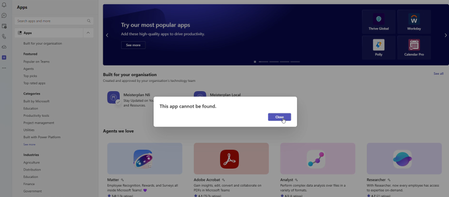
After the app is removed and subsequently re-uploaded, Microsoft Teams appears to retain stale application metadata or session information from the previous installation. This may include the previous app identity, bot or static tab references, and WebView session state. As a result, Teams may display errors such as "This app can't be found" or prevent navigation to the Messages/Chat section, even though the application configuration and React routing are functioning correctly. The issue appears to occur particularly when the application is re-uploaded using the same manifest version. Completely quitting and restarting Teams may temporarily resolve the problem. Expected Behavior After removing a sideloaded app and uploading it again, Teams should load the latest application configuration and should not retain stale metadata or session state from the previous installation. Actual Behavior Teams may continue using stale app metadata or session state after the app has been removed and re-uploaded, resulting in navigation failures or "This app can't be found" errors.10Views0likes0CommentsStatic Tab and Chat Tab Order Is Not Persisting in Microsoft Teams
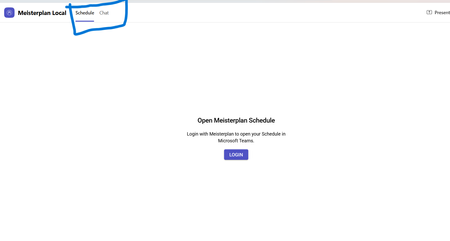
manifest file: "staticTabs": [ { "entityId": "schedule", "name": "Schedule", "contentUrl": "...", "websiteUrl": "...", "scopes": ["personal"] }, { "entityId": "conversations", "scopes": ["personal"] } ] the Schedule tab is intentionally place before conversations: it initially appears correctly, but after navigating away from the app and returning, Teams places Chat/Conversations before Shcedule. I'm using schema version 1.12. The tabs are configured in the specified order in the manifest file, and the expected tab order is displayed correctly when the app is initially opened. However, when I navigate to the Chat section, the tab order changes and does not persist as defined in the manifest file.10Views0likes0Comments
Cannot deploy Custom backgrounds for Teams in VDI environment
We have detected (or so we think) a malfunction in Teams on VDI when attempting to deploy Teams backgrounds that should be available to users for their video calls. The only article that documents how to do this is the following: https://learn.microsoft.com/en-us/microsoftteams/custom-meeting-backgrounds It clearly states that the path where custom Teams backgrounds are stored is in the user profile, specifically in the folder: %LOCALAPPDATA%\Packages\MSTeams_8wekyb3d8bbwe\LocalCache\Microsoft\MSTeams\Backgrounds\Uploads Expected Process The process is not direct, but it is straightforward. Using a script, a UUID is generated, which is used to create two image files (JPG, BMP, or PNG format, depending on the original image). For example, if the original is a JPG: UUID.JPG UUID_thumb.JPG These two files are copied to the path above, and on the next Teams session startup they should be available to the user. ✅ This works correctly in physical (non-VDI) environments. Tested many times without issues. What We Have Observed in VDI Even when the file pair is copied to the correct path within the user's FSLogix profile, the image does not become available in the Teams client — even after restarting Teams multiple times or even the VDI session itself. After each restart, the files are confirmed to be persistent and located at the correct profile path.[ %LOCALAPPDATA%\Packages\MSTeams_8wekyb3d8bbwe\LocalCache\Microsoft\MSTeams\Backgrounds\Uploads folder contents] When a background image is added manually through the Teams UI, a folder is created in OneDrive called "Microsoft Teams User Custom Video Backgrounds". If additional images are manually added to that OneDrive folder, they do not appear as available in Teams. This leads us to believe that the upload process performs additional operations in the registry or other configuration locations beyond simply copying the file. A ProcMon capture was performed, but after an initial superficial inspection, it was not possible to determine exactly what is happening under the hood.218Views0likes2Comments
Security loophole in Private Channels?
We came across an interesting use case in our organization today. We have a Team and a private channel within that Teams team. Within the private channel a subsite was created. I am not an owner or member of the Team nor am I a member or owner of the private channel. However during creation of the subsite I was able to be invited with unique permissions to the subsite and I was successfully able to access it. After the initial creation of the subsite, our admin was not able to add or remove or effect any additional permissions on that subsite. Is this a loophole? I expected that without being a member of the private channel I would have absolutely zero access to any items associated with the private channel and site. Which has remained true (when I go to the private channel URL I get denied access) except that I do have access to this specific subsite. My instinct is that the reason permissions cannot be changed after the fact is that this is a genuine loophole and permissions weren't intended by Microsoft to be able to be granted at all on the subsite. This is due to the fact it is under the private channel and permissions should only be able to be changed via the admin UI or from the Teams application. Has anyone come across this in their work? Any guesses or explanations for why the subsite access would be initially available? Is this just genuinely a loophole in the permissions architecture?106Views0likes1CommentIs Teams especially the class notebook being very slow?
Has anyone else noticed Teams being slower this last two weeks? What about class notebooks? Ours are taking more than an hour to distribute a simple page. Is that just us, or is anyone else experiencing that? What can you suggest to make it faster, how it was previously? Thank you.50Views0likes0CommentsDirect Routing PSTN calls to Teams Auto Attendant does not forward to Shared Voicemail
Hi all, I’m running into a strange issue with a Teams Auto Attendant and I’m hoping someone here has seen it before. We have a Direct Routing number where business hours calls go to a Call Queue, which works, and after hours calls should go to Shared Voicemail for a Microsoft 365 Group. If I call the Auto Attendant from inside our Teams tenant, the after-hours Shared Voicemail works correctly. I can leave a message and the voicemail is delivered to the group inbox as expected. If I call the same number from the PSTN over Direct Routing, I hear the after-hours greeting, so the schedule and call flow are clearly being hit, but once the greeting finishes I get: “Sorry, we cannot connect your call at the moment, please try again later.” I have already verified that the resource account has the correct Teams Phone Resource Account license, Enterprise Voice is enabled, the LineURI is assigned, the Online Voice Routing Policy is assigned, the Direct Routing route and SBC look healthy, the Auto Attendant is associated with the correct resource account, the after-hours call flow points to the correct Microsoft 365 Group, and the group mailbox exists and is healthy. What makes this more confusing is that redirects to internal or tenant-side destinations work, but redirect to Shared Voicemail from a PSTN-originated call does not work. I also tested redirect to an external PSTN number, and that fails with the same error as well. Because the after-hours greeting plays correctly, and because internal Teams calls can successfully leave voicemail in the shared mailbox, I do not think the issue is with the Auto Attendant configuration itself or with the Microsoft 365 Group mailbox. At this point it looks more like the handoff or redirect path for PSTN-originated calls over Direct Routing is where things break. Has anyone run into this with a Teams Auto Attendant, Shared Voicemail, and inbound PSTN over Direct Routing? I’m trying to figure out whether this is a known limitation, a bug, or if there is some specific setting related to PSTN-originated redirects that I am missing. Thanks!346Views1like1Comment
Cross-Tenant Shared Meeting Room Spaces
We have two M365 tenancies under our group. We need to allow users from both tenants to use Meeting room resources (book rooms, use calendars etc..). Is this just about configuring Exchange OR Sharing in EXO or do we need anything beyond that to facilitate Teams meeting room resource sharing? Would we also need to sync these meeting room objects across tenancies to allow users to see them in GAL etc.. ? Thank you!5KViews0likes4Comments
How do we export and import Teams Chat Contacts ?
In the teams app under chat we have created a list of contacts. How do we export and import these Teams Chat Contacts? Note, we have three Microsoft 365 accounts, so we would like these contacts to be sync'd or at manually sync'd ( eg via export and import). Thank you51KViews1like18Comments