accessibility
47 Topics
Help Desk Sent Me Here...Help!
I'm getting the msg in a ribbon at the top of my excel files as follows: COULDN'T VERIFY SUBSCRIPTION Excel couldn't verify your Microsoft 365 subscription. Please make sure that you're connected to the Internet. ( I am ). we've rebooted several times, uninstalled, reinstalled etc. I can open all my excel files, but can't edit or save them. All dropdowns are "grayed" out. Microsoft Help Desk sent me here.127Views0likes2Comments
Sensitivity label "Certificate Error"
When applying Sensitivity Labels in Microsoft Office applications, we receive the following certificate warning: "The certificate issuer for this site is untrusted or unknown. Do you wish to proceed?" We have already excluded the required Microsoft Azure URLs from the firewall and disabled SSL/TLS inspection, but the issue still persists. Observations: 1.On the same domain-joined computer, when signed in with a local user account, Sensitivity Labels work correctly without any errors. 2.When signed in with a domain user account, the certificate warning appears while applying or accessing Sensitivity Labels. Could you please help us identify the root cause and provide a solution? Your assistance in troubleshooting this issue would be greatly appreciated.113Views0likes1Comment
Office 365 Outlook - disaster with Accounts
New Outlook of the 3 accounts I have Gmail shows only one email Onet one stopped syncing new emails How is that possible the new FORCED outlook is such a cr....y disaster? Over the last 7 years with the Old one I have never ever had a single sync issue. How is that possible the BASIC Outlook functionality is now working?115Views0likes3CommentsPrimer: How to Use RBAC for Applications to Control App Use of the Mail.Send Permission
The temptation to use the Mail.Send application permission in scripts can lead PowerShell developers into trouble because the permission allows access to all mailboxes, including sensitive executive and financial mailboxes. Fortunately, RBAC for Applications allows tenants to control the access that apps have to mailboxes and other Exchange content. All explained here with an example script to test RBAC of Applications. https://office365itpros.com/2026/02/17/mail-send-rbac-for-applications/931Views3likes4Comments
Microsoft Edge Webview icon
I'm I in the right community? My Widgets Icon on my toolbar doesn't open even with the Widgets turned on in the settings. Could you help me? I am the administrator. I have the Edition Windows 11 Home Version, 23H2, with a Windows Feature Experience Pack. I have Windows 11 software and has been updated recently. Everything under Task Manager, details, mswebview.exe is running, however, the window doesn't appear on the home screen. Could this be an easy fix? TIA Joseph472Views0likes4Comments
My microsoft account got hacked: Need actual support (Not copy and pasted ones)
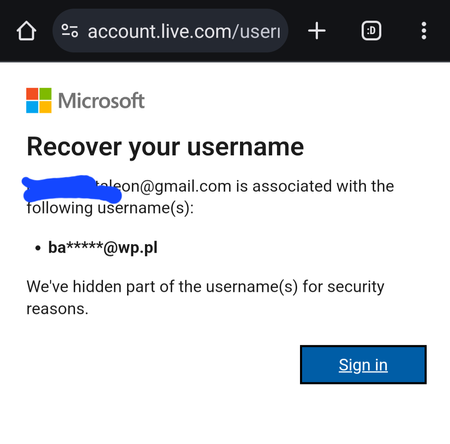
My account got hacked, i dont know how but im sure 2fa is turned on and hackers still got in. I dont understand why there wasnt any emails about it going through my email that someone logged in in my microsoft account. I had things connected to that account such as school and some game like minecraft. Currently my java minecraft is non existence and is deleted from minecraft forever because i cant find it in namemc, but my xbox gamer tag is still alive so it also confirms that it indeed had an association with my account before. The hacker changed the email of my account that cause my email to be non-existence in the microsoft system. (This is very huge flaw of microsoft, i hope before we do any changes in the account, it is first confirmed in the email address if this email should really be added to that microsoft account) But i do have evidence that it was indeed associated with it before the hacker change the email and its even confirmed by microsoft website, i also got the full email of the hackers email that was used on my account. I tried everything from contacting support to the account recovery form. But nothing works, i tried cursing the fake email of the hacker that was currently occupying my account, but recieved no response. I am in dilema on what to do now, this account has been with me ever since my email was created. I just hoped that i get it back, i could provide evidences. But its been getting ignored apparently.2.1KViews0likes5Comments
Shared OneDrive for Charity Management Team
We are a small charity running a Village Hall in the UK. A few of the trustees form a Business Team that run the hall day to day. All of these have Office 365 personal or family subscriptions to use word outlook etc on their own laptops. The charity itself has Office 365 Business Basic Grant subscription. This give us Exchange email, OneDrive, Teams and SharePoint plus a few other bits. We currently store all our charity documentation on a free 15Gb OneDrive dating back to SkyDrive when first adopted. Each member of the team has their own charity Microsoft account and email e.g. email address removed for privacy reasons or email address removed for privacy reasons etc, etc. I want to migrate this data onto an Office 365 Business OneDrive that is shared with this Business Team Here's the rub. As most users have a personal subscription and data saved on their own OneDrive keeping the two separate is problematic. Because Microsoft credentials are so tightly integrated between the OS and Office if they try and sign in to the existing OneDrive it takes them to their own private OneDrive. To work around this they have to use an Incognito browser session in order to log in. I am aware you can create a shared OneDrive for teams as described https://support.microsoft.com/en-gb/office/create-a-new-shared-library-from-onedrive-for-work-or-school-345c8599-05d8-4bf8-9355-2b5cfabe04d0 which should allow them to access this OneDrive by using their own credentials as above (email address removed for privacy reasons etc) but if they log in to this shared OneDrive once, and on the prompt that comes up at log in select "Stay logged in", can they keep visiting the site without logging in again and will they then have to use an incognito browser session to access their own personal OneDrive? Sorry this is so complicated but its been a nightmare trying to keep this working Many thanks John178Views0likes1Comment
CSPP Integration: Can a Timer Be Implemented as a Word/Excel Add‑in?
Hi everyone, I’m currently integrating Microsoft Word and Excel into our platform and making sure we follow all the recommended UI guidelines. In our solution, we use an internal timer component that runs while users are working inside our product(I mean the timer shows total time left for their tasks something like this). I’m trying to understand whether this timer can be built or installed as an Office Add‑in for Word and Excel. Would implementing it as an add‑in still align with Microsoft’s UI guidelines? Any guidance or clarification would be really helpful. Thanks!176Views0likes2Comments