accessibility
420 Topics
dell Vostro upgrade to Windows 11
Hi Microsoft support community, I request your advice as I would like to install Windows 11 on my Dell Vostro 3590. Initially it was shipped with Windows 10 pre-installed and it worked perfectly. But I wipped the system to install another operating system (linux) and it worked also perfectly. Now I tried to install Windows 11 as I noticed the laptop is secure boot capable and this should be sufficient for Windows 11 install. But, I never made it trying to install W11 with USB. direct install or W10 upgrade did not worked. It get stuck on the logo screen. There seem to miss a driver for harddrive, so i tried to install several drivers from dell site w/o success. So I require your advice if it possible to install Windows 11 on a dell Vostro 3590. Thank you and have a good day,6Views0likes0CommentsWindows Explorer Constantly Crashes
Hi. I switched to Windows 11 a couple months ago, and only today I started noticing a really annoying issue with Windows Explorer. Basically everytime I turn on the PC I can use it fine for 5-10 minutes but then I start noticing that it gets unresponsive. For example, I have Chrome open, and Microsoft Word, and out of nowhere I can't scroll in Chrome or switch to Word, it's like it completely freezes but I can still move my mouse. The actual explorer is frozen, so I can't open the task manager from there either. Only thing that works for fixing this is pressing Ctrl+Alt+Del to bring up the task manager through there, once I do that I can go back to using my computer normally but after some time it crashes again. I was reading some forums about this issue and it was recommended to end the "explorer.exe" task in the Details tab, and then starting it again, which I did, and restarted my computer after. Now its worse, when I turn on the PC and go into my desktop it's frozen from the start, so to start using the computer I need to access the task manager through Ctrl+Alt+Del. My computer specs are: Nvidia RTX4070ti 64gb ram AMD Ryzen 9 5950X 2 nvme SSDs and 1 HDD I have the latest drivers from Nvidia Studio Driver installed (6 16.92). I installed it more than a week ago, I wonder if this could be causing the issue. But please, anyone with this problem that can help me solve it? Thanks3Views0likes0Comments
Automatic Timezone Inaccurate
I had an issue wherein we are trying to implement an automatic timezone for users as they travel alot. The objective is that whenever a user goes say US, the timezone will automatically adjust to where he is. What we did is 2 things: To forcibly enable location services on a user device Enable the tzautoupdate via script Note: No defined/default timezone is selected Upon observation on a test user when enabled, everything is perfect except for when he was onsite at an office in UK. For some reason, when he is connected to office the timezone automatically shifts to UTC-4. We have tested it for almost 2 weeks and its still the same hence we halted the testings and removed the configuration. I have found similar issue that it might be related to Geolocation of Microsoft Database and unfortunately there is no way to update it or request it to be updated as there is no procedure how to raise them to update as well. https://learn.microsoft.com/en-au/answers/questions/5869140/persistent-incorrect-geolocation-on-windows-device In line with it, I created a microsoft case and based on our discussion and testings there is no issue on the device and/or the configuration and the only action plan that we have is to hope that this discussion gets to be seen and maybe microsoft updates their Geolocation Database.61Views0likes1CommentWhy does the Quick Settings panel sometimes refuse to open on Windows 11?
Why does the Quick Settings panel on my Windows 11 PC occasionally refuse to open when I click the network, volume, or battery icons in the taskbar, and why does it sometimes open as a completely blank window with no toggles? It works fine most of the time, but every few days it either ignores my clicks or shows an empty panel until I restart Explorer or reboot. Could this be caused by a corrupted shell experience, a broken system tray process, or something that a recent update changed? And is there a way to fix it without resetting the whole taskbar or reinstalling Windows?30Views0likes0CommentsWhy do all my windows jump to the main monitor after waking from sleep?
Why do all my open windows suddenly move to my primary monitor after my Windows 11 PC wakes from sleep, even though I arranged them across two or three displays before? Why does it only happen after sleep and not after a normal restart, and why does it sometimes put windows partly off-screen? Is this caused by a display driver issue, a problem with monitor detection on wake, or a setting in the graphics control panel? And is there a way to keep window positions from resetting every time the PC sleeps?28Views0likes0Comments
After the screen enters sleep mode, it gets stuck in an on/off loop.
After the screen enters sleep mode, the GPU starts cycling on and off, and the monitor gets stuck in an infinite on/off loop. I’ve already replaced the motherboard and CPU, reinstalled Windows, swapped the liquid cooler, and updated the BIOS... but the problem persists. As soon as the screen sleep timeout is reached, the GPU starts cycling its fans on and off at 1.8-second intervals, and consequently, the monitor enters this infinite on/off loop. I have been using Windows 11 Pro the entire time.74Views0likes1CommentWhy do Snap Layouts stop appearing when I hover over the maximize button?
Why do Snap Layouts on my Windows 11 PC sometimes stop showing up when I hover over the maximize button, even though the feature is enabled in Settings? Why does it work perfectly for a while, then suddenly nothing happens when I move the mouse to the top of the window? I've already tried restarting Explorer and checking the multitasking settings, but it only fixes it temporarily. Could this be caused by a corrupted shell experience, a conflict with a third-party window manager, or a recent update? And is there a way to bring Snap Layouts back permanently instead of rebooting every time they stop working?77Views0likes1CommentWhy does Windows 11 Search show web results before my installed apps?
Why does typing an app name into the Start menu search bring up Bing results and web suggestions before it shows the program that's already installed on my PC? Why does it sometimes completely fail to find local files that I know are on the drive, yet it happily pulls in a dozen unrelated web links? Could this be tied to web search integration that can't be fully turned off, a corrupted search index, or something a recent update changed? And is there any way to make local results appear first, or at least stop the web results from cluttering the list?58Views0likes1Comment
Win11 End Task option in taskbar right-click menu fails to close unresponsive apps
When you right-click an unresponsive app on the taskbar and select End Task, the app's window remains open and the process does not terminate. You must use Task Manager to force the app to close. This issue is more common in UWP apps and typically occurs after the system has been running for several hours. Restarting File Explorer can temporarily restore this functionality.59Views0likes0CommentsHow to move items from "Show more options" into the main context menu?
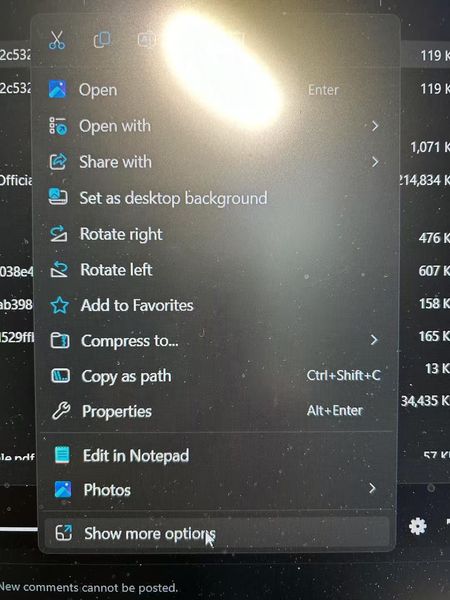
Is there a way to move certain items from the second pop-up (the "Show more options" menu) into the main right-click menu? I barely use some of the items that show up by default, and it would be way more convenient to have the ones I actually need right there without the extra click. Running Windows 11—anyone know if this is possible?80Views0likes1Comment