Quality & Performance
241 Topics
Live captions not working in Teams (Potentially widespread issue?)
Hi all, hope you can help. I work for a local council in the UK's IT department and we were looking into why a particular user couldn't get live captions to work in Teams meetings/calls. All of the options are enabled to get them to work, but in teams calls, it just shows the area at the bottom of the call window where the captions should appear, but no words come up. We updated the user's computer, and reinstalled the Teams app. We have tested this on the Teams app, as well as the browser version of Teams, on multiple computers, with different people, to the same result. The live captions simply aren't working. The user also mentioned their sister who works for another council is also having the same issue. Could this issue with live captions not working be widespread?Solved27KViews11likes45Comments
Restore Name / Timestamp Copy/Paste FEATURE in MS Teams
The ability for copy / paste to carry the sender's name and the timestamp of the comms in MS Teams was removed a while ago. Its seriously a ridiculous thing to fully remove. There are many many industries and many many use cases where having the name and timestamp EASILY copy / paste-able is NEEDED. Your devs should update with an option in settings to include Name and Timestamp on copy/paste actions in Teams. Going through multiple windows / options screens each time I want to pass along critical information is tiresome and annoying. Ad-hoc snip-it SS are as well. How narrow-sighted this change was is seriously concerning coming out of a multi-billion dollar company.301Views6likes1CommentTeams Screen Sharing Disabled
We are having multiple users reporting that they are not able to do Screen Sharing when they initiate the call the button is greyed out and says "Screensharing is disabled". Scenarios where it works: If Someone else initiates the call then the user who had issues in this case the receiver of the call, can share screen. They can initiate a screen share then unmute, works. Device OS: Windows 10 20H2 Enterprise Seems to be random but started between Friday and today..Solved32KViews5likes32Comments"You might not see everyone's video" - can I suppress this?
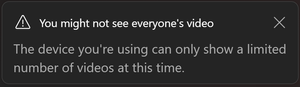
Recently (this week), I started getting this pop-up every time I join a Teams meeting: "You might not see everyone's video. The device you're using can only show a limited number of videos at this time." This using Teams 25017.203.3370.1174 on Windows 11 on a Surface Pro 6 (Core i7 w/16gb RAM). I've been using Teams on this Surface for years and have not had any issues with video. And I'm not seeing any new issues with video so not sure why I keep getting this message. I have to click to close it every time I join a meeting. Is there a way to suppress this or turn it off?4.3KViews4likes10CommentsNew Teams client suddenly not allowing specific characters from M365 Group naming policy
Since we deployed Teams a few years ago, we have had an M365 Group naming policy that appends " (UserCreated)" as a suffix for anything created by an end user/non-admin. There have been no changes since. Starting a few days ago, we got reports that users were getting an error of The team prefix or suffix is incorrect, please try again whenever creating a new team. After testing myself and reproducing the problem what I found is that if you're using the v2 client ("new" Teams on Windows/macOS, or https://teams.microsoft.com/v2 for the web client), it kicks back with the above error. If using a classic/v1 desktop client or the non-updated web client, the issue is not reproducible. v2 client + no parentheses in naming policy = SUCCESS - https://imgur.com/a/fun0klN v2 client + parentheses in naming policy = FAILURE - https://imgur.com/a/ZeADI6E v1 client + parentheses in naming policy = SUCCESS - https://imgur.com/a/jYae7l8 Currently unaware if this is a bug or new behavior that went unannounced, but there's at least a few other recent complaints of the same out in the community. https://answers.microsoft.com/en-us/msteams/forum/all/naming-teams/ebb29b25-20df-4642-8fcf-ffc67896e9f56.2KViews4likes13Comments
New Teams Mac - Can't position tasks in board view
OS: macOS 13.5.1 New Microsoft Teams for Mac doesn't allow the horizontal repositioning of task tiles in Board view. In what is now known as "Microsoft Teams classic," the act of clicking and moving a tile creates a faded image of the tile that can be moved within the task bucket. In New Teams, the click-and-move action turns the task into a small document icon that cannot be placed anywhere. On releasing the mouse the tile returns to its original position. Does anyone have this task positioning capability, or is it an actual missing feature? Cheers.1.4KViews4likes3Comments
URL Shortener for Tasks by Planner
A URL shortener for links to Tasks would be very useful. Currently the URLs are incredibly long, cumbersome and not conducive to easy sharing. URLs from Task by Planner currently appear like this: https://teams.microsoft.com/l/entity/com.microsoft.teamspace.tab.planner/mytasks?tenantId=[REDACTED]&webUrl=https%3A%2F%2Ftasks.teams.microsoft.com%2Fteamsui%2FpersonalApp%2Falltasklists%26context%3D%7B%22subEntityId%22%3A%22%2FtaskListType%2FteamTaskList%2Fteam%2F%5BREDACTED%5D%2Fchannel%2F%5BXX%5D%3A%5BREDACTED%5D%40thread.tacv2%2Fplan%2F%5BREDACTED%5D%22%7D This is unacceptably long and not easy to share. Something like Bit.Ly or similar URL shortening would be much appreciated for ease of sharing Task links.2.9KViews4likes2Comments
More control with Teams chat notifications (Duration, marking as Read)
Currently in Teams it shows you if you have unread chats in your taskbar notification icon (small red bell). But to mark that notification as read you have to open up Teams and then highlight the conversation to mark it as 'Read'. Does anyone know if there is a way, or given thought to building a way, to have more control over the notification pop-up that would allow you to control how long the notification displays when a new chat is received and to also add a button that would allow you to mark the chat as read rather than opening the entire Teams application? I'm not seeing this ability in either the "Teams built-in" or "Windows" notification styles.' Thank you for your consideration! Chris3.3KViews4likes3Comments
No background effects anymore (AGAIN!!!) on Teams on Web
After the latest update of MS Edge 108.1462 on MacOS Ventura 13.0.1, the Teams web app does not show ANY option to configure ANY background effect on the camera. This feature has been going on and off since months. Time for MS to get serious about this.Solved7.3KViews4likes6Comments