mobile device management (mdm)
2328 TopicsWill Intune device-only subscription get additional value in FY27
Will the Intune device-only subscription (Microsoft Intune announces device-only subscription for shared resources | Microsoft Community Hub) get the additional features which Intune P1 will get in FY27 (Microsoft 365 adds advanced Microsoft Intune solutions at scale - Microsoft Intune Blog), Intune Remote Help, Intune Advanced Analytics and Intune P2? This would have a huge impact of our planning how to manage special purpose devices in production environments without any user affinity. Deploying security and configuration settings, Windows Autopilot for Windows IoT Enterprise LTSC kiosk deployment, Windows Autopatch (servicing), Remote Help and FOTA for Zebra devices would be drivers to add these production devices to Intune.14Views0likes0Comments
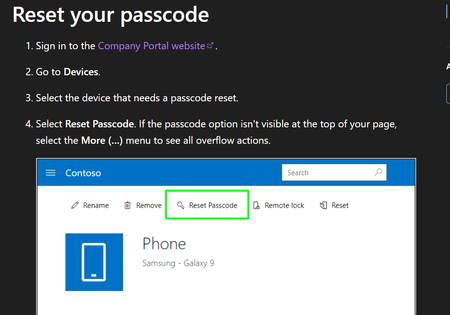
How to Disable Self-Service Passcode Reset for Standard Users in Microsoft Intune
Hi, We are using Microsoft Intune to manage Android corporate-owned devices. Currently, standard users can reset their own device passcode remotely. The problem is: Users reset the passcode themselves Then they get confused They call IT saying they cannot open their phone We want to prevent users from doing self-service passcode reset. Only admin should be able to reset the device passcode. I already checked configuration profiles and compliance policies in Intune, but I cannot find any setting to disable this. Has anyone successfully disabled this feature? Thank you.14Views0likes0CommentsEntra Shared Mode - Force App Stop
Hi All I hope you are well. Anyway, I was asked this yesterday and think I already might know the answer, but here goes. We had an instance of Microsoft Excel stuck in "getting things ready" on an Android Entra Shared Mode Device. Technical Support wondered if there was a way to Force Stop Excel or clear the app data. We had a look in Exit Kiosk Mode, Android Settings, and the Force Stop of Excel said "Action not allowed" and the clear the app data said "Unable to delete data for app" So, my question(s) would be, is going into Exit Kiosk Mode and even trying to force stop / clear data on apps even a valid option, or is this by design? Would adding Excel to this setting help? Any help or confirmation would be greatly appreciated. Stuart88Views0likes2Comments
Autopilot enrollment through serial number
I’m working for a reseller, and one of my customers has asked us to enroll their device serial numbers into their Intune/Autopilot tenant. We only have permission to upload devices because we are not their CSP partner. Now the customer wants us to enroll the devices, including their Purchase Order (PO) number, in the Purchase Order field in Intune. The issue is: Because we are not their CSP, the tenant does not allow us to enter or modify the Purchase Order field when we upload devices. My question: Is it possible for a non‑CSP reseller or partner to add a Purchase Order number during Autopilot device enrollment? If not, what options exist for a reseller to ensure that the Purchase Order field is populated?59Views0likes1CommentEdge for Android Smartscreen
Hi All I hope you are well. Anyway, is it possible to configure Edge for Android Smartscreen to: Prevent end user bypass Block potential risky downloads I can see various methods and guides pointing to Edge App Configuration policies but just cannot seem to get the this to work on Android Enterprise Fully Managed devices. Any help would be great. SK24Views0likes1CommentReplacing Complex GPO Item-Level Targeting with Intune
Hi All, I’m looking for some advice on the best way to handle this scenario. We’re running a hybrid environment and currently have a GPO that creates 1,000+ registry entries across 150+ user groups using item-level targeting with security groups. Now we need to move this over to Intune, and that’s where things get tricky. Intune doesn’t really offer the same item-level targeting flexibility as GPO. So far, the only workable option seems to be creating 150+ platform scripts or Proactive Remediation scripts, which obviously isn’t ideal from a management perspective. I’m thinking it might be much easier long-term to create one large PowerShell script that checks the logged-in user’s group membership and then applies the appropriate registry settings dynamically. Has anyone dealt with something similar? Is there a cleaner or more scalable approach in Intune? Thanks in advance! Dilan53Views0likes0CommentsControlling Excel Add-ins and Microsoft Store App Installations
We have a requirement to block users from adding add-ins to Excel and Installing certain application directly which utilize Microsoft Store apps. Below are the two scenarios we need to address. I would appreciate any guidance or recommendations on how to implement these controls. 1) Blocking Excel Add-ins from Microsoft Store Users are currently able to add add-ins such as “Claude by Anthropic in Excel” directly from the Microsoft Store apps. For example, if a user accesses the URL: https://marketplace.microsoft.com/en-us/product/saas/wa200009404?tab=overview they can proceed to add the add-in to Excel. So, We need a method to prevent users from adding Office add-ins from the Microsoft Marketplace or external sources. 2) Blocking Installation of Microsoft Store Apps (e.g., WhatsApp) We are currently blocking Microsoft Store apps on OS level. However, users can still download and install applications such as WhatsApp directly from the vendor website, which utilize Microsoft store apps in backend: https://www.whatsapp.com/download We are considering configuring the Intune policy “Only Private Store is enabled.” However, we noticed that enabling this setting prevents users from accessing certain built-in applications (e.g., Notepad). Is there any other way to block access Microsoft Store apps directly? Thank you in advance for your assistance. Dilan60Views0likes0CommentsDid expediting the 2024-08 Quality Updates fail for anyone else?
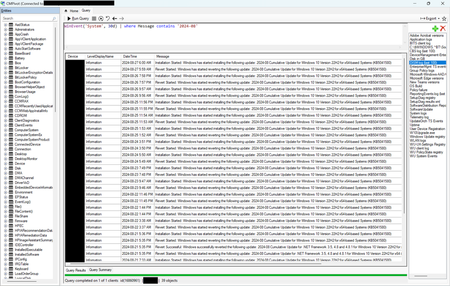
I posted this question yesterday on the Windows Servicing board, but there isn't much activity there. I hope it's okay to re-post it here. Due to the CVE-2024-38063 vulnerability, we attempted to use the Expedited Quality Updates feature to enforce the immediate installation of the 2024-08 security updates. Unfortunately, the feature simply did not work. Even a couple weeks after deploying the expedited update profile, we had about 25% of our Windows endpoints still in "Pending" status, most of which were powered on 24/7. We still have ConfigMgr in our environment, so I used CMPivot to run a query for events in the System log with "2024-08" in the message. This showed me that rather than installing the update and forcing a restart one day later as configured, the update was being installed, then reverted about ten hours later, then immediately re-installed again, over and over: If I manually initiated a restart on any of the affected machines, the update was successfully finalized, so the issue wasn't a failure to install the update. I've opened a case with Microsoft Support, but it is progressing slowly. If nobody else is seeing the issue, I will throw in the towel, but if it's more widespread, I think it is worth fighting to get this fixed (assuming that Microsoft isn't already aware and has simply chosen not to publicize it — for example, in the Windows release health blade in the Microsoft 365 Admin Center).Solved1.5KViews1like11Comments
What is the prerequisite for Migrating AirWatch to Intune
Hi Team, Could you please provide your suggestion and help with the prerequisite for migrating AirWatch to MS Intune? Note - Current environment is Airwatch and the client requirement migrating to MS Intune. Thanks, Anand Rathod1.5KViews0likes2Comments
iOS Company Portal Security
Scenario: Colleague have installed the Company Portal and enrolled their personal device. They then install an application through the Company Portal. Any application that does not have the Intune SDK integrated. It is understood that Application Protection will not be applied to the application without the SDK integration. Question(s): What is the level of security protection on this application? Would the data stored from the application be secured? If the iOS restriction policy deemed that the transfer of information from the application to another unmanaged application be limited, would that be enforced?85Views0likes1Comment