edge
816 Topics
400 Robux reward disappeared after my redemption was declined – anyone else?
Hi everyone, I’m really confused and frustrated right now. I spent about 5 months earning 6,750 Microsoft Rewards points and redeemed them for the 400 Robux digital code on March 2, 2026. The order was marked as “Declined,” and my points were returned. However, after that, the 400 Robux option completely disappeared from my rewards dashboard. Now only the 800 and 1000 Robux options are available. I earned all my points fairly and followed the program rules. The 400 Robux reward was available at the time I redeemed it, so I don’t understand why it was declined and then removed. Has this happened to anyone else? Does this usually mean it’s out of stock? Does it come back? Is there any way support can manually allow redemption? I’m just trying to redeem what I worked toward. Any advice would really help.423Views0likes1Comment
SmartScreen false positives
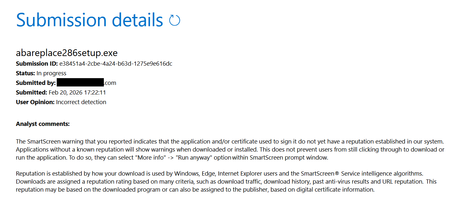
Hello, I'm a developer of https://www.abareplace.com/ Unfortunately, Microsoft SmartScreen blocks https://www.abareplace.com/download/ of my application and multiple attempts to contact Microsoft about this case were in vain. The app is clean on VirusTоtаl, has a valid digital signature, and is published to MS Store. However, users see the SmartScreen warning when trying to run the installer downloaded from my website: Windows protected your PC Windows Defender SmartScreen prevented an unrecognized app from starting. Running this app might put your PC at risk. Other developers report exactly the same problem and it https://www.reddit.com/r/Windows11/comments/1pz8qww/windows_code_signing_is_broken_for_indie/ It has no sense from the security point of view to block something that is already published on Microsoft Store. I submitted a ticket to https://www.microsoft.com/en-us/wdsi/filesubmission?persona=SoftwareDeveloper one month ago. The ticket was "In progress" for many weeks, then was silently closed. I opened a new ticket one week ago and it's still "in progress". I also submitted the file via Report this file as safe > I am the owner or representative of this website and I want to report an incorrect warning about it button in Microsoft Edge several times, but received no confirmation email that you should receive after submitting the form. I know that the times when Steve Ballmer shouted: "Developers! Developers! Developers!" are long gone, but can Microsoft make live at least a bit easier to independent software vendors? Thank you.116Views0likes3Comments
[Wayland] PWAs no longer appear as separate app windows — all group under main Edge icon
Hi, Since around 2025-09-07 to 2025-09-10, I’ve noticed that on GNOME (Wayland) all installed PWAs (even across different profiles) now appear grouped under the main Edge browser icon in the GNOME Shell dash/taskbar. Previously, each PWA would open in its own window group with its own icon. This is still the behavior in Chromium/Brave/Chrome, and can be restored there by editing the PWA’s .desktop file to set: StartupWMClass=<same value as Icon> However, Edge now seems to ignore StartupWMClass completely on Wayland, breaking workspace separation and making task switching hard. Environment: Ubuntu 25.04 GNOME 48.0 / Mutter (Wayland) Kernel 6.14.0-29 Intel Iris Xe GPU Edge (latest stable, observed post 2025-09-13) Repro steps: Install any PWA (e.g. Outlook, Teams, Spotify) from Edge Launch it (from any profile) Observe that it appears grouped under the main Edge browser icon Expected: PWA shows under its own icon and window group like in Chromium-based browsers Actual: All PWAs are bundled into the main Edge window group Editing StartupWMClass in the .desktop file no longer helps This regression makes PWAs much harder to manage on Wayland. Please route to the Linux/Wayland team if possible. Thanks!2.2KViews12likes18CommentsEdge rendering inside a container that cuts off pixels
Hello. In Microsoft Edge version 145.0.3800.58 (Official Build) (64-bit), web pages are displayed by default within a container with rounded corners and padding on all sides. This results in pixels being lost in height and width. It also means that CSS definitions with a min-width for common resolutions such as Full HD (1920px in width) or WQHD (2560px in width) do not apply. Many front-end frameworks rely on these pixel thresholds to dynamically adjust container sizes. I'm sorry to be so blunt, but as so often in the long, sad history of Microsoft web browsers, common web standards are once again being ignored. This time it's for a feature that no one really needs, but which once again causes extra work for many web developers. Ever since I started working in web development, back when the dreadful Microsoft Internet Explorer was still widely used, it has always been extremely labour-intensive to adjust websites for Microsoft browsers. This has caused a great deal of frustration over the decades, and there seems to be no end in sight. Integrating the Chromium engine into Edge was a promising first step. But perhaps Microsoft could also start respecting web standards outside of the engine? I'm sure that hundreds of millions of web developers would be grateful. I suppose hope dies last 😉21Views0likes0CommentsiPhone Edge 144 "Send to devices" - "No Device found"
About a week ago, when Edge was on version 143, everything worked as expected. After updating to version 144, the “Send to devices” feature no longer detects any Windows computers on the same network. No settings were changed on my end — the only change was updating Edge to the latest version on both iPhone and Windows. Any ideas?Solved342Views5likes3CommentsMicrosoft Industrial AI Partner Guide: Choosing the Right Data Expertise for Every Stage
As organizations scale Industrial AI, the challenge shifts from technology selection to deciding who should lead which part of the journey -- and when. Which partners should establish secure connectivity? Who enables production grade, AI ready industrial data? When do systems integrators step in to scale globally? This Partner Guide helps customers navigate these decisions with clarity and confidence: Identify which partners align to their current digital transformation and Industrial AI scenarios leveraging Azure IoT and Azure IoT Operations Confidently combine partners over time as they evolve from connectivity to intelligence to autonomous operations This guide focuses on the Industrial AI data plane – the partners and capabilities that extract, contextualize, and operationalize industrial data so it can reliably power AI at scale. It does not attempt to catalog or prescribe end‑to‑end Industrial AI applications or cloud‑hosted AI solutions. Instead, it helps customers understand how industrial partners create the trusted, contextualized data foundation upon which AI solutions can be built. Common Customer Journey Steps 1. Modernize Connectivity & Edge Foundations The industrial transformation journey starts with securely accessing operational data without touching deterministic control loops. Customers connect automation systems to a scalable, standards-based data foundation that modernizes operations while preserving safety, uptime and control. Outcomes customers realize Standardized OT data access across plants and sites Faster onboarding of legacy and new assets Clear OT–IT boundaries that protect safety and uptime Partner strengths at this stage Industrial hardware and edge infrastructure providers Protocol translation and OT connectivity Automation and edge platforms aligned with Azure IoT Operations 2. Accelerate Insights with Industrial AI With a consistent edge-to-cloud data plane in place, customers move beyond dashboards to repeatable, production-grade Industrial AI use cases. Customers rely on expert partners to turn standardized operational data into AI‑ready signals that can be consumed by analytics and AI solutions at scale across assets, lines, and sites. Outcomes customers realize Improved Operational efficiency and performance Adaptive facilities and production quality intelligence Energy, safety, and defect detection at scale Partner strengths at this stage Industrial data services that contextualize and standardize OT signals for AI consumption Domain-specific acceleration for common Industrial AI scenarios Data pipelines integrated with Azure IoT Operations and Microsoft Fabric 3. Prepare for Autonomous Operations As organizations advance toward closed‑loop optimization, the focus shifts to safe, scalable autonomy. Customers depend on partners to align data, infrastructure, and operational interfaces, while ensuring ongoing monitoring, governance, and lifecycle management across the full operational estate. Outcomes customers realize Proven reference architectures deployed across plants AI‑ready data foundations that adapt as operations scale Coordinated interaction between OT systems, AI models, and cloud intelligence Partner strengths at this stage Industrial automation leadership and control system expertise Edge infrastructure optimized and ready for Industrial AI scale Systems integrators enabling end‑to‑end implementation and repeatability Data Intelligence Plane of Industrial AI - Partner Matrix This matrix highlights which partners have the deepest expertise in accessing, contextualizing, and operationalizing industrial data so it can reliably power AI at scale. The matrix is not a catalog of end‑to‑end Industrial AI applications; it shows how specialized partners contribute data, infrastructure, and integration capabilities on a shared Azure foundation as organizations progress from connectivity to insight to autonomous operations. How to use this matrix: Start with your scenario → identify primary partner types → layer complementary partners as you scale. Partner Type Adaptive Cloud Primary Solution Example Scenarios Geography Advantech Industrial Hardware, Industrial Connectivity LoRaWAN gateway integration + Azure IoT Operations Industrial edge platforms with built in connectivity, industrial compute, LoRaWAN, sensor networks Global Accenture GSI Industrial AI, Digital Transformation, Modernization OEE, predictive maintenance, real-time defect detection, optimize supply chains, intelligent automation and robotics, energy efficiency Global Avanade GSI Factory Agents and Analytics based on Manufacturing Data Solutions Yield / Quality optimization, OEE, Agentic Root Cause Analysis and process optimization; Unified ISA-95 Manufacturing Data estate on MS Fabric Global Capgemini GSI The new AI imperative in manufacturing OEE, maintenance, defect detection, energy, robotics Global DXC GSI Intelligent Boost AI and IoT Analytics Platform 5G Industrial Connectivity, Defect detection, OEE, safety, energy monitoring Global Innominds SI Intelligent Connected Edge Platform Predictive maintenance, AI on edge, asset tracking North America, EMEA Litmus Automation Industrial Connectivity, Industrial Data Ops Litmus Edge + Azure IoT Operations Edge Data, Smart manufacturing, IIoT deployments at scale Global, North America Mesh Systems GSI & ISV Azure IoT & Azure IoT Operations implementation services and solutions (including Azure IoT Operations-aligned connector patterns) Device connectivity and management, data platforms, visualization, AI agents, and security North America, EMEA Nortal GSI Data-driven Industry Solutions IT/OT Connectivity, Unified Namespace, Digital Twins, Optimization, Edge, Industrial Data, Real‑Time Analytics & AI EMEA, North America & LATAM NVIDIA Technology Partner Accelerated AI Infrastructure; Open libraries, models, frameworks, and blueprints for AI development and deployment. Cross industry digitalization and AI development and deployment: Generative AI, Agentic AI, Physical AI, Robotics Global Oracle ISV Oracle Fusion Cloud SCM + Azure IoT Operations Real-time manufacturing Intelligence, AI powered insights, and automated production workflows Global Rockwell Automation Industrial Automation FactoryTalk Optix + Azure IoT Operations Factory modernization, visualization, edge orchestration, DataOps with connectivity context at scale, AI ops and services, physical equipment, MES Global Schneider Electric Industrial Automation Industrial Edge Physical equipment, Device modernization, energy, grid Global Siemens Industrial Automation & Software Industrial Edge + Azure IoT Operations reference architecture Industrial edge infrastructure at scale, OT/IT convergence, DataOps, Industrial AI suite, virtualized automation. Global Sight Machine ISV Integrated Industrial AI Stack Industrial AI, bottling, process optimization Global Softing Industrial Industrial Connectivity edgeConnector + Azure IoT Operations OT connectivity, multi-vendor PLC- and machine data integration, OPC UA information model deployment EMEA, Global TCS GSI Sensor to cloud intelligence Operations optimization, healthcare digital twin experiences, supply chain monitoring Global This Ecosystem Model enables Industrial AI solutions to scale through clear roles, respected boundaries and composable systems: Control systems continue to be driven by automation leaders Safety‑critical, deterministic control stays with industrial automation partners who manage real‑time operations and plant safety. Customers modernize analytics and AI while preserving uptime, reliability, and operational integrity. Data, AI, and analytics scale independently A consistent edge to cloud data plane supports cloud scale analytics and AI, accelerating insight delivery without entangling control systems or slowing operational change. This separation allows customers and software providers to build AI solutions on top of a stable, industrial‑grade data foundation without redefining control system responsibilities. Specialized partners align solutions across the estate Partners contribute focused expertise across connectivity, analytics, security, and operations, assembling solutions that reduce integration risk, shorten deployment cycles, and speed time to value across the operational estate. From vision to production Industrial AI at scale depends on turning operational data into trusted, contextualized intelligence safely, repeatably, and across the enterprise. This guide shows how industrial partners, aligned on a shared Azure foundation, create the data plane that enables AI solutions to succeed in production. When data is ready, intelligence scales. Call to action: Use this guide to identify the partners and capabilities that best align to your current Industrial AI needs and take the next step toward production‑ready outcomes on Azure.1.1KViews4likes0Comments
Edge Security breaks SQLite WASM loading
Edge with "Enhance your security on the web" toggled on, either Balanced or Strict breaks loading of the Sqlite WASM package. Believe this may have started with 144, but also appears to be in Dev/Canary 145. It looks as if it is somehow corrupting the WASM binary, although I am not an expert on this. You can confirm this by toggling the setting on and visiting projects using this library, eg. https://sqlime.org/140Views1like1CommentEdge browser crashes after file download / open
Hello, I am using Edge browser Version 142.0.3595.80 (Official build) (64-bit), on Linux. When downloading a file , and trying to open the downloaded file from wihin browser, it causes edge browser instances to close. I have been using other browsers to get around the problem. Is this a known problem, and are there a solution to this problem? Thanks, Jay424Views1like8CommentsWSUS edge update fail 0x80070643
Hello everyone, it's a little bit of time that one of my clients do not install from wsus server the update for microsoft edge properly. After the install get to 100% return the error code 0x80070643. Already tried to install manually (download edge business from ms site), reset all windows update components. Other updates are installed succesfully. The event log report a different error code (only a generic installation error with code 0x8024200B). The very wierd part is that if I disable the wsus policy and check for update in edge information page, the update install succesfully. Other clients install it from wsus without issues.4.7KViews0likes1Comment
Control MS Edge Notification Volume
Hello Is there a way to control the notification volume of Microsoft Edge? It looks like it has been bundled into System. I keep system sounds very low, but would like to be able to hear when new mail arrives when logged into outlook.com. At the moment it is a faint notification. Edge does not appear in the Volume Mixer list. What am I missing? Thanks.1.5KViews1like1Comment