edge
859 Topics
TypeError: Cannot read properties of undefined (reading 'media_size')
Since version 153.0.4234.48 (Official build) (64-bit) was released and installed on my machine on 9/18/2026 I've been getting the following error while using Edge to debug a Web Application in Visual Studio 2022: TypeError: Cannot read properties of undefined (reading 'media_size') Thead: edge://print StackTrace: at ei.updateSettingsValues (edge://print/index.js:5:91848) at ir.onSelectedDestinationCapReady (edge://print/index.js:3935:3913) at Object.handleChange (edge://print/index.js:3935:175) at or.notify (edge://print/index.js:1:20564) at Kr.notify (edge://print/index.js:1:20736) at Ae.updateDestination (edge://print/index.js:5:51222) at s (edge://print/index.js:5:53037) at Ae.onCapabilitiesSet (edge://print/index.js:5:53089) Source modules: edge://print/index.js c7754cdafbaf1eb70a049a157e46719b4bd6bd79117bb1ad6fc57a38b51bca24 I thought it had to do with the print JavaScript code I was doing, but any page I try to print from the "..." Print menu options does the same thing. The error doesn't occur in Firefox and appears to be caught and ignored in Chrome.233Views0likes2Comments
Microsoft Edge PDF Reader - signature validation warning for official signatures
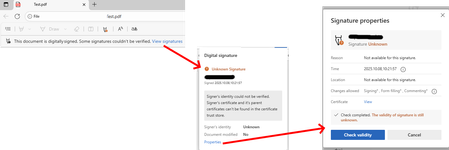
Since the last edge update we are running into the following issue, which triggers support tickets on our side. It seems that the edge internal PDF Reader now supports validation of digital PDF signatures. This new feature however is incomplete and causes a lot of confusion for edge users. "Official" signatures are labeled as "Unknown Signature" and "The validity of the signature is still unknown": "Official signatures" means qualified signatures from members of the EUTL - the European trust list as defined in ETSI TS 119 612 („Trusted Lists“): [...] the European Commission publishes a central list with links to the locations where the national trusted lists are published as notified by Member States. This central list, called the List Of Trusted Lists (LOTL), is available in both a human readable format and in a format suitable for automated (machine) processing XML. Parts of the edge PDF reader seems to come from *dobe itself which adds additional confusion since in their products (*dobe reader, acrobat etc) the signatures are correctly verified. They support this list for several years now (next to their own AATL list). I tried to find out whether this feature is 'work-in-progress' or it is a bug however the last published roadmap is quite old and doesn't give helpful information regarding this aspect. So my question is: Is full support of PDF signature validation including support of the EUTL planned and if so when?1.3KViews1like1Comment
Gpo question
Hi, if i set DownloadRestrictions to 2 for preventing Drive by Downloads, it also Block all ZIP files. Is this normal? If i deactivate SmartScreen, it is possible to Download ZIP files, even with this GPO. Is this a bug? Thanks for Feedback/Help in Advanced! best regards Wolle46Views0likes0CommentsMicrosoft Industrial AI Partner Guide: Choosing the Right Data Expertise for Every Stage
As organizations scale Industrial AI, the challenge shifts from technology selection to deciding who should lead which part of the journey -- and when. Which partners should establish secure connectivity? Who enables production grade, AI ready industrial data? When do systems integrators step in to scale globally? This Partner Guide helps customers navigate these decisions with clarity and confidence: Identify which partners align to their current digital transformation and Industrial AI scenarios leveraging Azure IoT and Azure IoT Operations Confidently combine partners over time as they evolve from connectivity to intelligence to autonomous operations This guide focuses on the Industrial AI data plane – the partners and capabilities that extract, contextualize, and operationalize industrial data so it can reliably power AI at scale. It does not attempt to catalog or prescribe end‑to‑end Industrial AI applications or cloud‑hosted AI solutions. Instead, it helps customers understand how industrial partners create the trusted, contextualized data foundation upon which AI solutions can be built. Common Customer Journey Steps 1. Modernize Connectivity & Edge Foundations The industrial transformation journey starts with securely accessing operational data without touching deterministic control loops. Customers connect automation systems to a scalable, standards-based data foundation that modernizes operations while preserving safety, uptime and control. Outcomes customers realize Standardized OT data access across plants and sites Faster onboarding of legacy and new assets Clear OT–IT boundaries that protect safety and uptime Partner strengths at this stage Industrial hardware and edge infrastructure providers Protocol translation and OT connectivity Automation and edge platforms aligned with Azure IoT Operations 2. Accelerate Insights with Industrial AI With a consistent edge-to-cloud data plane in place, customers move beyond dashboards to repeatable, production-grade Industrial AI use cases. Customers rely on expert partners to turn standardized operational data into AI‑ready signals that can be consumed by analytics and AI solutions at scale across assets, lines, and sites. Outcomes customers realize Improved Operational efficiency and performance Adaptive facilities and production quality intelligence Energy, safety, and defect detection at scale Partner strengths at this stage Industrial data services that contextualize and standardize OT signals for AI consumption Domain-specific acceleration for common Industrial AI scenarios Data pipelines integrated with Azure IoT Operations and Microsoft Fabric 3. Prepare for Autonomous Operations As organizations advance toward closed‑loop optimization, the focus shifts to safe, scalable autonomy. Customers depend on partners to align data, infrastructure, and operational interfaces, while ensuring ongoing monitoring, governance, and lifecycle management across the full operational estate. Outcomes customers realize Proven reference architectures deployed across plants AI‑ready data foundations that adapt as operations scale Coordinated interaction between OT systems, AI models, and cloud intelligence Partner strengths at this stage Industrial automation leadership and control system expertise Edge infrastructure optimized and ready for Industrial AI scale Systems integrators enabling end‑to‑end implementation and repeatability Data Intelligence Plane of Industrial AI - Partner Matrix This matrix highlights which partners have the deepest expertise in accessing, contextualizing, and operationalizing industrial data so it can reliably power AI at scale. The matrix is not a catalog of end‑to‑end Industrial AI applications; it shows how specialized partners contribute data, infrastructure, and integration capabilities on a shared Azure foundation as organizations progress from connectivity to insight to autonomous operations. How to use this matrix: Start with your scenario → identify primary partner types → layer complementary partners as you scale. Partner Type Adaptive Cloud Primary Solution Example Scenarios Geography Advantech Industrial Hardware, Industrial Connectivity LoRaWAN gateway integration + Azure IoT Operations Industrial edge platforms with built in connectivity, industrial compute, LoRaWAN, sensor networks Global Accenture GSI Industrial AI, Digital Transformation, Modernization OEE, predictive maintenance, real-time defect detection, optimize supply chains, intelligent automation and robotics, energy efficiency Global Avanade GSI Factory Agents and Analytics based on Manufacturing Data Solutions Yield / Quality optimization, OEE, Agentic Root Cause Analysis and process optimization; Unified ISA-95 Manufacturing Data estate on MS Fabric Global Belden Industrial Connectivity, Networking, Security Belden Horizon Data Operations (BHDO) + LioN-X with Azure IoT Operations OT-IT convergence, network orchestration and monitoring, ruggedized ethernet and switching, industrial WiFi, multi-vendor protocol connectivity, OT security, OPC UA Global Capgemini GSI The new AI imperative in manufacturing OEE, maintenance, defect detection, energy, robotics Global DXC GSI Intelligent Boost AI and IoT Analytics Platform 5G Industrial Connectivity, Defect detection, OEE, safety, energy monitoring Global Innominds SI Intelligent Connected Edge Platform Predictive maintenance, AI on edge, asset tracking North America, EMEA Litmus Automation Industrial Connectivity, Industrial Data Ops Litmus Edge + Azure IoT Operations Edge Data, Smart manufacturing, IIoT deployments at scale Global, North America Mesh Systems GSI & ISV Azure IoT & Azure IoT Operations implementation services and solutions (including Azure IoT Operations-aligned connector patterns) Device connectivity and management, data platforms, visualization, AI agents, and security North America, EMEA Nortal GSI Data-driven Industry Solutions IT/OT Connectivity, Unified Namespace, Digital Twins, Optimization, Edge, Industrial Data, Real‑Time Analytics & AI EMEA, North America & LATAM NVIDIA Technology Partner Accelerated AI Infrastructure; Open libraries, models, frameworks, and blueprints for AI development and deployment. Cross industry digitalization and AI development and deployment: Generative AI, Agentic AI, Physical AI, Robotics Global Oracle ISV Oracle Fusion Cloud SCM + Azure IoT Operations Real-time manufacturing Intelligence, AI powered insights, and automated production workflows Global Rockwell Automation Industrial Automation FactoryTalk Optix + Azure IoT Operations Factory modernization, visualization, edge orchestration, DataOps with connectivity context at scale, AI ops and services, physical equipment, MES Global Schneider Electric Industrial Automation Industrial Edge Physical equipment, Device modernization, energy, grid Global Siemens Industrial Automation & Software Industrial Edge + Azure IoT Operations reference architecture Industrial edge infrastructure at scale, OT/IT convergence, DataOps, Industrial AI suite, virtualized automation. Global Sight Machine ISV Integrated Industrial AI Stack Industrial AI, bottling, process optimization Global Softing Industrial Industrial Connectivity edgeConnector + Azure IoT Operations OT connectivity, multi-vendor PLC- and machine data integration, OPC UA information model deployment EMEA, Global TCS GSI Sensor to cloud intelligence Operations optimization, healthcare digital twin experiences, supply chain monitoring Global This Ecosystem Model enables Industrial AI solutions to scale through clear roles, respected boundaries and composable systems: Control systems continue to be driven by automation leaders Safety‑critical, deterministic control stays with industrial automation partners who manage real‑time operations and plant safety. Customers modernize analytics and AI while preserving uptime, reliability, and operational integrity. Data, AI, and analytics scale independently A consistent edge to cloud data plane supports cloud scale analytics and AI, accelerating insight delivery without entangling control systems or slowing operational change. This separation allows customers and software providers to build AI solutions on top of a stable, industrial‑grade data foundation without redefining control system responsibilities. Specialized partners align solutions across the estate Partners contribute focused expertise across connectivity, analytics, security, and operations, assembling solutions that reduce integration risk, shorten deployment cycles, and speed time to value across the operational estate. From vision to production Industrial AI at scale depends on turning operational data into trusted, contextualized intelligence safely, repeatably, and across the enterprise. This guide shows how industrial partners, aligned on a shared Azure foundation, create the data plane that enables AI solutions to succeed in production. When data is ready, intelligence scales. Call to action: Use this guide to identify the partners and capabilities that best align to your current Industrial AI needs and take the next step toward production‑ready outcomes on Azure.2KViews4likes0Comments
Microsoft Edge Workspaces deleted/hidden after update.
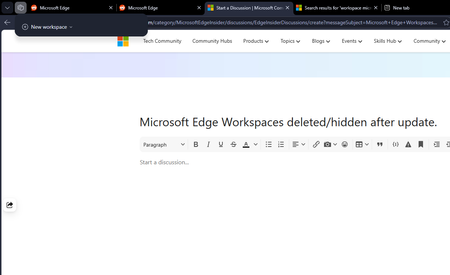
All my workspaces in Edge are hidden and/or are deleted. I updated my windows yesterday night (the restart also updated Edge which was pending) and noticed this issue this morning. I had 10+ workspaces and none of them are here to be found. Tried restarting the browser but no luck there.172Views0likes2CommentsOWA spell checks part of the word
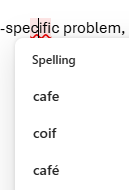
Something strange happened as I was typing an email today. I misspelled "specific" so I quickly fixed it using the spell checker. Then, it underlined the "cifi" part of the word "specific" suggesting spelling corrections as seen in the screenshot. There is no space in the word so I don't know why it focused on the part of the word (maybe because of the previous correction?). Do you know if this is an Outlook bug or an Edge bug? Not sure which spell checker is acting in OWA honestly.139Views0likes2CommentsScaling Industrial AI at the Edge with Helin and Azure IoT
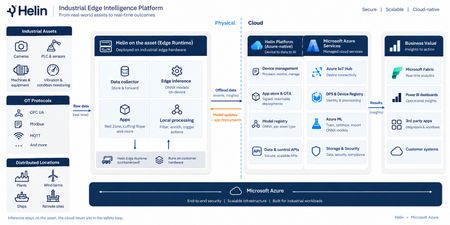
Remote industrial sites generate operational data continuously, but the ability to act on that data in near real time can be challenging. Bandwidth is often limited; connectivity is inconsistent, and the analysis needed to turn raw signals into insight typically depends on cloud connection. When worker safety is on the line, that gap matters even more, since a person entering a hazardous zone has to be detected and flagged on site independent of a cloud connection. Meeting those conditions calls for a secure, repeatable foundation, one that trains models in the cloud, runs inference locally, governs distributed edge devices, and turns the right signals into insight. Helin Data built that foundation: an edge-to-cloud platform that combines local inference, industrial data collection, and fleet observability on Azure. RedZone, Helin's vision AI application for hazardous-zone monitoring, is the first proof point of this platform. It uses the CCTV cameras already installed on a rig to detect when a person enters a defined danger zone around active equipment, triggering a local alert through an on-site interface and status lights, and logging the event for later safety and operational analysis. Because inference runs at the edge, RedZone can detect and alert without waiting on a connection to the cloud, while Azure handles centralized management, analysis, and model lifecycle activities. What sets this solution apart Designed for constrained environments – Inference runs directly on the edge box, so RedZone keeps detecting and alerting even through network outages, with no dependence on the cloud at runtime. Only priority events and metadata detected by RedZone sync to Azure, which keeps bandwidth use low on a constrained connection such as satellite connectivity used at some offshore sites. Secure, scalable fleet governance – Devices onboard automatically through Device Provisioning Service (DPS) with per-device X.509 certificates. Every device is listed in Azure Device Registry (in preview) and projected as native ARM resources, so updates and configuration changes can be targeted, governed, and audited using standard Azure tooling. Helin adds multi-level security, including public key infrastructure (PKI), data encryption, and industry-trusted authentication, protecting data as it moves from the rig to the cloud. Helin's observability layer spans device health, firmware updates, application status, and the data pipeline, so organizations can promptly identify and investigate potential issues across the edge-to-cloud pipeline. A closed edge-to-cloud AI loop – Models are trained and versioned in Azure Machine Learning, then deployed to the edge for local inference. Detections stream back into Microsoft Fabric, where the data can inform model evaluation and future model versions, closing the loop between the field and the cloud. A reusable application foundation – RedZone runs on the same platform and loop that can be adapted for additional customer scenarios. A different hazard, a different zone, or a different operational question can become its own application. Delivering a governed device fleet Azure IoT Hub and DPS provide secure device connectivity, messaging, and automated provisioning. The Azure IoT Hub integration with Azure Device Registry, currently in public preview, represents devices as Azure resources, providing a foundation for Azure-native fleet inventory and governance. Together, these services help Helin onboard, connect, and manage distributed edge deployments. Azure Device Registry (public preview with Azure IoT Hub): Provides the management plane, representing each device as an Azure Resource Manager resource so it can be governed with the same patterns used for other Azure resources including role-based access control, resource groups, tags, and resource-level management, with namespaces acting as the organizational and security boundary. Azure Device Registry integration with Azure IoT Hub and Microsoft-backed X.509 certificate management is in public preview and is not recommended for production workloads. Azure IoT Hub and DPS: Deliver secure onboarding and bidirectional messaging between the devices and the cloud. Helin Data Edge Inference and Data Collector: Runs vision AI inference at the edge and connects into the industrial control systems already on site, so each detection carries operational context. Industrial data is collected, contextualized, buffered, and filtered locally before important signals are sent to Azure. Microsoft Fabric: Ingests telemetry and turns it into an operational model for analysis and reporting, giving organizations clearer insight into their operations. Customer Impact This solution is already proven in a demanding industrial environment. When Helin Data implemented RedZone on Noble’s Maersk Discoverer rig, RedZone detected a person entering a hazardous zone and raised an alert in roughly 150 milliseconds. Processing the detection locally is particularly important offshore, where limited connectivity makes a cloud-dependent response impractical. Helin’s broader edge platform is already supporting Noble across its operations. The offshore drilling contractor, which operates a fleet of more than 40 rigs, uses Helin’s Remote CCTV Manager to provide authorized personnel with live video from more than 20 rigs. Reduced resolution streams sync to Noble’s secure Azure environment for viewing while full resolution recordings stay at the rig to reduce bandwidth use. Together, these examples demonstrate the broader platform pattern: process high-volume data locally, transmit the signals that matter, and centrally manage applications deployed across a distributed industrial fleet. Closing RedZone shows what becomes possible when Azure IoT Hub is used as more than a device-connectivity service. Combined with secure provisioning, Azure-native device governance, edge inference, model lifecycle management, and Microsoft Fabric, it becomes part of a repeatable platform for building and operating industrial AI applications at scale. For customers, the value extends beyond a single safety scenario. The same foundation can support new applications across worker safety, operational visibility, process improvement, and other industrial use cases, without rebuilding the underlying device and data infrastructure each time. Helin brings the industrial application expertise; Azure provides the scalable foundation on which those applications can be deployed, governed, and continuously improved. Take the next step Read the customer case study, Improving safety across a fleet of drilling rigs Learn more about RedZone in Seeing the Human Layer: Helin Brings Edge Vision AI to Industrial Operations on Azure. Explore Helin’s Intelligent Edge Application Platform is now available in Azure Marketplace Resources Deploy Azure IoT Hub with Device Registry integration and certificate management (preview) Azure IoT Hub Documentation Product documentation | Helin Documentation533Views0likes1Comment
Vertical Tabs! Enable control of pin/collapse pane (please!)
Edge's native implementation of vertical tabs when combined with tab groups make it an ideal browser for organized productivity and that's why I continue to use it as my daily driver on all desktop platforms. There is just one major pain point I find with using the vertical tab features: toggling its visibility. Of course, using vertical tabs makes more efficient use of screen real-estate (for landscape-oriented displays), but that does mean less screen space for actual webpage content, a reality which becomes obvious with 2+ vertical-tab-enabled browser windows open side-by-side. Thankfully, Edge includes convenient UI buttons to "Collapse" and "Pin" the vertical tab pane's visibility, but this is currently the only way to toggle this behavior, diminishing productivity of keyboard-centric use. Recently, the Edge team added the keyboard shortcut Ctrl+Shift+,(comma) — which switches the UI between vertical and classic tabs at the top. This is great, but it negates the value of having a collapsible vertical tab pane which would still show webpage favicons in the same visual paradigm of a vertical list and feels like a much more natural UI toggle. Some other users in the Edge Insider community have pointed out that such a side-panel collapse/expand key shortcut exists in many other popular programs as well. I've been trying to find some way of automating the collapse/pin behavior of the vertical tab pane, but it doesn't seem feasible without a proper menu option. Please consider adding a key shortcut specifically for this behavior, or instead include an option in the alt-menu dropdown that can be triggered via something like Power Automate. Thanks again to Edge team for all their work9.8KViews24likes5CommentsHow Mesh Systems Builds on Azure IoT Hub and Azure IoT Operations to Accelerate Industrial AI
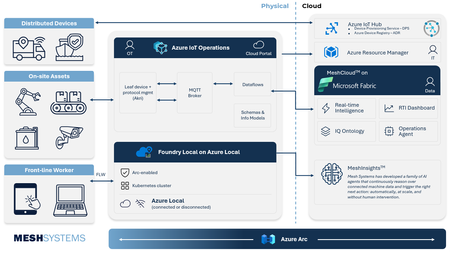
Manufacturers generate vast amounts of operational data, yet its complexity and fragmentation across historians, Operational Technology (OT) systems, and cloud platforms can slow AI adoption at scale. As organizations invest in AI to enhance productivity, quality, and decision making, the ability to connect and contextualize operational data becomes critical. Azure IoT Hub, Azure IoT Operations, and Mesh address this challenge together, spanning the full path from device connectivity to actionable AI-powered insights. Mesh brings deep Azure IoT platform experience and a practical path to industrial AI, with MeshCloud built on Azure IoT Hub, an open-source .NET Akri framework for Azure IoT Operations, and MeshInsights delivering generative AI-powered operational intelligence. This expertise is backed by a long history with Azure; Mesh launched its first IoT solution on Azure in private preview in 2009 and remained an early adopter of every major Azure IoT service since. Together, Azure IoT Hub, Azure IoT Operations, and Mesh give manufacturers a streamlined way to unify operational data and apply AI where it matters most. Unlocking legacy data with Mesh's Akri Connector Industrial organizations often struggle to modernize operations because critical operational data sits isolated inside historians and legacy Operational Technology (OT) systems. Many manufacturers are also wary of integrations that create new dependencies and limit future flexibility. Azure IoT Operations addresses this through an open architecture built around Akri, connecting industrial data sources while preserving interoperability across hardware and software environments. Mesh built on this foundation with its Akri Historian Connector, bringing historian and legacy operational data into Azure IoT Operations through prebuilt connectivity rather than source-by-source integration work. The result is faster access to operational data ready for analytics, AI, and industrial automation. The key features of this connector include: Restart-safe data continuity: Manufacturers can trust that operational data keeps flowing even through outages or restarts, with no data loss and no time spent recovering or reprocessing data. Secure, flexible authentication: Modern and legacy industrial systems connect under one security model, meeting enterprise-grade authentication standards without restructuring existing infrastructure. A foundation other connectors can be built on: The underlying framework handles the heavy lifting, so teams only need to build what's unique to each new OT data source. This means faster time to value for every new data source. Built in alignment with Azure IoT Operations roadmap: The connector stays up to date automatically, as new Azure IoT Operations features become available. This means manufacturers have access to the latest capabilities as the platform evolves. Together, Mesh and Azure IoT Operations give organizations a production-ready path from the shop floor into Azure IoT Operations and onward to Microsoft Fabric. Delivering Scalable Connected Products with Azure IoT Hub and MeshCloud MeshCloud helps manufacturers move from connected product pilots to fleet scale deployments faster by providing a platform build on Azure IoT Hub and other Azure native services. Azure IoT Hub provides per-device identity, support for MQTT, AMQP, and HTTPS, and built-in capabilities like device twins, direct methods, and rules-based message routing. Azure Device Provisioning Service (DPS) extends this foundation with zero-touch, just-in-time onboarding using X.509, TPM, or symmetric key attestation. Mesh operates as one cohesive engineering practice across the full connected product lifecycle, delivering hardware, firmware, wireless, edge, and cloud integration natively for Azure IoT Hub and Azure IoT Operations. That end-to-end scope is what MeshCloud, their Azure-native connected product platform, brings together. MeshCloud embeds Azure IoT Hub and DPS into an Azure-native connected product platform, giving organizations a faster path to connected product delivery without sacrificing control, scale, or solution ownership. The platform comes together across four layers: Edge to cloud: Connected devices, from MCU controllers to tablets and phones, register and authenticate through DPS and connect securely to IoT Hub, giving organizations a direct, secure line from shop floor to enterprise systems. Messaging and command: Event Hubs and Container Apps move telemetry and commands between devices and the cloud, with asset and ontology data exposed for digital twin management and device control. IT and operations: Azure Monitor, OpenTelemetry, Microsoft Entra, and Application Gateway bring platform observability, identity management, and secure ingress together, equipping IT and operations teams with a unified way to manage and secure the environment. Analytics and visualization: Telemetry flows into Azure Data Explorer and Microsoft Fabric for processing and storage, with Grafana, Power BI, and a Device Health UI giving teams fleet-wide visibility. This architecture enables organizations to move from pilot projects to fleet-scale deployments using Azure-native services, while maintaining interoperability across devices, connectivity protocols, and analytics platforms. For manufacturers, this means less time integrating infrastructure and more time delivering operational insights, connected services, and AI-powered workflows. Advancing Industrial Intelligence with MeshInsights As organizations connect more assets and operational systems, the next challenge becomes turning information into consistent actions and decisions. Microsoft Azure provides the cloud, data, and AI foundation for intelligent operational workflows, while giving organizations control over their data and business processes. Mesh extends this foundation through MeshInsights. MeshInsights is Mesh's AI agent offering for connected-product manufacturers. Mesh works with organizations to define a specific operational decision worth automating, such as classifying an alert or determining the right service response, and builds an evaluation standard from real telemetry, service history, and expert-validated examples. AI agents are then developed and measured against that standard, acting automatically on high-confidence cases and routing the rest to the organization's own experts. This extends connected systems beyond monitoring and reporting into trusted, auditable operational decisions. By combining Azure IoT platform services with MeshInsights, Mesh helps organizations move from connected infrastructure to autonomous, AI-driven action without changing where their data lives or who owns the architecture. Why This Matters Industrial transformation increasingly depends on strong collaboration between hyperscale cloud platforms and ecosystem partners who bring operational expertise, deployment acceleration, and industry-specific engineering capabilities. Mesh Systems demonstrates how partners can build differentiated value on top of Azure IoT platform services while helping organizations accelerate deployment timelines, standardize industrial data architectures, and operationalize AI across connected environments. Organizations are already putting this value to work in everyday operations. BUNN's cloud-connected coffee machines now give technicians a head start before every service call. As Kurt Powell, Executive Vice President at BUNN, put it: "With this solution, we know exactly which component to fix before we get there." WLS Lighting Systems has turned that same visibility into measurable savings at scale. Built on MeshCloud and Azure IoT, WLS's netLiNK gives property owners remote monitoring and control over individual light fixtures. Kevin Fletcher, President National Accounts at WLS, shared that the company has saved customers a little over $50 million in electrical costs since bringing netLiNK to market. Together, Azure IoT Hub, Azure IoT Operations, and Mesh Systems help manufacturers reduce integration complexity and operationalize industrial data, creating a foundation for AI driven operations spanning plant, edge, and cloud. The result: manufacturers spend less time on integration and more time improving productivity, resiliency, and decision making across their operations. Learn More Explore Mesh Systems solutions on Azure Marketplace: https://marketplace.microsoft.com/en-us/product/saas/mesh-systems.cloud?tab=Overview Read customer success stories: https://meshsystems.com/case-study-eaton-1/ Learn more about Azure IoT Operations: https://azure.microsoft.com/products/iot-operations/543Views1like0Comments