copilot
32 Topics
A Practical, Technical Guide to Bringing AI Into Everyday Nonprofit Workflows
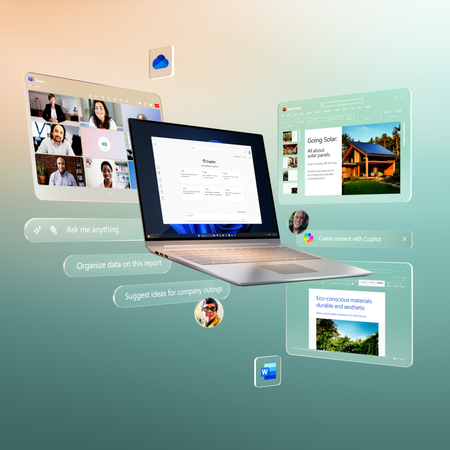
Nonprofits face increasing pressure to improve efficiency, strengthen reporting, and communicate more frequently—often with limited staff and resources. Microsoft Copilot for Microsoft 365 embeds AI directly into familiar tools like Word, Excel, Outlook, Teams, and PowerPoint, allowing nonprofits to automate knowledge work without adopting entirely new systems or hiring specialized AI teams. How Copilot Works Under the Hood Copilot is built on three core components: 1. Large Language Models (LLMs) These AI models generate, summarize, and transform text and other content. 2. Microsoft Graph Microsoft Graph connects Copilot to your organization’s data—including: Emails Files (SharePoint, OneDrive) Meetings and calendars Teams chats This provides context-aware responses based on your organization’s existing content. 3. Microsoft 365 Apps Copilot is embedded directly inside: Word Excel Outlook Teams PowerPoint Together, these components allow Copilot to generate insights and content grounded in your organization’s data. [learn.microsoft.com] 📌 Important: Copilot does not create new data silos. It respects existing permissions, so users only see data they are already authorized to access. 👉 Learn more: Microsoft 365 Copilot overview Requirements to Enable Copilot To use Copilot in Microsoft 365, organizations generally need: A supported Microsoft 365 plan (e.g., Business Standard, Business Premium, E3, or E5) A Copilot add-on license Proper data stored in Microsoft 365 (e.g., OneDrive, SharePoint, Teams) 📌 Copilot’s effectiveness depends heavily on how well your data is organized and accessible. Technical Use Cases for Nonprofits 1. Grant Writing & Reporting Automation Copilot can: Summarize program outcomes from documents (Word, SharePoint) Generate draft grant narratives Rewrite content to align with funder tone Extract insights from structured data (Excel, reports) ⚠️ Clarification: In many standard Microsoft 365 Copilot scenarios, Copilot does not directly query Power BI datasets. Instead, it relies on data embedded in documents, emails, or exported reports. However, newer integrations (e.g., Microsoft Fabric and Copilot Power BI integration) allow Copilot to access and answer questions using Power BI reports and semantic models, depending on licensing, environment, and configuration. Technical Advantage Copilot uses Microsoft Graph to pull relevant context from your organization’s documents, reducing manual copy-paste work. How to Use Copilot in Word for Grant Writing Open Word Select Copilot icon to open the Copilot pane Choose Draft with Copilot (or start typing a prompt) Enter a prompt such as: “Draft a 2-page grant narrative using the attached program summary and last year’s outcomes.” (Optional) Reference or attach relevant files from OneDrive or SharePoint Click Generate Review the draft Refine using Copilot commands such as: Rewrite (improve clarity) Expand (add detail) Adjust tone (formal, persuasive, etc.) 2. Outlook + Copilot for Donor Communications Copilot can: Draft personalized donor emails Summarize long email threads Rewrite messages for tone and clarity Suggest follow-ups Technical Note Copilot can use: Previous email threads Attached documents Calendar context to generate more relevant responses. How to Use Copilot in Outlook Open a new email Click Copilot icon in the tool bar Select Draft with Copilot Enter a prompt such as: “Write a warm thank-you email to a donor who contributed $500 to our youth program.” Click Generate Review the drafted email Edit directly or use Copilot to: Rewrite Adjust tone (formal, friendly, etc.) Change length (shorter or longer) Select Keep it, then send when ready 3. Teams Meeting Summaries Copilot in Teams can: Generate meeting summaries Identify decisions and key points Extract action items Suggest follow-ups 📌 Copilot works from meeting transcripts and chat logs. How to Use Copilot in Teams Start or join a Teams meeting Enable Transcription (recommended for full Copilot functionality) After the meeting, open the meeting chat or calendar event Select the Recap tab Click Copilot Select or enter a prompt (e.g., "Recap the meeting") Review: key discussion points Decision Action items 4. PowerPoint Storytelling Copilot can transform content into presentations: Word documents → slide decks Meeting summaries → presentations Reports → visual narratives Technical Advantage Copilot uses semantic understanding to: Structure slides Generate speaker notes Suggest layouts and visuals How to Use Copilot in PowerPoint Open PowerPoint Select the Copilot icon to open the Copilot pane Provide a prompt or upload a document Copilot generates slides and notes Refine using design and layout suggestions Security & Compliance Copilot inherits Microsoft 365’s enterprise-grade security model, including: Role-based access control (RBAC) Data residency and compliance controls Existing permissions enforcement Zero Trust principles 📌 Important clarification: Microsoft states that customer data is not used to train foundation models. Data remains within your organization’s tenant boundary. 👉 Learn more: Data, Privacy, and Security for Microsoft 365 Copilot | Microsoft Learn Important Implementation Considerations 1. Data Readiness Copilot’s quality depends on your data: Organized SharePoint libraries Consistent file naming Structured documents 2. Access Control Ensure proper permissions before rollout: Avoid overexposure of sensitive data Audit SharePoint and Teams access 3. Human Oversight Copilot generates drafts—not final outputs. Always review grant narratives Validate donor messaging Confirm factual accuracy Final Thought Microsoft Copilot is not a replacement for nonprofit expertise—it is a force multiplier. By embedding AI into everyday tools, nonprofits can: Reduce administrative workload Accelerate writing and reporting Improve internal communication Focus more time on mission-driven work When implemented thoughtfully—with strong data practices, governance, and human oversight—Copilot can help organizations move faster, communicate more effectively, and make better-informed decisions. Ultimately, the goal is not just efficiency, but greater impact—freeing teams to spend less time on repetitive tasks and more time advancing the mission they serve.25Views0likes0CommentsTurn AI Potential into Real Impact—One Day Is All It Takes
🌐 Online | Multiple session times 📅 May 6, 2026 🔗 Register: https://aka.ms/AgentathonMay2026 If AI is on your roadmap—but still feels out of reach—this is your reminder that May 6 is coming up fast. The Microsoft Global Agent‑a‑thon is your opportunity to move from AI interest to real, usable solutions in one day, with guidance and support that continues well beyond the event. This isn’t about watching demos or talking about possibilities. It’s about building. Why This Matters Right Now Across nonprofits, public sector, education, and business, teams are stretched thin. Workloads are increasing, expectations are growing, and there’s little room to experiment without support. AI agents can help—if teams know how to build and apply them responsibly and effectively. That’s exactly what the Agent‑a‑thon provides: Hands‑on building Clear learning paths Real use cases Ongoing guidance A global community solving real problems There’s a Level for You Whether you’re brand new to AI or already building solutions, there’s a path designed for your role and goals: 🌱 Explorer Build your first AI agent, no coding required and walk away with something you can use immediately. ⚙️ Commander Automate workflows, connect systems, and reduce repetitive work using Copilot Studio and no‑code tools. 🚀 Master Design secure, enterprise‑grade AI agents with governance, orchestration, and scale in mind. No matter the level, the focus is the same: practical impact, not theory. A Special Note for Nonprofits Nonprofits often feel the pressure of “doing more with less” the most. Through the Agent‑a‑thon, nonprofits can: Automate administrative tasks that drain time and energy Support staff and volunteers with faster access to information Scale services without adding overhead Explore AI in a safe, guided environment Build solutions aligned directly to their mission Most importantly, you don’t have to do it alone. The Agent‑a‑thon is designed to support you before, during, and after the event. More Than a Day—A Starting Point Yes, the build happens in one day. But the learning, support, and momentum continue. Participants can submit their agents, access continued resources, and learn alongside a global community focused on real‑world outcomes—not shelfware. If AI is on your list this year, this is your moment. One day to build. Ongoing support to grow. A chance to shine globally.252Views0likes0CommentsWant to get more out of Microsoft Copilot Chat without adding another tool—or cost—to your stack?
Microsoft has released a free Copilot Chat learning pathway that helps users quickly build practical, everyday skills using Copilot Chat already built into Microsoft 365 apps. Even better, Copilot Chat is now available to users without a paid Microsoft 365 license, making this learning opportunity widely accessible. In under an hour, you’ll learn how to: Write clearer, more effective prompts Refine Copilot responses for better results Use Copilot Chat for real work—summarizing, drafting, brainstorming, and planning It’s a quick, hands‑on way to boost productivity and help teams feel confident using AI in the tools they already know. 👉 Check out the learning pathway and the original LinkedIn post here.263Views0likes0CommentsChildren International: Turning time saved into lives changed
What happens when a nonprofit gives hours back to its people? Children International is using AI to reduce administrative work and reinvest that time into children, families, and communities. The impact is already clear — in Colombia, participation in educational programs rose from 33% to 95%. Read the full story and watch how this shift is helping scale mission where it matters most: Microsoft for Nonprofits LinkedIn86Views0likes0Comments
REGISTER: Nonprofit & Education Partners Webinar - Mar 24 (EMEA)
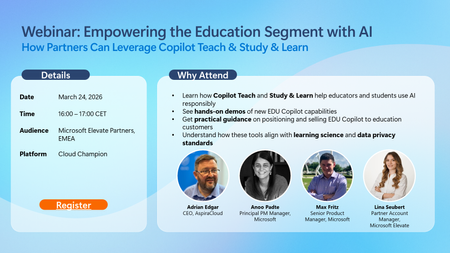
Microsoft Elevate Partners in EMEA — Don’t Miss This EDU Copilot Webinar! MARCH WEBINAR | Empowering the Education Segment with AI: How Partners can Leverage Copilot Teach and Study & Learn When: March 24, 2026 Time: 4:00 PM CET 👉 Register ✔️ Why join: Get a clear view of how Copilot for EDU is evolving and what it means for education customers today. ✔️ What you’ll gain: Hands-on demos of the new Teach and Study & Learn agents now available in Copilot Chat for EDU Clear guidance on how these learning-science–based capabilities support responsible AI use while meeting strict education data privacy requirements Practical positioning tips from Microsoft Partner AspiraCloud, drawing on real-world experience with educational institutions ✔️ How it helps Stronger education customer conversations, and more confident positioning of Copilot for EDU. Webinar: Empowering the Education Segment with AI | Microsoft Community Hub67Views0likes0CommentsDiscontinuation of M365 Business Premium Grant Deeply Disappointing,Harmful to Small Nonprofits
As a Microsoft CSP partner supporting multiple nonprofit organizations, I am extremely disappointed by the decision to discontinue the Microsoft 365 Business Premium grant. This change disproportionately affects small nonprofits that rely on these tools to fulfill their missions with limited resources. The justification that this is about “alignment” or “sustainability” is disingenuous. Let’s be honest—this is a revenue-driven decision that undermines Microsoft’s long-standing commitment to empowering nonprofits. Removing access to essential tools like Office desktop apps and Intune from the grant program forces small organizations into paid plans they cannot afford, jeopardizing their operations and security. Microsoft has built goodwill in the nonprofit sector over the years. This move erodes that trust. I urge you to reconsider this decision or at least provide a longer transition period and more flexible options for small nonprofits. Please do better. The nonprofit sector deserves more than a corporate cost-cutting maneuver disguised as a strategic realignment.1KViews7likes3Comments10 Nonprofit Technology Myths Debunked: What Cloud + AI Really Mean for Your Mission
Nonprofits are being asked to do more than ever—serve more people, manage more data, communicate across more channels, and respond to rising community needs. But with limited staff and tight budgets, many organizations feel stretched thin. Cloud technology and AI can help. They reduce busywork, strengthen security, and free your team to focus on what matters. Yet persistent myths often stop nonprofits from taking the next step. Let’s clear the fog. Here are the 10 biggest nonprofit technology myths debunked. Myth #1: “Tech is just an IT problem.” Reality: Tech powers every part of your mission. From fundraising to fieldwork, tools like Microsoft Teams, Defender, and Copilot help your whole organization collaborate, protect data, and work smarter. Myth #2: “AI will replace nonprofit jobs.” Reality: AI replaces busywork—not people. Drafting emails, summarizing meetings, automating reports—AI handles the repetitive tasks so your team can focus on human-centered impact. Myth #3: “The cloud is too expensive.” Reality: Microsoft offers deep nonprofit discounts. Think: • 75% off Microsoft 365 Business Premium • Azure credits • Free Power Apps for 10 users • Copilot discounts Cloud tech is now more affordable than maintaining aging servers. Myth #4: “Cloud migration is too complicated.” Reality: You can start small—and you don’t have to do it alone. There are several programs and partner to support helping nonprofits move at their own pace without disrupting operations. Myth #5: “Cloud tools only work online.” Reality: Microsoft 365 apps work offline, too. Staff can draft, edit, and respond anywhere perfect for field teams and rural programs. Myth #6: “Updates will break our systems.” Reality: Cloud updates reduce IT headaches. Microsoft handles compatibility, security, and maintenance so your team doesn’t have to. Myth #7: “On‑premises data is safer.” Reality: The Microsoft Cloud delivers enterprise‑grade security. With tools like Defender, Sentinel, and 24/7 monitoring, nonprofits get protection that’s nearly impossible to replicate on local servers. Myth #8: “Security isn’t my job.” Reality: Everyone plays a role. Since 60% of breaches involve human error, training + built‑in protections like MFA and conditional access make a huge difference. Myth #9: “Training is too expensive.” Reality: Microsoft offers robust nonprofit training—often free. Live events, self-paced learning, AI workshops, and product tutorials help every staff member build confidence. Myth #10: “IT must control all data.” Reality: Cloud governance enables secure, shared access. With proper permissions, staff can get the information they need—without bottlenecks. The Bottom Line Cloud + AI aren’t barriers—they’re accelerators. They give nonprofits more time, more security, more collaboration, and more impact. If your organization is ready to cut through the myths and move forward with confidence…sign up for the free eBook: 10 Nonprofit Technology Myths Debunked114Views0likes0CommentsWhy “Working Smarter with AI” Matters for Every Nonprofit Right Now
Nonprofits are being asked to do more than ever, often with fewer people and tighter resources. Important mission‑driven work gets buried under emails, meetings, and administrative overload. Working Smarter with AI highlights a major shift happening across the sector — one that helps organizations reclaim time, reduce burnout, and refocus on what truly matters. AI Is Changing How Work Gets Done AI isn’t a future concept anymore. It’s already helping teams streamline tasks, cut through busywork, and stay focused on mission‑critical work. This isn’t about working faster — it’s about working smarter. Digital Debt Is Draining Teams Email overload, nonstop meetings, and constant information flow are holding staff back. AI can take on routine tasks so people can spend more time on creativity, strategy, and impact. Refocus on Mission‑Driven Work From summarizing documents to drafting content and analyzing information, AI tools remove the tedious parts of work and help teams reconnect with their purpose. AI as a True Productivity Partner Tools like Microsoft 365 Copilot support staff right inside the apps they already use. Whether it’s clearing inboxes, drafting grant proposals, or building presentations, AI gives teams a head start — and nearly 90% of users say it helps them feel more fulfilled. Built on Responsible AI Responsible AI ensures fairness, transparency, and privacy. It keeps people in control and supports staff rather than replacing them. A Better Way of Working AI gives nonprofits the opportunity to rethink how work happens — reducing burnout, boosting creativity, and helping teams stay focused on advancing the mission. Want to dive deeper? Get the free e‑book: Working Smarter with AI142Views0likes0CommentsAI in Care Services: Restoring the Human Touch
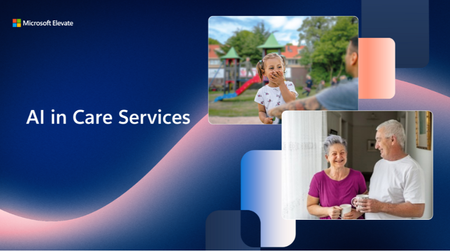
Frontline care workers are the heart of our communities—but many are overwhelmed by paperwork, policies, and burnout. In Australia alone, the care sector faces a 344,000-worker shortage. The question isn’t just how to meet demand—it’s how to care for the caregivers. Two nonprofits—Uniting NSW.ACT in Australia and Parlan in the Netherlands—are showing how AI can do just that. Uniting NSW.ACT: Meet Buddy, the AI Sidekick Serving 148,000 clients annually, Uniting needed a smarter way to work. Enter Buddy, an AI assistant built on Microsoft Azure. What Buddy Delivers: Case notes in 2 minutes (down from 15) Voice-to-text documentation, even in remote areas Instant access to 1,600 policies More time for personal, compassionate care Buddy uses Azure OpenAI Service and a Retrieval Augmented Generation (RAG) approach to surface accurate policy guidance and streamline compliance. It saves frontline workers nearly an hour per day, improves onboarding, and helps attract and retain staff in a tight labor market. By reducing administrative burdens, Buddy empowers carers to focus on what matters most—human connection. Parlan: Copilot for Mental Health Dutch nonprofit Parlan provides mental health care to children and families with complex needs. To reduce paperwork and improve care, Parlan adopted Microsoft 365 Copilot. What Copilot Delivers: Therapy reports in minutes Faster prep for complex cases Real-time translation in Teams Easy creation of therapeutic tools Copilot helps staff summarize hundreds of pages of client history, draft reports quickly, and even translate conversations during live sessions. It also assists in creating therapeutic stories—tasks that once took hours now take minutes. By streamlining administrative work, Copilot gives practitioners more time for direct care. Why It Matters This isn’t just about speed—it’s about wellness. Less admin means: Lower stress Reduced burnout Higher job satisfaction Better client outcomes The Big Picture AI isn’t replacing care—it’s restoring time, trust, and connection. Tools like Buddy and Copilot help workers do what they do best: care deeply, and serve with purpose. To learn more about their story, please visit Microsoft for Nonprofits: (21) How Technology Is Boosting Worker Wellness and Restoring the Human Touch | LinkedIn151Views0likes0Comments