administrator
2896 Topics
Feature Request: Real-Time Multilingual Voice Translation in Microsoft Teams
Hello Microsoft Teams Community, I would like to suggest a feature for Microsoft Teams that could help multilingual users communicate more naturally during meetings. Feature Idea: Each participant can speak in their own native language, and Teams will automatically translate and play the speech audio in the listener’s selected language in real time. Example: Telugu speaker talks in Telugu Kannada user hears Kannada audio Hindi user hears Hindi audio English user hears English audio This would be more powerful than subtitles because users can continue conversations naturally in their mother tongue without needing to read captions constantly. Possible Technologies: Speech-to-Text AI Translation Text-to-Speech Real-Time Voice Streaming Benefits: Better communication in multilingual countries like India Improved accessibility Easier collaboration for global teams More inclusive meetings I believe this feature could significantly improve communication in international and regional meetings. Thank you.23Views0likes0Comments
New MTR devices unable to connect workplace
Hello collective im facing an issue with new Poly devices Poly X52 + Poly TC10 + Poly Trio 60 Poly X52 + Poly TC10 Both devices can not connect to M365. Error message: "Couldn't connect to Workplace Join. try again, or contact your admin." Firewall settings seems to be ok and devices are on the same VLAN. What is the workaround for this kind of issue or what should we check first? Best regards80Views0likes1CommentUpdate to disabling Teams meeting recording expiration notification emails
Hello, Thank you to everyone who shared their thoughts and feedback regarding the planned Upcoming change: disabling Teams meeting recording expiration notification emails. After carefully reviewing the feedback from this discussion, survey responses, and support channels, we have decided to pause the rollout of this change. The updates originally planned for June 1st will not take effect on that date. What this means for you: - Email notifications for expired Teams meeting recordings will continue as they do today. - No action is required on your part. - Recording expiration and deletion policies remain unchanged. Your input along with ongoing, internal engineering discussions helped shaped this decision. We want to make sure that any changes we make to the notification experience truly work for your organizations, and the feedback we received made it clear that we need more time to get this right. We're still committed to improving the notification experience for Teams meeting recordings and will provide updates here and through the Message Center when we have more to share. In the meantime, please continue to share your thoughts in this discussion. Thank you for your patience and for being part of our community.211Views2likes2CommentsUpcoming change: disabling Teams meeting recording expiration notification emails
Hello, We wanted to share an important update regarding email notifications for expired Microsoft Teams meeting recordings. Based on valuable feedback from our community, we’ve decided to make a change to how notifications are handled. What’s changing: Starting June 1st, we will stop sending email notifications for expired Microsoft Teams meeting recordings. We are making this change due to complaints we received from many customers about the high volume of notifications which they deemed low value. This change allows us to respect your preferences while ensuring critical communications remain accessible. Recording expiration and deletion policies remain unchanged and items that expire will be deleted even when notifications are not being sent. How to keep receiving notifications: For those customers that would like to continue receiving email notifications, we will create a new setting and make it available before June 1st. This will be a per-tenant setting. We will send another message center post once this setting is available and update our documentation in this discussion and on our support page. After June 1st: If you didn’t change notification settings before the deadline, you can still re-enable them at any time by running the PowerShell command. Note: Our original message center post incorrectly asked recipients to fill out a survey and failed to include a link to the survey. We are committed to providing options that work for your organization, and we would like to hear from you. If you have questions or additional feedback about this change, please complete this survey and join the discussion: Teams Meeting Recording Notification Changes – Fill out form Thank you for being part of our community.2.4KViews4likes4Comments
Microsoft Teams PowerShell Module 7.6.0 is broken
Dear Community I have a few Script with Microsoft Teams PowerShell, witch authenticate via Access Token. Everything works fine until latest Microsoft Teams PowerShell Module Update 7.6.0. I got following Error with the Script. Connect-MicrosoftTeams : Could not load file or assembly 'Microsoft.IdentityModel.JsonWebTokens, Version=8.3.0.0, Culture=neutral, PublicKeyToken=31bf3856ad364e35' or one of its dependencies. The system cannot find the file specified. If I downgrade my environment from Version 7.6.0 to Version 7.5.0 and rerun my script, the authentication is working as expected. What is wrong here with latest PowerShell Module 7.6.0 and how can I resolve the issue Many thanks for sharing any hint or tip ANDY519Views3likes3CommentsHow to explicitly state an external org is trusted
We have a B2B relationship with our parent company. They manage their own M365 we manage ours, but we added each others' domains as instructed in Cross-Tenant Access Settings and allowed access to each other's directory and calendar. However, on our Teams, their users pop up with a grey "external" badge stating "This person's org hasn't yet been added to your org's trusted list" even though Team's External Access Settings is set to Allow all External Domains, which means there is no trust list to begin with. Do the trusted domains have to be specified explicitly if so, is there a way to set this external domain as trusted without having to change "Allow all External domains" to "Allow only specific external domains"?Solved290Views0likes1CommentAllow only specific external domains
When External Access is set to “Allow only specific external domains” Scenario 1 If Microsoft Teams External Access is set to “Allow only specific external domains”, and a user from a domain not on the allowed list joins a meeting while signed into their work Teams account, Will they still appear with their actual name and organization, rather than as Anonymous? Is this correct? Scenario 2 If a user from a non-allowed domain joins the meeting link through a browser and selects “Join as guest”, Will they appear under the name they manually enter, instead of showing as Anonymous? Is this correct? Scenario 3 If a user joins without authenticating and meeting policy allows anonymous access, Will they appear as Anonymous only in that situation, and not because of the External Access restriction? Is this correct?414Views0likes4Comments'Registering user becomes local admin on Joined Devices' - WHAT
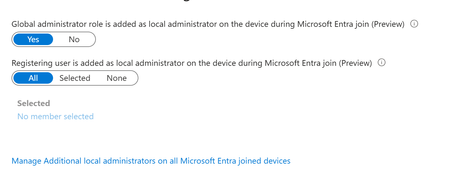
Stumbled on a tenant with 'JOIN' available for all users. Haven't worked with this much - most tenants I see only have registration. But then I noticed the horrifying 'Registering user is added as local administrator on the device during Microsoft Entra join' option was ALSO set to ALL. This is a tenant we just took on, but I've never seen that control before. This is terrifying, considering AFAIK, there is no real way for a registering user to know if they're registering or joining. Beneath it is an option to 'Manage Additional local administrators on all Microsoft Entra joined devices', which leads to the Role page for Device Administrators, which is empty. Under Description, this describes what APPEARS to be to be the same thing mentioned in the previous control - 'Users with this role become local machine administrators on all Windows 10 devices that are joined to Microsoft Entra'. But no one is assigned this. Conveniently, on my own tenant, I happened to let someone JOIN yesterday. We have this limited to 2 (now 3) people - most just register... But this user Joined, and the 'Joining user becomes local admin' option was on ALL. But I can't validate that the user ever become local admin. They don't have the role, their device shows as joined, but there's no additional roles. The audit logs don't look weird. They're not in that 'Device Administrators' group, which describes itself as 'Users with this role become local machine administrators on all Windows 10 devices that are joined to Microsoft Entra'. Thoughts? Freaking out, honestly. We have a mix of DC and Cloud users. I've inherited them all, and had the understanding that Join was essentially registration but with Org ownership. I've tried to get some input from Copilot, but he has basically waffled between 'No, this setting is just badly named' and 'no, actually it's this other setting' and 'no, you know what, it all makes sense somehow'. 1. Does that option actually set the joining user as global admin? Is that really the default setting? 2. can you validate this ANYWHERE in Entra? Or does it just disappear? 3. what is that Device Admin group? A separate group, independent of these two settings, that gives local admin? 4. Is there a graph endpoint that can be used to set this? Thanks288Views0likes2Comments
Restrict Users from Creating New Teams in Microsoft Teams
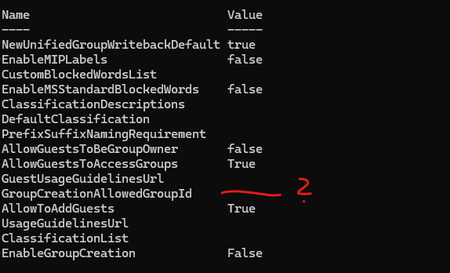
Hello together, I've do this here: https://learn.microsoft.com/en-us/previous-versions/microsoft-365/solutions/manage-creation-of-groups?view=o365-worldwide#step-2-run-powershell-commands I create a group for users, that allowed to create new Teams Channels and run the script, but i didnt see in the updated settings the group ID: What im doing wrong? At the moment no one can create new Teams Channels, also the members of the GroupCreationAllowed Group. Can somebody help, whats the problem of the script is? Thx Peter97Views0likes1CommentDirect Routing PSTN calls to Teams Auto Attendant does not forward to Shared Voicemail
Hi all, I’m running into a strange issue with a Teams Auto Attendant and I’m hoping someone here has seen it before. We have a Direct Routing number where business hours calls go to a Call Queue, which works, and after hours calls should go to Shared Voicemail for a Microsoft 365 Group. If I call the Auto Attendant from inside our Teams tenant, the after-hours Shared Voicemail works correctly. I can leave a message and the voicemail is delivered to the group inbox as expected. If I call the same number from the PSTN over Direct Routing, I hear the after-hours greeting, so the schedule and call flow are clearly being hit, but once the greeting finishes I get: “Sorry, we cannot connect your call at the moment, please try again later.” I have already verified that the resource account has the correct Teams Phone Resource Account license, Enterprise Voice is enabled, the LineURI is assigned, the Online Voice Routing Policy is assigned, the Direct Routing route and SBC look healthy, the Auto Attendant is associated with the correct resource account, the after-hours call flow points to the correct Microsoft 365 Group, and the group mailbox exists and is healthy. What makes this more confusing is that redirects to internal or tenant-side destinations work, but redirect to Shared Voicemail from a PSTN-originated call does not work. I also tested redirect to an external PSTN number, and that fails with the same error as well. Because the after-hours greeting plays correctly, and because internal Teams calls can successfully leave voicemail in the shared mailbox, I do not think the issue is with the Auto Attendant configuration itself or with the Microsoft 365 Group mailbox. At this point it looks more like the handoff or redirect path for PSTN-originated calls over Direct Routing is where things break. Has anyone run into this with a Teams Auto Attendant, Shared Voicemail, and inbound PSTN over Direct Routing? I’m trying to figure out whether this is a known limitation, a bug, or if there is some specific setting related to PSTN-originated redirects that I am missing. Thanks!116Views0likes0Comments