User Profile

JuliusPIV
Brass Contributor
Joined Nov 16, 2017


User Widgets
Recent Discussions
How to Escape Special Characters in the -Filter Property of the Get-IntuneManagedDevice Cmdlet?
TL;DR: How do I escape the pound/hash (#) and apostrophe (') characters in the Filter property of the Get-IntuneManagedDevice cmdlet? Full Explanation I'm leveraging the Get-IntuneManagedDevice cmdlet to get devices associated with users by their UserPrincipalName: Get-intunemanageddevice -Filter "userprincipalname eq 'email userUPN at domain.tld'" Whenever I come across a UPN with special characters in it, the cmdlet fails with error: Invalid filter clause: Syntax error at position NN in 'userprincipalname eq 'user D'UPN at domain.tld''. So far the I've run into this problem when users have: "#EXT#" in their UPN indicating an external user An apostrophe in their name How do I escape the pound/hash (#) and apostrophe (') characters in the Filter property of the Get-IntuneManagedDevice cmdlet? I considered switching to using the user's object ID, instead of the UPN, but swapping "userPrincipalName" for "Id" or "userId" that doesn't yield valid results and curiously seems to return all devices in the organization.932Views0likes1CommentRe: Secure Score - Secure Home Folders in macOS
Hey ahmacaulay We have not yet implemented this particular Secure Score recommendation, but it's coming, and this is a little concerning. Are you doing this just to your machine or to a number of machines? Have you opened a case with Microsoft yet?3.9KViews0likes0CommentsRe: "Run Antivirus Scan" results in "Antivirus scan failed"
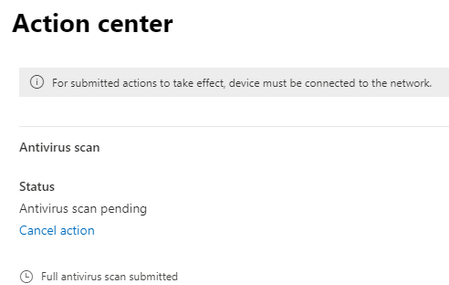
Thanks again! We are indeed triggering the full scan from the M365 Security portal. In the http://Thanks%20again! We are indeed triggering the full scan from the M365 Security portal. If you check the first/original post I have screenshots showing that After scheduling it the Action Center window appears & confirms the scan is scheduled/queued. However, after a few minutes when revisiting the Action Center it shows the scan I have screenshots showing: After triggering a scan, the Action Center window appears & confirms a scan is pending. However, after a few minutes when revisiting the Action Center again it now shows the scan failed Awesome tip regarding the Event logs. I'll do what I can remotely & see what comes back. Thanks again!2.8KViews1like2CommentsRe: "Run Antivirus Scan" results in "Antivirus scan failed"
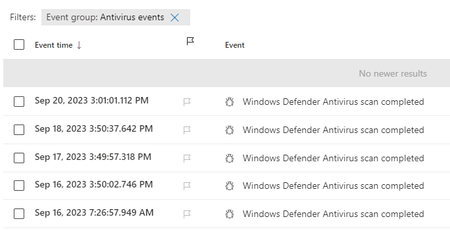
Hey there elieelkarkafi! Thanks for taking the time to reply and congratulations on the MVP nomination! :party_popper:🥳 The timeline doesn't show a full scan having completed today which is curious as I started looking into this several hours ago. The 'Device health status' also doesn't show today's date for the last full scan: I find that interesting as I tried to trigger a scan via Intune which completed without error: We're 100% in the cloud so remote access is limited, but I tried to trigger a scan via mpcmdrun.exe which presumably worked because, when I run Start-MPScan it fails immediately with "start-mpscan : A scan is already in progress on this device." Curiously the FullScanStartTime property from Get-MPComputerStatus returns a September 16, not today which doesn't instill much confidence that a scan is indeed in progress. Is there a sure fire way to verify that a full scan is indeed underway and there isn't a deeper problem? Are there any logs I can review to see what Defender is up to?2.7KViews0likes4Comments"Run Antivirus Scan" results in "Antivirus scan failed"
I'm responding to an alert and via the Microsoft 365 Security portal I've triggered off a full antivirus scan: However shortly after that when I double check the Action Center again it shows "Antivirus scan failed" When hovering over the info ( ) icon, next to the "Antivirus scan failed" text, a small tooltip comes up showing "AV Scan is already in progress". Because this happened yesterday (9/20) and again today (9/21) I'm frankly a little suspicious. Is Defender really already in the middle of an AV scan? If yes, how can I confirm that? If no, then why won't the AV Scan execute? Any advice is greatly appreciated!SolvedIs it possible to update provisioned apps via command line? (e.g.: During OSD)
TL;DR: Via command line, is it possible to trigger all provisioned apps to self update for all user profiles (current and future) even when no one is logged in? We recently noticed that on freshly imaged machines, all of the built-in provisioned apps (Calc, Calendar, Weather, Microsoft Store etc.) are woefully out of date. In reviewing our Task Sequence we used to start the "Microsoft\Windows\WindowsUpdate\Automatic App Update" scheduled task, but it appears this scheduled task has disappeared. This is disappointing as we no longer know what command it was executing to trigger the updating of those apps. That said, is there anything that can be done to force all provisioned apps for all user profiles, both those that currently exist and future ones as well?1.2KViews0likes0CommentsWindows 10 v1909 (19042.1586) Missing Set time zone automatically
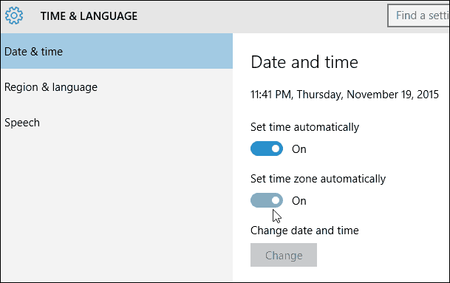
A user who recently traveled requested that we setup Windows so that the time zone would update automatically the next time she traveled. In checking our machines (Win 10 v1909 19042.1586) we're noticing that the "Set time zone automatically" option in Settings > Time & Language > Date & Time is missing. Was this feature removed in some version of Windows? If yes, which version and where is it documented? If no, Any thoughts as to why it might be missing? I checked this article "https://docs.microsoft.com/en-us/troubleshoot/windows-client/shell-experience/cannot-set-timezone-automatically" but my "Start" value is already set to "3" and "Value" is already set to "Allow".1.6KViews0likes0CommentsRe: VPP Apps on DEP iPadOS Devices Do Not Automatically Update Error code: 0x87D13B9F
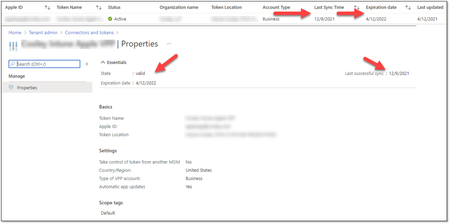
MattisJanos Thanks for following up on this and I appeciate the super hot tip. I did a quick check and everything seems to check out: Although this it is a pretty standard operation, I'm going to submit a request for change (RFC) to re-import the token & see how that goes. Question: We're transitioning from one MDM solution to Intune and I'm wondering if, since some apps were delivered using the other MDM solution, do need to set 'Take control of token from another MDM' to yes?16KViews0likes1CommentRe: VPP Apps on DEP iPadOS Devices Do Not Automatically Update Error code: 0x87D13B9F
I definitely can't remove that filter for those devices as it would then incorrectly apply the software to devices that should not receive it. I'm thinking I'm going to have to open a case with Microsoft for this one as it's not really jumping out at any of us.18KViews0likes4CommentsMultiple User Personas for the Same User Profile on the Login Screen
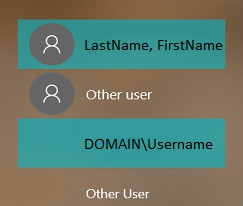
One of my customers pointed out a really odd issue they're seeing on the login screen/lock screen on their machine. They have two 'personas' that correspond to them One persona is listed as LastName, FirstName and they can only login using PIN, Fingerprint, Face but not password. The other personal is listed as DOMAIN\Username and they can only login using password, not PIN, Fingerprint or Face. They also have two 'Other user' options Here's a screenshot of what it essentially looks like Again, it's the same account but for some reason there are two icons for it. I've confirmed they only have one user profile on that machine so it's not something wonky where a separate .000 user profile was created. (I double checked %SystemDrive%\Users, HKEY_LOCAL_MACHINE\SOFTWARE\Microsoft\Windows NT\CurrentVersion\ProfileGuid and HKEY_LOCAL_MACHINE\SOFTWARE\Microsoft\Windows NT\CurrentVersion\ProfileList to be sure) First of all has anyone ever see something like that? Second, my customer tells me that when they initially got their machine everything was fine. However after restoring data from a third-party app we use to backup/restore user data & settings, this reappeared. Is there anything in the user profile (be it at the file level of the registry) that would allow a user to manipulate the login screen/lock screen? Any feedback is greatly appreciated.1KViews0likes0CommentsRe: VPP Apps on DEP iPadOS Devices Do Not Automatically Update Error code: 0x87D13B9F
Thanks for taking the time to read and reply. The reason for the filter is to ensure we're targeting the right devices for the required deployment. Taking it off would mean that too many devices/the incorrect devices would receive the deployment which would not be good. But I hear you. We have other devices with required app deployments so I'll have to take a look to see if any of those apps have been updated recently and what the disposition is.18KViews0likes6CommentsVPP Apps on DEP iPadOS Devices Do Not Automatically Update Error code: 0x87D13B9F
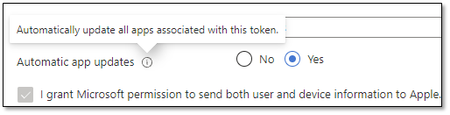
We're in the process of migrating to Intune and we're starting with DEP devices. However we've noticed that as applications are updated in the App Store, the device itself is not updating the applications automatically but requires human intervention. Today we checked one of the devices and saw that the update failed with error 0x87D13B9F: Application attempted to install 9/30/2021 6:43:12 AM App installation failed 9/30/2021 4:13:53 AM Hide details Error code: 0x87D13B9F An app update is available. Available apps can be updated using Company Portal and required apps will auto-update on device sync. Suggested remediation This code is returned when a VPP app is installed but there is a newer version available. Our Apple VPP token is configured for automatic updates: The Microsoft documentation confirms that: Automatic app updates - Choose from Yes or No to enable automatic updates. When enabled, Intune detects the VPP app updates inside the app store and automatically pushes them to the device when the device checks in. Note: Automatic app updates for Apple VPP apps will automatically update for both Required and Available install intents. For apps deployed with Available install intent, the automatic update generates a status message for the IT admin informing that a new version of the app is available. This status message is viewable by selecting the app, selecting Device Install Status, and checking the Status Details. All this to say that this configuration should be working as the application in question is required But it's not happening automatically Did we miss something somewhere? Any advice is greatly appreciated. References: https://docs.microsoft.com/en-us/troubleshoot/mem/intune/troubleshoot-app-install https://docs.microsoft.com/en-us/troubleshoot/mem/intune/app-install-error-codes https://docs.microsoft.com/en-us/mem/intune/apps/vpp-apps-ios#upload-an-apple-vpp-or-apple-business-manager-location-token 0x87D13B9F App Install Error - Microsoft Tech Community20KViews0likes12CommentsRe: Office Add-ins error: Cannot connect to catalog
MTSBob: We sorted this out today. When we were initially manually configuring "Block Web Add-ins" (DisableAllCatalogs) and "Block Office Add-ins" (DisableOMEXCatalogs), we were setting it in HKEY_CURRENT_USER\Software\Microsoft\Office\16.0\WEF\TrustedCatalogs. When you configure those two settings in policy (User \ Administrative Templates \ Microsoft Office 2016 \ Security Settings \ Trusts Center \ Trusted Catalogs), it gets written to HKEY_CURRENT_USER\Software\Policies\Microsoft\Office\16.0\WEF\TrustedCatalogs. Because we need to target this particular Office Add-in to a subset of users, we cannot rely on setting the Trusted Catalog Location policy items so we leveraged registry preferences in order to make use of https://docs.microsoft.com/en-us/previous-versions/windows/it-pro/windows-server-2012-r2-and-2012/dn789189(v=ws.11). When we dropped those keys we matched our initial test configuration which was to write the Office Add-in settings to to HKEY_CURRENT_USER\Software\Microsoft\Office\16.0\WEF\TrustedCatalogs. Turns out that gets ignored or overridden when something is set at the HKEY_CURRENT_USER\Software\Policies\Microsoft\Office\16.0\WEF\TrustedCatalogs level. Once we realized this behavior we corrected the discrepancy and decided to rely solely on registry preferences, not policies, and the add-in started working again. So we shot ourselves in the foot but it took us a while to realize it.62KViews0likes4CommentsRe: Office Add-ins error: Cannot connect to catalog
Hi MTSBob - I hope all is well in your world. I recently encountered this with another "Modern" https://docs.microsoft.com/en-us/office/dev/add-ins/overview/office-add-ins, one we're in the process of deploying via https://gpsearch.azurewebsites.net/#11614. What's particularly frustrating is that this was working fine a few weeks ago. Here's what I think I know: The 'https://gpsearch.azurewebsites.net/#11609' policy is not enabled (set to 0) Doesn't seem to matter whether or not the 'https://gpsearch.azurewebsites.net/#11610' policy is configured The manifest file is in place & accessible This was for sure was working in August & July; it's only recently that I've noticed that the add-in is no longer accessible/available. Thanks to AGPM I am the gatekeeper for all group policy modifications so I can confirm no rogue changes have been made. Me and another sharp guy on my team have examined this fully and we're both at a loss. We're beginning to wonder if an update changed this behavior.62KViews1like6CommentsRe: Windows 10 Free upgrade
It's technically expired but try running the upgrade assistant on your Windows 7 machine: https://support.microsoft.com/en-us/help/3159635/windows-10-update-assistant There's a link on the page that'll take you to the download page. You can also try to download the ISO from there as well, mount it and run the setup. Let us know how it goes.1.4KViews0likes1CommentRe: Connecting a computer in a remote location
The old "login as a local admin and fire up VPN" is my favorite but doesn't work for every VPN solution. I'm interested in the responses myself. Not having done this myself, my initial thoughts are: - Offline domain join (djoin.exe) - Azure AD - Provisioning package via WCD There are some prerequisites/assumptions here.953Views0likes0Comments
Recent Blog Articles
No content to show